Disabilita il monitoraggio delle modifiche in Word In n8n
Disabilita il monitoraggio delle modifiche in Word è un PDF4me azione del nodo in n8n che disattiva la registrazione delle revisioni su un Word documento. Usalo per chiudere automaticamente un ciclo di revisione, impedire che ulteriori modifiche vengano registrate come modifiche tracciate o normalizzare l'impostazione su ogni .docx che proviene da un collaboratore esterno.
Cosa fa questo nodo
PDF4me: Disabilita il monitoraggio delle modifiche in Word prende un .docx da Binary Data, un Base64 String, o un URL e lo restituisce con l'impostazione delle modifiche disattivata, in modo che le modifiche successive non vengano più registrate come revisioni. È la controparte diretta di Abilita il monitoraggio delle modifiche in WordPoiché viene eseguito come passaggio del flusso di lavoro, l'impostazione viene applicata in modo coerente a ogni documento che lo attraversa, anziché dipendere dal fatto che qualcuno si ricordi di attivare o disattivare l'opzione nella barra degli strumenti.
Autenticazione del tuo API Richiesta
Ogni PDF4me nodo in n8n richiede un valido Credenziali per connettersi con. Crea o selezionane uno che contenga il tuo PDF4me API chiave affinché il flusso di lavoro possa autenticare in modo sicuro le richieste di documenti.
Informazioni importanti da non perdere
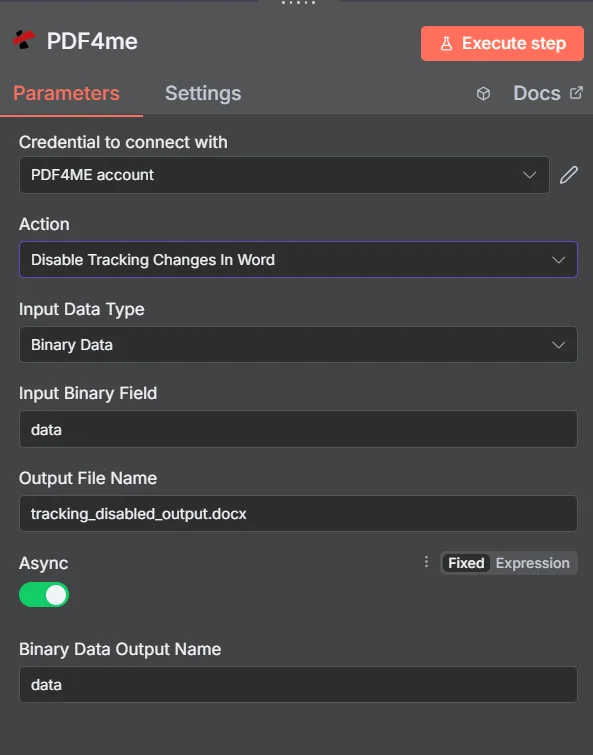
PDF4me Disabilita il monitoraggio delle modifiche in Word pannello dei parametri in n8n
Confronto tra le tre azioni di cambio binario
PDF4me Questa operazione visualizza le modifiche al tracciato come una famiglia di tre azioni. Scegliere quella sbagliata è l'errore più comune in questa operazione.
| Azione | Cosa fa | Usalo quando |
|---|---|---|
| Disable Tracking Changes In Word | Switches revision recording off | A review is finished and further edits should not be logged |
| Enable Tracking Changes In Word | Switches revision recording on | You are sending a document out for review and want edits captured |
| Get Tracking Changes In Word | Reads the revision information out | A workflow needs to inspect or report on what was changed |
Quali parametri disabilita il monitoraggio delle modifiche in Word Bisogno?
Necessario: Azione, tipo di dati di input, il campo corrispondente a tale tipo di input e nome del file di output. Async, Nome di output dati binari e profili personalizzati hanno impostazioni predefinite funzionanti.
| Parametro | Necessario | Cosa fa | Esempio |
|---|---|---|---|
| Action | Required | Selects the PDF4me node action to run. Choose Disable Tracking Changes In Word. | Disable Tracking Changes In Word |
| Input Data Type | Required | Format of the source Word input. Choose Binary Data (from a previous node), Base64 String, or URL. | Binary Data |
| Input Binary Field | Conditional | Name of the binary property on the incoming n8n item that holds the .docx. Required when Input Data Type is Binary Data. Defaults to data. | data |
| Base64 Document Content | Conditional | Base64-encoded content of the source Word document. Required when Input Data Type is Base64 String. | UEsDBBQABgAI... |
| File URL | Conditional | Publicly reachable HTTPS URL to the source Word document. Required when Input Data Type is URL. | https://example.com/contract.docx |
| Output File Name | Required | Filename for the Word document returned by the node. Include the .docx extension. | tracking_disabled_output.docx |
| Async | Optional | Toggle, enabled by default. Processes larger documents in the background instead of holding the request open, which reduces timeout risk. | enabled |
| Binary Data Output Name | Optional | Name of the binary property the output item exposes. Defaults to data. | data |
| Custom Profiles | Optional | Advanced Options field for extra processing settings, supplied in a JSON-like format. Leave blank unless you have a specific profile to apply. | { "preserveMetadata": true } |
Campi di output
Una corsa di successo restituisce uno n8n oggetto che trasporta il Word documento con tracciamento disattivato.
| Campo | Tipo | Cosa contiene |
|---|---|---|
Binary (data) | Binary | The returned Word document, under Binary Data Output Name (default data). |
fileName | String | Generated filename, matching Output File Name. |
docName | String | Name of the processed document, for reference and tracking. |
mimeType | String | MIME type of the output, the wordprocessingml.document type used by .docx files. |
fileSize | Number | Size of the returned document in bytes. |
trackingDisabled | Boolean | Confirms the track changes setting was switched off. A useful assertion before distributing the file. |
success | Boolean | True when the operation completed, false on failure. Use it to branch error handling. |
message | String | Human-readable status message, carrying success confirmation or error detail. |
Come impostare Disabilita il monitoraggio delle modifiche in Word In n8n?
- Aggiungere PDF4me al tuo n8n flusso di lavoro e scegliere il Disabilita il monitoraggio delle modifiche in Word azione.
- In Credenziali per connettersi con, seleziona il tuo PDF4me credenziali o clicca Crea nuove credenziali e incolla il tuo API chiave.
- Impostato Tipo di dati di input A Dati binari (predefinito), Base64 String, O URL e fornire la fonte corrispondente Word campo.
- Impostato Nome del file di output, terminando in
.docx. - Partire Async abilitato a meno che una fase successiva non richieda la risposta sincrona.
- Partire Nome dell'output dei dati binari COME
dataa meno che un nodo successivo non si aspetti una proprietà diversa. - Esegui il nodo e instrada il documento restituito alla fase successiva, come la conversione, l'archiviazione o la distribuzione.
Configurazioni tipiche
Esempi di flusso di lavoroCommon n8n workflow patterns using Disable Tracking Changes In Word.
- Il revisore restituisce il contratto modificato via e-mail.
- La funzione "Ottieni monitoraggio modifiche" registra le modifiche apportate al record di controllo.
- L'opzione "Disabilita rilevamento modifiche" disattiva la registrazione prima che il file venga elaborato.
- I documenti provengono da diverse agenzie con impostazioni incoerenti.
- L'opzione "Disabilita il monitoraggio delle modifiche" applica la stessa impostazione a ciascuna di esse.
- Il processo di costruzione del modello di casa parte da un punto di partenza prevedibile.
- Il documento completato viene messo in coda per la distribuzione.
- Disabilitando il rilevamento delle modifiche si impedisce che ulteriori modifiche vengano registrate come revisioni.
- Il file viene convertito in PDF e pubblicato.
- L'opzione "Abilita il monitoraggio delle modifiche" viene eseguita prima che il documento venga inviato per la consultazione.
- I revisori apportano le modifiche necessarie a ogni cambiamento rilevato.
- La funzione "Disabilita il monitoraggio delle modifiche" viene eseguita alla chiusura della finestra di revisione.
Consigli pratici
Foglio riassuntivo
| Campo | Valore |
|---|---|
| Action | Disable Tracking Changes In Word |
| Input Data Type | Binary Data |
| Input Binary Field | data |
| Output File Name | tracking_disabled_output.docx |
| Async | enabled |
| Binary Data Output Name | data |
| Credentials | PDF4me API credential |