Sblocca PDF In n8n
Sblocca PDF è un PDF4me azione del nodo in n8n che rimuove la protezione tramite password da un PDF quando inserisci la password corretta. Usala per rendere leggibili i file protetti nelle fasi successive del flusso di lavoro, rimuovere la crittografia da un archivio di tua proprietà o sbloccare tutti gli estratti conto inviati da un fornitore senza doverli aprire uno alla volta.
Cosa fa questo nodo
PDF4me: Sblocca PDF prende un protetto PDF da Binary Data, un Base64 String, o un URL, applica la password fornita e restituisce una copia che si apre senza richiesta. Password Questo campo è obbligatorio, quindi sblocca i documenti che si è già autorizzati ad aprire, anziché recuperare una password persa. Il suo compito principale è quello di trovarsi all'inizio di una pipeline, poiché le fasi di estrazione e conversione non possono leggere un file crittografato.
Autenticazione del tuo API Richiesta
Ogni PDF4me nodo in n8n richiede un valido Credenziali per connettersi con. Crea o selezionane uno che contenga il tuo PDF4me API chiave in modo che il flusso di lavoro possa autenticare in modo sicuro le richieste di sblocco.
Informazioni importanti da non perdere
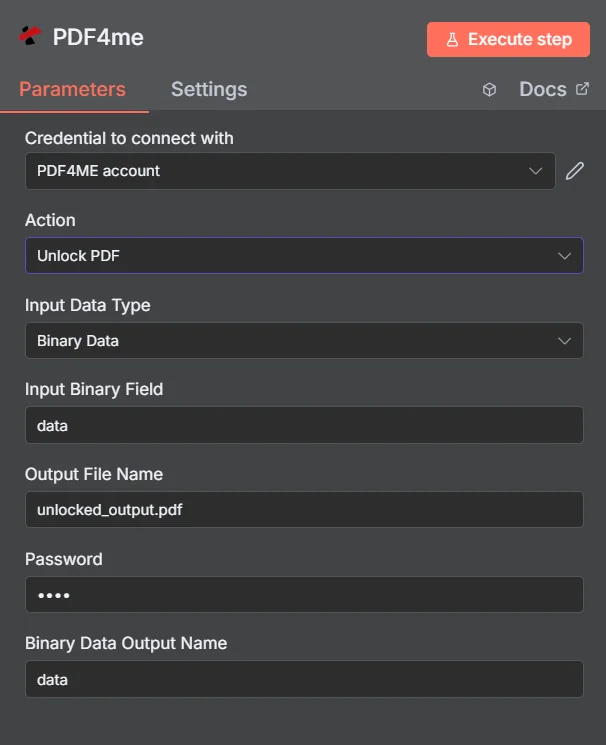
PDF4me Sblocca PDF pannello dei parametri in n8n
Sblocca PDF vs Proteggi documento
Queste due azioni sono opposte e i flussi di lavoro spesso le utilizzano entrambe: sbloccare un file in entrata per leggerlo, quindi proteggere nuovamente il risultato prima che venga inviato nuovamente.
| Aspetto | Sblocca PDF | Proteggi il documento |
|---|---|---|
| What it does | Removes existing password protection | Applies password protection |
| Password you supply | The current password on the document | The new password you want to set |
| Typical position | First step, so later nodes can read the file | Last step, before the file is sent or stored |
| Prerequisite | You must already know the password | None beyond the source document |
Quali parametri sbloccano PDF Bisogno?
Necessario: Azione, Tipo di dati di input, il campo corrispondente a quel tipo di input, Nome del file di output e Password. Il nome di output dei dati binari e i profili personalizzati hanno impostazioni predefinite funzionanti.
| Parametro | Necessario | Cosa fa | Esempio |
|---|---|---|---|
| Action | Required | Selects the PDF4me node action to run. Choose Unlock PDF. | Unlock PDF |
| Input Data Type | Required | Format of the source PDF input. Choose Binary Data (from a previous node), Base64 String, or URL. | Binary Data |
| Input Binary Field | Conditional | Name of the binary property on the incoming n8n item that holds the protected PDF. Required when Input Data Type is Binary Data. Defaults to data. | data |
| Base64 Document Content | Conditional | Base64-encoded content of the protected PDF. Required when Input Data Type is Base64 String. | JVBERi0xLjQK... |
| File URL | Conditional | Publicly reachable HTTPS URL to the protected PDF. Required when Input Data Type is URL. | https://example.com/statement.pdf |
| Output File Name | Required | Filename for the unlocked PDF returned by the node. Include the .pdf extension. | unlocked_output.pdf |
| Password | Required | The current password on the document. Shown masked in the panel. Reference a credential or environment variable rather than typing the secret into a saved workflow. | {{ $env.PDF_PASSWORD }} |
| Binary Data Output Name | Optional | Name of the binary property the output item exposes. Defaults to data. | data |
| Custom Profiles | Optional | Advanced Options field for extra processing settings, supplied in a JSON-like format. Leave blank unless you have a specific profile to apply. | { "preserveMetadata": true } |
Campi di output
Una corsa di successo restituisce uno n8n oggetto che trasporta lo sbloccato PDF.
| Campo | Tipo | Cosa contiene |
|---|---|---|
Binary (data) | Binary | The unlocked PDF, under Binary Data Output Name (default data). |
fileName | String | Generated filename, matching Output File Name. |
docName | String | Name of the processed document, for reference and tracking. |
mimeType | String | MIME type of the output, always application/pdf. |
fileSize | Number | Size of the returned PDF in bytes. |
isUnlocked | Boolean | Confirms the document was unlocked. A useful assertion before handing the file to an extraction step. |
securityRemoved | Boolean | Confirms password protection and access restrictions were removed. |
success | Boolean | True when the unlock completed, false on failure such as a wrong password. Use it to branch error handling. |
message | String | Human-readable status message, carrying success confirmation or error detail. |
Come si imposta lo sblocco? PDF In n8n?
- Aggiungere PDF4me al tuo n8n flusso di lavoro e scegliere il Sblocca PDF azione.
- In Credenziali per connettersi con, seleziona il tuo PDF4me credenziali o clicca Crea nuove credenziali e incolla il tuo API chiave.
- Impostato Tipo di dati di input A Dati binari (predefinito), Base64 String, O URL e fornire la fonte corrispondente PDF campo.
- Impostato Nome del file di output per il file sbloccato, che termina in
.pdf. - Inserire il documento Password, idealmente come espressione che legge una credenziale o una variabile d'ambiente.
- Partire Nome dell'output dei dati binari COME
dataa meno che un nodo successivo non si aspetti una proprietà diversa. - Esegui il nodo e instrada lo sbloccato PDF alla fase successiva, come l'estrazione, la conversione o lo stoccaggio.
Configurazioni tipiche
Esempi di flusso di lavoroCommon n8n workflow patterns using Unlock PDF.
- L'estratto conto arriva tramite e-mail protetta da una password nota.
- Sblocca PDF rimuove la protezione utilizzando un segreto memorizzato.
- Una fase di estrazione dati da tabella legge le transazioni e le inserisce in un foglio di calcolo.
- I documenti legacy presenti in un'unità condivisa hanno tutti la stessa vecchia password.
- Sblocca PDF viene eseguito su ciascun file durante un batch di migrazione.
- Le copie non protette vengono inserite nel nuovo sistema documentale e sono consultabili.
- Sblocca PDF Apre un documento protetto in entrata.
- Il flusso di lavoro appone un timbro, unisce o modifica il file leggibile.
- Il sistema di protezione del documento applica una nuova password prima di inviarlo nuovamente.
- Sblocca PDF tenta di indovinare la password memorizzata su ogni file in arrivo.
- Un nodo IF verifica il risultato success e i campi isUnlocked.
- Gli errori vengono inoltrati a un avviso, in modo che una password modificata venga rilevata immediatamente.
Consigli pratici
Foglio riassuntivo
| Campo | Valore |
|---|---|
| Action | Unlock PDF |
| Input Data Type | Binary Data |
| Input Binary Field | data |
| Output File Name | unlocked_output.pdf |
| Password | {{ $env.PDF_PASSWORD }} |
| Binary Data Output Name | data |
| Credentials | PDF4me API credential |