Ottieni il documento da PDF4me In n8n
Scarica il documento da Pdf4me è un PDF4me azione del nodo in n8n che recupera un documento PDF4me già contiene. Usalo per raccogliere il risultato di una fase di elaborazione precedente, recuperare un file memorizzato in un'esecuzione successiva del flusso di lavoro o terminare un'attività basata su callback recuperando ciò che è stato prodotto.
Cosa fa questo nodo
PDF4me: Ottieni il documento da Pdf4me è un utilità di recupero, non una trasformazione. Richiede solo due input, un Nome del file e un Richiamare URL, ed entrambi sono richiesti. Restituisce il file memorizzato invariato insieme al suo nome, dimensione e MIME tipo, quindi qualsiasi operazione da eseguire sul documento avviene in un'azione separata concatenata successivamente.
Autenticazione del tuo API Richiesta
Ogni PDF4me nodo in n8n richiede un valido Credenziali per connettersi con. Crea o selezionane uno che contenga il tuo PDF4me API chiave affinché il flusso di lavoro possa autenticare in modo sicuro le richieste di recupero.
Informazioni importanti da non perdere
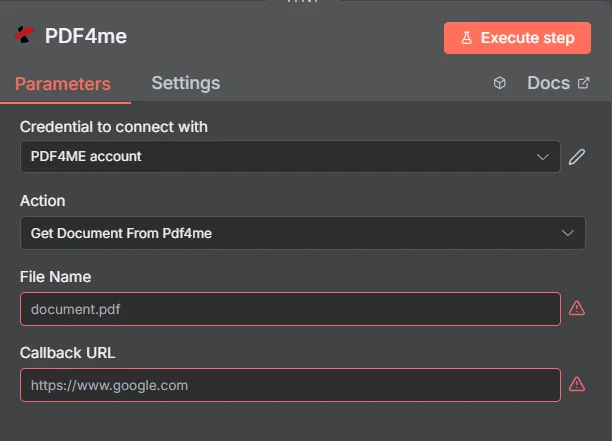
L'intero pannello è composto da quattro campi. I bordi rossi su Nome file e Callback URL Il nodo ti sta dicendo che entrambi i campi devono essere compilati prima che l'operazione venga eseguita.
Azioni di recupero vs. azioni di elaborazione
| Domanda | Scarica il documento da Pdf4me | Azione di elaborazione |
|---|---|---|
| What it needs | A file name and a callback URL | A source file plus operation settings |
| What it changes | Nothing, the file is returned as stored | The document content or format |
| Where it sits | After the work, to collect the result | In the middle, doing the work |
| What comes back | The stored file plus its metadata | A newly produced document |
| Typical use | Finishing a callback-based job | Converting, securing, or editing |
Quali parametri sono necessari per ottenere un documento da Pdf4me?
| Parametro | Necessario | Cosa fa | Esempio |
|---|---|---|---|
| Credential to connect with | Required | The PDF4me account credential the node authenticates with. | PDF4ME account |
| Action | Required | The action this node performs. Select Get Document From Pdf4me. | Get Document From Pdf4me |
| File Name | Required | Exact name of the document to retrieve, including its extension. Best supplied by an expression carrying the name from the producing step. | document.pdf |
| Callback URL | Required | Reachable URL used for callback-based retrieval. The node shows a validation warning until it is set. | https://example.com/callback |
Questo nodo ha una superficie insolitamente piccola. Non è presente alcun selettore del tipo di input, alcun campo per la denominazione dell'output e nessuna raccolta di opzioni avanzate, motivo per cui ogni parametro sopra indicato è contrassegnato come obbligatorio anziché condizionale.
Produzione
| Campo | Tipo | Cosa contiene |
|---|---|---|
| success | Boolean | Whether the retrieval request completed. Branch on this before using the file. |
| message | String | Human-readable status text, including error detail when something went wrong. |
| fileName | String | Name of the retrieved document. |
| mimeType | String | Content type of the retrieved file, which tells you what you actually got back. |
| fileSize | Number | Size of the retrieved document in bytes. |
| docName | String | Document name reference, matching fileName. |
| retrievalCompleted | Boolean | Confirmation that retrieval finished. Worth checking alongside success. |
Il documento stesso viene restituito come dati binari insieme a questi campi, pronto per essere scritto nella memoria, allegato a un'e-mail o passato a un altro PDF4me azione.
Come si imposta la funzione "Ottieni documento da Pdf4me"? n8n?
- Aggiungi il PDF4me nodo al tuo flusso di lavoro e impostalo Azione A Scarica il documento da Pdf4me.
- Seleziona il tuo PDF4me credenziali oppure creane una e incolla il tuo API chiave.
- Impostato Nome del file al nome esatto memorizzato, idealmente tramite un'espressione che lo riporta dal passaggio precedente.
- Impostato Richiamare URL verso un endpoint raggiungibile. Il nodo non verrà eseguito finché è vuoto.
- Eseguire il nodo.
- Controllo
successEretrievalCompletednella risposta con un nodo IF. - Conferma
mimeTypecorrisponde a ciò che ti aspetti prima di passare il file a una fase che presuppone un formato. - Instrada il documento binario all'archivio, all'e-mail o al successivo PDF4me azione.
Configurazioni tipiche
Esempi di flusso di lavoroCommon n8n workflow patterns using Get Document From Pdf4me.
- Un'azione precedente avvia l'elaborazione di un documento di grandi dimensioni.
- La funzione "Get Document From Pdf4me" raccoglie il file finale in base al nome.
- Il flusso di lavoro prosegue senza mantenere una connessione aperta.
- Il file memorizzato viene recuperato senza modifiche.
- Un secondo PDF4me l'azione lo comprime o lo fissa.
- Le fasi di recupero ed elaborazione rimangono nettamente separate.
- Il destinatario richiede un documento generato in precedenza.
- Il flusso di lavoro lo recupera tramite il nome memorizzato.
- Viene inviata nuovamente via email senza rigenerare nulla.
- Un nodo IF controlla success e recupero completato.
- mimeType viene confrontato con ciò che prevede il passo successivo.
- Un'anomalia segnala un errore anziché un problema più in profondità nella catena.
Consigli pratici
Foglio riassuntivo
| Campo | Valore |
|---|---|
| Action | Get Document From Pdf4me |
| File Name | document.pdf |
| Callback URL | https://example.com/callback |
| Credentials | PDF4ME account |
| Success check | success and retrievalCompleted |
| Format check | mimeType |