Sicuro Word Documento in n8n
Sicuro Word Document è un PDF4me azione del nodo in n8n che blocca un .docx Un file protetto da password, con restrizioni di modifica o entrambe. Utilizzalo per proteggere report riservati prima dell'invio, impedire la modifica di un modello firmato o consentire ai revisori di commentare un contratto senza modificarne il testo.
Cosa fa questo nodo
PDF4me Word: Sicuro Word Document si applica due tipi di protezione indipendenti. Sicuro su aperto altro Apri la password decide se il file può essere aperto o meno. Tipo di protezione altro Password di protezione Decide cosa può essere modificato una volta aperto, da completamente in sola lettura a solo commenti, campi modulo o revisioni tracciate. Utilizzare una delle due opzioni o entrambe contemporaneamente.
Autenticazione del tuo API Richiesta
Ogni PDF4me nodo in n8n richiede un valido Credenziali per connettersi con. Crea o selezionane uno che contenga il tuo PDF4me API chiave affinché il flusso di lavoro possa autenticare le richieste di sicurezza dei documenti.
Informazioni importanti da non perdere
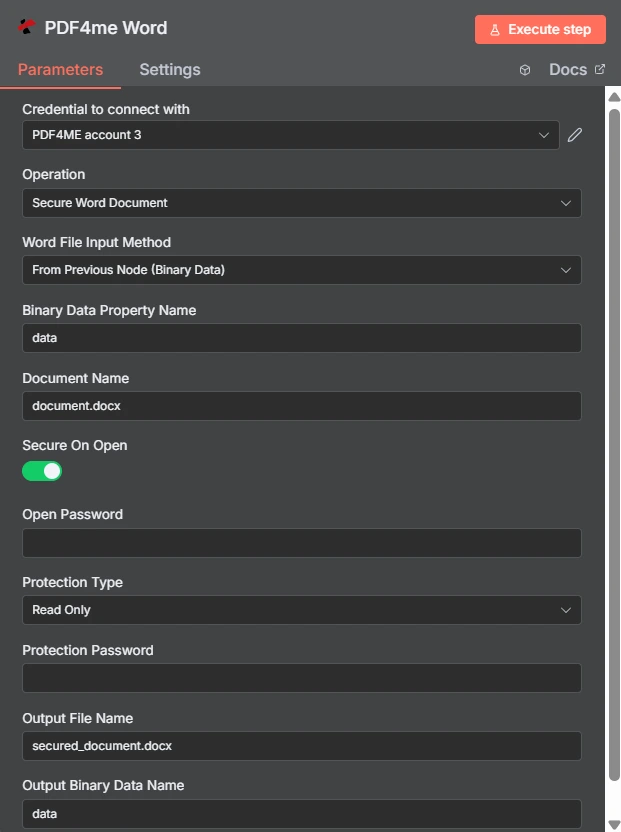
L'opzione "Proteggi all'apertura" è un interruttore, mentre il "Tipo di protezione" è un menu a tendina separato impostato su "Sola lettura". I due campi password sottostanti sono indipendenti l'uno dall'altro.
Password di apertura vs. restrizione di modifica
| Domanda | Password di apertura | Restrizione di modifica |
|---|---|---|
| Which fields set it | Secure On Open and Open Password | Protection Type and Protection Password |
| What it blocks | Opening the document at all | Changing the document once open |
| Can the recipient read it | Only with the password | Yes, reading is always allowed |
| Typical recipient | A named person receiving something confidential | A reviewer or a form filler |
| Use it when | The content must not be seen by others | The content may be seen but not altered |
Quali parametri garantisce la sicurezza? Word Documento necessario?
| Parametro | Necessario | Cosa fa | Esempio |
|---|---|---|---|
| Credential to connect with | Required | The PDF4me account credential the node authenticates with. | PDF4ME account |
| Operation | Required | The action this node performs. Select Secure Word Document. | Secure Word Document |
| Word File Input Method | Required | How the .docx reaches the node: from the previous node as binary data, as a Base64 string, or from a URL. | From Previous Node (Binary Data) |
| Binary Data Property Name | Conditional | Name of the binary property holding the document. Appears when the file comes from the previous node. | data |
| Document Name | Required | Filename of the input document including the extension. Drives format detection. | document.docx |
| Secure On Open | Optional | Toggle that requires a password before the document will open. Leave off if you only want an editing restriction. | enabled |
| Open Password | Conditional | The password needed to open the file. Required once Secure On Open is enabled. Supply it through an expression, not as literal text. | {{ $env.DOC_OPEN_PW }} |
| Protection Type | Optional | Editing restriction applied to the document: Read Only, Allow Comments, Allow Form Fields, or Allow Revisions. | Read Only |
| Protection Password | Conditional | The password that lifts the editing restriction. Required once a Protection Type is chosen, and should differ from Open Password. | {{ $env.DOC_EDIT_PW }} |
| Output File Name | Optional | Filename of the returned secured document. Keep the .docx extension. | secured_document.docx |
| Output Binary Data Name | Optional | Binary property the secured document is written to. Leave as data unless a later node expects another name. | data |
Opzioni del tipo di protezione
| Opzione | Cosa può fare il destinatario |
|---|---|
Read Only | View the document only. No edits of any kind are accepted. |
Allow Comments | Add and edit comments, but not change the document text itself. |
Allow Form Fields | Fill in form fields while the surrounding content stays locked. |
Allow Revisions | Edit, but only with tracked changes recorded so every alteration is visible. |
Produzione
| Campo | Tipo | Cosa contiene |
|---|---|---|
| fileName | String | Name of the returned secured document. |
| fileSize | Number | Size of the secured document in bytes. |
| success | Boolean | Whether protection was applied. Branch on this so failures surface as alerts. |
| originalFileName | String | Name of the input document as supplied in Document Name. |
| secureOnOpen | Boolean | Whether an open password was applied, echoed back for verification. |
| protectionType | String | The editing restriction applied, such as ReadOnly, or empty when none was set. |
| message | String | Human-readable status text describing the result of the operation. |
Controllo protectionType nella risposta c'è il modo più economico per confermare che la restrizione che intendevi è quella che è stata effettivamente applicata.
Come si configura la sicurezza? Word Documento in n8n?
- Aggiungi il PDF4me Word nodo al tuo flusso di lavoro e impostalo Operazione A Sicuro Word Document.
- Seleziona il tuo PDF4me credenziali oppure creane una e incolla il tuo API chiave.
- Scegli un Word Metodo di immissione file e fornire il
.docxattraverso il campo sottostante. - Impostato Nome reale con l'estensione corretta.
- Per aprire il cancello, accendere Sicuro su aperto e impostare Apri la password da una credenziale o da una variabile d'ambiente.
- Per bloccare la modifica, impostare Tipo di protezione e fornire un diverso Password di protezione.
- Impostato Nome del file di output terminando in
.docx. - Esegui il nodo, conferma
secureOnOpenEprotectionTypenella risposta, quindi inoltrare il file protetto.
Configurazioni tipiche
Esempi di flusso di lavoroCommon n8n workflow patterns using Secure Word Document.
- Una fase di reporting produce un documento contenente dati sensibili.
- Secure On Open applica una password memorizzata in una variabile d'ambiente.
- Il file viene inviato via email e la password viene condivisa tramite un canale separato.
- Il tipo di protezione è impostato su "Consenti commenti".
- I revisori annotano senza modificare il testo di alcuna clausola.
- Il feedback arriva senza una differenza da conciliare in seguito.
- L'opzione "Consenti campi modulo" mantiene fisso il testo circostante.
- I destinatari compilano solo i campi a loro destinati.
- I moduli restituiti sono sufficientemente coerenti da consentire l'analisi automatica.
- Un modello viene approvato e pubblicato su un'unità condivisa.
- La protezione di sola lettura impedisce modifiche locali silenziose.
- Tutti lavorano basandosi sulla stessa formulazione ufficiale.
Consigli pratici
Foglio riassuntivo
| Campo | Valore |
|---|---|
| Operation | Secure Word Document |
| Word File Input Method | From Previous Node (Binary Data) |
| Binary Data Property Name | data |
| Document Name | document.docx |
| Secure On Open | enabled |
| Open Password | {{ $env.DOC_OPEN_PW }} |
| Protection Type | Read Only |
| Protection Password | {{ $env.DOC_EDIT_PW }} |
| Output File Name | secured_document.docx |
| Output Binary Data Name | data |