Estrai pagine da PDF In n8n
Estrai pagine da PDF è un PDF4me azione del nodo in n8n che costruisce un nuovo PDF contenente solo il pages che elenchi. Usalo per estrarre una pagina di firme da un contratto, isolare un singolo capitolo da un manuale o passare ai passaggi successivi solo il riepilogo pages invece dell'intero documento.
Cosa fa questo nodo
PDF4me: Estrai pagine da PDF prende un PDF da Binary Data, un Base64 String, o un URL e restituisce un nuovo file contenente solo il pages denominato in Numeri di paginaQuel campo è l'intera azione: accetta singoli pages, intervalli con trattini, elenchi misti e intervalli aperti che si estendono fino alla fine del documento. Poiché viene eseguito come fase del flusso di lavoro, la stessa regola di estrazione si applica a ogni file che arriva senza che nessuno apra un editor.
Autenticazione del tuo API Richiesta
Ogni PDF4me nodo in n8n richiede un valido Credenziali per connettersi con. Crea o selezionane uno che contenga il tuo PDF4me API chiave affinché il flusso di lavoro possa autenticare in modo sicuro le richieste di estrazione.
Informazioni importanti da non perdere
10- significa da pagina 10 fino alla fine, quindi un'unica impostazione funziona per documenti di lunghezza diversa.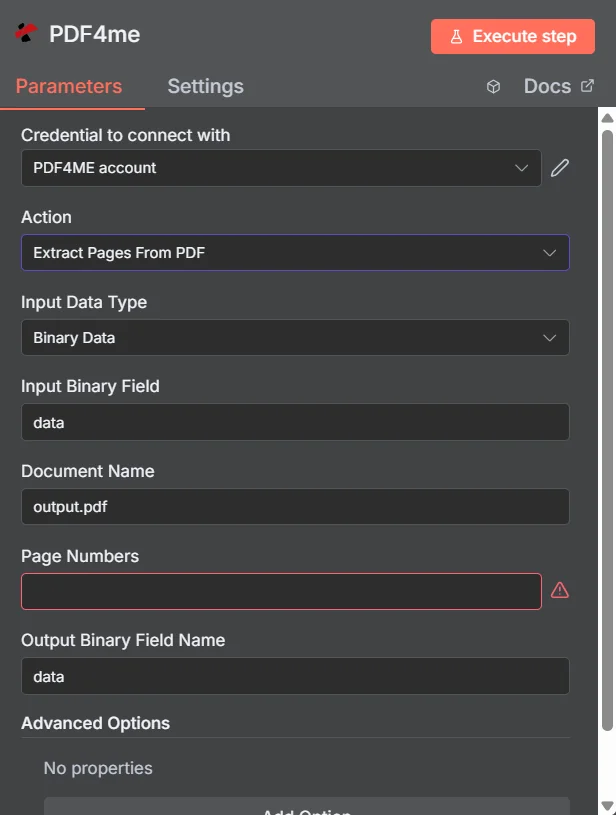
PDF4me Estrai pagine da PDF pannello dei parametri in n8n
Pagine estraibili vs. pagine divise PDF
Entrambi producono documenti più piccoli, ma rispondono a domande diverse. L'estrazione chiede quale pages vuoi conservare; la divisione chiede come dovrebbe essere suddiviso l'intero documento.
| Domanda | Estrai pagine da PDF | Diviso PDF |
|---|---|---|
| How many files come back | One PDF holding the pages you listed | Several PDFs covering the whole document |
| What happens to unlisted pages | They are absent from the output | They still appear, in another output file |
| Typical use | Pull the signature page, one chapter, or a summary section | Break a bundle into per-invoice or per-section files |
| Driven by | An explicit page list you supply | A split rule such as page count, text, or barcode |
Quali parametri estrae le pagine da PDF Bisogno?
Necessario: Azione, Tipo di dati di input, il campo corrispondente a quel tipo di input, Nome del documento e Numeri di pagina. Il nome del campo binario di output ha un valore predefinito di lavoro datie la sezione Opzioni avanzate è inizialmente vuota.
| Parametro | Necessario | Cosa fa | Esempio |
|---|---|---|---|
| Action | Required | Selects the PDF4me node action to run. Choose Extract Pages From PDF. | Extract Pages From PDF |
| Input Data Type | Required | Format of the source PDF input. Choose Binary Data (from a previous node), Base64 String, or URL. | Binary Data |
| Input Binary Field | Conditional | Name of the binary property on the incoming n8n item that holds the PDF. Required when Input Data Type is Binary Data. Defaults to data. | data |
| Base64 Document Content | Conditional | Base64-encoded content of the source PDF. Required when Input Data Type is Base64 String. | JVBERi0xLjQK... |
| File URL | Conditional | Publicly reachable HTTPS URL to the source PDF. Required when Input Data Type is URL. | https://example.com/report.pdf |
| Document Name | Required | Filename used for the document on the request, for reference and tracking. Include the .pdf extension. | output.pdf |
| Page Numbers | Required | The pages to keep. Accepts a comma-separated list, a hyphenated range, a mixed list, or an open range that runs to the end of the document. Pages are numbered from 1. | 1,3,5-8 |
| Output Binary Field Name | Optional | Name of the binary property the output item exposes. Defaults to data. | data |
| Advanced Options | Optional | A collection that starts empty, shown as No properties with an Add Option button. Leave it alone unless you have a specific option to add. | No properties |
Come compilare il campo dei numeri di pagina
| Modello | Esempio | Cosa ritorna |
|---|---|---|
| Single page | 5 | Just page 5, as a one page PDF. |
| Comma-separated list | 1,3,5 | Pages 1, 3, and 5 in one PDF, with pages 2 and 4 absent. |
| Hyphenated range | 2-5 | Pages 2, 3, 4, and 5, with both ends included. |
| Mixed list | 1,3,5-8 | Page 1, page 3, then the block from 5 to 8. |
| Open range | 10- | Page 10 through the last page, whatever the document length turns out to be. |
Campi di output
Una corsa di successo restituisce uno n8n oggetto che trasporta l'estratto PDF.
| Campo | Tipo | Cosa contiene |
|---|---|---|
Binary (data) | Binary | The extracted PDF, under Output Binary Field Name (default data). |
fileName | String | Generated filename of the extracted PDF. |
mimeType | String | MIME type of the output, always application/pdf. |
fileSize | Number | Size of the returned PDF in bytes. |
pagesExtracted | Number | How many pages ended up in the output. Compare it against the length of your requested list as a cheap sanity check. |
originalPageCount | Number | Page count of the source document before extraction. |
extractedPageNumbers | Array | The page numbers that were actually extracted, useful for verifying the result against what you asked for. |
success | Boolean | True when the extraction completed, false on failure. Use it to branch error handling. |
message | String | Human-readable status message, carrying success confirmation or error detail. |
Come impostare l'estrazione delle pagine da PDF In n8n?
- Aggiungere PDF4me al tuo n8n flusso di lavoro e scegliere il Estrai pagine da PDF azione.
- In Credenziali per connettersi con, seleziona il tuo PDF4me credenziali o clicca Crea nuove credenziali e incolla il tuo API chiave.
- Impostato Tipo di dati di input A Dati binari (predefinito), Base64 String, O URL e fornire la fonte corrispondente PDF campo.
- Impostato Nome reale per il file sorgente, incluso il
.pdfestensione. - Inserisci Numeri di pagina utilizzando un elenco, un intervallo, un elenco misto o un intervallo aperto.
- Partire Nome del campo binario di output COME
dataa meno che un nodo successivo non si aspetti una proprietà diversa. - Esegui il nodo e instrada il risultato PDF al passaggio successivo, come l'archiviazione, l'invio tramite e-mail o l'inserimento in una coda di revisione.
Configurazioni tipiche
Esempi di flusso di lavoroCommon n8n workflow patterns using Extract Pages From PDF.
- Il contratto firmato viene inviato come allegato e-mail.
- Estrai pagine da PDF prende l'ultima pagina utilizzando un intervallo aperto.
- La singola pagina viene archiviata nella scheda del cliente per una rapida consultazione.
- Secondo una pianificazione prestabilita, viene generato un report dettagliato.
- Estrai pagine da PDF mantiene i primi pochi pages con una gamma come
1-3. - I revisori ricevono il riassunto, mentre il rapporto completo viene archiviato.
- Una richiesta di assistenza fa riferimento a una sezione del manuale del prodotto.
- Estrai pagine da PDF tira fuori quel capitolo con un intervallo con trattino.
- Il cliente ottiene il pertinente pages invece di un accessorio di grandi dimensioni.
- Diversi documenti originali contengono ciascuno una pagina che vale la pena conservare.
- Estrai pagine da PDF esegue ogni documento per estrarre quella pagina.
- Unione multipla PDFs combina i risultati in un unico compendio.
Consigli pratici
Foglio riassuntivo
| Campo | Valore |
|---|---|
| Action | Extract Pages From PDF |
| Input Data Type | Binary Data |
| Input Binary Field | data |
| Document Name | output.pdf |
| Page Numbers | 1,3,5-8 |
| Output Binary Field Name | data |
| Advanced Options | No properties |
| Credentials | PDF4me API credential |