Sovrapposizione PDFs In n8n
Sovrapposizione PDFs è un PDF4me azione del nodo in n8n che mette uno PDF sopra un altro, combinandoli entrambi sullo stesso pages Invece di aggiungerli. Usalo per stampare una carta intestata progettata sopra il contenuto generato, applicare una cornice per un certificato o sovrapporre un modello approvato a un documento in arrivo senza aggiungere una singola pagina.
Cosa fa questo nodo
PDF4me: Sovrapposizione PDFs ci vogliono due persone PDFs, UN base che funge da sfondo e da strato che si trova sopra e restituisce un singolo documento in cui entrambi appaiono sullo stesso pagesOgni file ha il proprio tipo di input, quindi la base può provenire da un nodo precedente come dati binari mentre il layer viene estratto da un URLA differenza della funzione di unione, il numero di pagine non aumenta, il che la rende lo strumento ideale per carta intestata, cornici e timbri modello.
Autenticazione del tuo API Richiesta
Ogni PDF4me nodo in n8n richiede un valido Credenziali per connettersi con. Crea o selezionane uno che contenga il tuo PDF4me API chiave affinché il flusso di lavoro possa autenticare in modo sicuro le richieste di sovrapposizione.
Informazioni importanti da non perdere
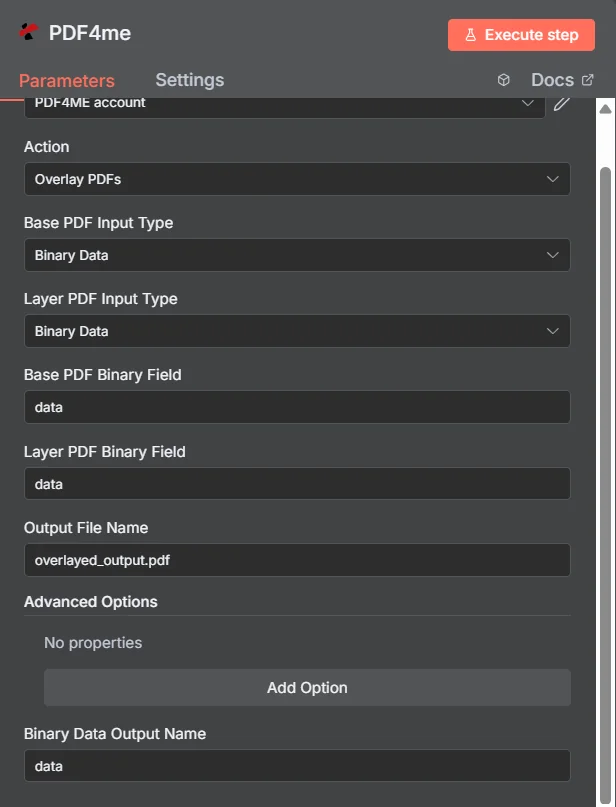
PDF4me Sovrapposizione PDFs pannello dei parametri in n8n, con entrambi i tipi di input impostati su Dati binari
Sovrapposizione vs Unione vs Filigrana
Tre modi per aggiungere contenuti extra a un PDF, ciascuno dei quali produce un documento diverso.
| Approccio | Effetto sul pages | Migliore vestibilità |
|---|---|---|
| Overlay PDFs | Both documents appear on the same pages, page count unchanged | Branding that already exists as a designed PDF, such as a letterhead or certificate frame |
| Merge PDFs | Documents follow one another, page counts add up | Content that genuinely belongs in sequence as one longer document |
| Add watermark | Simple text or a single image drawn onto the existing pages | A short notice such as DRAFT or CONFIDENTIAL, where no designed PDF layer exists |
Quali parametri sovrappone PDFs Bisogno?
Necessario: Azione, entrambi i tipi di input, il campo sorgente corrispondente a ciascun tipo di input e Nome file di output. Nome output dati binari e tutto ciò che si trova in Opzioni avanzate utilizza valori predefiniti funzionanti.
| Parametro | Necessario | Cosa fa | Esempio |
|---|---|---|---|
| Action | Required | Selects the PDF4me node action to run. Choose Overlay PDFs. | Overlay PDFs |
| Base PDF Input Type | Required | Format of the background PDF. Choose Binary Data, Base64 String, or URL. Independent of the layer setting. | Binary Data |
| Layer PDF Input Type | Required | Format of the PDF placed on top. Choose Binary Data, Base64 String, or URL. Independent of the base setting. | Binary Data |
| Base PDF Binary Field | Conditional | Name of the binary property holding the base PDF. Required when Base PDF Input Type is Binary Data. | data |
| Layer PDF Binary Field | Conditional | Name of the binary property holding the layer PDF. Required when Layer PDF Input Type is Binary Data. | data |
| Base PDF Base64 Content | Conditional | Base64-encoded content of the base PDF. Required when Base PDF Input Type is Base64 String. | JVBERi0xLjQK... |
| Layer PDF Base64 Content | Conditional | Base64-encoded content of the layer PDF. Required when Layer PDF Input Type is Base64 String. | JVBERi0xLjQK... |
| Base PDF File URL | Conditional | Publicly reachable HTTPS URL to the base PDF. Required when Base PDF Input Type is URL. | https://example.com/base.pdf |
| Layer PDF File URL | Conditional | Publicly reachable HTTPS URL to the layer PDF. Required when Layer PDF Input Type is URL. | https://example.com/letterhead.pdf |
| Output File Name | Required | Filename for the combined PDF. Include the .pdf extension. | overlayed_output.pdf |
| Binary Data Output Name | Optional | Name of the binary property the output item exposes. Defaults to data. | data |
| Advanced Options | Optional | Collection for extra processing settings, added with Add Option. Leave empty unless you have a specific requirement. | No properties |
Campi di output
Una corsa di successo restituisce uno n8n articolo che trasporta il combinato PDF.
| Campo | Tipo | Cosa contiene |
|---|---|---|
Binary (data) | Binary | The combined PDF with the layer placed over the base, under Binary Data Output Name (default data). |
fileName | String | Generated filename, matching Output File Name. |
mimeType | String | MIME type of the output, always application/pdf. |
fileSize | Number | Size of the combined PDF in bytes. |
docName | String | Document name reference for the processed file, matching fileName. |
overlayCompleted | Boolean | Confirms the overlay operation finished, useful as an explicit check that the layer was applied. |
layersProcessed | Number | Count of PDF layers combined into the final document. |
success | Boolean | True when the operation completed, false on failure. Use it to branch error handling. |
message | String | Human-readable status message, carrying success confirmation or error detail. |
Come si imposta la sovrapposizione? PDFs In n8n?
- Aggiungere PDF4me al tuo n8n flusso di lavoro e scegliere il Sovrapposizione PDFs azione.
- In Credenziali per connettersi con, seleziona il tuo PDF4me credenziali o clicca Crea nuove credenziali e incolla il tuo API chiave.
- Impostato Base PDF Tipo di input E Strato PDF Tipo di inputSono indipendenti, quindi ogni file può arrivare in modo diverso.
- Compila i campi sorgente corrispondenti, ad esempio Base PDF Campo binario E Strato PDF Campo binario, entrambi impostati di default su
data. - Impostato Nome del file di output (deve terminare in
.pdf). - Eseguire il nodo e instradare il combinato PDF, esposto sotto Nome dell'output dei dati binari, al passo successivo.
Configurazioni tipiche
Esempi di flusso di lavoroCommon n8n workflow patterns using Overlay PDFs.
- Il documento viene generato da un modello senza alcun marchio.
- Sovrapposizione PDFs applica la carta intestata approvata PDF prelevato da un URL come strato.
- Il prodotto finito, con il marchio impresso, viene inviato senza alcun intervento da parte del designer.
- I dati sul completamento del corso producono un semplice PDF con il nome del destinatario.
- Sovrapposizione PDFs posiziona il bordo del certificato progettato sopra di esso.
- Ogni certificato completato viene inviato via e-mail al destinatario.
- Un documento completa una fase di approvazione nel flusso di lavoro.
- Sovrapposizione PDFs applica uno strato di timbro predefinito e approvato.
- La copia timbrata viene archiviata nel sistema di registrazione.
- Un nodo Loop Over Items scorre una cartella di documenti in arrivo dai fornitori.
- Sovrapposizione PDFs applica lo stesso strato PDF da un URL a ciascuno.
- Ogni documento entra nell'archivio con una struttura coerente.
Consigli pratici
Foglio riassuntivo
| Campo | Valore |
|---|---|
| Action | Overlay PDFs |
| Base PDF Input Type | Binary Data |
| Layer PDF Input Type | Binary Data |
| Base PDF Binary Field | data |
| Layer PDF Binary Field | data |
| Output File Name | overlayed_output.pdf |
| Binary Data Output Name | data |
| Advanced Options | No properties |
| Credentials | PDF4me API credential |