Aggiungi margine a PDF In n8n
Aggiungi margine a PDF è un PDF4me azione del nodo in n8n che aggiunge margini sinistro, destro, superiore e inferiore a un PDF, ciascuno misurato in millimetri. Utilizzalo per creare spazio di rilegatura per report stampati, lasciare spazio per annotazioni su dispense o allineare automaticamente i documenti in arrivo a uno standard di impaginazione aziendale.
Cosa fa questo nodo
PDF4me: Aggiungi margine a PDF prende un PDF da Binary Data, un Base64 String, o un URL e restituisce un nuovo file con i quattro valori di margine specificati applicati in millimetri. Ogni lato viene impostato in modo indipendente, quindi un margine di rilegatura asimmetrico corrisponde semplicemente a un valore maggiore sul lato sinistro. Poiché viene eseguito come passaggio del flusso di lavoro, lo stesso standard di margine può essere applicato a ogni documento ricevuto senza che nessuno debba aprire un editor desktop.
Autenticazione del tuo API Richiesta
Ogni PDF4me nodo in n8n richiede un valido Credenziali per connettersi con. Crea o selezionane uno che contenga il tuo PDF4me API chiave affinché il flusso di lavoro possa autenticare in modo sicuro le richieste di margine.
Informazioni importanti da non perdere
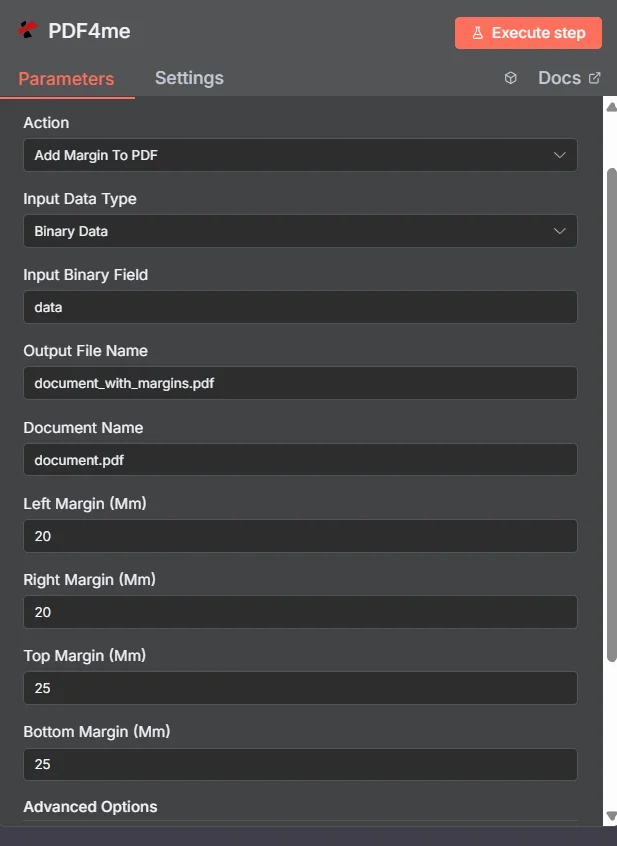
PDF4me Aggiungi margine a PDF pannello dei parametri in n8n
Margini automatizzati (n8n) contro un desktop PDF Redattore
La maggior parte dei risultati di questa ricerca sono editor che consentono di lavorare su un file alla volta. La differenza sta nel luogo in cui avviene il lavoro.
| Approccio | Grilletto | Migliore vestibilità |
|---|---|---|
| Desktop editor or online margin tool | A person opens and adjusts one file by hand | A single document you are already working on |
| PDF4me Add Margin To PDF in n8n | A generated report, an upload, or a scheduled batch | Applying one house margin standard to every document that arrives, unattended |
A quali parametri aggiunge il margine? PDF Bisogno?
Necessario: Azione, Tipo di dati di input, il campo corrispondente a quel tipo di input, Nome del file di output, Nome del documento e tutti e quattro i valori dei margini. Nome output dati binari e profili personalizzati hanno valori predefiniti funzionanti.
| Parametro | Necessario | Cosa fa | Esempio |
|---|---|---|---|
| Action | Required | Selects the PDF4me node action to run. Choose Add Margin To PDF. | Add Margin To PDF |
| Input Data Type | Required | Format of the source PDF input. Choose Binary Data (from a previous node), Base64 String, or URL. | Binary Data |
| Input Binary Field | Conditional | Name of the binary property on the incoming n8n item that holds the PDF. Required when Input Data Type is Binary Data. Defaults to data. | data |
| Base64 Document Content | Conditional | Base64-encoded content of the source PDF. Required when Input Data Type is Base64 String. | JVBERi0xLjQK... |
| File URL | Conditional | Publicly reachable HTTPS URL to the source PDF. Required when Input Data Type is URL. | https://example.com/report.pdf |
| Output File Name | Required | Filename for the PDF returned with margins applied. Include the .pdf extension. | document_with_margins.pdf |
| Document Name | Required | Filename of the source PDF, used for reference and tracking on the request. | document.pdf |
| Left Margin (Mm) | Required | Left margin width in millimetres. Set this larger than the other sides when you need binding space. | 20 |
| Right Margin (Mm) | Required | Right margin width in millimetres. | 20 |
| Top Margin (Mm) | Required | Top margin height in millimetres. Increase it when a printed header or letterhead needs clearance. | 25 |
| Bottom Margin (Mm) | Required | Bottom margin height in millimetres. Increase it when a footer or page number needs clearance. | 25 |
| Binary Data Output Name | Optional | Name of the binary property the output item exposes. Defaults to data. | data |
| Custom Profiles | Optional | Advanced Options field for extra processing settings, supplied in a JSON-like format. Leave blank unless you have a specific profile to apply. | { "preserveContentQuality": true } |
Campi di output
Una corsa di successo restituisce uno n8n oggetto che trasporta il PDF con l'applicazione dei margini.
| Campo | Tipo | Cosa contiene |
|---|---|---|
Binary (data) | Binary | The PDF with the four margin values applied, under Binary Data Output Name (default data). |
fileName | String | Generated filename, matching Output File Name. |
mimeType | String | MIME type of the output, always application/pdf. |
fileSize | Number | Size of the returned PDF in bytes. |
pageCount | Number | Number of pages processed with margin adjustments. |
success | Boolean | True when the margin operation completed, false on failure. Use it to branch error handling. |
message | String | Human-readable status message, carrying success confirmation or error detail. |
Come impostare Aggiungi margine a PDF In n8n?
- Aggiungere PDF4me al tuo n8n flusso di lavoro e scegliere il Aggiungi margine a PDF azione.
- In Credenziali per connettersi con, seleziona il tuo PDF4me credenziali o clicca Crea nuove credenziali e incolla il tuo API chiave.
- Impostato Tipo di dati di input A Dati binari (predefinito), Base64 String, O URL e fornire la fonte corrispondente PDF campo.
- Inserisci Margine sinistro (mm), Margine destro (mm), Margine superiore (mm), E Margine inferiore (mm) in millimetri.
- Impostato Nome del file di output (deve terminare in
.pdf) E Nome reale per il file sorgente. - Esegui il nodo e instrada il risultato PDF al passaggio successivo, come l'archiviazione, la posta elettronica o una coda di stampa.
Configurazioni tipiche
Esempi di flusso di lavoroCommon n8n workflow patterns using Add Margin to PDF.
- Un report programmato viene generato come un PDF durante la notte.
- Aggiungi margine a PDF Applica un ampio margine sinistro e valori più ristretti a destra, in alto e in basso.
- Il risultato viene inviato alla coda di stampa con spazio per la rilegatura a spirale o a pettine.
- Il materiale formativo viene caricato in una cartella condivisa.
- Aggiungi margine a PDF allarga il margine destro in modo che i lettori abbiano spazio per prendere appunti.
- La copia annotata viene distribuita ai partecipanti.
- Un webhook riceve PDFs da un fornitore esterno con layout incoerenti.
- Aggiungi margine a PDF applica gli stessi quattro valori a ogni file.
- I documenti vengono inseriti nell'archivio con una presentazione uniforme delle pagine.
- Un documento unificato viene creato a partire da diverse fonti.
- Aggiungi margine a PDF crea prima lo spazio libero inferiore.
- Aggiungi pagina Number A PDF quindi inserisce la numerazione all'interno del nuovo spazio del piè di pagina.
Consigli pratici
Foglio riassuntivo
| Campo | Valore |
|---|---|
| Action | Add Margin To PDF |
| Input Data Type | Binary Data |
| Input Binary Field | data |
| Output File Name | document_with_margins.pdf |
| Document Name | document.pdf |
| Left / Right Margin (Mm) | 20 / 20 |
| Top / Bottom Margin (Mm) | 25 / 25 |
| Binary Data Output Name | data |
| Credentials | PDF4me API credential |