Creare una fattura elettronica ZUGFeRD 2.0+ in Make: un flusso di lavoro Dropbox a 4 moduli
ZUGFeRD 2.0+ (anche noto come Fattore X in Francia e XRechnung nel settore pubblico tedesco) è un Fattura ibrida PDF/A3 con l'XML leggibile dalla macchina incorporato nel PDF. Un file che sia gli esseri umani che i sistemi ERP possono consumare. Questa guida illustra l'esecuzione esatta mostrata negli screenshot: una fattura base in PDF e un XML ZUGFeRD 2.0+ in Dropbox diventano una fattura elettronica ibrida conforme a EN16931 in /pdf4meoutput/, In 4 Crea moduli, zero codice.
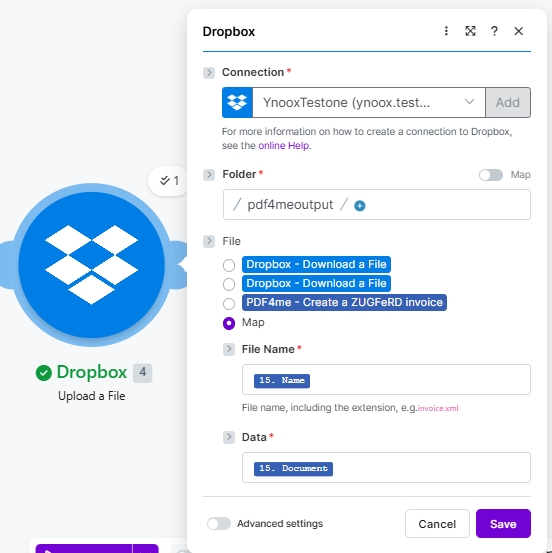
Quattro moduli Make end-to-end. Due Dropbox Scarica un file i passaggi estraggono il PDF di base e l'XML ZUGFeRD 2.0+ (gli screenshot mostrano YnooxTeststone collegamento più percorsi /pdf4metest/Fattura Zugfred/SimplePdf.pdf E /pdf4metest/FatturaZugfred/versione2.xml). PDF4me Crea una fattura ZUGFeRD incorpora l'XML nel PDF con Modalità di uscita XML con PDF, Versione ZUGFeRD 2+, Livello di conformità EN16931, Genera fattura in formato PDF SÌ, Lingua DiDropbox Carica un file scrive il risultato Formato ibrido PDF/A3 A /pdf4meoutput/ con File impostato su MappaNome del file 15. Nome, Dati 15. DocumentIl file di output si apre in qualsiasi lettore PDF e viene analizzato correttamente da qualsiasi sistema ERP che supporti ZUGFeRD / Factur-X / XRechnung.
Innanzitutto, il Livello di conformità deve corrispondere a quanto previsto dal sistema ERP dell'acquirente o del destinatario. EN16931 (Comfort) è l'impostazione predefinita legale tedesca e la scelta sicura per il B2B nell'UE; XRECHARGE è richiesto per la fatturazione B2G (settore pubblico) in Germania; DI BASE funziona per la maggior parte degli altri acquirenti. In secondo luogo, il Versione ZUGFeRD deve essere 2+ per qualsiasi cosa conforme alla norma EN 16931. Legacy 1.0 Utilizza BASIC / COMFORT / EXTENDED ed è incompatibile con i ricevitori EN 16931. Scegli 2+ a meno che il destinatario non richieda esplicitamente 1.0.
Domande comuni del mondo reale a cui questo risolve
Le persone cercano questo specifico problema utilizzando frasi come:
- "Come si crea una fattura ZUGFeRD con XML incorporato in Make?" Questo scenario a 4 moduli gestisce l'intero processo: modello PDF più fattura XML in ingresso, output in formato ibrido PDF/A-3.
- "ZUGFeRD è la stessa cosa di Factur-X?" Sì. Stesso formato tecnico con nomi diversi. Un file ZUGFeRD 2.x è accettato dai sistemi che si aspettano Factur-X e viceversa.
- "Quale livello di conformità dovrei scegliere?" EN16931 per B2B (conforme allo standard legale tedesco e alla norma UE EN 16931), XRECHNUNG per il settore pubblico tedesco (B2G), BASIC per la massima compatibilità con i sistemi preesistenti.
- "Devo scrivere io stesso il codice XML?" No, ma in questo scenario gli screenshot utilizzano una fattura XML esistente. Il modulo accetta anche input JSON o CSV e genera automaticamente il file XML.
- "E se il mio acquirente avesse bisogno solo del file XML, senza PDF?" Imposta la modalità di output su
XML Onlye il modulo restituisce solo il file di fattura XML anziché quello ibrido.
Cosa stai costruendo
Uno scenario Make riutilizzabile che produce una fattura elettronica ibrida ZUGFeRD 2.0+ pienamente conforme a partire da un file PDF di base e un file di fattura XML. L'attivazione può essere manuale, pianificata (come mostrato), tramite il monitoraggio di file Dropbox o un webhook HTTP. L'output è un singolo file che soddisfa sia il requisito di leggibilità umana del PDF sia il requisito di leggibilità automatica dell'XML per le normative UE sulla fatturazione elettronica.
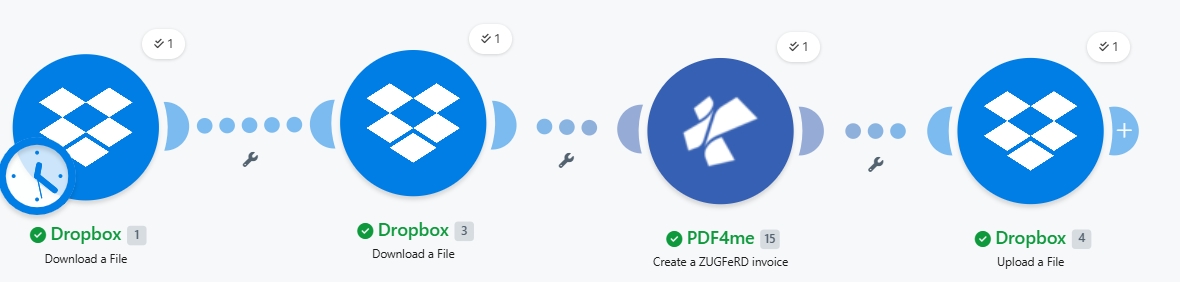
Quattro moduli end-to-end. Due download, un'azione PDF4me, un upload. L'icona dell'orologio sul Modulo 1 indica un'attivazione programmata; è possibile passare alla modalità manuale/monitoraggio file/webhook in base alle proprie esigenze.
Ciò di cui hai bisogno
- Fare account con uno scenario aperto. Crea un account Make se ne hai bisogno.
- Chiave API di PDF4me. Ottieni la tua chiave API e collegarsi al primo modulo PDF4me. Vedi Collega PDF4me per creare.
- Dropbox con una cartella sorgente (ad esempio
/pdf4metest/Fattura Zugfred/) contenente il modello PDF e la fattura XML, oltre a una cartella di output (/pdf4meoutput/). - Un PDF di base (gli screenshot utilizzano
SimplePdf.pdfNon necessita di alcuna formattazione del layout. Il modulo incorpora l'XML come allegato PDF/A-3. - Una fattura XML ZUGFeRD 2.0+. Usa il tuo, oppure prendine uno Esempio XML 2.0 per seguire.
Guida rapida: a cosa serve ciascun parametro
Costruisci lo scenario
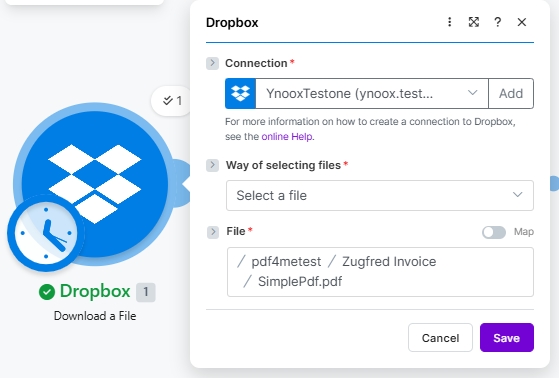
Modulo 1: Download di un file tramite Dropbox (PDF di base)
Scarica il file PDF di origine in cui verrà incorporato il codice XML di ZUGFeRD come allegato PDF/A3.
| Campo | Valore utilizzato in questa esecuzione |
|---|---|
| Connection | YnooxTestone (ynoox.test...). your Dropbox connection |
| Way of selecting files | Select a file |
| File | /pdf4metest/Zugfred Invoice/SimplePdf.pdf |
Modulo 2: Download di un file da Dropbox (ZUGFeRD 2.0+ XML)
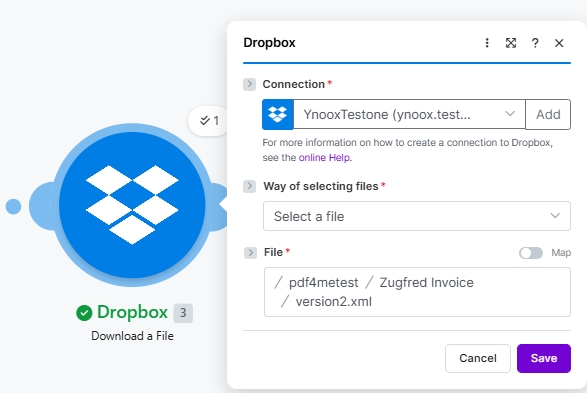
Scarica il file XML della fattura ZUGFeRD. Il file XML contiene tutti i dettagli della fattura; il PDF è solo la rappresentazione grafica.
| Campo | Valore utilizzato in questa esecuzione |
|---|---|
| Connection | YnooxTestone (ynoox.test...). same Dropbox connection |
| Way of selecting files | Select a file |
| File | /pdf4metest/Zugfred Invoice/version2.xml |
Modulo 3: PDF4me Crea una fattura ZUGFeRD
L'azione che esegue l'incorporamento vero e proprio. Mappa entrambi i file scaricati come input, scegli le impostazioni di conformità ed esegui.
| Gruppo | Campo | Valore |
|---|---|---|
| Auth | Connection | Classify Documen (testva...). PDF4me connection |
| Source | File (PDF template) | Map → Module 1 File Name + Data |
| Source | Input Format | XML |
| Source | File (XML invoice) | Map → Module 2 File Name + Data (a second File picker appears when Input Format is XML) |
| Output | Output Mode | XML With PDF (hybrid PDF/A-3) |
| Output | ZUGFeRD Version | 2+ |
| Output | Conformance Level | EN16931 |
| Output | Render Invoice on PDF | Yes |
| Output | Language | de |
Modulo 4: Caricamento di un file tramite Dropbox
Salvare la fattura elettronica ibrida PDF/A-3 nella cartella di output.
| Campo | Valore utilizzato in questa esecuzione |
|---|---|
| Connection | YnooxTestone (ynoox.test...) |
| Folder | /pdf4meoutput/ |
| File | Map (so File Name and Data come from the PDF4me step) |
| File Name | 15. Name (dynamic content from PDF4me Module 3) |
| Data | 15. Document (dynamic content from PDF4me Module 3) |
Salva e fai clic Eseguire una volta. Il PDF/A-3 ibrido arriva in /pdf4meoutput/ nel giro di un paio di secondi.
File di esempio (XML, JSON, CSV)
È possibile sostituire il Modulo 2 (XML) con uno qualsiasi di questi input e modificarlo Formato di input di conseguenza.
versione2.xml nella corsa sopra.