PDF Delete Hyperlink in Make
What this module does
PDF4me — PDF - Delete Hyperlink strips all clickable hyperlink annotations from specific pages of a PDF without touching the visible text. Specify individual pages, a range, or the entire document in one step. Tools like UPDF and Adobe Acrobat require manual file-by-file editing — this module does it automatically inside your Make scenario for every document that passes through.
Authenticating Your API Request
Every PDF4me module in Make requires a valid Connection. Create or select one that holds your PDF4me API key so the scenario can call the hyperlink deletion service securely.
Important Facts You Should Not Miss
The anchor text that was the clickable link stays exactly where it is — same font, same colour. Readers can read it, but clicking no longer does anything.
Every hyperlink on the pages you specify is stripped in a single pass — there is no URL-level filter. If you need selective removal, run Extract Hyperlinks first to plan which pages to target.
Internal PDF bookmark navigation and table-of-contents anchors are completely untouched. Only external URL hyperlinks and in-page href clickable annotations are stripped.
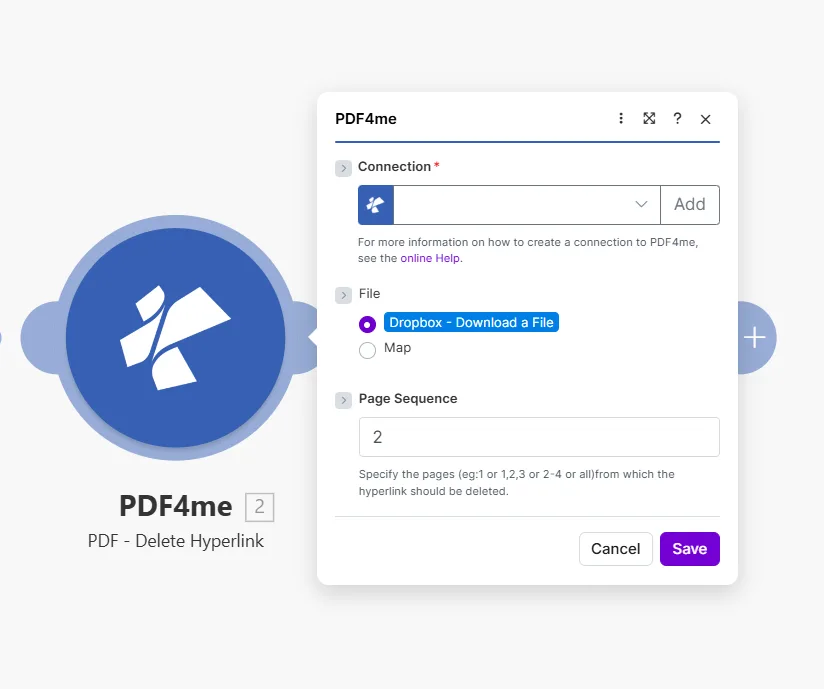
Enter a single page, a comma-separated list, a range, or all to strip every link from the whole document.
Parameters
Required: All three parameters — Connection, File, and Page Sequence — must be provided for the module to run.
| Parameter | Required | What it does | Example |
|---|---|---|---|
| Connection | Yes | PDF4me API connection used to authenticate hyperlink deletion requests. Click Add to create one with your API key. | Your PDF4me connection |
| File | Yes | Source PDF. Choose Dropbox - Download a File for a direct Dropbox trigger, or Map to supply the filename and binary content from a prior module. | Dropbox - Download a File |
| Page Sequence | Yes | Which pages to strip of hyperlinks. Accepts a single page, comma-separated list, a range, or all to clean the entire document at once. | 2 or 1,2,3 or 2-4 or all |
Quick Setup
- Add PDF4me → PDF - Delete Hyperlink to your Make scenario.
- Select Connection (or click Add to create one with your API key).
- Set File to Dropbox - Download a File or Map from a prior module that outputs a PDF binary.
- Enter the pages to clean in Page Sequence — use
allto strip links from every page in one shot. - Save and click Run once. The output contains Document Name and Document Data — the PDF with all hyperlinks removed on the specified pages.
Workflow Examples
Workflow ExamplesCommon Make scenario patterns that use PDF - Delete Hyperlink to sanitize, prepare, and archive documents.
- A finished proposal PDF is placed in the "Ready for Client" folder in Google Drive.
- PDF - Delete Hyperlink runs with Page Sequence set to all.
- The returned link-free PDF is attached to a Gmail message and sent to the client.
- The original working copy in its source folder keeps all internal links intact.
- A Typeform submission marks a contract as approved and triggers the scenario.
- PDF - Delete Hyperlink strips all links from every page.
- The link-free PDF is uploaded to the "Print Queue" folder in Dropbox.
- Gmail notifies the print team that a new job is ready.
- A scheduled scenario runs on the 1st of every month.
- Google Drive downloads the current active document.
- PDF - Delete Hyperlink removes all links from every page.
- The static snapshot is uploaded to an "Archive / [month]" folder — no dead links, no stale redirects.