Create SwissQR Bill in Make
What this module does
PDF4me Create SwissQR Bill appends a compliant Swiss QR bill payment slip to an existing PDF document. It adds the complete standardized section required by Swiss Payment Standards (ISO 20022) for invoicing within Switzerland and Liechtenstein. Supply your invoice PDF, the creditor and debtor details, IBAN, amount, and reference, and the module returns the same document with the payment slip attached. Every Swiss bank accepts the output for payment initiation via mobile banking app.
Authenticating Your API Request
Every PDF4me module in Make requires a valid Connection. Create or select one that holds your PDF4me API key so the scenario can authenticate Swiss QR bill generation securely.
Important Facts You Should Not Miss
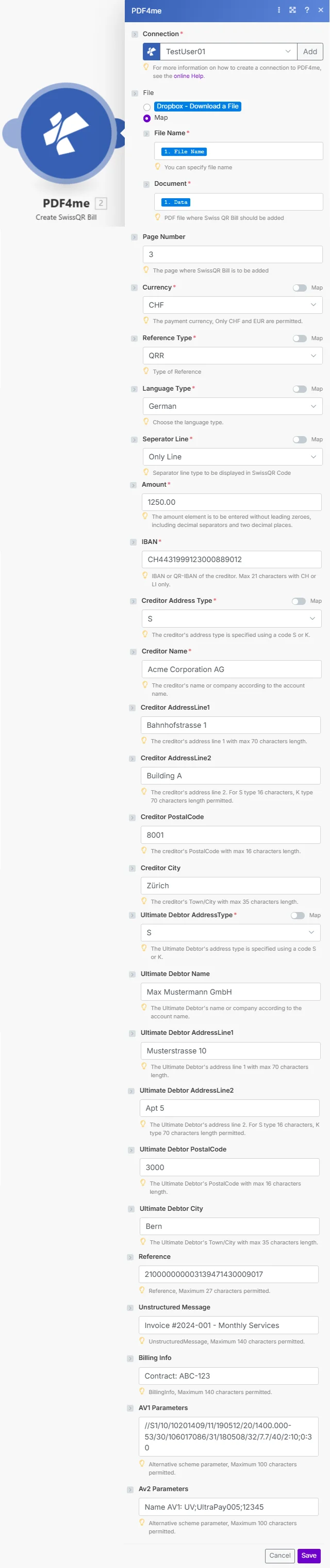
Required fields include Currency, Reference Type, Language Type, Seperator Line, Amount, IBAN, Creditor Address Type, and Ultimate Debtor AddressType. Creditor and Debtor detail fields fill the payment slip.
Parameters
Required: Connection, File (File Name + Document when using Map), Currency, Reference Type, Language Type, Seperator Line, Amount, IBAN, Creditor Address Type, and Ultimate Debtor AddressType. All other fields are optional but recommended for a complete payment slip.
| Parameter | Required | What it does | Example |
|---|---|---|---|
| Connection | Yes | PDF4me API connection. Click Add and paste your API key if connecting for the first time. | Your PDF4me connection |
| File | Yes | Source PDF to append the QR bill to. Choose Dropbox - Download a File or Map to supply from a prior module. | Map |
| File Name | Yes (Map) | Filename of the source PDF including .pdf extension. Hint: "You can specify file name." | 1. File Name |
| Document | Yes (Map) | Binary content of the source PDF. Hint: "PDF file where Swiss QR Bill should be added." | 1. Data |
| Page Number | No | The page of the PDF where the QR bill section is added. Hint: "The page where SwissQR Bill is to be added." | 3 |
| Currency | Yes | Payment currency. Hint: "Only CHF and EUR are permitted." | CHF |
| Reference Type | Yes | Format of the payment reference. Options: QRR (QR Reference, 27-digit numeric), SCOR (ISO 11649 creditor reference), NON (no reference). Hint: "Type of Reference." | QRR |
| Language Type | Yes | Language for the QR bill text. Options: German, French, Italian, English. Hint: "Choose the language type." | German |
| Seperator Line | Yes | Separator line style displayed in the QR bill section. Hint: "Separator line type to be displayed in SwissQR Code." Note: field name uses "Seperator" spelling as shown in module. | Only Line |
| Amount | Yes | Payment amount in two decimal places without leading zeroes. Hint: "entered without leading zeroes, including decimal separators and two decimal places." | 1250.00 |
| IBAN | Yes | Swiss or Liechtenstein IBAN or QR-IBAN of the creditor. Hint: "Max 21 characters with CH or LI only." | CH4431999123000889012 |
| Creditor Address Type | Yes | Address format for the creditor: S (Structured, separate PostalCode and City fields) or K (Combined, two free-text AddressLine fields). | S |
| Creditor Name | No | Creditor's company or personal name as it appears on the bank account. Hint: "The creditor's name or company according to the account name." | Acme Corporation AG |
| Creditor AddressLine1 | No | Creditor's primary address line. Max 70 characters. | Bahnhofstrasse 1 |
| Creditor AddressLine2 | No | Creditor's secondary address line. Max 16 characters for type S, 70 for type K. | Building A |
| Creditor PostalCode | No | Creditor's postal code. Max 16 characters. | 8001 |
| Creditor City | No | Creditor's town or city. Max 35 characters. | Zürich |
| Ultimate Debtor AddressType | Yes | Address format for the debtor: S (Structured) or K (Combined). Same rules as Creditor Address Type. | S |
| Ultimate Debtor Name | No | Debtor's company or personal name. Hint: "The Ultimate Debtor's name or company according to the account name." | Max Mustermann GmbH |
| Ultimate Debtor AddressLine1 | No | Debtor's primary address line. Max 70 characters. | Musterstrasse 10 |
| Ultimate Debtor AddressLine2 | No | Debtor's secondary address line. Max 16 characters (S) or 70 characters (K). | Apt 5 |
| Ultimate Debtor PostalCode | No | Debtor's postal code. Max 16 characters. | 3000 |
| Ultimate Debtor City | No | Debtor's town or city. Max 35 characters. | Bern |
| Reference | No | Payment reference number. Max 27 characters. Format depends on Reference Type. Hint: "Reference, Maximum 27 characters permitted." | 210000000003139471430009017 |
| Unstructured Message | No | Free-text payment description shown on the bill. Max 140 characters. | Invoice #2024-001 - Monthly Services |
| Billing Info | No | Additional billing information. Max 140 characters. | Contract: ABC-123 |
| AV1 Parameters | No | Alternative scheme parameter 1. Max 100 characters. | /S1/10/10201409/11/180512/20/1400.00 |
| AV2 Parameters | No | Alternative scheme parameter 2. Max 100 characters. | Name AV1: UV.UltraPay005;12345 |
Quick Setup
- Add PDF4me to Create SwissQR Bill in your Make scenario.
- Select Connection (or click Add to create one with your API key).
- Set File to Dropbox - Download a File or Map. If using Map, connect File Name and Document from the prior step.
- Fill the required payment fields: Currency (CHF or EUR), Reference Type, Language Type, Seperator Line, Amount, IBAN, Creditor Address Type, and Ultimate Debtor AddressType.
- Add creditor and debtor details in the remaining fields, then Save and run. The output
Doc Datacontains the source PDF with the Swiss QR bill section appended.
Workflow Examples
Workflow ExamplesCommon Make scenario patterns using Create SwissQR Bill.
- A new row added to a Google Sheets invoice register triggers the scenario.
- Google Drive downloads the blank invoice PDF template.
- Create SwissQR Bill maps all payment fields, including Amount, IBAN, Reference, and Creditor and Debtor details, directly from the sheet columns.
- Gmail sends the completed invoice with the Swiss QR bill attached to the customer's email address from the sheet.
- A scheduled trigger runs on the 1st of each month.
- Airtable returns all active subscription records.
- An Iterator processes each subscriber individually. Create SwissQR Bill generates a personalized invoice with the subscription amount, the customer's details mapped as the Ultimate Debtor, and a unique Reference per record.
- Gmail sends each customer their invoice. Airtable is updated with the sent timestamp.
- A webhook fires when an invoice is approved in the ERP system.
- HTTP downloads the approved invoice PDF.
- Create SwissQR Bill appends the payment slip using the ERP-supplied IBAN, amount, and reference number.
- The completed invoice is uploaded to the SharePoint accounts receivable folder and the accounting team is notified via Microsoft Teams.