Excel Separate Worksheets in Zapier
Excel - Separate Worksheets is a Zapier action that splits one .xlsx file into a separate workbook per sheet without VBA or macros. The action reads your source workbook, walks every tab, and returns an array where each item is one worksheet packaged as its own file. Pair it with the Looping utility to save one file per sheet to Dropbox, Drive, or OneDrive automatically.
Authenticating Your API Request
Every PDF4me module in Zapier requires a valid connection. Create or select one that holds your PDF4me API key.
Important Facts You Should Not Miss
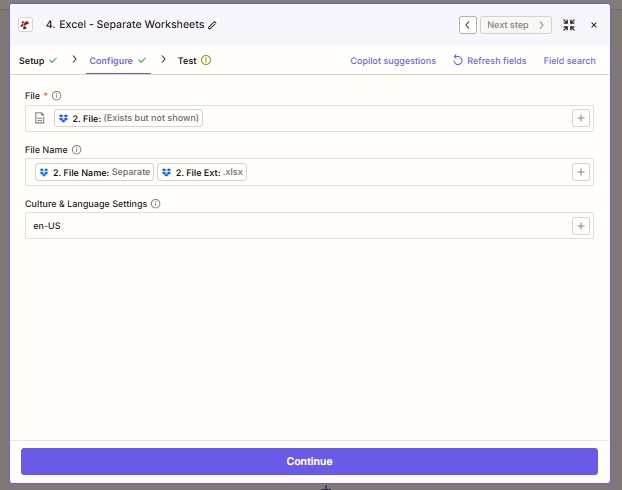
Three fields to configure. File carries the source workbook bytes; File Name is used for logging and downstream naming; Culture & Language Settings controls how numeric and date cells are parsed for internal processing.
What is Excel - Separate Worksheets in Zapier?
Excel - Separate Worksheets is Zapier's PDF4me action for splitting a multi-sheet .xlsx into one workbook per tab. It accepts a single file and returns an array of files, one per source worksheet. Unlike a desktop "Move or Copy Sheet" macro that runs interactively in Excel, this action runs in the cloud on any Zapier trigger, so a workbook dropped into Dropbox at 3am is already split by 3:15am.
Parameters
| Parameter | Required | What it does | Example |
|---|---|---|---|
| File | Required | The source .xlsx file. Map from a Dropbox / Drive / OneDrive Get File step (or any step that emits a file). | 2. File |
| File Name | Optional | Filename with extension. Passed through for logging and downstream mapping. Typically built by concatenating File Name and File Ext from the prior step. | Separate.xlsx |
| Culture & Language Settings | Optional | Locale used to parse date and numeric cells for internal processing. Does not modify stored values in the output workbooks. | en-US |
Output
| Field | Type | What it contains |
|---|---|---|
| Splitted Worksheet[] | Array of files | One populated .xlsx per source worksheet. Each element has both File and File Name properties. Feed the whole array into a Zapier Looping utility to process one at a time. |
| File Name | String | Property on each array item. Set to the source worksheet name plus .xlsx, e.g. Q1.xlsx, Summary.xlsx. Use it as the destination filename in the Upload File step. |
| File | Binary | Property on each array item. The .xlsx bytes for that worksheet. Map into a Dropbox / Drive / OneDrive Upload File action. |
How does Excel - Separate Worksheets work in Zapier?
Zapier passes the source .xlsx bytes to PDF4me's /api/v2/SplitWorksheet endpoint. PDF4me opens the workbook with Aspose Cells, iterates over every sheet, packages each sheet as a standalone .xlsx (headers preserved, styles preserved, formulas preserved), and returns them Base64-encoded. Zapier surfaces the collection as a Splitted Worksheet[] array output. Per the Zapier documentation on loops, you then pipe that array through the Looping by Zapier utility so subsequent actions run once per element.