Excel Populate in Zapier
Excel - Populate is a Zapier action that fills an .xlsx template with JSON data and returns the populated workbook, preserving every cell style, formula, and merged region. Use it when you already have a branded Excel layout and want new data slotted into it automatically. The action takes a template file plus a JSON payload and returns a filled .xlsx, so you can email, upload, or archive it without any manual paste.
Authenticating Your API Request
Every PDF4me module in Zapier requires a valid connection. Create or select one that holds your PDF4me API key.
Important Facts You Should Not Miss
&=Items.ItemName or sit inside an Excel table whose column headers match the JSON field names. A plain blank sheet produces an empty output.2. File from a Dropbox / Google Drive / OneDrive Get File step. Template URL is only for public HTTPS-served templates and stays blank whenever you're passing a mapped file.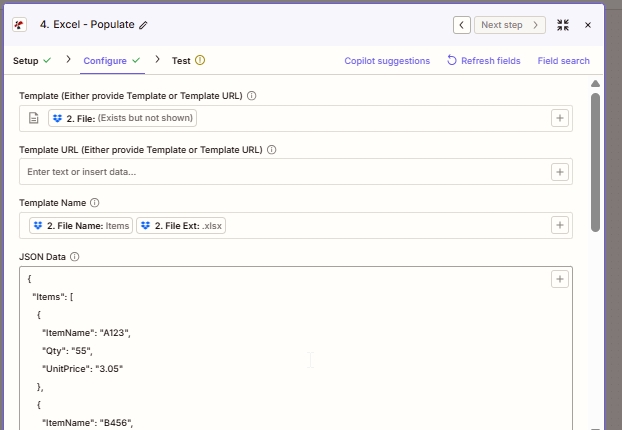
Top of Configure. Map Template from the previous step's file output, then build Template Name by concatenating File Name and File Ext. JSON Data is the payload PDF4me writes into the template.
What is Excel - Populate in Zapier?
Excel - Populate is Zapier's PDF4me action for filling a pre-designed .xlsx template with data from a JSON payload. It accepts a template file plus a JSON object and returns a filled workbook file. Unlike an online JSON-to-Excel converter that flattens everything to a raw grid, Populate preserves the template's layout, so branded reports, invoices, and dashboards can be regenerated on every trigger without formatting drift.
Parameters
| Parameter | Required | What it does | Example |
|---|---|---|---|
| Template | Conditional | The .xlsx template file. Map from a Dropbox / Drive / OneDrive Get File step. Required unless Template URL is set. | 2. File |
| Template URL | Conditional | Public HTTPS URL to fetch the template. Used only when Template is blank. | https://example.com/tpl.xlsx |
| Template Name | Required | Filename with extension. Used for output naming and downstream mapping. Typically built by concatenating File Name and File Ext from the prior step. | Items.xlsx |
| JSON Data | Required | Data payload to write into the template. Object keys must match Smart Markers or table column headers. | {"Items":[{"ItemName":"A123","Qty":"55","UnitPrice":"3.05"}]} |
| Strict JSON Strings | Optional | When True, quoted numbers stay as strings in the output cells. When False, they auto-convert to numeric cells. | True |
| Culture & Language Settings | Optional | Locale used to parse date and numeric cells. Does not modify stored values. | en-US |
| Calculate Formulas | Optional | When True, formulas in the template are evaluated after population so totals open pre-computed. | True |
| Worksheet Indexes | Optional | 1-based index of the worksheet(s) to populate. Comma-separated for multiple sheets in one call. | 1 (or 1,3) |
| Quote Prefix To Style | Optional | When True, cells beginning with a single quote are styled as text rather than treated as a prefix character. | False |
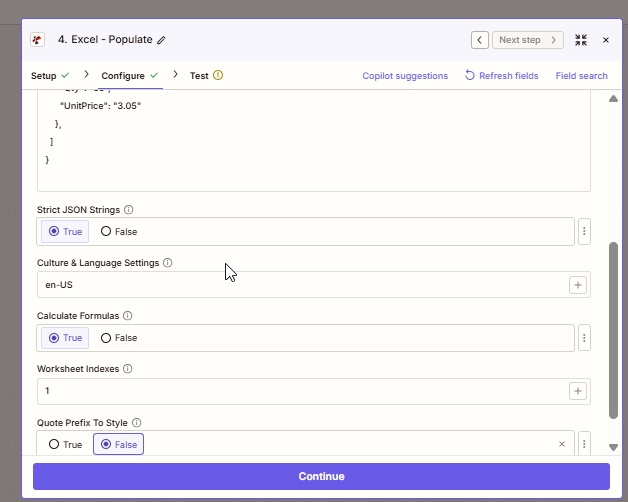
Advanced options. Strict JSON on and Calculate Formulas on are the two defaults you almost never want to change. Adjust Worksheet Indexes only if the template's data area lives on a sheet other than the first.
Output
| Field | Type | What it contains |
|---|---|---|
| File | Binary | The populated .xlsx workbook. Map into a Dropbox / Drive / OneDrive Upload File step, or attach it in Gmail / Outlook Send Email. |
| File Name | String | The Template Name you provided in the Configure tab. Useful when the upload step needs both file bytes and a filename separately. |
How does Excel - Populate work in Zapier?
Zapier passes the template file bytes and the JSON payload to PDF4me's /api/v2/PopulateExcelTemplate endpoint. PDF4me opens the template with Aspose Cells, resolves every Smart Marker or table binding against the JSON, evaluates any dependent formulas, and returns the populated .xlsx as a Base64-encoded byte stream that Zapier surfaces as the File output. Per the Zapier documentation on file fields, that File output can be dropped into any subsequent action that accepts a file input, without a manual encode or decode step.