Google Docs template in Power Automate
The Google Docs family is a Power Automate Generate Document Single option that uses a template designed in Google Docs and exported as .docx. Map that file into Generate Document Single, merge it with your JSON or XML data, and get a personalized PDF or Word file back. Choose it when your team authors templates in Google Docs rather than Microsoft Word.
Before You Start
google-docs-template.docx is already exported and ready.google-docs-data.json (recommended), test.xml, or test.csv. The placeholder names in the template match the data keys.Sample File Pack
Download the files below. One Google Docs template plus matching data in JSON, XML, and CSV. Map the .docx from SharePoint, OneDrive, or Dropbox into Generate Document Single.
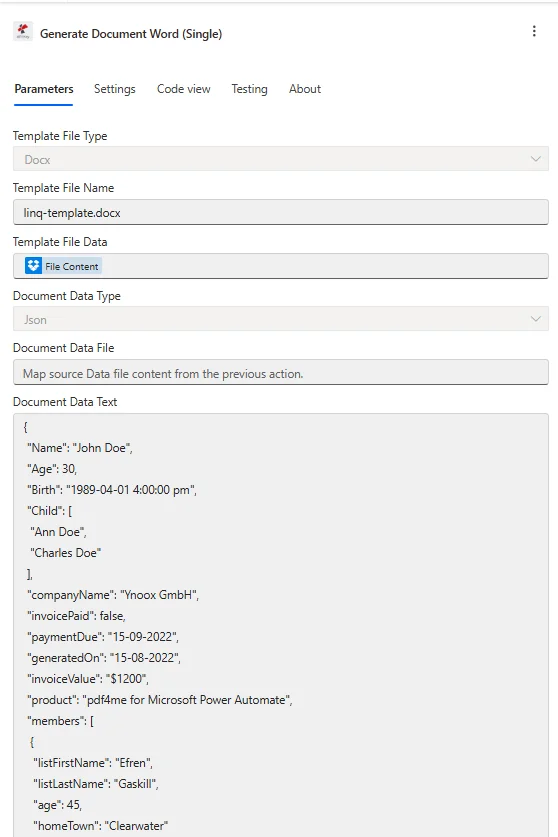
Target configuration for a Google Docs export: map the .docx under Template File Data, set Template File Type to Docx, and paste JSON into Document Data Text.
What is the Google Docs template in Power Automate?
The Google Docs family lets you author a template in Google Docs, export it as .docx, and merge it with data in a Power Automate flow. Because the exported file is a .docx, it runs through the Word template engine and supports mustache-style placeholders such as {{name}}. It is the simplest option for teams that prefer Google Workspace over Microsoft Word for template design.
How do I configure Google Docs template in Power Automate?
Set the action fields as below. Generate Document Single maps the exported .docx from a prior Get file step. For a template already saved in your PDF4me account, use Generate Document Using Template instead.
| Parameter | Required | What it does | Example |
|---|---|---|---|
| Connection | Required | PDF4me connection for the flow. Create one with your API key, then reuse it across every PDF4me action. | My PDF4me connection |
| Template File Type | Required | Format of the template file. A Google Docs export is a .docx, so choose PDF4me Word Template (Docx). | PDF4me Word Template |
| Output Type | Required | Format of the generated document. PDF for a locked layout, or Word for an editable .docx. | PDF |
| Template Name | Required | Filename of the exported template including the .docx extension. Map from the prior Get file step. | google-docs-template.docx |
| Template | Required | Binary content of the Google Docs export. Map File Content from SharePoint, OneDrive, or Dropbox Get file content. | File Content |
| Document DataType | Required | Format of the data payload. Json maps cleanly from SharePoint columns and Forms. Xml is for XML source systems. | Json |
| Document Data Text | Conditional | Inline data payload built from dynamic content. Required when Document Data File is empty. | [{ "name": "Alice Johnson" }] |
| Document Data File | Conditional | A JSON or XML data file mapped from a prior step. Required when Document Data Text is empty. | 1. Data |
| Meta Data Json | Optional | Document metadata for fields in JSON format. Leave empty for most certificate and letter templates. | {"title":"Certificate"} |
The sample data below matches the placeholders in google-docs-template.docx. Paste it into Document Data Text, or upload it as a file into Document Data File.
[
  {
    "name": "Alice Johnson",
    "course": "Intro to Automation",
    "date": "2026-03-10",
    "instructor": "Mr. Smith"
  }
]
Output
The action returns the generated document as dynamic content. Map it into any downstream step that accepts file content.
| Field | Type | What it contains |
|---|---|---|
Doc Data | Binary | The merged document produced from the Google Docs export and your data. Map it into File Content of Create file (Dropbox, OneDrive, SharePoint) or into an Outlook attachment. |
File Name | String | Output filename derived from Template Name. Combine it with an expression such as guid() when you want unique filenames per run. |
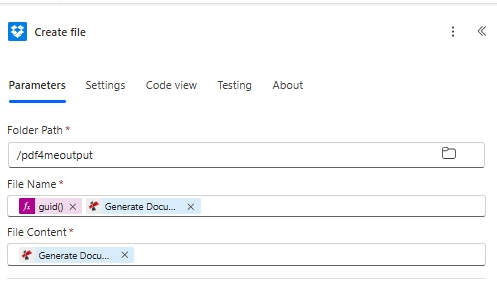
Saving the result: map the generated document into File Content, and use guid() in File Name for a unique output name.
Production patterns
Common Power Automate patterns for Google Docs templatesReplace the manual test with these once the sample works.
- Microsoft Forms When a new response is submitted trigger fires.
- Generate Document Single maps the Google Docs certificate .docx from Get file content.
- The response fields are passed as JSON in Document Data Text.
- Create file saves the certificate and Outlook Send an email delivers it.
- SharePoint When an item is created trigger fires on a list.
- Generate Document Single merges the list columns into the template.
- The generated document is returned as dynamic content.
- SharePoint Create file stores it in a document library.
- Manually trigger a flow starts the run.
- Generate Document Single maps google-docs-template.docx with inline JSON.
- Create file writes to /pdf4meoutput with a guid() filename.
- Swap the manual trigger for a real trigger once verified.
Frequently Asked Questions
Related Guides
For the underlying template engine, see the Aspose Words for .NET documentation and the Power Automate expressions reference.