Pdf Form template in Make
The Pdf Form family is a Make Generate Document Single option that fills the named fields of a fillable PDF (an AcroForm) with your data and returns the completed PDF. Choose it when you have a fixed-layout regulatory or government form that cannot be redesigned as a Word template but still needs automated data entry.
Before You Start
template.pdf is an AcroForm with named fields. Each key in your data file maps to a form field of the same name; unmatched fields stay blank.formdata.json (recommended), test.xml, or test.csv. Keys map one-to-one to the form field names.Sample File Pack
Download the files below. One PDF form template plus matching data in JSON, XML, and CSV.
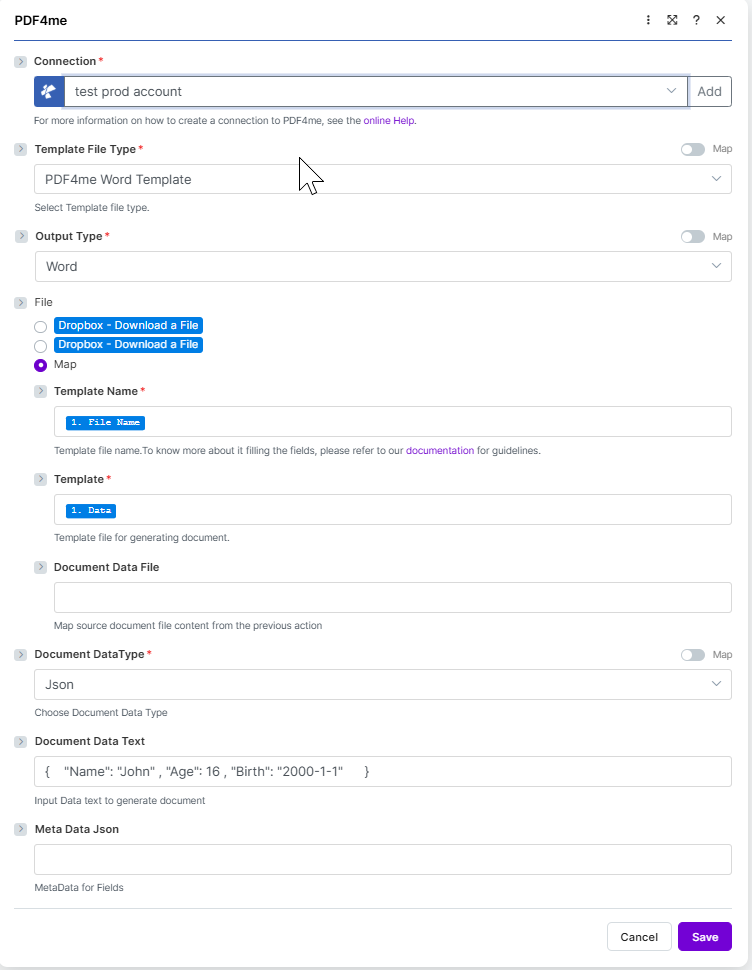
Target configuration: PDF4me PDF Template + form JSON in Document Data Text + PDF output.
What is the Pdf Form template template in Make?
The Pdf Form family performs form-field replacement on a fillable PDF. Instead of a layout with mustache tags, the PDF carries named AcroForm fields, and the module writes your data values into those fields. The output is the same PDF with every matched field completed, ideal for standardized forms.
How do I configure Pdf Form template in Make?
Set the module fields as below. Required fields are marked with a red asterisk in the Make UI.
| Parameter | Required | What it does | Example |
|---|---|---|---|
| Connection | Required | PDF4me connection for the scenario. Click Add to create one with your API key. | My PDF4me connection |
| Template File Type | Required | Set to PDF4me PDF Template for this template family. | PDF4me PDF Template |
| Output Type | Required | Format of the generated document. PDF is the output for a form-fill template. | PDF |
| Template Name | Required | Template file name including extension. Map from the prior module file name output. | template.pdf |
| Template | Required | Template file binary. Map from the prior module data output (for example 1. Data from Dropbox Download a File). | 1. Data |
| Document DataType | Required | Choose Json for JSON payloads (most common) or Xml when the upstream system returns XML. | Json |
| Document Data Text | Conditional | Inline JSON or XML data. Use when Document Data File is empty. | formdata.json |
| Document Data File | Conditional | Mapped data file from a prior module. Use when Document Data Text is empty. | 1. Data |
Output
The module returns one bundle per run. The generated file is placed on the Doc Data output field.
| Field | Type | What it contains |
|---|---|---|
Doc Data | Binary | The generated PDF document. Map into a downstream Upload File or Send Email Attachment module. |
File Name | String | Output filename based on Template Name with the extension matching Output Type. |
Mime Type | String | MIME type of the generated document. |
Production patterns
Common Make patterns for PDF form templatesReplace the manual test with these once the sample works.
- Dropbox or Google Drive stores
template.pdf. - Download a File loads the template as binary.
- Generate Document Single maps Template Name and Template.
- Data is built from Sheets or a webhook as JSON.
- Webhook receives the record payload.
- Generate Document Single merges it with the template.
- Output Type is PDF.
- Send Email or Upload File delivers Doc Data.
- Search Records returns many rows.
- Iterator loops one record at a time.
- Generate Document Single runs once per record.
- Each file is uploaded to a per-record folder.
Frequently Asked Questions
Related Guides
For the underlying template engine, see the Aspose Words for .NET documentation and the Make data structures reference.