HTML template in Make
The HTML template family is a Make Generate Document Single option that renders an .html layout into a finished document. It merges mustache tags, such as a recipient name field and a line-item loop, with your JSON data and outputs a PDF or HTML file. It suits teams that already maintain HTML or email templates.
Before You Start
invoice_sample_1.html is a full invoice layout with nested paths and a subInfo line-item loop. Paths must match your JSON structure exactly.invoice_sample_data_1.json (recommended), test.xml, or test.csv. JSON uses nested objects and a subInfo array.Sample File Pack
Download the files below. One HTML template plus matching data in JSON, XML, and CSV.
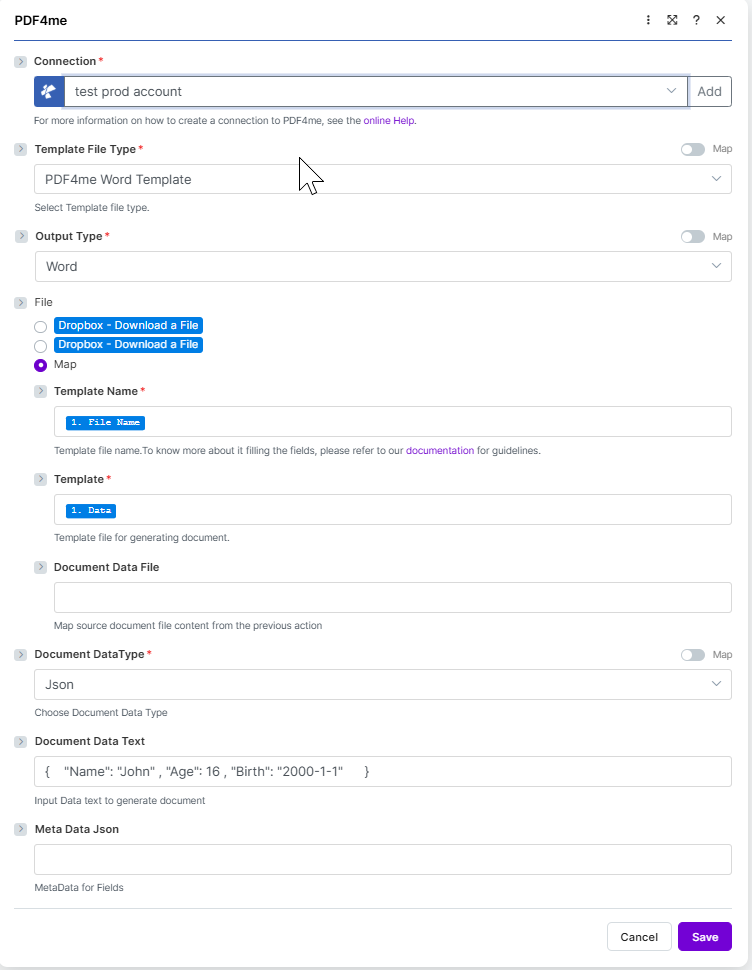
Target configuration: PDF4me HTML Template + JSON in Document Data Text + PDF output.
What is the HTML template template in Make?
The HTML template family renders a browser-style .html layout with inline CSS into a document. Placeholders written in mustache syntax are substituted from your data, and the loop block {{#each subInfo}} repeats a table row per line item. Choose it for marketing PDFs and brand-styled invoices your team already maintains as HTML.
How do I configure HTML template in Make?
Set the module fields as below. Required fields are marked with a red asterisk in the Make UI.
| Parameter | Required | What it does | Example |
|---|---|---|---|
| Connection | Required | PDF4me connection for the scenario. Click Add to create one with your API key. | My PDF4me connection |
| Template File Type | Required | Set to PDF4me HTML Template for this template family. | PDF4me HTML Template |
| Output Type | Required | Format of the generated document. PDF for a print-ready file, or HTML for an email body or web preview. | PDF |
| Template Name | Required | Template file name including extension. Map from the prior module file name output. | invoice_sample_1.html |
| Template | Required | Template file binary. Map from the prior module data output (for example 1. Data from Dropbox Download a File). | 1. Data |
| Document DataType | Required | Choose Json for JSON payloads (most common) or Xml when the upstream system returns XML. | Json |
| Document Data Text | Conditional | Inline JSON or XML data. Use when Document Data File is empty. | invoice_sample_data_1.json |
| Document Data File | Conditional | Mapped data file from a prior module. Use when Document Data Text is empty. | 1. Data |
Output
The module returns one bundle per run. The generated file is placed on the Doc Data output field.
| Field | Type | What it contains |
|---|---|---|
Doc Data | Binary | The generated PDF document. Map into a downstream Upload File or Send Email Attachment module. |
File Name | String | Output filename based on Template Name with the extension matching Output Type. |
Mime Type | String | MIME type of the generated document. |
Production patterns
Common Make patterns for HTML templatesReplace the manual test with these once the sample works.
- Dropbox or Google Drive stores
invoice_sample_1.html. - Download a File loads the template as binary.
- Generate Document Single maps Template Name and Template.
- Data is built from Sheets or a webhook as JSON.
- Webhook receives the record payload.
- Generate Document Single merges it with the template.
- Output Type is PDF.
- Send Email or Upload File delivers Doc Data.
- Search Records returns many rows.
- Iterator loops one record at a time.
- Generate Document Single runs once per record.
- Each file is uploaded to a per-record folder.
Frequently Asked Questions
Related Guides
For the underlying template engine, see the Aspose Words for .NET documentation and the Make data structures reference.