Hapus Header Footer dari Excel Menggunakan Zapier
Hapus Header Footer dari Excel adalah sebuah Zapier tindakan oleh PDF4me yang menghapus konten header dan footer dari Excel Lembar kerja, bagian demi bagian. Targetkan Kiri, Tengah, atau Kanan secara independen pada header dan footer, terapkan pada satu lembar kerja atau seluruh buku kerja, dan gunakan untuk menghapus branding usang atau draf tanda sebelum didistribusikan kembali.
Bagaimana Cara Saya Mengautentikasi Saya? API Meminta?
Untuk mengakses PDF4me Web API melalui ZapierSetiap permintaan harus menyertakan kredensial otentikasi yang tepat. Otentikasi memastikan komunikasi yang aman dan memvalidasi identitas Anda sebagai pengguna yang berwenang, memungkinkan integrasi yang lancar antara aplikasi Anda. Zapier alur kerja dan PDF4mekuatnya Excel layanan pemformatan.
Fakta Penting yang Tidak Boleh Anda Lewatkan
Parameter
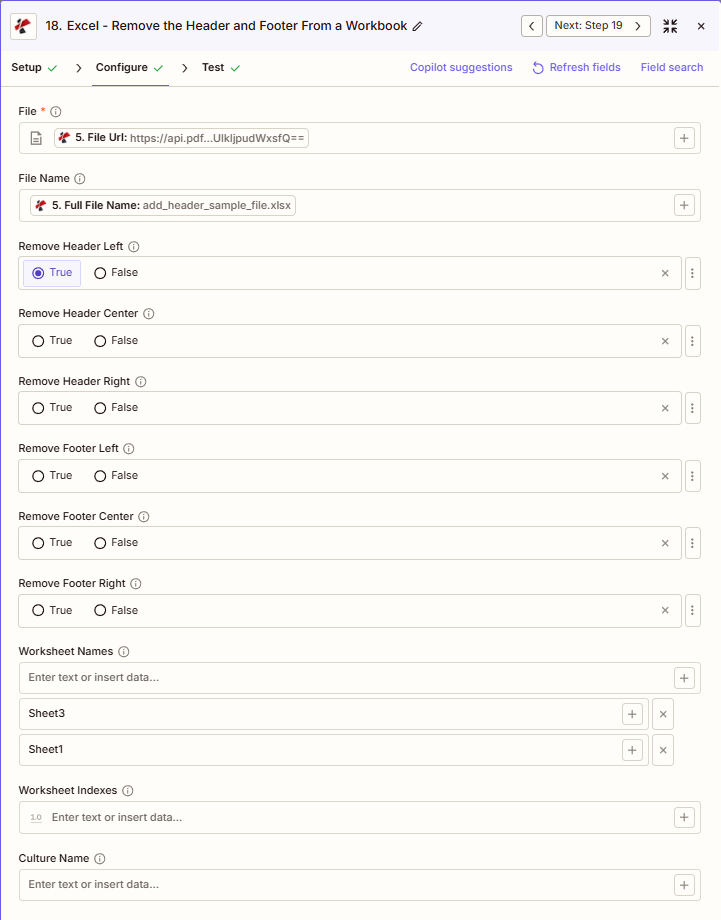
Daftar lengkap parameter untuk tindakan Hapus Header Footer. Nama parameter sesuai dengan Zapier konfigurasi UI.
Diperlukan dalam Zapier UI: Hanya file saja. Nama File, enam tombol pengalih header/footer, penargetan lembar kerja, dan Nama Budaya semuanya bersifat opsional.
| Parameter | Diperlukan | Apa fungsinya? | Contoh |
|---|---|---|---|
| File | Required | Excel file content, mapped from a previous step using full file content (not an "Exists but not shown" reference). | [5. File Url] |
| File Name | Conditional | Filename with .xlsx or .xls extension, used for output naming. | add_header_sample_file.xlsx |
| Remove Header Left | Conditional | Removes the left section of the header. | True |
| Remove Header Center | Conditional | Removes the center section of the header. | False |
| Remove Header Right | Conditional | Removes the right section of the header. | False |
| Remove Footer Left | Conditional | Removes the left section of the footer. | False |
| Remove Footer Center | Conditional | Removes the center section of the footer. | False |
| Remove Footer Right | Conditional | Removes the right section of the footer. | False |
| Worksheet Names | Conditional | Comma-separated sheet names to target. Sheets left out keep their headers/footers. Empty targets every sheet. | Sheet3, Sheet1 |
| Worksheet Indexes | Conditional | Sheet positions to target instead of names. Empty targets every sheet. | [1.0] |
| Culture Name | Conditional | Locale code used during processing. | en-US |
Kolom apa saja yang termasuk dalam output?
Aksi tersebut mengembalikan yang telah dimodifikasi. Excel berkas ditambah metadata pelacakan. Bentuk keluaran ini umum di semua PDF4me Excel tindakan dalam Zapier.
| Bidang | Jenis | Isi di dalamnya |
|---|---|---|
Job Id | String | Unique identifier for the Zapier job execution. |
File Url | URL | API endpoint to download the processed Excel file. Map this to the next step, Drive, Dropbox, or another PDF4me Excel action. |
Alternate File Url | URL | Alternate download URL with the filename in the path, for apps that expect a human-readable filename. |
File Name | String | Base filename without extension. |
File Extension | String | File extension of the output, .xlsx or .xls. |
Full File Name | String | Complete filename including extension. |
Document Id | String | Unique identifier for the processed document. |
File Size | Number | Size of the output file in bytes. |
Pengaturan Umum
Contoh Alur KerjaCommon Zapier workflow patterns using Remove Header Footer.
- Langkah Google Drive mengambil setiap Excel mengambil template dari pustaka template, satu per satu melalui aplikasi Looping.
- PDF4me Remove Header Footer dijalankan dengan keenam tombol Remove Header/Footer diatur ke True dan Worksheet Names/Indexes dibiarkan kosong sehingga setiap lembar kerja dibersihkan.
- File yang sudah dibersihkan diunggah ke folder sementara untuk proses rebranding agar header/footer baru dapat diterapkan.
- Langkah manajemen templat mengambil templat utama dengan stempel DRAFT di bagian header tengah.
- Remove Header Footer dijalankan dengan Remove Header Center diatur ke True dan semua toggle lainnya dibiarkan False, sehingga nomor halaman footer tetap utuh.
- Nama Lembar Kerja diatur ke lembar kerja spesifik yang didistribusikan secara eksternal.
- Alur kerja dipicu ketika suatu hasil akhir ditandai sebagai final dalam alat manajemen proyek.
- Opsi "Remove Header Footer" menghapus Header Kiri dan Footer Tengah (nama peninjau internal dan pemberitahuan draf) sementara Footer Kanan (konten yang dilihat klien) tetap utuh, hanya terbatas pada lembar kerja yang terlihat oleh klien.
- Buku kerja yang telah disanitasi diunggah ke portal klien.
Tips Praktis
Lembar Panduan Singkat
| Bidang | Nilai |
|---|---|
| Action | Remove Header Footer |
| File | [mapped from previous step, full content] |
| File Name | add_header_sample_file.xlsx |
| Remove Header Left | True |
| Remove Header Center | False |
| Remove Header Right | False |
| Remove Footer Left | False |
| Remove Footer Center | False |
| Remove Footer Right | False |
| Worksheet Names | Sheet3, Sheet1 |
Pertanyaan yang Sering Diajukan
Tindakan Terkait
Tugas yang Sama di Platform Lain
Studi Kasus & Aplikasi Industri
- Corporate Rebranding
- Finance & Accounting
- Legal
- Operations
- Pembersihan Pustaka TemplatHapus logo dan nama perusahaan lama dari semua header/footer template Excel.
- Integrasi Penggabungan: Membersihkan header perusahaan yang diakuisisi dari template selama proses rebranding M&A
- Penyegaran MerekHapus slogan dan informasi kontak yang sudah usang dari bagian footer.
- Standardisasi TemplatBersihkan header/footer yang tidak konsisten sebelum menerapkan branding standar baru.
- Persiapan ArsipHapus header khusus waktu sebelum template masuk ke pustaka evergreen.
- Pengguliran Kuartal ke DepanBersihkan header/footer kuartal sebelumnya dari templat anggaran untuk kuartal baru.
- Sanitasi Laporan KlienHapus nama peninjau internal dan catatan kaki draf sebelum pengiriman ke klien.
- Pembersihan Berkas AuditHapus header kertas kerja sebelum penyusunan berkas audit akhir.
- Penyegaran TemplatBersihkan header periode lama dari templat perkiraan bergulir.
- Pembersihan KonsolidasiHapus footer khusus entitas dari templat pelaporan konsolidasi.
- Persiapan PengajuanHapus bagian peninjauan internal dari dokumen hukum sebelum diajukan ke pengadilan.
- Pembersihan Hasil Akhir KlienHapus catatan kaki hasil kerja pengacara sebelum didistribusikan kepada klien.
- Pembersihan TemplatHapus header khusus kasus dari templat hukum untuk digunakan kembali.
- Sanitasi Penemuan: Hapus header hak akses dari tampilan yang tidak memiliki hak akses
- Persiapan ArsipBersihkan footer tinjauan internal sebelum pengarsipan penutupan perkara.
- Standardisasi LaporanHapus footer khusus situs dari templat yang digunakan di berbagai lokasi.
- Distribusi TemplatBersihkan draf header dari templat operasional sebelum peluncuran tim.
- Pembersihan Dasbor KlienHapus header internal dari dasbor sebelum diunggah ke portal klien.
- Standardisasi ArsipHapus footer khusus tanggal sebelum templat masuk ke pustaka standar.
- Pembersihan Hasil Kerja VendorHapus header proyek internal sebelum didistribusikan ke vendor.