Baca Kode QR Swiss di Zapier
Baca Kode QR Swiss adalah sebuah Zapier tindakan oleh PDF4me yang menerjemahkan kode Swiss QR-tagihan tertanam di dalam PDF dan pengembalian kreditur, debitur, IBAN, jumlah, dan data referensi sebagai JSONGunakan fitur ini untuk mengubah nama faktur secara otomatis, mencocokkan pembayaran dengan catatan akuntansi, atau mengarahkan dokumen berdasarkan jumlah atau referensi tanpa perlu memasukkan data secara manual.
Apa yang dilakukan oleh tindakan ini?
PDF4me Baca Kode QR Swiss mengambil satu PDF berisi sebuah Swiss QR-tagihan (QR-Faktur) dan mengembalikan data pembayaran terstrukturnya, di dalam Zap. Petakan Mengajukan, dan aksinya kembali Teks Dokumen, A JSON tali dengan IBAN, kreditur, kreditur utama, debitur, jumlah, mata uang, dan kolom referensi. Uraikan dengan Kode berdasarkan Zapier langkah untuk mendorong penggantian nama faktur, pencocokan pembayaran, atau otomatisasi akuntansi.
Memverifikasi Identitas Anda API Meminta
Untuk mengakses PDF4me Web API melalui ZapierSetiap permintaan harus menyertakan kredensial otentikasi yang tepat.
Fakta Penting yang Tidak Boleh Anda Lewatkan
Teks Dokumen, memegang seluruh muatan yang telah didekodekan sebagai sebuah JSON string. Anda memerlukan Kode oleh Zapier (Jalankan JavaScript) langkah ke JSON.parse sebelum memetakan nilai-nilai individual seperti IBAN atau Nama_ud.cr_ adalah kreditur, ucr_ adalah kreditur utama (seringkali kosong), dan keluar_ adalah debitur utama, yang sesuai dengan Standar Pembayaran Swiss (SPC) penamaan bidang. cr_Nama Dan Nama_ud adalah dua bidang yang paling banyak digunakan dalam alur kerja.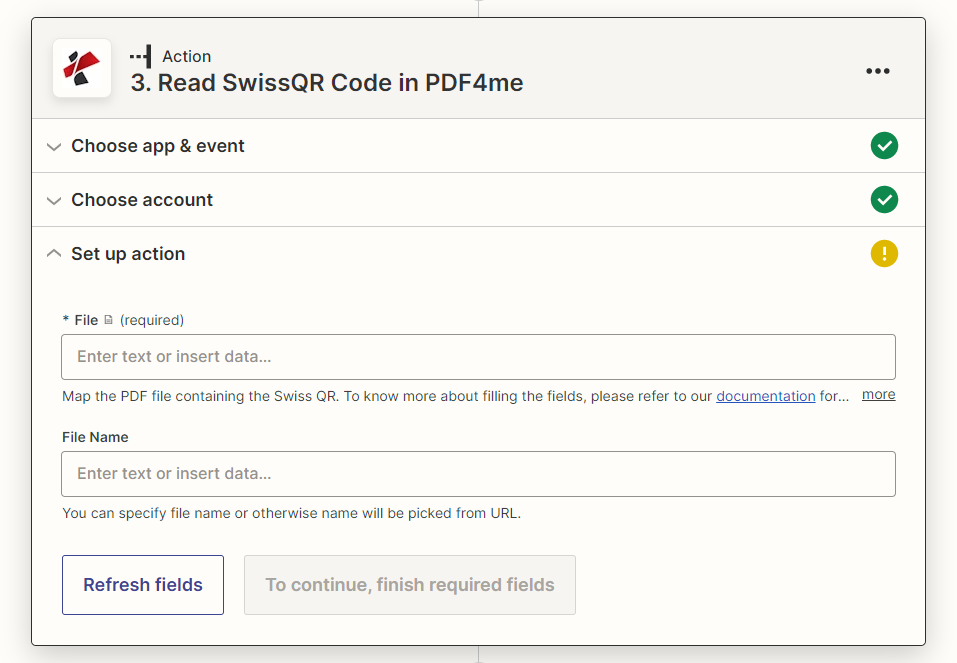
Siapkan panel aksi: hanya File yang wajib diisi, Nama File bersifat opsional.
Parameter
Diperlukan dalam Zapier UI: Berkas. Nama berkas bersifat opsional.
| Parameter | Diperlukan | Apa fungsinya? | Contoh |
|---|---|---|---|
| File | Required | The PDF containing the Swiss QR-bill to decode. Map from your trigger or a previous step. | 1. File |
| File Name | Optional | Name for the response file. If left blank, the name is picked from the source URL. | invoice.pdf |
Keluaran
Aksi tersebut mengembalikan metadata file ditambah satu bidang muatan (payload), Teks Dokumen, A JSON Uraikan string tersebut untuk mencapai masing-masing Swiss. QR-kolom tagihan tercantum di bawah tabel.
| Bidang | Jenis | Isi di dalamnya |
|---|---|---|
File Name | String | Name of the generated response file, from File Name or picked from the source URL. |
File Extension | String | Extension of the response file, .json. |
Full File Name | String | Complete filename including extension. |
File Alternate Url | String | URL to the generated JSON response file. |
Document Id | String | Unique identifier for this processing run. |
File Size | Number | Size of the response file in bytes. |
Doc Text | String (JSON) | The decoded Swiss QR-bill payload as a JSON string. Parse it to reach IBAN, creditor, debtor, amount, currency, and reference fields. |
Kolom Teks Dokumen (setelah JSON.uraikan)
| Bidang | Isi di dalamnya |
|---|---|
QRType, Version, CodingType | Swiss Payment Standards header data identifying this as an SPC QR payload and its version. |
IBAN | Creditor IBAN the payment settles to. |
cr_Name, cr_StreetOrAddressLine1, cr_PostalCode, cr_City, cr_Country | Creditor (biller) name and address. |
ucr_Name, ucr_StreetOrAddressLine1, ucr_PostalCode, ucr_City, ucr_Country | Ultimate creditor fields, populated only when the creditor differs from the ultimate payee. |
Amount, Currency | Payment amount and currency (CHF or EUR). |
ud_Name, ud_StreetOrAddressLine1, ud_PostalCode, ud_City, ud_Country | Ultimate debtor (payer) name and address. |
ReferenceType, Reference | Reference type (QRR, SCOR, or NON) and the reference number itself. |
UnstructuredMessage, BillingInfo | Free-text payment message and structured billing information, when present on the bill. |
Bagaimana Cara Saya Mengatur Pembacaan Kode QR Swiss di Zapier?
- Menambahkan PDF4me sebagai aplikasi aksi di Zap Anda dan pilih Baca Kode QR Swiss.
- Hubungkan milik Anda PDF4me buat akun atau pilih koneksi yang sudah ada.
- Peta Mengajukan ke Swiss QR-tagihan PDF dari pemicu Anda atau langkah sebelumnya. Secara opsional, petakan. Nama File.
- Uji langkah tersebut dan periksa. Teks Dokumen di panel Data out, itu adalah JSON rangkaian.
- Tambahkan Kode oleh Zapier (Jalankan JavaScript) langkah yang menerima Teks Dokumen, berjalan
JSON.parse, dan mengembalikan kolom spesifik yang Anda butuhkan (Nama_ud,cr_Nama,IBAN,Referensiatau lainnya). - Petakan nilai yang diuraikan tersebut ke dalam Unggah File (untuk penggantian nama), sebuah Menyaring atau Jalan setapak langkah (untuk perutean), atau tindakan spreadsheet/akuntansi.
Apa itu orang Swiss? QR-Bill dan Mengapa Diperlukan Pembaca Khusus?
Orang Swiss QR-tagihan (QR(Rechnung) adalah format Standar Pembayaran Swiss yang menjadi satu-satunya slip pembayaran Swiss yang sah pada tanggal 30 September 2022, menggantikan slip pembayaran lama berwarna oranye dan merah. Slip ini mengkodekan kreditur, debitur, IBAN, jumlah, dan data referensi di dalam sebuah QR kode menggunakan SPC (Swiss Payment Code) struktur, urutan bidang tetap yang merupakan barcode generik atau QR Pemindai membaca teks mentah tetapi tidak dapat memetakan ke bidang bernama. Pembacaan Kode QR Swiss menerjemahkan teks tersebut. SPC struktur dan mengembalikannya sesuai nama yang diberikan. JSON ladang.
Pengaturan Umum
Contoh Alur KerjaCommon Zapier patterns using Read SwissQR Code.
- Pemicu File Baru di Folder (Dropbox, Google Drive, SharePoint) kebakaran di Swiss baru QR-tagihan PDF.
- Fungsi Read SwissQR Code dijalankan dengan File dan Nama File yang dipetakan dari pemicu, dan mengembalikan Teks Dokumen.
- Sebuah Kode oleh Zapier Langkah ini mengurai Teks Dokumen dan mengembalikan ud_Name (debitur).
- Unggah File menyimpan hal yang sama PDF Konten dengan nama yang telah diuraikan sehingga file dapat dicari berdasarkan pembayar.
- Pemicu email atau folder mengirimkan Swiss QR-tagihan PDF.
- Baca SwissQR Code yang mengekstrak Teks Dokumen, lalu sebuah Kode oleh Zapier langkah-langkah penguraian IBAN, Jumlah, dan Referensi.
- Langkah pencarian dalam sistem akuntansi (QuickBooks, Xero, atau basis data khusus) mencocokkan Referensi dengan faktur yang belum dibayar.
- Langkah selanjutnya menandai faktur sebagai telah dibayar dan mencatat transaksi tersebut.
- Program Read SwissQR Code berjalan pada tagihan yang masuk dan mengembalikan Teks Dokumen.
- Sebuah Kode oleh Zapier Langkah ini menguraikan Jumlah dan Tipe Referensi.
- Langkah Paths mengarahkan pembayaran bernilai tinggi ke antrian persetujuan manual dan QRR-Pembayaran yang dirujuk ke posting otomatis.
Tips Praktis
Lembar Panduan Singkat
| Bidang | Nilai |
|---|---|
| Action | Read SwissQR Code |
| File | Required, Swiss QR-bill PDF |
| File Name | Optional |
| Output payload | Doc Text (JSON string) |
| Common parsed fields | IBAN, cr_Name, ud_Name, Amount, Currency, Reference |
| Parse step needed | Code by Zapier, JSON.parse(Doc Text) |
| Counterpart action | Create SwissQR Bill (generates the QR-bill instead of reading it) |
Pertanyaan Umum
Tindakan Terkait
Studi Kasus & Aplikasi Industri
- Swiss Banking & Financial Services
- Swiss Business & Professional Services
- Swiss E-commerce & Retail
- Swiss Government & Public Sector
- Pemrosesan PembayaranBaca Kode QR Swiss untuk pemrosesan pembayaran otomatis dan penanganan transaksi.
- Manajemen TransaksiEkstrak data pembayaran untuk pemrosesan dan rekonsiliasi transaksi yang komprehensif.
- Pelaporan KepatuhanMasukkan data referensi dan jumlah yang telah didekode ke dalam catatan jejak audit internal.
- Pelayanan pelanggan: Memproses pembayaran dan pertanyaan pelanggan dengan pengenalan Kode QR Swiss otomatis
- Pemrosesan FakturMembaca Kode QR Swiss dari faktur untuk pemrosesan pembayaran dan akuntansi otomatis.
- Manajemen KlienEkstrak informasi pembayaran untuk penagihan klien dan pelacakan pembayaran.
- Manajemen KeuanganOtomatisasi pembacaan Kode QR Swiss untuk manajemen keuangan yang komprehensif
- Otomatisasi DokumenSederhanakan pemrosesan dokumen bisnis dengan pembacaan Kode QR Swiss terintegrasi.
- Pemrosesan PesananBaca Kode QR Swiss untuk pemrosesan pesanan otomatis dan pengumpulan pembayaran.
- Pelacakan PembayaranEkstrak data pembayaran untuk pelacakan pesanan dan pembayaran yang komprehensif.
- Pengalaman PelangganTingkatkan pengalaman pembayaran pelanggan dengan pemrosesan Kode SwissQR otomatis.
- Manajemen InventarisMenghubungkan data pembayaran dengan manajemen inventaris dan pemenuhan pesanan
- Layanan PublikBaca Kode QR Swiss untuk layanan pemerintah dan pemrosesan pembayaran sektor publik.
- Administrasi PerpajakanEkstrak data pembayaran untuk pembayaran pajak dan pemrosesan biaya pemerintah.
- Manajemen ArsipMemasukkan data pembayaran yang telah didekode ke dalam pencatatan internal untuk akuntansi sektor publik.
- Layanan DigitalModernisasi pemrosesan pembayaran sektor publik dengan otomatisasi Kode QR Swiss