Buat Swiss QR Bill di Zapier
Apa yang dilakukan oleh tindakan ini?
PDF4me Buat Tagihan SwissQR menghasilkan Standar Pembayaran Swiss (SPS) sesuai Swiss QR-tagihan (QR-Faktur) di dalam dirimu Zapier alur kerja. Konversi data faktur dari Bexio, Sage, Abacus, QuickBooks, Xero, Microsoft Dynamics, atau lainnya. Zapier-sumber terhubung menjadi format Swiss yang siap cetak QR-tagihan dengan IBAN, rincian kreditur terstruktur dan debitur utama, QR Referensi (QRR) atau Referensi Kreditur (SCOR), Jumlah, Mata Uang, dan label multibahasa. Output sebagai PDF, PNG, JPEG, atau TIFFDiterima oleh setiap bank Swiss, PostFinance, dan aplikasi perbankan Swiss sejak saat itu QR-bill menjadi satu-satunya dokumen pembayaran Swiss yang sah pada tanggal 30 September 2022.
Memverifikasi Identitas Anda API Meminta
Untuk mengakses PDF4me Web API melalui ZapierSetiap tindakan harus diautentikasi. Klik Hubungkan akun baru pertama kali dan tempelkan milik Anda PDF4me API kunci. Zap berikutnya akan menggunakan kembali koneksi secara otomatis.
Fakta Penting yang Tidak Boleh Anda Lewatkan
Konfigurasi di Zapier
Pada Konfigurasi Langkah ini, kolom-kolom akan muncul sesuai urutan di bawah ini. Jenis Format, IBAN, Jenis Alamat Kreditur, Dan Nama Kreditur diperlukan (ditandai dengan tanda bintang) Zapier); kolom lainnya bersifat opsional atau kondisional.
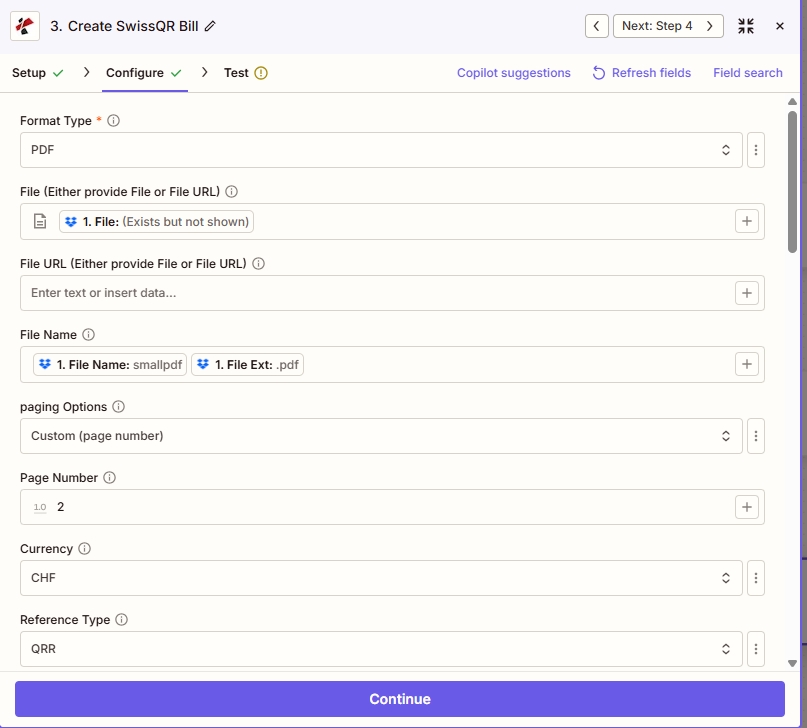
Keluaran dan PDF penempatan: mengatur Jenis Format (PDF/PNG/JPEG/TIFF), peta opsional Mengajukan atau Berkas URL Dan Nama File, memilih Opsi penomoran halaman (Di Sini Kustom (nomor halaman) dengan Nomor Halaman 2), Kemudian Mata uang Dan Jenis Referensi (contoh: CHF Dan QRR).
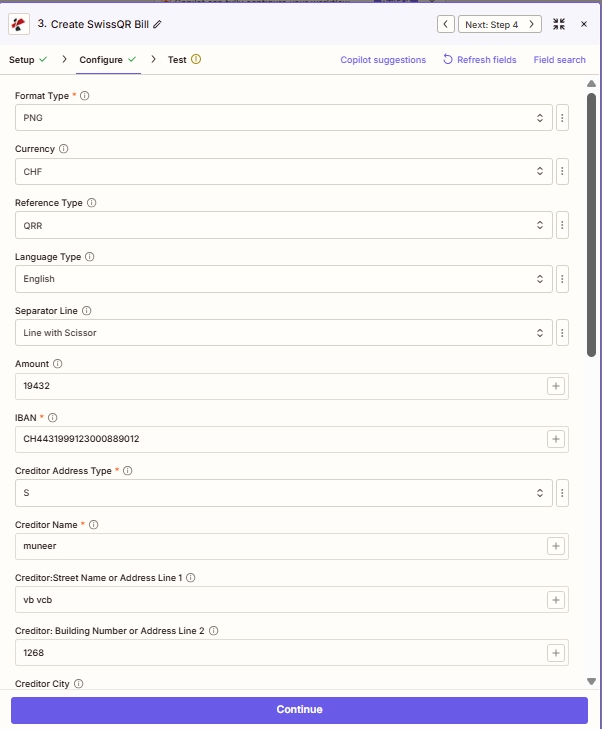
Pembayaran dan kreditur: Mata uang, Jenis Referensi, Jumlah, IBAN, dan terstruktur Kreditor kolom alamat (S = Terstruktur).
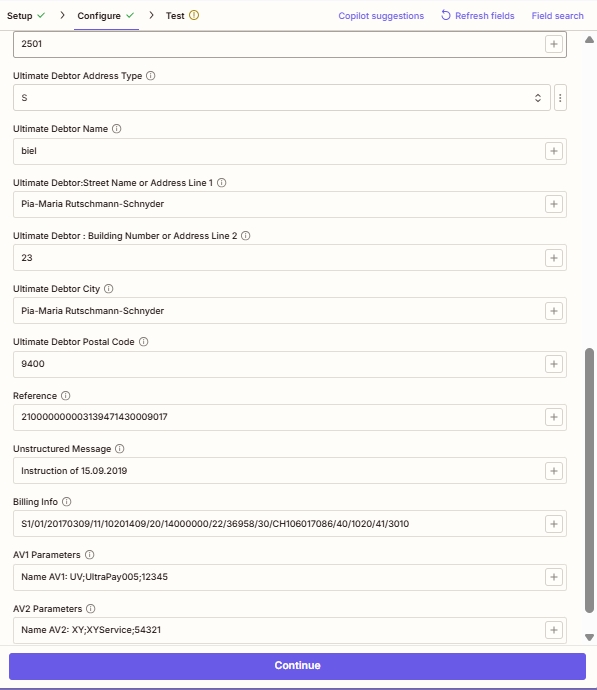
Debitur, referensi, dan bidang lanjutan: opsional Debitur Utama detail, Referensi (untuk QRR/SCOR), Pesan Tidak Terstruktur, Informasi Penagihan (Swico), dan AV1 / AV2 parameter.
Parameter
Aksi Create SwissQR Bill mengungkap 26 bidang, yang disajikan dalam Zapier UI sebagai lima blok yang dapat digulir. Tangkapan layar di bawah ini mencerminkan urutan bidang yang tepat dan menangkap nilai contoh yang telah diverifikasi dari hasil uji coba langsung.
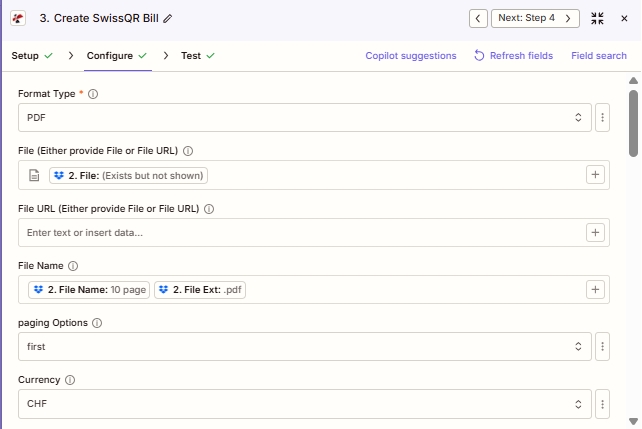
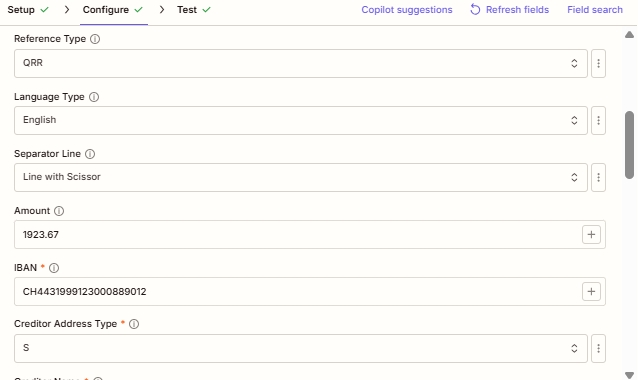
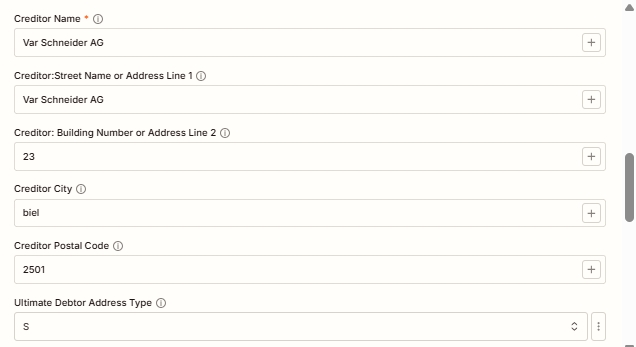
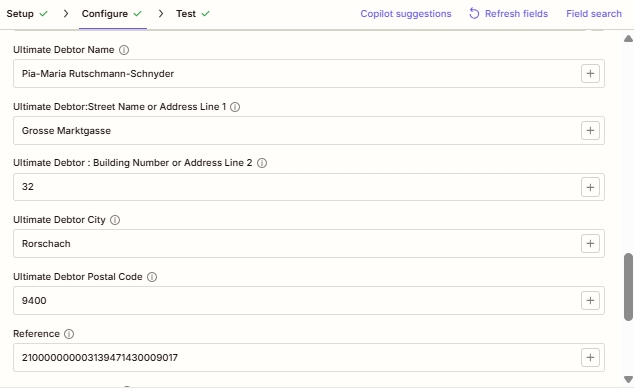
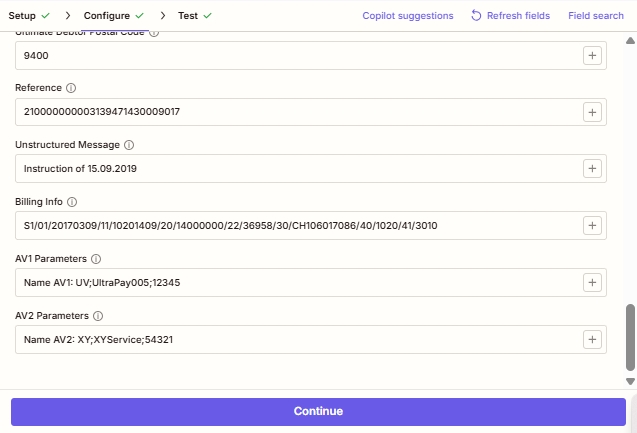
Diperlukan dalam Zapier UI (bertanda bintang): Jenis Format, IBAN, Jenis Alamat Kreditur, Nama Kreditur. Bersyarat: Berkas atau Berkas URL (pilih salah satu, digunakan saat menyematkan) QR-RUU dalam yang sudah ada PDF); Nomor Halaman (ketika Opsi penomoran halaman adalah Kustom). Sangat direkomendasikan untuk pemegang kartu identitas Swiss yang sah. QR-tagihan: Semua kolom alamat Kreditur dan kolom Debitur Utama. Spesifikasi Standar Pembayaran Swiss mensyaratkan data alamat lengkap meskipun Zapier UI tidak memberi tanda bintang pada mereka.
| Parameter | Diperlukan | Apa fungsinya? | Contoh |
|---|---|---|---|
| Format Type | Yes | Output file format. PDF for print-ready Swiss QR-bills (default), PNG/JPEG for digital web or email embedding, TIFF for archival quality, Empty/null for raw data. Asterisked in the Zapier UI. | PDF |
| File | Conditional | Base PDF where the Swiss QR-bill will be embedded. Either provide File or File URL, not both. Map binary content from a previous step (Dropbox, Google Drive, HTTP). Hint: "Either provide File or File URL". | Input sample (sample.pdf)1. File |
| File URL | Conditional | Public URL to the base PDF. Either provide File or File URL. PDF4me downloads the file and embeds the QR-bill onto it. | Input sample (sample.pdf)1. File |
| File Name | No | Output filename for the generated Swiss QR-bill document. Include the extension matching Format Type (.pdf, .png, .jpg, .tiff). | Output sample (sample.swissqr.pdf) |
| paging Options | No | Controls where the QR-bill is placed in the output PDF. First (top of doc), Last (final page), Add Page At End (appends a new dedicated QR-bill page), Custom (specific page index; requires Page Number below). | Custom (page number) |
| Page Number | Conditional | Specific page index for the QR-bill placement. Required when paging Options is Custom. Page index starts at 1. | 3 |
| Currency | No | Currency for the QR-bill payment amount. Only CHF (Swiss Franc, default for Swiss domestic) and EUR (cross-border) are valid per SPS specification. | CHF |
| Reference Type | No | Sent as code: NON (No Reference, for simple payments), QRR (27-digit QR Reference for QR-IBAN auto-reconciliation), or SCOR (ISO 11649 Creditor Reference for SEPA-compatible cross-border). | QRR |
| Language Type | No | Display language for printed QR-bill labels. Options: English, German, French, Italian. Match the recipient's Swiss region. | English |
| Separator Line | No | Visual separator between invoice body and QR-bill tear-off section. Options: "Line with Scissor" (Swiss standard for printed bills), Simple Line, No Line. | Line with Scissor |
| Amount | No | Payment amount in the chosen Currency. Enter as a number with up to two decimal places. Leave blank if the customer fills in the amount themselves. | 19432 |
| IBAN | Yes | Creditor's Swiss IBAN. Must start with CH and have 19 digits total. For QRR reference type, use a QR-IBAN (with QR-IID 30000-31999). Asterisked in the Zapier UI. | CH4431999123000889012 |
| Creditor Address Type | Yes | Address format for creditor information. Sent as code S (Structured, recommended for Swiss banking) or K (Combined, two free-form lines). Asterisked. | S |
| Creditor Name | Yes | Full name of the creditor (company or individual) as registered with the bank. Printed on the generated QR-bill. Asterisked. | muneer |
| Creditor: Street Name or Address Line 1 | No | Street name for the creditor (Structured) OR first free-form address line (Combined). Strongly recommended for valid SPS output. | vb vcb |
| Creditor: Building Number or Address Line 2 | No | House/building number (Structured) OR second free-form address line (Combined). | 1268 |
| Creditor City | No | Swiss city for the creditor. Must correspond to the Postal Code. | Zurich |
| Creditor Postal Code | No | Valid 4-digit Swiss postal code for the creditor. | 2501 |
| Ultimate Debtor Address Type | No | Address format for the party who will pay the bill. S (Structured) or K (Combined). Use S for automated processing. | S |
| Ultimate Debtor Name | No | Full name of the party who will pay. Appears in the payment section of the printed QR-bill. | Pia-Maria Rutschmann-Schnyder |
| Ultimate Debtor: Street Name or Address Line 1 | No | Debtor street name (Structured) or first free-form line (Combined). | Grosse Marktgasse |
| Ultimate Debtor: Building Number or Address Line 2 | No | Debtor house/building number or secondary address line. | 23 |
| Ultimate Debtor City | No | Swiss city of the debtor. | Rorschach |
| Ultimate Debtor Postal Code | No | Valid 4-digit Swiss postal code for the debtor. | 9400 |
| Reference | No | The actual reference value embedded in the QR code. Required content when Reference Type is QRR (27-digit numeric) or SCOR (ISO 11649 starting with RF). Empty when Reference Type is NON. | 210000000003139471430009017 |
| Unstructured Message | No | Free-form payment note printed on the QR-bill. Combined with Billing Info, max 140 characters total. Useful for invoice references when Reference Type is NON. | Instruction of 15.09.2019 |
| Billing Info | No | Structured billing information per Swiss QR-bill specification (Swico syntax). Encodes invoice number, date, VAT details. Combined with Unstructured Message, max 140 characters total. | S1/01/20170309/11/10201409/20/14000000/22/36958/30/CH106071086/40/1020/41/3010 |
| AV1 Parameters | No | Alternative procedure parameter 1 (AV1). Reserved for future Swiss payment alternative procedures and bilateral agreements between sender and receiver. | Name AV1: UV;UltraPay005;12345 |
| AV2 Parameters | No | Alternative procedure parameter 2 (AV2). Reserved for future Swiss payment alternative procedures. | Name AV2: XY;XYService;54321 |
Opsi Jenis Format
Mengontrol format file keluaran dari dokumen Swiss yang dihasilkan. QR-tagihan.
PDFDefault (siap cetak)PNGPenyematan web dan digitalJPEGGambar terkompresi yang ramah emailBERTENGKARKualitas arsipKosong (null)Keluaran data mentahOpsi Jenis Referensi
Mengontrol standar referensi pembayaran mana yang disematkan di dalamnya. QR Kode ini secara langsung memengaruhi bagaimana pembayaran direkonsiliasi dalam laporan rekening bank penerima.
NONTidak ada referensi (pembayaran sederhana)QRRQR Referensi (rekonsiliasi Swiss 27 digit)SKORReferensi Kreditur (ISO 11649 SEPA)Opsi Jenis Alamat
Berlaku untuk keduanya Jenis Alamat Kreditur Dan Jenis Alamat Debitur Utama.
STerstruktur (direkomendasikan)KGabungan (dua baris bebas)Opsi Paging
Kontrol di mana QR-tagihan ditempatkan di output PDF ketika Tipe Format adalah PDF.
PertamaTerakhirTambahkan Halaman di AkhirKustom (nomor halaman)File Contoh
Gunakan file-file ini untuk pengujian. Buat Tagihan SwissQR sebelum memasang kabel Zap Anda yang aktif. sample.pdf adalah masukan: sebuah dataran PDF Anda memetakan ke Mengajukan (atau tuan rumah di Berkas URL). sample.swissqr.pdf adalah keluaran: dokumen yang sama setelahnya PDF4me tambah orang Swiss itu QR-bagian pembayaran tagihan dengan konfigurasi Anda IBAN, kreditor, dan kolom referensi.
contoh.pdfcontoh.swissqr.pdfBidang Keluaran
| Bidang | Jenis | Isi di dalamnya |
|---|---|---|
File Content | Binary | Generated Swiss QR-bill file (PDF/PNG/JPEG/TIFF). Map into the next step for upload, email, or further processing. See sample.swissqr.pdf for a PDF example. |
File Url | String | Direct URL to access the generated QR-bill, useful for sharing or downstream HTTP processing. |
File Name | String | Output filename without extension (for example sample.swissqr when the full name is sample.swissqr.pdf). |
Full File Name | String | Complete output filename with extension matching the chosen Format Type (for example sample.swissqr.pdf). |
Pengaturan Cepat
- Di dalam Zapier, klik + untuk menambahkan tindakan baru dan memilih PDF4me.
- Memilih Buat Tagihan SwissQR sebagai peristiwa aksi.
- Hubungkan milik Anda PDF4me akun Anda atau tempelkan API Tekan tombol saat diminta.
- Mengatur Jenis Format: PDF untuk faktur tercetak, PNG/JPEG untuk web/email, TIFF untuk keperluan arsip.
- Jika menyematkan QR-RUU dalam yang sudah ada PDFpeta Mengajukan ATAU Berkas URL (tidak keduanya) dan pilih Opsi penomoran halaman (Persyaratan khusus) Nomor Halaman).
- Memasuki Mata uang (
CHFuntuk warga Swiss domestik,EURuntuk lintas batas), Jumlah, Jenis Referensi (QRR/SCOR/NON), Jenis Bahasa, Dan Garis Pemisah. - Memasuki IBAN (Swiss CH yang valid) IBAN; untuk QRR jenis referensi menggunakan a QR-IBAN dengan QR-IID 30000: 31999).
- Isi semua Kreditor Kolom: Nama, Jenis Alamat (S disarankan), Nama Jalan, Nomor Bangunan, Kota, Kode Pos.
- Mengisi Debitur Utama kolom dengan detail pihak pembayar (pola Terstruktur/Gabungan yang sama).
- Untuk kasus yang lebih lanjut, tambahkan Referensi (27 digit) QRR atau RF... SCOR), Pesan Tidak Terstruktur, Informasi Penagihan (Sintaks Swico), AV1, AV2.
- Uji tindakan tersebut dengan data sampel, verifikasi hasilnya, dan aktifkan Zap.
Contoh Alur Kerja
Contoh Alur KerjaCommon Zapier workflow patterns using Create SwissQR Bill.
- Webhook Bexio, Sage, atau Abacus akan aktif ketika faktur B2B baru diselesaikan untuk pelanggan Swiss.
- PDF4me Buat tagihan SwissQR: Jenis Format = PDFMata uang = CHF, Tipe Referensi = QRR (dengan QR-IBAN), Jenis Bahasa = Jerman, Jumlah dan IBAN dipetakan dari payload webhook.
- Kolom kreditur dipetakan dari catatan perusahaan Anda; kolom debitur utama dipetakan dari catatan pelanggan di sistem sumber.
- Gmail atau Outlook langkah mengirimkan QR-tagihan PDF sebagai lampiran email pada email penagihan pelanggan. File tersebut sepenuhnya SPS-Sesuai standar dan siap untuk pembayaran instan dari aplikasi perbankan Swiss mana pun.
- Log Google Sheets atau Airtable mencatat ID faktur, pelanggan, jumlah, QR Referensi dan cap waktu untuk rekonsiliasi piutang.
- Webhook checkout Shopify, WooCommerce, atau Stripe akan aktif ketika pelanggan Swiss memilih "Bayar melalui Transfer Bank" alih-alih kartu.
- PDF4me Buat tagihan SwissQR: Jenis Format = PNG (penyematan gambar), Mata uang = CHF, Tipe Referensi = QRRJumlah dari total pesanan, Jenis Bahasa disesuaikan dengan lokal pelanggan.
- Yang PNG gambar disematkan sebaris dalam sebuah HTML Email konfirmasi pesanan sehingga pelanggan dapat memindainya langsung di aplikasi perbankan mereka untuk melakukan pembayaran.
- Pembayaran diterima → rekonsiliasi bank sesuai QR Secara otomatis merujuk kembali ke pesanan awal.
- Pesanan Shopify ditandai sebagai Terbayar dan proses pemenuhan dimulai tanpa rekonsiliasi manual atau tebakan nomor faktur.
- Jadwal oleh Zapier Pemicu diaktifkan pada tanggal 1 setiap bulan untuk penagihan langganan bulanan di CHF.
- Pencarian di Google Sheets atau Airtable akan mengambil semua pelanggan aktif beserta informasinya. IBAN, alamat, jumlah, dan QR Templat referensi.
- Sebuah Loop oleh Zapier mengulangi proses pada setiap pelanggan. PDF4me Buat SwissQR Bill menghasilkan satu QR-tagihan per baris dengan QRR Referensi dan penambahan halaman di akhir halaman.
- Setiap QR-tagihan PDF Dikirim melalui email ke pelanggan melalui Gmail dan diarsipkan di Microsoft. SharePoint dengan pola nama file seperti
qrbill_{customerId}_{YYYY-MM}.pdf. - Email ringkasan bulanan kepada tim keuangan melaporkan total jumlah faktur, jumlah pelanggan, dan jumlah pengecualian untuk visibilitas arus kas yang jelas sejak hari pertama.