Pengurai Kartu Kesehatan AI di Power Automate
Pengurai Kartu Kesehatan AI adalah sebuah Power Automate tindakan oleh PDF4me yang membaca kartu asuransi kesehatan dengan AI dan mengembalikan ID anggota, nomor grup, jenis paket, tanggal cakupan, dan data manfaat resep sebagai data terstruktur. JSONGunakan fitur ini untuk mengotomatiskan pendaftaran pasien, verifikasi asuransi, atau pengecekan manfaat farmasi tanpa perlu memasukkan data secara manual.
Apa yang dilakukan oleh tindakan ini?
PDF4me Pengurai Kartu Kesehatan AI membaca kartu asuransi kesehatan (PDF, PNG, JPG, atau JPEG) dan pengembalian ID anggota, groupNumber, Jenis rencana, Penyedia asuransi, nama anggota, tanggal cakupan, dan kolom manfaat resep di dalam Data kesehatan objek, beserta per bidang kepercayaan diri skor. Dapat diatur secara opsional Badan/kunciBidangKustom untuk mengambil bidang tambahan di luar kumpulan standar.
Bagaimana Cara Saya Mengautentikasi Saya? Power Automate Mengalir?
Setiap PDF4me tindakan dalam Power Automate Membutuhkan koneksi yang valid. Buat atau pilih koneksi yang sesuai dengan kebutuhan Anda. PDF4me API kunci agar alur kerja dapat mengautentikasi permintaan pemrosesan kartu kesehatan AI secara aman.
Fakta Penting yang Tidak Boleh Anda Lewatkan
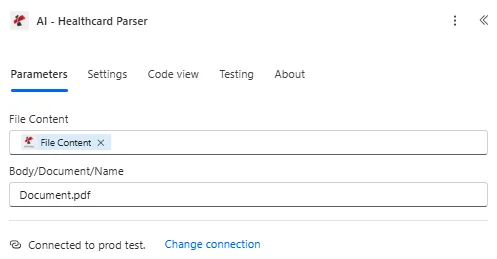
Petakan Konten File dan Isi/Dokumen/Nama, lalu perluas parameter Lanjutan untuk Isi/customFieldKeys.
Parameter
Diperlukan: Isi berkas kartu kesehatan dan nama kartu kesehatan harus selalu diberikan. Body/customFieldKeys adalah parameter Lanjutan opsional.
| Parameter | Diperlukan | Apa fungsinya? | Contoh |
|---|---|---|---|
| Health Card File Content | Required | Binary content of the health card, mapped from a previous action (Get file content, SharePoint, OneDrive, email attachment). Supports .pdf, .png, .jpg, .jpeg. | body('Get_file_content') |
| Health Card Name | Required | Filename of the health card including its extension. Used for format detection and processing. | health_card_2024.jpeg |
| Body/customFieldKeys | Optional | Advanced parameter. Array of additional field names to extract beyond the standard health card data set. | ["customField1", "customField2"] |
Bidang Keluaran
| Bidang | Jenis | Isi di dalamnya |
|---|---|---|
success | Boolean | true if the health card was processed successfully, false if extraction failed. |
message | String | Descriptive message describing the result of the processing run. |
processedData.healthData.memberId | String | The unique member identification number extracted from the health card. |
processedData.healthData.groupNumber | String | The group or policy number associated with the health insurance plan. |
processedData.healthData.planType | String | The type of health insurance plan, for example PPO, HMO, or EPO. |
processedData.healthData.insuranceProvider | String | The name of the insurance company or provider on the card. |
processedData.healthData.memberName | String | The full name of the insured member. |
processedData.healthData.dateOfBirthStr | String | The member date of birth, formatted as YYYY-MM-DD. |
processedData.healthData.effectiveDateStr | String | The date the health insurance coverage becomes effective, formatted as YYYY-MM-DD. |
processedData.healthData.rxBin | String | The Bank Identification Number for prescription drug coverage. |
processedData.healthData.rxPcn | String | The Processor Control Number for prescription drug coverage. |
processedData.healthData.rxGroup | String | The group identifier for prescription drug coverage. |
processedData.healthData.copayInfo | Array | List of copay details by service, for example Primary Care or Specialist. |
processedData.healthData.confidence | Object | Per-field confidence scores on a 0-1 scale for key extracted values. |
processedData.status | String | Overall status of the health card processing operation. |
processedData.errors | Array | Any errors encountered while processing the health card. Empty when none. |
processedData.jobId | String | Unique identifier for the AI processing job, used for tracking and debugging. |
processingTimestamp | String | ISO 8601 timestamp indicating when processing completed. |
- Sample JSON Response
- Flow Integration
{
  "success": true,
  "message": "Health card processed successfully using AI",
  "processedData": {
    "healthData": {
      "memberId": "M123456789",
      "groupNumber": "GRP001234",
      "planType": "PPO",
      "insuranceProvider": "Blue Cross Blue Shield",
      "memberName": "John Michael Smith",
      "dateOfBirthStr": "1985-03-15",
      "effectiveDateStr": "2024-01-01",
      "rxBin": "123456",
      "rxPcn": "ABC123",
      "rxGroup": "RXGRP001",
      "copayInfo": [
        { "service": "Primary Care", "copay": "$25" },
        { "service": "Specialist", "copay": "$50" },
        { "service": "Emergency Room", "copay": "$200" }
      ],
      "confidence": {
        "memberId": 0.95,
        "memberName": 0.98,
        "insuranceProvider": 0.92
      }
    },
    "status": "Success",
    "errors": [],
    "jobId": "11111111-2222-3333-4444-555555555555"
  },
  "processingTimestamp": "2024-01-15T10:30:45.123Z"
}
Arahkan yang diekstrak healthData objek menjadi Microsoft 365 dan sistem perawatan kesehatan:
- Catatan pasienTuliskan memberId, memberName, dan planType ke dalam sebuah SharePoint daftar atau sistem manajemen pasien.
- Verifikasi asuransiCocokkan memberId dan groupNumber dengan daftar utama penyedia asuransi.
- Pemrosesan farmasiMasukkan rxBin, rxPcn, dan rxGroup ke dalam formulir pengecekan manfaat farmasi.
- PenagihanLampirkan insuranceProvider dan copayInfo ke catatan penagihan medis.
Bagaimana Cara Saya Mengatur AI-Health Card Parser di Power Automate?
- Menambahkan PDF4me → Pengurai Kartu Kesehatan AI untuk Anda Power Automate mengalir.
- Peta Isi Berkas Kartu Kesehatan dari tindakan sebelumnya (SharePoint, OneDrive, Dropbox, atau lampiran email).
- Mengatur Nama Kartu Kesehatan dengan ekstensi file (.pdf, .png, .jpg, atau .jpeg).
- Dapat diperluas secara opsional Parameter lanjutan dan mengatur Badan/kunciBidangKustom untuk bidang apa pun di luar kumpulan standar.
- Jalankan alurnya. Hasil yang diuraikan akan dikembalikan sebagai Data kesehatan objek bersarang di dalam Data yang diproses, dengan kolom anggota, paket, cakupan, dan resep ditambah kepercayaan diri skor.
Pengaturan Umum
Contoh Alur KerjaCommon Power Automate flow patterns using AI-Health Card Parser.
- Alur proses akan terpicu ketika pasien mengunggah gambar kartu kesehatan melalui portal atau email.
- AI-Health Card Parser mengekstrak memberId, memberName, dateOfBirthStr, dan insuranceProvider.
- Bidang yang diekstrak ditulis ke sebuah SharePoint daftar atau sistem manajemen pasien.
- Kondisi tersebut memeriksa objek kepercayaan dan mengarahkan baris dengan kepercayaan rendah ke tinjauan manual.
- Alur kerja dipicu ketika kartu kesehatan diterima melalui email atau SharePoint mengunggah.
- AI-Health Card Parser mengekstrak groupNumber, planType, dan effectiveDateStr.
- Catatan verifikasi dibuat dan dihubungkan dengan profil asuransi pasien.
- Seorang pasien mengunggah kartu kesehatan ke dalam alur penerimaan apotek.
- AI-Health Card Parser mengekstrak rxBin, rxPcn, dan rxGroup.
- Pengidentifikasi resep digunakan untuk langkah verifikasi manfaat apotek, dan copayInfo menghasilkan perkiraan biaya pembayaran bersama pasien.
Tips Praktis
Lembar Panduan Singkat
| Bidang | Nilai |
|---|---|
| Action | AI-Health Card Parser |
| Required fields | Health Card File Content, Health Card Name |
| Optional advanced field | Body/customFieldKeys |
| Supported file types | .pdf, .png, .jpg, .jpeg |
| Output root | processedData.healthData |
| Key output fields | memberId, groupNumber, planType, insuranceProvider, memberName, dateOfBirthStr, effectiveDateStr, rxBin, rxPcn, rxGroup, copayInfo, confidence |
Pertanyaan Umum
Studi Kasus & Aplikasi Industri
- Healthcare Providers
- Medical Billing & Revenue Cycle
- Pharmacy & Prescription Services
- Telemedicine & Virtual Care
- Pendaftaran PasienOtomatisasi pendaftaran pasien dengan ekstraksi data kartu kesehatan
- Verifikasi AsuransiVerifikasi cakupan asuransi pasien secara otomatis.
- Verifikasi ManfaatPeriksa manfaat pasien dan kelayakan cakupan
- Penjadwalan Janji TemuHubungkan informasi asuransi dengan catatan janji temu.
- Pemrosesan Klaim: Mengekstrak informasi asuransi untuk klaim medis
- Otorisasi SebelumnyaGunakan data asuransi yang telah diekstrak untuk permintaan otorisasi sebelumnya.
- Verifikasi KelayakanVerifikasi kelayakan pasien menggunakan ID anggota yang telah diekstrak.
- Integrasi PenagihanMemasukkan data asuransi ke dalam sistem penagihan dan siklus pendapatan.
- Pemrosesan Resep: Mengekstrak manfaat resep untuk operasional apotek
- Perhitungan Biaya BersamaMenentukan biaya pembayaran bersama resep menggunakan informasi pembayaran bersama yang telah diekstrak.
- Pengajuan AsuransiAjukan klaim resep menggunakan data asuransi yang telah diekstrak.
- Profil PasienBuat profil apotek pasien dengan data kartu kesehatan yang telah diekstrak.
- Pendaftaran VirtualAktifkan pendaftaran pasien jarak jauh dengan unggahan kartu kesehatan.
- Verifikasi Asuransi Jarak JauhVerifikasi asuransi untuk janji temu telemedisin.
- Rekam Medis DigitalMengintegrasikan data kartu kesehatan yang telah diekstrak ke dalam rekam medis elektronik.
- Aplikasi Kesehatan Seluler: Memproses kartu kesehatan yang diunggah melalui aplikasi seluler