Pengurai Kartu Kredit AI di Power Automate
Pengurai Kartu Kredit AI adalah sebuah Power Automate tindakan oleh PDF4me yang membaca gambar, hasil pindai, atau kartu kredit PDF Dengan AI, aplikasi ini mengembalikan nomor kartu, tanggal kedaluwarsa, nama pemegang kartu, dan merek kartu sebagai kamus bidang terstruktur. Gunakan aplikasi ini untuk mengotomatiskan pelacakan pengeluaran, pencatatan kartu, atau rekonsiliasi tanpa entri data manual.
Apa yang dilakukan oleh tindakan ini?
PDF4me Pengurai Kartu Kredit AI membaca dokumen atau gambar kartu kredit (PDF, PNG, JPG, atau JPEG) dan mengembalikan ladang kamus yang dapat mencakup Nomor kartu, Tanggal kedaluwarsa, Nama pemegang kartu, Jenis kartu, Merek kartu, Bank penerbit, dan tanggal berlaku mulai/berlaku hingga. Secara opsional dapat diatur Badan/kunciBidangKustom untuk mengambil bidang tambahan di luar kumpulan standar.
Bagaimana Cara Saya Mengautentikasi Saya? Power Automate Mengalir?
Setiap PDF4me tindakan dalam Power Automate Membutuhkan koneksi yang valid. Buat atau pilih koneksi yang sesuai dengan kebutuhan Anda. PDF4me API kunci agar alur kerja dapat mengautentikasi permintaan pemrosesan kartu kredit AI dengan aman.
Fakta Penting yang Tidak Boleh Anda Lewatkan
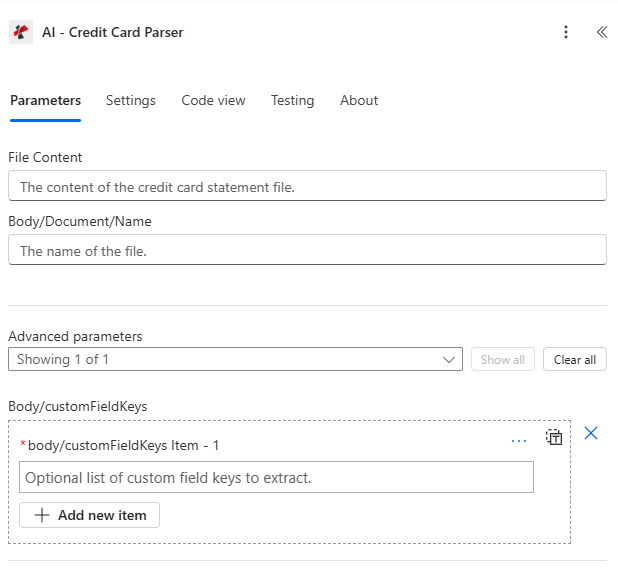
Petakan Konten File dan Isi/Dokumen/Nama, lalu perluas parameter Lanjutan untuk Isi/customFieldKeys.
Parameter
Diperlukan: Konten File dan Isi/Dokumen/Nama harus selalu disediakan. Body/customFieldKeys adalah parameter Lanjutan opsional.
| Parameter | Diperlukan | Apa fungsinya? | Contoh |
|---|---|---|---|
| File Content | Required | Binary content of the credit card document or image, mapped from a previous action (Get file content, SharePoint, OneDrive, email attachment). Supports .pdf, .png, .jpg, .jpeg. | body('Get_file_content') |
| Body/Document/Name | Required | Filename of the credit card document including its extension. Used for format detection and processing. | card_scan_2024.jpeg |
| Body/customFieldKeys | Optional | Advanced parameter. Array of additional field names to extract beyond the standard credit card data set. | ["customField1", "customField2"] |
Bidang Keluaran
| Bidang | Jenis | Isi di dalamnya |
|---|---|---|
success | Boolean | true if the credit card document was processed successfully, false if extraction failed. |
message | String | Descriptive message describing the result of the extraction run. |
fields | Object | Dictionary of extracted credit card fields, where each key is a field name and each value holds the extracted text. |
fields.bankName | String | The name of the bank issuing the credit card, if present on the source document. |
fields.cardNumber | String | The account number printed on the credit card, often partially masked in the source document. |
fields.expiryDate | String | The expiration date of the credit card, typically in MM/YY format. |
fields.cardholderName | String | The name of the cardholder as it appears on the credit card. |
fields.cardType | String | The type of credit card, for example Visa, MasterCard, or American Express. |
fields.issuingBank | String | The name of the bank that issued the credit card. |
fields.cardBrand | String | The brand of the credit card, for example Visa, MasterCard, or Discover. |
fields.accountNumber | String | The associated bank account number, if available on the source document. |
fields.validFrom | String | The valid-from date of the credit card, typically in MM/YY format. |
fields.validThru | String | The valid-through date of the credit card, often the same as expiryDate. |
warnings | Array | Warning messages indicating potential data quality issues encountered during processing. |
fallbackUsed | Boolean | true if fallback extraction methods were used to process the document. |
jobId | String | Unique identifier for the AI processing job, used for tracking and debugging. |
jobIdExt | String | External job identifier for integration with third-party systems, if applicable. |
- Sample JSON Response
- Flow Integration
{
  "fields": {
    "bankName": { "value": "Chase Bank" },
    "cardNumber": { "value": "XXXX-XXXX-XXXX-1234" },
    "expiryDate": { "value": "12/25" },
    "cardholderName": { "value": "JOHN MICHAEL SMITH" },
    "cardType": { "value": "Visa" },
    "issuingBank": { "value": "Chase Bank" },
    "cardBrand": { "value": "Visa" },
    "accountNumber": { "value": "1234567890" },
    "validFrom": { "value": "01/22" },
    "validThru": { "value": "12/25" },
    "customField1": { "value": "Value for Custom Field 1" }
  },
  "warnings": [],
  "fallbackUsed": false,
  "jobId": "87654321-4321-4321-4321-210987654321",
  "jobIdExt": "CC-2024-001",
  "success": true,
  "message": "Credit card data extracted successfully using AI technology"
}
Arahkan yang diekstrak fields kamus menjadi Microsoft 365 dan sistem keuangan:
- Pelacakan pengeluaranTuliskan nama pemegang kartu, merek kartu, dan tanggal kedaluwarsa ke dalam sebuah SharePoint daftar atau sistem pengeluaran.
- Pencatatan kartu: Cocokkan nomor kartu (disembunyikan) dan bank penerbit dengan daftar master kartu.
- RekonsiliasiMasukkan nomor rekening dan nomor kartu ke dalam sebuah Excel atau buku kerja rekonsiliasi SQL.
- Pelacakan kedaluwarsaHitung jumlah hari hingga tanggal kedaluwarsa dan picu pengingat perpanjangan.
Bagaimana Cara Saya Mengatur AI-Credit Card Parser di Power Automate?
- Menambahkan PDF4me → Pengurai Kartu Kredit AI untuk Anda Power Automate mengalir.
- Peta Isi File dari tindakan sebelumnya (SharePoint, OneDrive, Dropbox, atau lampiran email).
- Mengatur Badan/Dokumen/Nama dengan ekstensi file (.pdf, .png, .jpg, atau .jpeg).
- Dapat diperluas secara opsional Parameter lanjutan dan mengatur Badan/kunciBidangKustom untuk bidang apa pun di luar kumpulan standar.
- Jalankan alurnya. Hasil yang diuraikan akan dikembalikan sebagai ladang kamus dengan detail kartu, pemegang kartu, dan bank, ditambah peringatan Dan cadangan Digunakan bendera.
Pengaturan Umum
Contoh Alur KerjaCommon Power Automate flow patterns using AI-Credit Card Parser.
- Suatu alur akan terpicu ketika laporan kartu atau tanda terima diunggah ke SharePoint atau diterima melalui email.
- AI-Credit Card Parser mengekstrak cardholderName, cardBrand, dan expiryDate.
- Bidang yang diekstrak ditulis ke dalam sebuah SharePoint sistem daftar atau manajemen pengeluaran.
- Kondisi menandai baris dengan peringatan untuk ditinjau secara manual sebelum disetujui.
- Alur kerja akan terpicu ketika dokumen kartu baru diterima melalui email atau SharePoint mengunggah.
- AI-Credit Card Parser mengekstrak cardNumber, issuingBank, dan validThru.
- Catatan kartu dibuat atau diperbarui di dalam sebuah SharePoint daftar, dengan pengingat kedaluwarsa yang terjadwal.
- Suatu alur akan terpicu ketika laporan kartu diunggah ke folder rekonsiliasi.
- AI-Credit Card Parser mengekstrak accountNumber dan cardholderName.
- Ladang yang diekstraksi memberi makan sebuah Excel atau lembar kerja rekonsiliasi SQL untuk pencocokan dengan catatan akuntansi.
Tips Praktis
Lembar Panduan Singkat
| Bidang | Nilai |
|---|---|
| Action | AI-Credit Card Parser |
| Required fields | File Content, Body/Document/Name |
| Optional advanced field | Body/customFieldKeys |
| Supported file types | .pdf, .png, .jpg, .jpeg |
| Output root | fields (dictionary) |
| Key output fields | cardNumber, expiryDate, cardholderName, cardType, cardBrand, issuingBank, accountNumber, validFrom, validThru, warnings, fallbackUsed |
Pertanyaan Umum
Studi Kasus & Aplikasi Industri
- Finance & Accounting
- Banking & Financial Services
- Retail & E-commerce
- Corporate Finance
- Compliance & Security
Studi Kasus Keuangan & Akuntansi
- Pemrosesan PengeluaranOtomatisasi ekstraksi data pengeluaran dari kartu kredit
- Rekonsiliasi Keuangan: Mencocokkan transaksi kartu kredit dengan catatan akuntansi
- Pelaporan Pengeluaran: Menghasilkan laporan pengeluaran dari data kartu kredit yang diekstrak
- Kepatuhan Audit: Memelihara data kartu kredit yang terstruktur untuk jejak audit
- Pelacakan AnggaranLacak pengeluaran menggunakan informasi kartu kredit yang telah diekstrak.
Studi Kasus Perbankan & Jasa Keuangan
- Pemrosesan KartuOtomatisasi pemrosesan dan digitalisasi kartu kredit
- Verifikasi KartuVerifikasi informasi kartu kredit menggunakan detail kartu yang telah diekstrak.
- Manajemen AkunKelola akun kartu kredit menggunakan data kartu yang telah diekstrak.
- Deteksi PenipuanMendeteksi aktivitas penipuan menggunakan pola kartu yang diekstrak.
- Pelayanan pelangganMemberikan layanan pelanggan yang lebih cepat dengan ekstraksi data kartu otomatis.
Studi Kasus Ritel & E-commerce
- Pemrosesan Pembayaran: Memproses pembayaran menggunakan informasi kartu kredit yang telah diekstrak
- Pelacakan PengeluaranLacak pengeluaran bisnis menggunakan data kartu kredit yang telah diekstrak.
- Pembayaran Vendor: Memproses pembayaran vendor menggunakan informasi kartu yang telah diekstrak
- Analisis KeuanganMenganalisis pola pengeluaran dari data kartu kredit yang telah diekstrak.
- Manajemen InventarisHubungkan pelacakan pengeluaran dengan sistem manajemen inventaris.
Studi Kasus Keuangan Korporasi
- Manajemen Kartu KorporatKelola kartu kredit perusahaan menggunakan data kartu yang telah diekstrak.
- Pelacakan Pengeluaran Karyawan: Melacak pengeluaran karyawan menggunakan informasi kartu kredit yang telah diekstrak
- Manajemen Biaya PerjalananKelola pengeluaran perjalanan menggunakan detail kartu yang telah diekstrak.
- Alur Kerja Persetujuan Pengeluaran: Mengarahkan pengeluaran untuk persetujuan menggunakan data kartu yang diekstrak
- Pelaporan Keuangan: Menghasilkan laporan keuangan dari transaksi kartu kredit yang diekstrak
Kasus Penggunaan Kepatuhan & Keamanan
- Kepatuhan PCI DSS: Mendukung upaya kepatuhan PCI DSS untuk penanganan data kartu kredit
- Keamanan Data: Ekstraksi dan penyimpanan data kartu kredit yang aman
- Jejak Audit: Memelihara jejak audit untuk akses dan pemrosesan data kartu kredit
- Kontrol Akses: Terapkan kontrol akses untuk informasi kartu kredit yang diekstrak
- Pelaporan Kepatuhan: Menghasilkan laporan kepatuhan dari data kartu yang diekstrak