Uraikan Dokumen di Power Automate
PDF4me Uraikan Dokumen menjalankan templat parse yang Anda simpan terhadap PDF di dalam Power Automate mengalir dan mengembalikan ID Jejak ditambah data bidang yang diekstrak siap digunakan sebagai konten dinamis. Isi File Pipa dari SharePoint, Outlook, OneDrive, atau Dataverse, rujuk templat tersebut dengan Nama Templat (TemplateId), dan mengarahkan nilai-nilai yang telah diurai langsung ke dalam sebuah SharePoint pembaruan daftar, pembuatan baris Dataverse, sebuah Outlook Email, atau notifikasi Teams. Satu tindakan, satu templat, setiap saat. Microsoft 365 alur kerja.
Sebelum Anda menjalankan tindakan ini: buat templat parse di PDF4me Dasbor. Tentukan kunci tangkapan Anda dan pilih Ekspresi Regex untuk pola yang stabil atau JavaScript Ekspresi untuk logika kondisional. Itu Power Automate referensi tindakan yang templat oleh ID Templat. Melihat Siapkan Informasi Penguraian untuk Dokumen Untuk pengaturan lengkap, contoh Regex (INV-\d{6,10}, \d{2}/\d{2}/\d{4}), dan dua pekerja JavaScript Contoh pengklasifikasi ekspresi.
Memverifikasi Identitas Anda API Meminta
Yang PDF4me Hubungkan konektor di Power Automate memerlukan validitas Koneksi memegangmu PDF4me API kunci. Buat koneksi sekali saat pembuatan alur, lalu setiap PDF4me Tindakan di penyewa Anda menggunakannya kembali.
Fakta Penting yang Tidak Boleh Anda Lewatkan
teks Variabel untuk klasifikasi dan aturan cadangan, kemudian rutekan berdasarkan variabel tersebut dengan Kondisi atau Peralihan.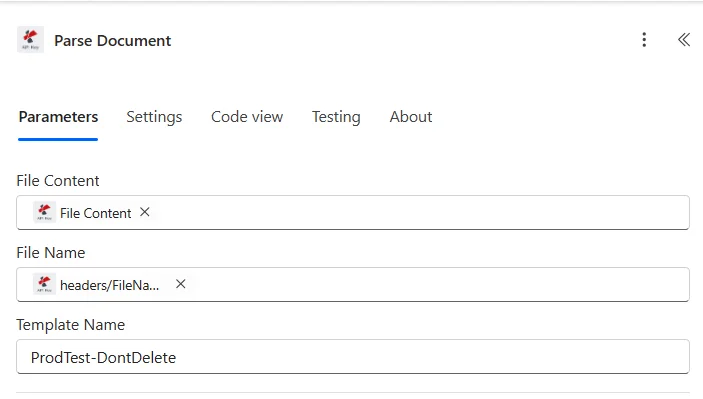
Parameter
| Parameter | Diperlukan | Apa fungsinya? | Contoh |
|---|---|---|---|
| File Content | Yes | Binary PDF as dynamic content from a prior Microsoft 365 action: SharePoint Get file content, Outlook Get attachments, OneDrive Get file content, Dataverse Download file. Must be a valid PDF. | @triggerOutputs()?['body'] |
| File Name | Yes | Source filename including .pdf extension. Usually mapped as dynamic content from the same upstream action File Name output. | Invoice_12345.pdf |
| Template Name | Yes | TemplateId GUID from the PDF4me dashboard. Identifies which parse template (capture keys + extraction rules) the action should apply. | 12345678-1234-1234-1234-123456789abc |
Jenis ekspresi dalam templat parse Anda
Ekspresi RegexPola yang stabilINV-\d{6,10}), tanggal (\d{2}/\d{2}/\d{4}), jumlah ($?\d{1,3}(?:,\d{3})*(?:.\d{2})?). Sekitar 80% kunci pengambilan produksi.JavaScript EkspresiLogika kondisional dan pengklasifikasiteks; mengembalikan string. Klasifikasi multi-marker, aturan cadangan, normalisasi tanggal. Lihat Siapkan Informasi Penguraian untuk Dokumen untuk dua sampel kerja.Keluaran
Aksi ini mengembalikan ID Jejak ditambah data bidang yang diuraikan sebagai konten dinamis yang tersedia untuk setiap aksi selanjutnya.
| Bidang | Jenis | Isi di dalamnya |
|---|---|---|
Trace-Id | String | Unique identifier for the parse operation. Log it to a SharePoint list or Dataverse table for audit and troubleshooting. |
Parsed fields | Object | One dynamic-content field per capture key in your template (invoiceNumber, totalAmount, invoiceDate, etc). Reference them directly in any downstream action. |
Contoh alur
Pola alur Common Power AutomateTypical ways to chain Parse Document into a Power Automate flow.
- Outlook Saat email baru tiba, pemicu akan aktif di kotak masuk/AP.
- Terapkan pada setiap filter lampiran PDFs hanya.
- Parse Document menjalankan templat Faktur terhadap lampiran.
- Dataverse menambahkan baris baru akan menulis invoiceNumber, totalAmount, vendorName ke dalam tabel Invoices.
- Teams: Kirim pesan di obrolan atau saluran untuk memberi tahu tim AP.
- SharePoint Saat sebuah file dibuat di dalam folder, pemicu akan aktif di /Documents/Invoices.
- SharePoint Mendapatkan konten file memuat PDF biner.
- Parse Document mengekstrak kolom-kolom faktur.
- SharePoint Pembaruan item menulis kembali nilai yang telah diuraikan ke metadata item yang sama.
- Pengiriman melalui Formulir atau Power Apps memberikan PDF.
- Parse Document menjalankan template dengan sebuah JavaScript Ekspresi kunci yang mengembalikan tipe dokumen.
- Alihkan rute tindakan pada kolom tipe (faktur / pesanan / kontrak).
- Setiap cabang mengirimkan nilai yang telah diuraikan ke tujuan yang tepat (Dynamics, SharePoint, Outlook persetujuan).