Perbarui Baris di Excel di dalam Power Automate
PDF4me Excel - Perbarui Baris adalah sebuah Power Automate Tindakan yang memodifikasi sel yang sudah ada di dalam buku kerja secara langsung, mencocokkan JSON Nama properti ke header kolom. Gunakan ini untuk menyinkronkan perubahan basis data, menyegarkan CRM catatan, atau memperbarui kolom status di dalam Excel membuat laporan tanpa menyisipkan atau menghapus baris apa pun.
Apa yang dilakukan oleh tindakan ini?
PDF4me Excel - Perbarui Baris menulis sebuah JSON Menyusun array objek ke dalam baris yang sudah ada, dimulai dari Baris Awal, mencocokkan setiap nama properti dengan header kolom. Konversi Numerik dan Tanggal, Format Tanggal, Format Numerik, dan Nama Budaya mengontrol bagaimana nilai diketik dan diformat. Fungsi ini tidak pernah menyisipkan atau menghapus baris, hanya sel yang cocok yang berubah.
Bagaimana Cara Saya Mengautentikasi Saya? Power Automate Mengalir?
Setiap PDF4me tindakan dalam Power Automate Membutuhkan koneksi yang valid. Buat atau pilih koneksi yang sesuai dengan kebutuhan Anda. PDF4me API kunci agar alur dapat melakukan autentikasi Excel permintaan pembaruan baris secara aman.
Fakta Penting yang Tidak Boleh Anda Lewatkan
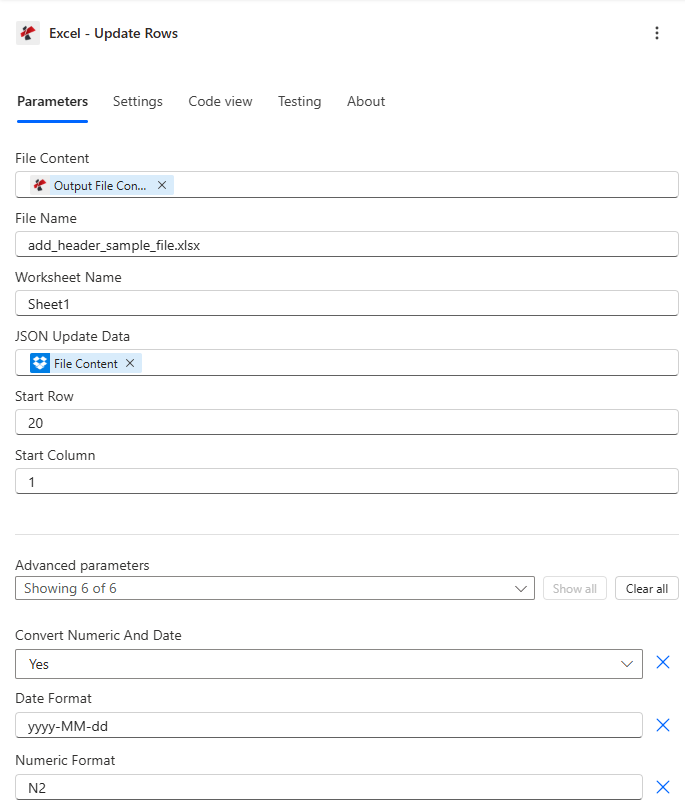
Petakan Isi File dan Nama File, atur JSON Perbarui Data dan Baris Awal, lalu perluas Parameter Lanjutan untuk konversi tipe dan pemformatan.
Parameter
Diperlukan: Isi File, Nama File, dan JSON Data pembaruan harus selalu diberikan. JSON Pembaruan Data harus berupa JSON array, objek kosong akan ditolak.
| Parameter | Diperlukan | Apa fungsinya? | Contoh |
|---|---|---|---|
| File Content | Required | Base64 content of the source Excel workbook, mapped from SharePoint, OneDrive, or another prior action. | [File Content from Get File] |
| File Name | Required | Excel filename including extension (.xlsx or .xls), used for processing and output identification. | data.xlsx |
| JSON Update Data | Required | JSON array of objects to update. Each object updates one row sequentially starting at Start Row. Must be an array, a bare single object is rejected. | [{"Name":"John","Age":31}] |
| Worksheet Name | Optional | Name of the worksheet to update. Defaults to the first worksheet if left blank. | Sheet1 |
| Start Row | Optional | 1-based row number to start updating. Default 1, typically set to 2 or higher to skip a header row. | 2 |
| Start Column | Optional | 1-based column offset for header matching. Default 1 (column A). | 1 |
| Convert Numeric And Date | Optional | Enables automatic conversion of JSON numbers to Excel numeric values and date-like strings to Excel dates. Default true. | true |
| Date Format | Optional | Excel date format applied when Convert Numeric And Date is enabled. Default yyyy-MM-dd. | MM/dd/yyyy |
| Numeric Format | Optional | Excel numeric format applied when Convert Numeric And Date is enabled. Default N2. | #,##0.00 |
| Ignore Null Values | Optional | Skips updating a cell for any JSON property that is null when enabled. Default false, which writes nulls as empty cells. | false |
| Ignore Attribute Titles | Optional | Makes JSON property name matching case-insensitive against column headers when enabled. Default false. | true |
| Culture Name | Optional | Culture code used to parse incoming date and number strings before conversion. Default empty (system default). | en-US |
Bidang Keluaran
| Bidang | Jenis | Isi di dalamnya |
|---|---|---|
document | Base64 | The Excel workbook with the matched rows updated. |
Success | Boolean | true if the update completed, false if the action failed. |
ErrorMessage | String | Error description, null when Success is true. |
Errors | Array | Detailed error objects with Code and Message, empty when Success is true. |
Apa Arti Pesan Kesalahan Umum Tersebut?
| Pesan Kesalahan | Menyebabkan | Larutan |
|---|---|---|
| Request is empty | The request object is null. | Provide a valid request object. |
| Document is empty | File Content is null or empty. | Map a valid Excel document into File Content. |
| Invalid worksheet selection | The named worksheet does not exist. | Use an existing worksheet name or leave it blank for the first sheet. |
| No headers found in worksheet | The target row (or Start Row minus one) has no headers. | Ensure the header row exists directly above the rows you are updating. |
| JsonData must be an array | A bare single object was provided instead of an array. | Wrap the object in array brackets, for example [{"Name":"John"}]. |
Bagaimana Cara Mengatur Pembaruan Baris di Power Automate?
- Menambahkan PDF4me → Excel - Perbarui Baris untuk Anda Power Automate mengalir.
- Peta Isi File Dan Nama File dari tindakan sebelumnya (SharePoint, OneDrive, atau konektor basis data).
- Mengatur Pembaruan Data JSON ke sebuah JSON Deretan objek, satu per baris untuk diperbarui.
- Mengatur Baris Awal ke baris pertama yang akan diperbarui (lewati baris header) dan Kolom Awal untuk offset header.
- Memperluas Parameter lanjutan untuk memungkinkan Konversi Angka dan Tanggal dan atur formatnya. Jalankan alur kerja, buku kerja yang diperbarui akan kembali sebagai berikut. dokumen.
Pengaturan Umum
Contoh Alur KerjaCommon Power Automate flow patterns using Update Rows.
- Pemicu terjadwal akan melakukan kueri ke basis data untuk mendapatkan informasi terbaru tentang tingkat stok.
- Hasilnya dikonversi menjadi sebuah JSON larik yang sesuai dengan judul kolom lembar inventaris.
- Mendapatkan konten file mengambil buku kerja inventaris utama dari SharePoint.
- Update Rows menerapkan array mulai dari Baris Awal 2, dengan Konversi Angka dan Tanggal diaktifkan untuk penghitungan stok berupa bilangan bulat.
- Buku kerja inventaris yang diperbarui disimpan kembali ke SharePoint.
- Suatu alur dipicu ketika status pesanan berubah dalam sistem manajemen pesanan.
- Skenario tersebut membangun sebuah JSON array dengan kolom status yang diperbarui untuk baris yang terpengaruh.
- Mengambil isi file akan menampilkan log pelacakan pesanan.
- Update Rows menerapkan perubahan dengan opsi Abaikan Nilai Null diaktifkan, sehingga kolom pesanan lainnya tetap tidak berubah.
- Log yang diperbarui disimpan kembali ke SharePoint.
- Pertanyaan pemicu mingguan Dynamics 365 untuk kontak yang diubah dalam 7 hari terakhir.
- Rekaman tersebut dikonversi menjadi sebuah JSON array dengan kolom kontak dan tanggal modifikasi terakhir.
- Update Rows menerapkan perubahan dengan opsi Abaikan Judul Atribut diaktifkan untuk pencocokan header yang tidak peka terhadap huruf besar/kecil.
- Daftar kontak yang diperbarui diarsipkan dengan cap waktu.
Tips Praktis
Lembar Panduan Singkat
| Bidang | Nilai |
|---|---|
| Action | Excel - Update Rows |
| Required fields | File Content, File Name, JSON Update Data (array) |
| Default start row | 1 (set to 2+ to skip headers) |
| Default start column | 1 (column A) |
| Type conversion toggle | Convert Numeric And Date = true (default) |
| Default date/numeric format | yyyy-MM-dd / N2 |
| Output | document (Base64 workbook) + Success + ErrorMessage + Errors |
Pertanyaan Umum
Studi Kasus & Aplikasi Industri
- Sales & Marketing
- Finance & Accounting
- Human Resources
- Operations & Manufacturing
- Retail & E-Commerce
- Project Management
- Pembaruan Status ProspekPerbarui status kualifikasi prospek di lembar pelacakan Excel.
- Metrik Kampanye: Perbarui metrik kinerja kampanye dari platform analitik
- Catatan PelangganSinkronkan informasi kontak pelanggan dari CRM ke Excel.
- Kuota PenjualanPerbarui target dan data penjualan aktual bulanan di dasbor Excel.
- Saldo Akun: Memperbarui saldo rekening pelanggan dari sistem akuntansi
- Anggaran vs. Aktual: Perbarui data pengeluaran aktual di Excel pelacakan anggaran
- Status Faktur: Memperbarui status pembayaran untuk faktur dalam log Excel
- Nilai TukarPerbarui nilai tukar mata uang dalam templat keuangan.
- Status Karyawan: Memperbarui status pekerjaan (aktif, cuti, diberhentikan) di Excel
- Pembaruan GajiPerbarui informasi gaji setelah tinjauan tahunan.
- Penyelesaian Pelatihan: Perbarui status pelatihan dan tanggal penyelesaian
- Saldo PTOSinkronkan saldo cuti liburan dan cuti sakit dari sistem HR.
- Status Produksi: Memperbarui status pesanan kerja dalam jadwal produksi Excel
- Status Peralatan: Memperbarui kondisi peralatan dan tanggal perawatan
- Metrik Kualitas: Memperbarui tingkat cacat dan skor kualitas dari sistem QC
- Status PemasokPerbarui status persetujuan dan peringkat vendor
- Tingkat StokPerbarui ketersediaan produk di lembar inventaris Excel.
- Pembaruan Harga: Perbarui harga produk dari sistem manajemen harga
- Pemenuhan Pesanan: Perbarui status pengiriman pesanan dan nomor pelacakan
- Informasi ProdukSinkronkan deskripsi dan spesifikasi produk.
- Status Tugas: Perbarui status penyelesaian tugas dan persentase kemajuan
- Tanggal-tanggal Penting: Perbarui tanggal pencapaian proyek dari sistem proyek
- Alokasi Sumber Daya: Memperbarui penugasan dan pemanfaatan anggota tim
- Pelacakan Anggaran: Sinkronkan pengeluaran proyek dan pemanfaatan anggaran