Menguraikan CSV ke JSON di dalam Power Automate dengan PDF4me
PDF4me CSV - Uraikan ke JSON adalah sebuah Power Automate tindakan yang mengubah CSV file ke dalam struktur terstruktur JSON array dengan sistem prioritas header tiga tingkat dan pembatas yang dapat dikonfigurasi. Gunakan ini untuk memberi input CSV mengekspor ke dalam basis data, REST APIatau Excel tanpa perlu menulis parser khusus di alur kerja Anda.
Apa yang dilakukan oleh tindakan ini?
PDF4me CSV - Uraikan ke JSON membaca sebuah CSV berkas dan mengembalikan Base64-dikodekan JSON Array objek, dengan Header Kolom, Lewati Baris Pertama, dan Nama Budaya yang mengontrol bagaimana baris dan header diinterpretasikan. Semua pembatas dapat digunakan, dan baris yang salah format ditangani dengan baik alih-alih menyebabkan alur gagal.
Bagaimana Cara Saya Mengautentikasi Saya? Power Automate Mengalir?
Setiap PDF4me tindakan dalam Power Automate Membutuhkan koneksi yang valid. Buat atau pilih koneksi yang sesuai dengan kebutuhan Anda. PDF4me API kunci agar alur dapat melakukan autentikasi CSV Menganalisis permintaan dengan aman.
Fakta Penting yang Tidak Boleh Anda Lewatkan
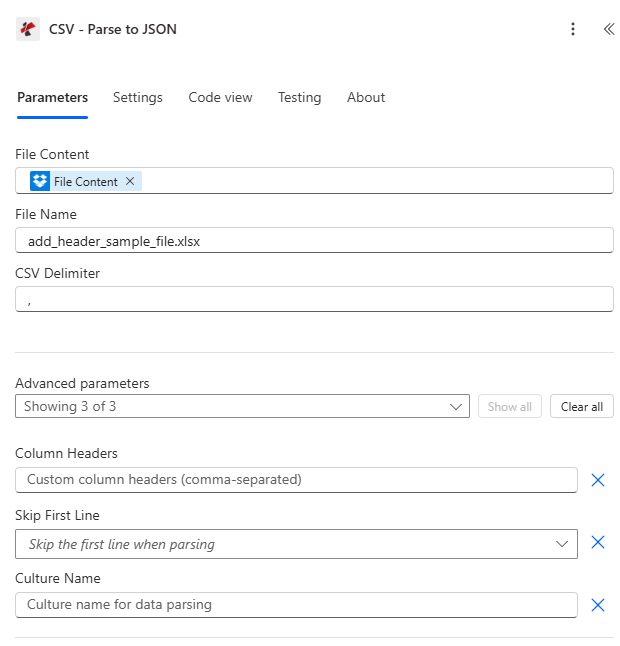
Petakan Isi File dan Nama File, atur CSV Kemudian, perluas parameter Lanjutan untuk Header Kolom, Lewati Baris Pertama, dan Nama Budaya.
Parameter
Diperlukan: Isi File, Nama File, dan CSV Pembatas (delimiter) harus disediakan. Header Kolom, Lewati Baris Pertama, dan Nama Budaya adalah parameter lanjutan opsional.
| Parameter | Diperlukan | Apa fungsinya? | Contoh |
|---|---|---|---|
| File Content | Required | Base64 content of the source CSV file, mapped from SharePoint, OneDrive, or an email attachment. | [File Content from Get File] |
| File Name | Required | CSV filename including extension, used for processing and output identification. | data.csv |
| CSV Delimiter | Required | Character or short string separating columns. Comma, semicolon, tab, and pipe are all supported, as are multi-character delimiters. | , |
| Column Headers | Optional | Comma-separated custom header names. When provided, every CSV line including the first is treated as data and Skip First Line is ignored. | FullName,Age,Email |
| Skip First Line | Optional | When true and Column Headers is empty, uses the first CSV line as headers and starts data from the second line. Default false. | true |
| Culture Name | Optional | Locale used to interpret region-specific number and date formats in the CSV content. | en-US |
Bidang Keluaran
| Bidang | Jenis | Isi di dalamnya |
|---|---|---|
document | Base64 | The parsed JSON array, UTF-8 encoded and Base64 wrapped. |
FileName | String | Fixed output filename, "parsed_data.json". |
Success | Boolean | true if parsing completed, false if the action failed. |
ErrorMessage | String | Error description, null when Success is true. |
Errors | Array | Detailed error objects with Code and Message, empty when Success is true. |
Apa Arti Pesan Kesalahan Umum Tersebut?
| Pesan Kesalahan | Menyebabkan | Larutan |
|---|---|---|
| Request is empty | Request object is null. | Provide a valid request object. |
| Document is empty | Document object is null or CSV content is null. | Provide valid CSV file content. |
| Encoding exceptions | CSV content is not UTF-8 encoded. | Re-save or export the CSV file as UTF-8. |
| Empty array output | CSV content is empty or contains only a header row. | Provide a CSV file with at least one data row. |
Bagaimana Cara Saya Mengatur Parse? CSV di dalam Power Automate?
- Menambahkan PDF4me → CSV - Uraikan ke JSON untuk Anda Power Automate mengalir.
- Peta Isi File Dan Nama File dari tindakan sebelumnya (SharePoint, OneDrive, atau lampiran email).
- Mengatur Pembatas CSV agar sesuai dengan file sumber Anda (koma, titik koma, tab, atau pipa).
- Memperluas Parameter lanjutan dan mengatur Judul Kolom untuk nama khusus, atau Lewati Baris Pertama untuk menggunakan baris header file itu sendiri.
- Jalankan alurnya, dekode dokumen Base64 output, dan ulangi proses melalui hasilnya. JSON susunan dengan Terapkan pada setiap.
Pengaturan Umum
Contoh Alur KerjaCommon Power Automate flow patterns using Parse CSV.
- A CSV berkas mendarat di SharePoint Folder "Impor", memicu alur kerja.
- Parse CSV mengonversinya menjadi JSON dengan CSV Pembatas diatur ke koma dan Lewati Baris Pertama diaktifkan.
- Dokumen yang dihasilkan kemudian didekode dan diuraikan menjadi bagian-bagian individual. JSON benda.
- Terapkan pada setiap perulangan melalui catatan dan memasukkannya melalui konektor SQL.
- Yang diproses CSV dipindahkan ke folder "Arsip".
- Sistem sumber mengirimkan email yang dipisahkan oleh titik koma. CSV Ekspor.
- Mengurai CSV berjalan dengan CSV Pembatas diatur ke titik koma dan Lewati Baris Pertama diaktifkan.
- Setiap catatan yang diurai diposting ke sebuah REST API titik akhir dengan HTTP.
- Kode respons dikumpulkan untuk menandai setiap catatan yang gagal.
- Ringkasan akan dikirim melalui email setelah proses selesai.
- Laporan lama diterima sebagai dokumen yang dipisahkan oleh tab. CSV tanpa baris header.
- Mengurai CSV berjalan dengan CSV Pembatas diatur ke tab dan Header Kolom diatur secara eksplisit.
- Hasilnya JSON array memberi makan sebuah PDF4me Gunakan tindakan Tambah Baris untuk mengisi templat Excel.
- File Excel yang sudah diformat dikirim melalui email kepada para pemangku kepentingan.
Tips Praktis
Lembar Panduan Singkat
| Bidang | Nilai |
|---|---|
| Action | CSV - Parse to JSON |
| Header priority | Column Headers > Skip First Line > auto-generated |
| Common delimiters | , (comma) / ; (semicolon) / \t (tab) / | (pipe) |
| Output filename | parsed_data.json (fixed) |
| Output format | document (Base64 JSON array) |
| Malformed data behavior | Returns empty array, does not error |
Pertanyaan Umum
Studi Kasus & Aplikasi Industri
- IT & System Integration
- Finance & Accounting
- Sales & Marketing
- Human Resources
- Operations & Supply Chain
- Integrasi Sistem Warisan: Menguraikan ekspor CSV dari sistem lama ke JSON
- Umpan Data APIKonversi data CSV ke JSON untuk digunakan pada REST API.
- Migrasi Basis Data: Mengurai file CSV untuk operasi impor basis data
- Pemrosesan Berkas Log: Menguraikan file log berformat CSV untuk analisis
- Impor Laporan Bank: Mengurai laporan rekening bank CSV ke JSON untuk diproses
- Pemrosesan TransaksiKonversikan ekspor transaksi CSV ke JSON terstruktur.
- Impor Data GL: Mengurai ekspor CSV bagan akun untuk impor ke ERP
- Pemrosesan FakturKonversi data faktur CSV ke JSON untuk otomatisasi.
- Impor Timbal: Mengurai daftar prospek CSV dari platform pemasaran
- Data KampanyeKonversi hasil kampanye CSV ke JSON untuk analisis.
- Impor Kontak: Menguraikan ekspor kontak CSV dari berbagai sumber
- Integrasi Data PenjualanKonversi laporan penjualan CSV ke JSON untuk impor ke CRM.
- Data Penggajian: Mengurai lembar waktu CSV untuk diimpor ke sistem penggajian
- Impor KaryawanKonversi data karyawan CSV ke JSON untuk HRIS
- Pendaftaran Manfaat: Mengurai data pendaftaran CSV untuk diproses
- Catatan KehadiranKonversikan ekspor data kehadiran CSV ke JSON terstruktur.
- Impor Inventaris: Menguraikan ekspor inventaris CSV ke JSON untuk impor sistem
- Pemrosesan PesananKonversi data pesanan CSV ke JSON untuk diproses.
- Data Pengiriman: Mengurai manifes pengiriman CSV untuk sistem logistik
- Data PemasokKonversi daftar vendor CSV ke JSON untuk pengadaan.