Hapus Baris dari Excel di dalam Power Automate
PDF4me Hapus Baris dari Excel adalah sebuah Power Automate tindakan yang menghapus satu atau lebih rentang baris dari suatu Excel Lembar kerja menggunakan sintaks rentang yang dipisahkan koma. Gunakan untuk memangkas baris header, menghapus catatan yang kedaluwarsa, atau membersihkan data sampel setiap kali alur kerja memberikannya buku kerja dan string rentang, dan mengembalikan lembar kerja yang telah dibersihkan. Excel Berkas siap untuk langkah selanjutnya.
Apa yang dilakukan oleh tindakan ini?
PDF4me Hapus Baris dari Excel mengambil sebuah Excel memproses file ditambah string Rentang Baris dan menghapus persis baris-baris tersebut dari lembar kerja target. Rentang dapat menggabungkan baris tunggal dan rentang yang dipisahkan tanda hubung dalam satu permintaan, dan PDF4me selalu menghapus dari nomor baris tertinggi ke bawah sehingga rentang sebelumnya dalam panggilan yang sama tidak pernah bergeser dari tempatnya.
Memverifikasi Identitas Anda API Meminta
Untuk mengakses PDF4me Web API melalui Power AutomateSetiap permintaan harus menyertakan validitas API Kunci. Otentikasi memvalidasi identitas Anda dan memungkinkan konektor untuk terhubung. PDF4me'S Excel layanan penghapusan baris dari alur kerja Anda.
Fakta Penting yang Tidak Boleh Anda Lewatkan
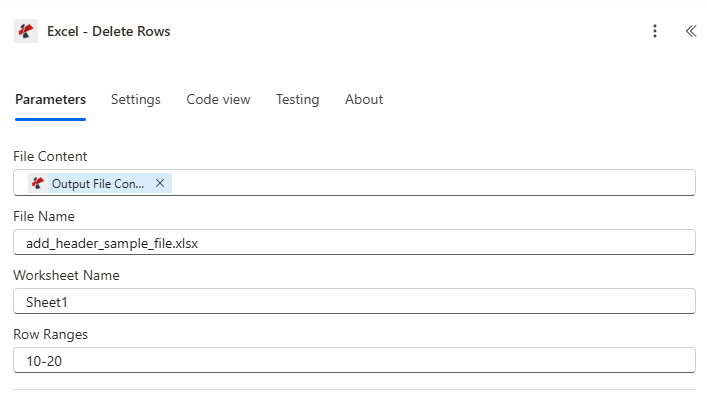
Petakan Konten File dan Nama File dari tindakan sebelumnya, atur Nama Lembar Kerja jika target bukan lembar pertama, lalu masukkan Rentang Baris.
Parameter
Diperlukan: Isi berkas, nama berkas, dan rentang baris harus selalu disediakan. Nama lembar kerja bersifat opsional dan secara default menggunakan lembar kerja pertama.
| Parameter | Diperlukan | Apa fungsinya? | Contoh |
|---|---|---|---|
| File Content | Required | Base64 or buffer content of the source Excel file, typically mapped from a prior action like SharePoint Get File Content or OneDrive. | [File Content from Get File] |
| File Name | Required | Name of the Excel file including its extension, used for processing and naming the output. | data.xlsx |
| Worksheet Name | Optional | Exact, case-sensitive name of the worksheet to delete rows from. Blank defaults to the first worksheet (index 0). | Sheet1 |
| Row Ranges | Required | Comma-separated row ranges in 1-based format. A single number deletes one row, a hyphenated pair deletes a span, and multiple entries can be combined, for example 1-5,10,15-20. | 1-5,10,15-20 |
Apa yang Dikembalikan oleh Penghapusan Baris?
| Bidang | Jenis | Isi di dalamnya |
|---|---|---|
document | Base64 | The Excel document with the specified rows removed. |
Success | Boolean | true when the deletion completed, false if the request failed validation or processing. |
Error Message | String | Description of what went wrong, null when Success is true. |
Errors | Array | Detailed error entries with Code and Message, empty when Success is true. |
Pesan Kesalahan Umum
| Pesan Kesalahan | Menyebabkan | Larutan |
|---|---|---|
Request is empty | Request object is null. | Provide a valid request object. |
Document is empty | Document object is null. | Provide a valid Excel document. |
Row ranges are required | RowRanges is null or an empty string. | Provide a valid row range specification. |
Invalid worksheet selection | WorksheetName doesn't exist in the workbook. | Use an existing worksheet name. |
Invalid start row {row}. Row numbers must be positive. | Row number is less than 1, such as "0-5" or "-1". | Use row numbers of 1 or greater (1-based indexing). |
Row {row} exceeds maximum data row ({maxRow}) | Row number is greater than the worksheet's data row count. | Use row numbers within the valid range, 1 to maxRow. |
Invalid range {start}-{end}: End row cannot be less than start row | End row is smaller than start row, such as "10-5". | Make sure the end row is greater than or equal to the start row. |
Invalid row range format | Malformed range string that couldn't be parsed. | Check the syntax, use commas and hyphens correctly. |
Bagaimana Cara Mengatur Penghapusan Baris di Power Automate?
- Menambahkan PDF4me → Hapus Baris dari Excel untuk Anda Power Automate mengalir.
- Peta Isi File Dan Nama File dari tindakan sebelumnya, seperti SharePoint atau OneDrive Dapatkan Isi File.
- Mengatur Nama Lembar Kerja Jika targetnya bukan lembar kerja pertama, biarkan kosong.
- Memasuki Rentang Baris sebagai string yang dipisahkan koma, misalnya
1-5,10,15-20. - Jalankan alur kerja. Baris akan dihapus secara otomatis dari bawah ke atas, dan file yang telah dibersihkan akan dikembalikan sebagai berikut.
document.
Pengaturan Umum
Contoh Alur KerjaCommon Power Automate flow patterns using Delete Rows from Excel.
- Pemicu alur kerja akan aktif ketika laporan internal ditandai siap untuk klien.
- Get File Content mengambil laporan dari SharePoint.
- Hapus Baris dari Excel dijalankan dengan Rentang Baris yang diatur ke baris header dan footer internal, misalnya "1-3,96-100".
- Berkas yang telah dibersihkan dikirim melalui email kepada klien dan berkas aslinya diarsipkan secara terpisah.
- Pemicu pengulangan menjalankan alur pengarsipan bulanan.
- Get File Content mengambil Excel log transaksi dari SharePoint.
- Langkah sebelumnya mengidentifikasi baris yang lebih lama dari jendela retensi dan membangun string Rentang Baris secara dinamis.
- Hapus Baris dari Excel Menghapus baris-baris tersebut, dan log yang telah dipangkas disimpan kembali ke SharePoint.
- Proses orientasi karyawan baru dimulai di sistem SDM.
- Get File Content mengambil templat laporan pengeluaran dari pustaka templat.
- Hapus Baris dari Excel Menghapus baris sampel dengan Rentang Baris yang diatur ke "2-10" dan Nama Lembar Kerja yang diatur ke "Pengeluaran".
- Templat yang bersih dikirimkan melalui email kepada karyawan baru dengan header baris 1 tetap utuh.
Tips Praktis
Lembar Panduan Singkat
| Bidang | Nilai |
|---|---|
| Action | Delete Rows from Excel |
| File Content | Mapped from a prior file-retrieval action |
| File Name | e.g. data.xlsx |
| Worksheet Name | Blank = first worksheet, or exact case-sensitive name |
| Row Ranges format | 1-based, comma-separated: "1-5,10,15-20" |
| Deletion order | Bottom-to-top automatically, no action needed |
| Output | document (Base64), Success, Error Message, Errors |
Pertanyaan Umum
Studi Kasus & Aplikasi Industri
- Finance & Accounting
- Sales & Marketing
- Human Resources
- Operations & Manufacturing
- Education & Training
- Healthcare & Medical
Studi Kasus Keuangan & Akuntansi
- Pembersihan TransaksiHapus baris transaksi lama atau yang tidak berlaku dari log akuntansi.
- Penutupan Periode: Hapus baris perhitungan sementara setelah penutupan akhir bulan
- Distribusi LaporanHapus catatan internal dan komentar ulasan dari laporan klien.
- Templat AnggaranHapus data sampel tahun sebelumnya dari templat anggaran baru.
Studi Kasus Penjualan & Pemasaran
- Pembersihan Daftar ProspekHapus baris prospek yang tidak memenuhi syarat atau duplikat dari daftar.
- Data KampanyeHapus baris uji dan entri yang tidak valid dari hasil kampanye.
- Pembaruan HargaHapus baris harga usang dari lembar tarif.
- Manajemen WilayahHapus penugasan wilayah yang tidak aktif dari data penjualan.
Studi Kasus Sumber Daya Manusia
- Catatan KaryawanHapus baris karyawan yang telah diberhentikan dari daftar karyawan aktif.
- Pemrosesan PenggajianHapus data sampel dari templat penggajian untuk karyawan baru.
- Pendaftaran ManfaatHapus opsi pendaftaran yang sudah kedaluwarsa dari lembar manfaat.
- Tinjauan KinerjaHapus data siklus tinjauan lama dari lembar pelacakan.
Studi Kasus Operasi & Manufaktur
- Pembersihan InventarisHapus baris produk yang dihentikan dari daftar inventaris.
- Catatan ProduksiHapus data produksi lama yang telah melewati masa retensi.
- Kontrol KualitasHapus baris hasil inspeksi yang tidak valid atau ditolak.
- Catatan PemeliharaanHapus baris tugas pemeliharaan yang telah selesai dari jadwal aktif.
Studi Kasus Pendidikan & Pelatihan
- Daftar SiswaHapus baris mahasiswa yang telah lulus dari daftar kelas.
- Katalog KursusHapus baris mata kuliah yang sudah tidak tersedia dari lembar katalog.
- Buku NilaiHapus entri nilai contoh dari templat semester baru.
- Catatan PelatihanHapus baris sertifikasi yang kedaluwarsa dari lembar pelacakan.
Kasus Penggunaan di Bidang Kesehatan & Medis
- Daftar PasienHapus baris pasien yang telah keluar dari daftar perawatan aktif.
- Jadwal Janji TemuHapus baris janji temu sebelumnya dari templat jadwal.
- Hasil LaboratoriumHapus baris hasil pengujian lama yang melebihi persyaratan penyimpanan.
- Klaim AsuransiHapus baris klaim yang telah diproses dari pelacakan klaim aktif.