Buka kunci PDF di dalam n8n
Buka kunci PDF adalah sebuah PDF4me tindakan node di n8n yang menghapus perlindungan kata sandi dari sebuah PDF Saat Anda memasukkan kata sandi yang benar. Gunakan kata sandi ini untuk membuat file yang dilindungi dapat dibaca oleh langkah-langkah alur kerja selanjutnya, menghapus enkripsi dari arsip yang Anda miliki, atau membuka setiap laporan yang dikirim pemasok tanpa harus membukanya satu per satu.
Fungsi node ini
PDF4meBuka kunci PDF mengambil perlindungan PDF dari Data Biner, sebuah Base64 String, atau sebuah URL, menerapkan kata sandi yang Anda berikan, dan mengembalikan salinan yang dapat dibuka tanpa perintah. Kata sandi Kolom ini wajib diisi, jadi ini membuka dokumen yang sudah Anda berhak buka, bukan memulihkan kata sandi yang hilang. Tugas biasanya adalah berada di bagian depan alur kerja, karena langkah ekstraksi dan konversi tidak dapat membaca file yang terenkripsi.
Memverifikasi Identitas Anda API Meminta
Setiap PDF4me simpul di n8n memerlukan validitas Kredensial untuk terhubung denganBuat atau pilih salah satu yang sesuai dengan kebutuhan Anda. PDF4me API kunci agar alur kerja dapat mengautentikasi permintaan pembukaan kunci dengan aman.
Fakta Penting yang Tidak Boleh Anda Lewatkan
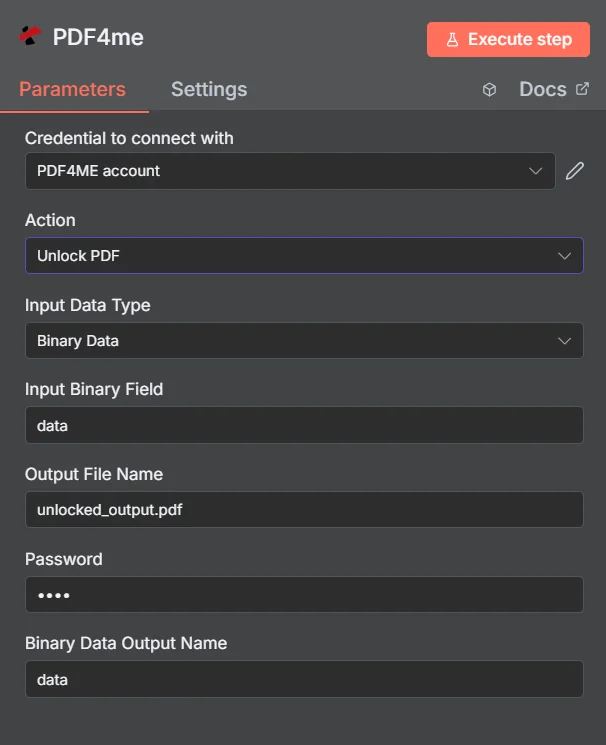
PDF4me Buka kunci PDF panel parameter di n8n
Buka kunci PDF vs Lindungi Dokumen
Kedua tindakan ini berlawanan, dan alur kerja sering menggunakan keduanya: membuka kunci file yang masuk untuk membacanya, lalu melindungi kembali hasilnya sebelum dikirim keluar.
| Aspek | Buka kunci PDF | Lindungi Dokumen |
|---|---|---|
| What it does | Removes existing password protection | Applies password protection |
| Password you supply | The current password on the document | The new password you want to set |
| Typical position | First step, so later nodes can read the file | Last step, before the file is sent or stored |
| Prerequisite | You must already know the password | None beyond the source document |
Parameter apa yang Dibuka Kuncinya? PDF Membutuhkan?
Diperlukan: Aksi, Tipe Data Masukan, kolom yang sesuai dengan tipe masukan tersebut, Nama File Keluaran, dan Kata Sandi. Nama Keluaran Data Biner dan Profil Kustom memiliki nilai default yang berfungsi.
| Parameter | Diperlukan | Apa fungsinya? | Contoh |
|---|---|---|---|
| Action | Required | Selects the PDF4me node action to run. Choose Unlock PDF. | Unlock PDF |
| Input Data Type | Required | Format of the source PDF input. Choose Binary Data (from a previous node), Base64 String, or URL. | Binary Data |
| Input Binary Field | Conditional | Name of the binary property on the incoming n8n item that holds the protected PDF. Required when Input Data Type is Binary Data. Defaults to data. | data |
| Base64 Document Content | Conditional | Base64-encoded content of the protected PDF. Required when Input Data Type is Base64 String. | JVBERi0xLjQK... |
| File URL | Conditional | Publicly reachable HTTPS URL to the protected PDF. Required when Input Data Type is URL. | https://example.com/statement.pdf |
| Output File Name | Required | Filename for the unlocked PDF returned by the node. Include the .pdf extension. | unlocked_output.pdf |
| Password | Required | The current password on the document. Shown masked in the panel. Reference a credential or environment variable rather than typing the secret into a saved workflow. | {{ $env.PDF_PASSWORD }} |
| Binary Data Output Name | Optional | Name of the binary property the output item exposes. Defaults to data. | data |
| Custom Profiles | Optional | Advanced Options field for extra processing settings, supplied in a JSON-like format. Leave blank unless you have a specific profile to apply. | { "preserveMetadata": true } |
Bidang Keluaran
Satu kali lari yang sukses akan menghasilkan satu n8n item yang membawa yang tidak terkunci PDF.
| Bidang | Jenis | Isi di dalamnya |
|---|---|---|
Binary (data) | Binary | The unlocked PDF, under Binary Data Output Name (default data). |
fileName | String | Generated filename, matching Output File Name. |
docName | String | Name of the processed document, for reference and tracking. |
mimeType | String | MIME type of the output, always application/pdf. |
fileSize | Number | Size of the returned PDF in bytes. |
isUnlocked | Boolean | Confirms the document was unlocked. A useful assertion before handing the file to an extraction step. |
securityRemoved | Boolean | Confirms password protection and access restrictions were removed. |
success | Boolean | True when the unlock completed, false on failure such as a wrong password. Use it to branch error handling. |
message | String | Human-readable status message, carrying success confirmation or error detail. |
Bagaimana Cara Mengatur Unlock? PDF di dalam n8n?
- Menambahkan PDF4me untuk Anda n8n alur kerja dan pilih Buka kunci PDF tindakan.
- Di dalam Kredensial untuk terhubung dengan, pilih milikmu PDF4me kredensial atau klik Buat Kredensial Baru dan tempelkan milik Anda API kunci.
- Mengatur Tipe Data Masukan ke Data Biner (bawaan), Base64 String, atau URL dan menyediakan sumber yang sesuai PDF bidang.
- Mengatur Nama File Output untuk file yang tidak terkunci, diakhiri dengan
.pdf. - Masukkan dokumen Kata sandi, idealnya sebagai ekspresi yang membaca kredensial atau variabel lingkungan.
- Meninggalkan Nama Keluaran Data Biner sebagai
datakecuali jika node selanjutnya mengharapkan properti yang berbeda. - Eksekusi node dan arahkan yang tidak terkunci. PDF ke langkah selanjutnya, seperti ekstraksi, konversi, atau penyimpanan.
Pengaturan Umum
Contoh Alur KerjaCommon n8n workflow patterns using Unlock PDF.
- Pernyataan tersebut akan dikirim melalui email yang dilindungi dengan kata sandi yang diketahui.
- Buka kunci PDF Menghapus perlindungan menggunakan rahasia yang tersimpan.
- Langkah ekstraksi tabel membaca transaksi ke dalam sebuah lembar kerja.
- Dokumen lama di drive bersama semuanya menggunakan kata sandi lama yang sama.
- Buka kunci PDF berjalan melalui setiap file selama batch migrasi.
- Salinan yang tidak terlindungi masuk ke sistem dokumen baru dan dapat dicari.
- Buka kunci PDF Membuka dokumen terlindungi yang masuk.
- Alur kerja tersebut memberi cap, menggabungkan, atau mengedit file yang dapat dibaca.
- Protect Document menerapkan kata sandi baru sebelum dikirim kembali.
- Buka kunci PDF setiap file yang masuk mencoba kata sandi yang tersimpan.
- Node IF menguji nilai yang dikembalikan. success dan kolom isUnlocked.
- Kegagalan akan diarahkan ke peringatan sehingga kata sandi yang diganti dapat segera diketahui.
Tips Praktis
Lembar Panduan Singkat
| Bidang | Nilai |
|---|---|
| Action | Unlock PDF |
| Input Data Type | Binary Data |
| Input Binary Field | data |
| Output File Name | unlocked_output.pdf |
| Password | {{ $env.PDF_PASSWORD }} |
| Binary Data Output Name | data |
| Credentials | PDF4me API credential |