Tambahkan Tanda Air Gambar ke Word Dokumen di n8n
Tambahkan Tanda Air Gambar ke Word adalah sebuah PDF4me tindakan node di n8n yang mencetak gambar ke atas Word Gunakan dokumen ini untuk memberi merek pada laporan yang akan dikirim dengan logo perusahaan, menandai draf sebelum ditinjau, atau menerapkan lencana kerahasiaan pada setiap kontrak yang dihasilkan alur kerja, tanpa perlu membuka satu file pun. Word.
Fungsi node ini
PDF4me WordTambahkan Tanda Air Gambar ke Word membutuhkan dua masukan, bukan satu: .docx berkas untuk dicap dan gambar untuk membubuhkannya. Masing-masing memiliki menu tarik-turun metode inputnya sendiri, sehingga dokumen dan tanda air dapat datang melalui jalur yang berbeda, seperti dokumen dari node sebelumnya dan logo yang diambil dari URLUkuran ditentukan oleh... Skala kecuali Anda menetapkan secara eksplisit Lebar atau Tinggi dalam poin.
Memverifikasi Identitas Anda API Meminta
Setiap PDF4me simpul di n8n Membutuhkan kredensial yang valid. Buat atau pilih salah satu yang memuat kredensial Anda. PDF4me API kunci agar alur kerja dapat mengautentikasi permintaan watermark dengan aman.
Fakta Penting yang Tidak Boleh Anda Lewatkan
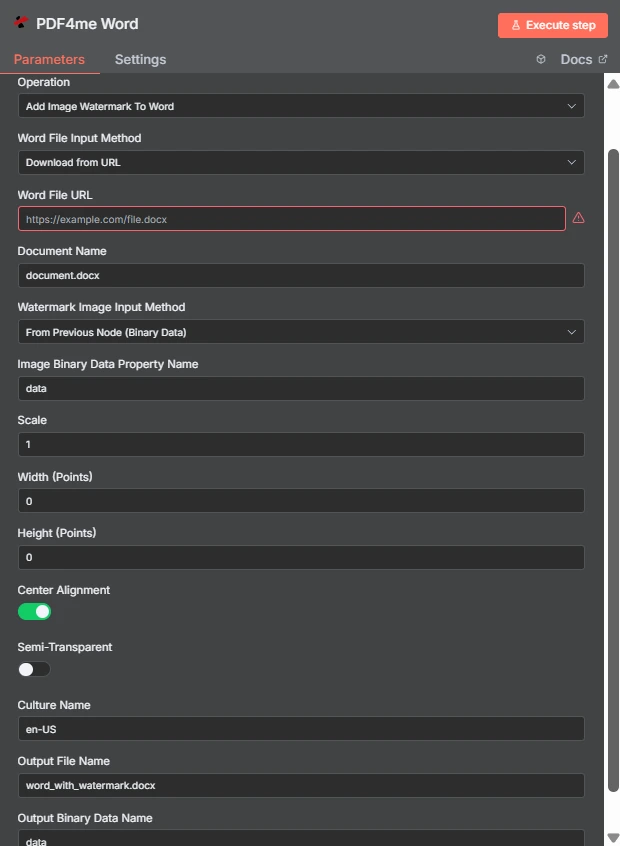
Perhatikan dua metode input independen: Word berkas tiba melalui URL sementara gambar watermark berasal dari node sebelumnya. Lebar dan Tinggi berada pada nilai 0, sehingga Skala 1 mengontrol ukurannya.
Tanda Air Gambar vs Tanda Air Teks Word
| Pertanyaan | Tambahkan Tanda Air Gambar ke Word | Tambahkan Tanda Air Teks ke Word |
|---|---|---|
| What gets stamped | An image file such as a logo, seal, or badge | A word or phrase you type, such as DRAFT |
| Second input needed | Yes, the image file itself | No, only the text string |
| Changing it per run | Swap the image binary or URL | Change the text with an expression |
| Best for | Company branding and scanned marks | Status labels and per-document text |
| Transparency control | Semi-Transparent toggle plus PNG alpha | Handled through the text styling options |
Parameter apa yang digunakan untuk menambahkan watermark gambar? Word Membutuhkan?
Yang Word File dan gambar watermark masing-masing memiliki menu tarik-turun metode input. Metode mana pun yang Anda pilih, kolom sumber yang sesuai akan muncul tepat di bawahnya, sehingga baris bersyarat di bawahnya berubah tergantung pada pilihan Anda.
| Parameter | Diperlukan | Apa fungsinya? | Contoh |
|---|---|---|---|
| Credential to connect with | Required | The PDF4me API credential the node authenticates with. | PDF4me account |
| Operation | Required | The action this node performs. Select Add Image Watermark To Word. | Add Image Watermark To Word |
| Word File Input Method | Required | How the .docx reaches the node: from the previous node as binary data, as a Base64 string, or downloaded from a URL. | Download from URL |
| Word File URL | Conditional | Public URL of the .docx to stamp. Appears only when the Word file input method is set to download from a URL. | https://example.com/file.docx |
| Document Name | Required | Filename of the input document including the extension. Used for format detection, so keep the .docx suffix accurate. | document.docx |
| Watermark Image Input Method | Required | How the image reaches the node. Independent of the Word file input method, so the two can differ. | From Previous Node (Binary Data) |
| Image Binary Data Property Name | Conditional | Name of the binary property holding the watermark image. Appears when the image comes from the previous node. | data |
| Scale | Optional | Size multiplier applied to the image at its natural size. Ignored when a non-zero Width or Height is supplied. | 1 |
| Width (Points) | Optional | Exact watermark width in points. Leave at 0 to size by Scale. Setting only Width keeps the aspect ratio. | 0 |
| Height (Points) | Optional | Exact watermark height in points. Leave at 0 to size by Scale. Setting only Height keeps the aspect ratio. | 0 |
| Center Alignment | Optional | Toggle that centres the watermark on the page. Ships enabled; turn it off to align to the top left within the margins. | enabled |
| Semi-Transparent | Optional | Toggle that reduces watermark opacity so page text stays readable underneath. Ships disabled. | disabled |
| Culture Name | Optional | Culture code recorded for document processing, such as en-US or de-DE. | en-US |
| Output File Name | Optional | Filename of the returned document. Keep the .docx extension so downstream steps handle it correctly. | word_with_watermark.docx |
| Output Binary Data Name | Optional | Binary property the stamped document is written to. Leave as data unless a later node expects another name. | data |
Keluaran
| Bidang | Jenis | Isi di dalamnya |
|---|---|---|
| fileName | String | Name of the returned watermarked document, taken from Output File Name. |
| fileSize | Number | Size of the returned document in bytes. A useful sanity check that the image was embedded. |
| success | Boolean | Whether the watermark was applied. Branch on this so failures surface as alerts. |
| originalFileName | String | Name of the input document as supplied in Document Name. |
| scale | Number | The scale factor actually applied, echoed back for verification. |
| alignImage | Boolean | Whether centre alignment was used, reflecting the Center Alignment toggle. |
| semiTransparent | Boolean | Whether reduced opacity was applied, reflecting the Semi-Transparent toggle. |
| cultureName | String | The culture code recorded for the operation. |
| message | String | Human-readable status text describing the result of the operation. |
Dokumen yang telah dicap itu sendiri dikembalikan sebagai data biner pada properti yang diberi nama di Nama Data Biner Keluaran, siap untuk ditulis ke penyimpanan, dilampirkan ke email, atau dimasukkan ke dalam PDF langkah konversi.
Bagaimana Cara Menambahkan Tanda Air pada Gambar? Word di dalam n8n?
- Tambahkan PDF4me Word Tambahkan node ini ke alur kerja Anda dan atur. Operasi ke Tambahkan Tanda Air Gambar ke Word.
- Pilih Anda PDF4me atau buat yang baru dan tempelkan kredensial Anda API kunci.
- Pilih Word Metode Input File dan menyediakan
.docxmelalui bidang yang tampak di bawahnya. - Mengatur Nama Dokumen jadi
.docxEkstensi tersebut ada dan benar. - Pilih Metode Input Gambar Tanda Airlalu arahkan Nama Properti Data Biner Gambar di properti yang menyimpan gambar tersebut, biasanya
data. - Meninggalkan Lebar (Titik) Dan Tinggi (Poin) pada
0dan menyesuaikan Skalaatau tetapkan nilai titik eksplisit ketika ukurannya harus tepat. - Menyalakan Setengah tembus terang jika tanda air berada di atas teks utama, dan biarkan Penyelarasan Tengah aktif kecuali jika Anda menginginkan tanda di kiri atas.
- Mengatur Nama File Output berakhir di
.docx, jalankan node tersebut, dan teruskan hasilnya.
Pengaturan Umum
Contoh Alur KerjaCommon n8n workflow patterns using Add Image Watermark To Word.
- Langkah pelaporan menghasilkan sebuah Word dokumen sesuai jadwal.
- Tambahkan Tanda Air Gambar ke Word membubuhkan logo perusahaan di atasnya.
- File bermerek tersebut dikirim melalui email ke daftar distribusi.
- Sebuah kontrak masuk ke dalam folder peninjauan.
- Gambar lencana DRAFT dicap dengan opsi Semi-Transparan diaktifkan.
- Para pengulas tidak akan pernah salah mengira salinan kerja sebagai salinan final.
- Logo diterapkan saat file masih dapat diedit. Word.
- Langkah konversi mengubah dokumen yang telah dicap menjadi sebuah PDF.
- Yang PDF dipublikasikan, dengan tanda tersebut sudah terintegrasi, bukan ditambahkan kemudian.
- Daftar folder menghasilkan satu item per file .docx lama.
- Node tersebut dijalankan sekali untuk setiap item dengan gambar watermark yang sama.
- Salinan yang telah dicap kemudian ditulis ulang dengan nama file baru.
Tips Praktis
Lembar Panduan Singkat
| Bidang | Nilai |
|---|---|
| Operation | Add Image Watermark To Word |
| Word File Input Method | Download from URL |
| Word File URL | https://example.com/file.docx |
| Document Name | document.docx |
| Watermark Image Input Method | From Previous Node (Binary Data) |
| Image Binary Data Property Name | data |
| Scale | 1 |
| Width (Points) / Height (Points) | 0 / 0 |
| Center Alignment | enabled |
| Semi-Transparent | disabled |
| Culture Name | en-US |
| Output File Name | word_with_watermark.docx |
| Output Binary Data Name | data |