Hapus Baris dari Excel Lembar kerja di n8n
Hapus Baris adalah sebuah n8n modul oleh PDF4me yang menghilangkan baris yang tidak diinginkan dari Excel Lembar kerja dalam satu langkah alur kerja. Kirim buku kerja dan string Rentang Baris yang mencakup baris tunggal, rentang, atau daftar campuran, dan PDF4me Menghapusnya dari bawah ke atas dan mengembalikan file yang sudah dibersihkan.
Fungsi node ini
PDF4meHapus Baris Menghapus baris header, baris kosong, atau bagian yang sudah usang dari sebuah Excel lembar kerja langsung di n8nSediakan buku kerja sebagai data biner, Base64, atau sebuah URL, targetkan lembar kerja tertentu atau biarkan kosong untuk lembar pertama, dan berikan string Rentang Baris berbasis 1 (baris tunggal, rentang, atau campuran). Mengembalikan buku kerja yang telah dibersihkan dengan baris yang diminta dihapus. Ideal untuk membersihkan ekspor sebelum dibagikan, memangkas templat, atau menghapus catatan yang masa retensinya telah berakhir.
Memverifikasi Identitas Anda API Meminta
Setiap PDF4me simpul di n8n memerlukan validitas Kredensial untuk terhubung denganBuat atau pilih salah satu yang sesuai dengan kebutuhan Anda. PDF4me API kunci agar alur kerja dapat mengautentikasi permintaan penghapusan baris secara aman.
Fakta Penting yang Tidak Boleh Anda Lewatkan
1-3, 10, 25-30, untuk menghapus beberapa bagian yang tidak berdekatan dalam satu eksekusi node.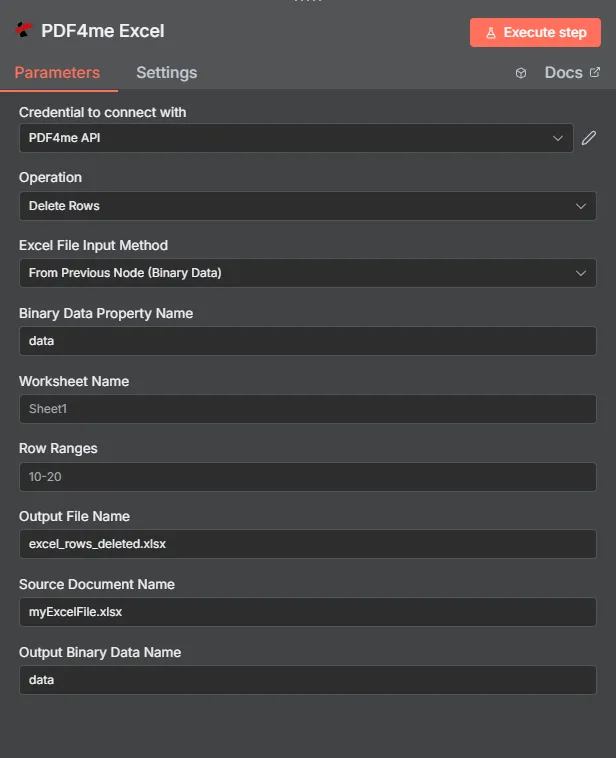
Panel node lengkap: buku kerja melalui Data Biner, Rentang Baris 10-20 pada Sheet1
Parameter
Diperlukan dalam n8n UI: Excel Metode Input File, Nama Dokumen Sumber, dan Rentang Baris. Nama Lembar Kerja (defaultnya adalah lembar pertama), Nama File Output (default excel_baris_yang_dihapus.xlsx), dan Nama Data Biner Keluaran (default data) bersifat opsional. Bidang sumber buku kerja bersyarat (Nama Properti Data Biner, Base64 Isi Dokumen, Dokumen URL) hanya muncul saat pencocokan Excel Metode Input File telah dipilih.
| Parameter | Diperlukan | Apa fungsinya? | Contoh |
|---|---|---|---|
| Excel File Input Method | Required | How the workbook enters the node. From Previous Node (Binary Data) reads from a prior node (default). Base64 String accepts an encoded workbook. URL downloads it from a public link. | From Previous Node (Binary Data) |
| Binary Data Property Name | Conditional | Name of the binary property on the incoming n8n item that holds the workbook. Required when Excel File Input Method is Binary Data. Defaults to data. | data |
| Base64 Document Content | Conditional | Base64-encoded workbook content. Required when Excel File Input Method is Base64 String. | UEsDBBQAAAA... |
| Document URL | Conditional | Publicly reachable HTTPS link to the workbook. Required when Excel File Input Method is URL. | https://files.example.com/report.xlsx |
| Worksheet Name | Optional | Worksheet to clean. Leave blank to target the first sheet in the workbook. | Summary |
| Row Ranges | Required | Row range string with 1-based row numbers. Accepts single rows, ranges, or a mixed comma-separated list. Rows are deleted bottom-to-top. | 1-3,10,25-30 |
| Output File Name | Optional | Filename of the cleaned workbook returned by the node. Default is excel_rows_deleted.xlsx. | excel_rows_deleted.xlsx |
| Source Document Name | Required | Logical filename of the source workbook, used for reference and tracking in the response. | myExcelFile.xlsx |
| Output Binary Data Name | Optional | Name of the binary property the output item exposes. Default is data. Use a different name when a downstream node expects it. | data |
Kolom apa saja yang termasuk dalam output?
| Bidang | Jenis | Isi di dalamnya |
|---|---|---|
fileName | String | Name of the output workbook after row deletion, set from Output File Name (default excel_rows_deleted.xlsx). |
fileSize | Number | Size of the output workbook in bytes. |
success | Boolean | True when the row deletion completed successfully. Use to route error-handling branches. |
originalFileName | String | The Source Document Name that was processed, kept for audit trails. |
worksheetName | String | Name of the worksheet where rows were deleted. |
rowRanges | String | The Row Ranges string that was used for this deletion. |
message | String | Descriptive status message including the row ranges and worksheet name. |
Binary (data) | Binary | The cleaned workbook under Output Binary Data Name (default data). Pass into Write Binary File, Email, or any storage upload. |
Bagaimana Cara Mengatur Penghapusan Baris di n8n?
- Tambahkan PDF4me Excel simpul ke Anda n8n alur kerja dan pengaturan Operasi ke Hapus Baris.
- Di dalam Kredensial untuk terhubung dengan, pilih milikmu PDF4me kredensial atau klik Buat Kredensial Baru dan tempelkan milik Anda API kunci.
- Mengatur Excel Metode Input File ke Dari Node Sebelumnya (Data Biner) (bawaan), Base64 String, atau URL dan isi kolom yang sesuai.
- Memasuki Nama Dokumen Sumber, nama file logis dari buku kerja, untuk referensi dan pelacakan.
- Masukkan Rentang Baris string dengan nomor baris berbasis 1, rentang, atau daftar campuran seperti
1-3,10,25-30. - Pengaturan opsional Nama Lembar Kerja Untuk menargetkan lembar tertentu. Biarkan kosong untuk menargetkan lembar pertama.
- Ubah secara opsional Nama File Output dari default
excel_rows_deleted.xlsxDan Nama Data Biner Keluaran dari defaultdata. - Jalankan node dan arahkan buku kerja yang telah dibersihkan ke Write Binary File, Email, atau penyimpanan cloud.
Pengaturan Umum
Contoh Alur KerjaCommon n8n workflow patterns using Delete Rows.
- Node Unduhan Google Drive menarik buku kerja laporan internal (Data Biner, properti)
data). - PDF4me Perintah Hapus Baris dijalankan dengan Rentang Baris yang menargetkan baris catatan internal dan baris pemisah kosong.
- Node Write Binary File menyimpan buku kerja yang siap digunakan klien dengan cara
$json.fileName.
- Node Baca File Biner memuat master. Excel templat.
- PDF4me Opsi Hapus Baris menghapus baris data contoh sebelum templat didistribusikan, dengan Nama Lembar Kerja diatur ke lembar yang berisi baris contoh.
- Templat yang sudah dibersihkan diunggah ke folder onboarding bersama.
- Node Cron akan dijalankan setiap minggu pada buku kerja catatan yang tersimpan di lokasi tetap. URL.
- Langkah sebelumnya menghitung string Rentang Baris untuk catatan yang masa retensinya telah berakhir dan meneruskannya ke PDF4me Hapus Baris dengan Excel Metode Input Berkas diatur ke URL.
- Buku kerja yang telah dibersihkan akan menimpa file sumber di penyimpanan cloud.
Tips Praktis
Lembar Panduan Singkat
| Bidang | Nilai |
|---|---|
| Operation | Delete Rows |
| Excel File Input Method | From Previous Node (Binary Data) |
| Binary Data Property Name | data |
| Worksheet Name | Sheet1 |
| Row Ranges | 10-20 |
| Output File Name | excel_rows_deleted.xlsx |
| Source Document Name | myExcelFile.xlsx |
| Output Binary Data Name | data |
| Credentials | PDF4me API credential |
Pertanyaan yang Sering Diajukan
Tindakan Terkait
Tugas yang Sama di Platform Lain
POST kantor/ApiV2Excel/ExcelHapusBaris endpoint, untuk kode backend kustom atau pengujian Postman.Kasus Penggunaan
- Pembersihan laporanHapus catatan internal, total, atau pemisah kosong sebelum dikirim ke klien.
- Persiapan templat: Hapus baris contoh dari Excel templat sebelum melakukan onboarding pengguna baru.
- Alur kerja kepatuhanHapus secara otomatis data yang sudah kedaluwarsa atau baris yang masa penyimpanannya telah berakhir.