Tambahkan Tanda Air Teks ke Excel di dalam n8n
Tambahkan Tanda Air Teks adalah sebuah PDF4me Excel operasi di n8n Fitur ini menambahkan label teks khusus seperti RAHASIA atau DRAFT ke seluruh lembar kerja dalam buku kerja .xlsx. Gunakan fitur ini untuk menandai spreadsheet sensitif, menandai draf sebelum ditinjau, atau menerapkan branding perusahaan secara otomatis, tanpa perlu pengeditan manual. Excel.
Fungsi node ini
PDF4me ExcelTambahkan Tanda Air Teks menampilkan tanda air teks bergaya WordArt pada Excel Lembar kerja, dengan kontrol atas jenis huruf, ukuran teks dalam poin, warna teks, gaya tebal dan miring, transparansi, sudut rotasi, dan kisi penempatan sembilan posisi. Pemilihan Lembar Kerja menentukan apakah watermark akan muncul di setiap lembar atau hanya lembar yang Anda tentukan. Ideal untuk label kerahasiaan, penanda draf, pemberitahuan hak cipta, dan branding spreadsheet otomatis.
Memverifikasi Identitas Anda API Meminta
Setiap PDF4me simpul di n8n memerlukan validitas Kredensial untuk terhubung denganBuat atau pilih salah satu yang sesuai dengan kebutuhan Anda. PDF4me API kunci agar alur kerja dapat mengautentikasi permintaan watermarking dengan aman.
Fakta Penting yang Tidak Boleh Anda Lewatkan
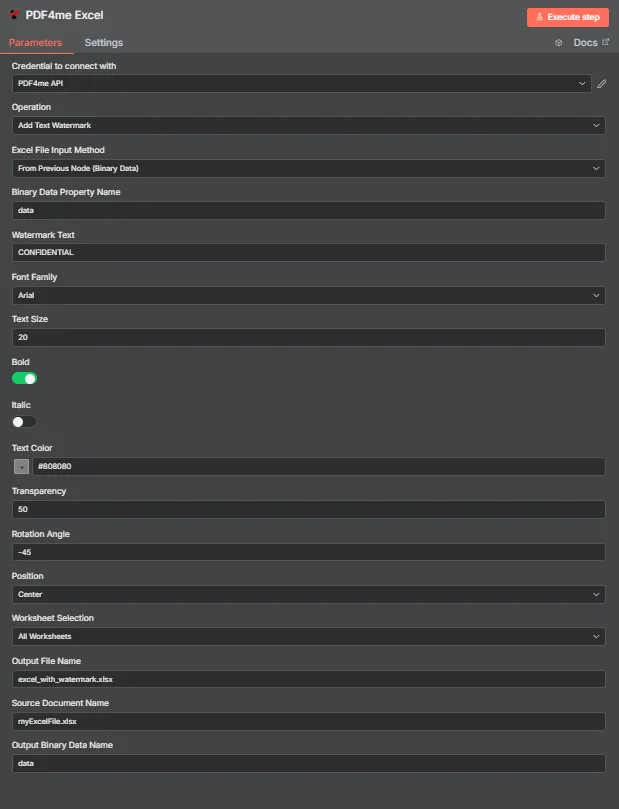
PDF4me Excel Tambahkan panel parameter Tanda Air Teks di n8n
Parameter apa saja yang dibutuhkan untuk menambahkan watermark teks?
Diperlukan: Operasi, Excel Metode Input File, kolom input yang sesuai dengan metode tersebut, Teks Tanda Air, dan Nama File Output. Kolom penataan gaya (Jenis Huruf, Ukuran Teks, Warna Teks, Tebal, Miring, Transparansi, Sudut Rotasi, Posisi) semuanya dilengkapi dengan pengaturan default yang berfungsi, dan Nama Dokumen Sumber serta Nama Data Biner Output adalah label opsional.
| Parameter | Diperlukan | Apa fungsinya? | Contoh |
|---|---|---|---|
| Operation | Required | Selects the PDF4me Excel action to run. Choose Add Text Watermark. | Add Text Watermark |
| Excel File Input Method | Required | How the workbook reaches the node. From Previous Node (Binary Data) reads it from an upstream item; the dropdown also offers base64 and file URL alternatives. | From Previous Node (Binary Data) |
| Binary Data Property Name | Conditional | Name of the binary property on the incoming n8n item that holds the .xlsx workbook. Applies when the input method is binary data. Defaults to data. | data |
| Watermark Text | Required | The text stamped across the worksheet. Accepts any string, including expressions mapped from earlier nodes. | CONFIDENTIAL |
| Font Family | Optional | Font used to render the watermark, chosen from the dropdown of available families. | Arial |
| Text Size | Optional | Watermark size in points, entered directly. The response echoes the same number back as textSize. | 20 |
| Bold | Optional | Toggle that applies bold weight to the watermark text. Off by default. | true |
| Italic | Optional | Toggle that applies italic styling to the watermark text. Off by default. | false |
| Text Color | Optional | Watermark colour, set through the colour picker or as a hex code. | #808080 |
| Transparency | Optional | Transparency from 0 (fully opaque) to 100 (fully invisible). Default 0. | 50 |
| Rotation Angle | Optional | Rotation in degrees. 0 is horizontal, negative values tilt anticlockwise for the classic diagonal watermark. | -45 |
| Position | Optional | Placement on the sheet, picked from a nine-cell grid running Top Left through Bottom Right. Returned as a numeric code in the response. | Center |
| Worksheet Selection | Optional | All Worksheets watermarks every sheet. Switching to a specific selection lets you target sheets by name or zero-based index. | All Worksheets |
| Output File Name | Required | Filename for the watermarked workbook the node returns. Include the .xlsx extension. | excel_with_watermark.xlsx |
| Source Document Name | Optional | Reference label for the incoming workbook. Echoed back as originalFileName for tracking; it does not change the output. | myExcelFile.xlsx |
| Output Binary Data Name | Optional | Name of the binary property the output item exposes. Defaults to data. | data |
Bidang Keluaran
Satu kali lari yang sukses akan menghasilkan satu n8n barang yang dibawa JSON metadata ditambah buku kerja berwatermark sebagai data biner.
| Bidang | Jenis | Isi di dalamnya |
|---|---|---|
success | Boolean | True when the watermark was applied successfully. Use it to route error-handling branches. |
fileName | String | Filename of the watermarked workbook, matching Output File Name. |
fileSize | Number | Size of the returned workbook in bytes. |
originalFileName | String | The value supplied in Source Document Name, echoed back for tracking. |
watermarkText | String | The text that was stamped onto the worksheets. |
fontFamily | String | Font family used to render the watermark. |
textSize | Number | Watermark size in points, matching the Text Size input. |
isBold | Boolean | Whether bold weight was applied. |
isItalic | Boolean | Whether italic styling was applied. |
textColor | String | Watermark colour as a hex value. |
transparency | Number | Transparency level applied, from 0 to 100. |
rotationAngle | Number | Rotation in degrees applied to the watermark. |
position | Number | Numeric code for the placement cell used on the nine-position grid. |
worksheetSelection | Number | 0 when every worksheet was watermarked, 1 when a specific selection was targeted. |
selectedWorksheetNames | Array | Worksheet names targeted, empty when all worksheets were processed. |
selectedWorksheetIndexes | Array | Zero-based worksheet indexes targeted, empty when all worksheets were processed. |
message | String | Human-readable result message for the operation. |
Binary (data) | Binary | The watermarked .xlsx under Output Binary Data Name (default data). Pass into Write Binary File, Email, or a cloud-storage upload. |
N8N Tindakan dan Respons
Yang PDF4me Tambahkan Tanda Air Teks Operasi ini mengembalikan respons yang dapat Anda periksa dalam beberapa format di dalamnya. n8n:
- JSON
- Schema
- Binary
JSON Format Respons
[
  {
    "fileName": "excel_with_watermark.xlsx",
    "fileSize": 219605,
    "success": true,
    "originalFileName": "myExcelFile.xlsx",
    "watermarkText": "CONFIDENTIAL",
    "fontFamily": "Arial",
    "textSize": 20,
    "isBold": true,
    "isItalic": false,
    "textColor": "#808080",
    "transparency": 50,
    "rotationAngle": -45,
    "position": 1,
    "worksheetSelection": 1,
    "selectedWorksheetNames": [],
    "selectedWorksheetIndexes": [],
    "message": "Text watermark added to Excel file successfully"
  }
]
Tampilan Skema
1 item
fileName: T excel_with_watermark.xlsx
fileSize: # 219605
success: true
originalFileName: T myExcelFile.xlsx
watermarkText: T CONFIDENTIAL
fontFamily: T Arial
textSize: # 20
isBold: true
isItalic: false
textColor: T #808080
transparency: # 50
rotationAngle: # -45
position: # 1
worksheetSelection: # 1
selectedWorksheetNames: [] Array
selectedWorksheetIndexes: [] Array
message: T Text watermark added to Excel file successfully
Indikator Tipe: T = String, # = Number, [] = Array.
Tampilan Data Biner
data
File Name: excel_with_watermark.xlsx
File Extension: xlsx
Mime Type: application/vnd.openxmlformats-officedocument.spreadsheetml.sheet
File Size: 219.6 kB
Akses Data Biner: akses buku kerja di $binary.data.data, siap untuk diunduh, dikirim melalui email, atau disimpan.
Bagaimana Cara Mengatur Penambahan Teks Tanda Air di n8n?
- Tambahkan PDF4me Excel simpul ke Anda n8n alur kerja dan pengaturan Operasi ke Tambahkan Tanda Air Teks.
- Di dalam Kredensial untuk terhubung dengan, pilih milikmu PDF4me API atau buat yang baru dan tempelkan kredensial Anda API kunci.
- Mengatur Excel Metode Input File ke Dari Node Sebelumnya (Data Biner) dan mengatur Nama Properti Data Biner ke properti yang menyimpan buku kerja tersebut, biasanya
data. - Memasuki Teks Tanda Air, Misalnya
CONFIDENTIAL. - Berikan sentuhan gaya pada watermark dengan Keluarga Font, Ukuran Teks (dalam poin), Warna Teks, Berani, Dan Miring.
- Sesuaikan visibilitas dan penempatan dengan Transparansi, Sudut Rotasi, Dan Posisi.
- Mengatur Pemilihan Lembar Kerja ke Semua Lembar Kerja atau menargetkan lembar data tertentu.
- Mengatur Nama File Output berakhir di
.xlsxKemudian, jalankan node tersebut dan teruskan workbook yang telah diberi watermark.
Pengaturan Umum
Contoh Alur KerjaCommon n8n workflow patterns using Add Text Watermark for Excel.
- Pemicu Google Drive akan aktif ketika sebuah buku kerja masuk ke folder keluar.
- PDF4me Excel menjalankan Tambahkan Teks Tanda Air dengan Teks Tanda Air RAHASIA, Warna Teks merah, Transparansi 50.
- Buku kerja yang diberi tanda air dikirim melalui email kepada penerima dan diarsipkan kembali ke Drive.
- Schedule Trigger membuat buku kerja angka mingguan dari ekspor basis data.
- Tambahkan Teks Tanda Air dengan Teks Tanda Air DRAFT, Sudut Rotasi -45, Transparansi 50, Posisi Tengah.
- Draf tersebut diunggah ke saluran peninjauan Slack sebelum disetujui.
- Node Loop Over Items mengiterasi baris klien dari sebuah CRM Ekspor.
- Teks tanda air dipetakan dari sebuah ekspresi sehingga setiap buku kerja memuat nama klien tersebut.
- Setiap output ditulis ke penyimpanan cloud menggunakan ID klien sebagai nama file.
- Webhook menerima buku kerja pelaporan yang sudah selesai dari alat internal.
- Pemilihan Lembar Kerja menargetkan lembar ringkasan sehingga tab data mentah tetap tidak ditandai.
- Hasilnya diunggah ke SharePoint untuk didistribusikan.
Tips Praktis
Lembar Panduan Singkat
| Bidang | Nilai |
|---|---|
| Operation | Add Text Watermark |
| Excel File Input Method | From Previous Node (Binary Data) |
| Binary Data Property Name | data |
| Watermark Text | CONFIDENTIAL |
| Font Family | Arial |
| Text Size | 20 (points) |
| Text Color | #808080 |
| Transparency | 50 |
| Rotation Angle | -45 |
| Position | Center |
| Worksheet Selection | All Worksheets |
| Output File Name | excel_with_watermark.xlsx |
| Output Binary Data Name | data |
| Credentials | PDF4me API credential |