Tambahkan Baris ke sebuah Excel Lembar kerja di n8n
Tambahkan Baris adalah sebuah PDF4me tindakan node di n8n yang menulis JSON catatan ke dalam sebuah Excel Lembar kerja. Gunakan untuk mendorong API hasil ke dalam laporan, mencatat muatan webhook ke buku kerja bersama, atau menambahkan CRM Ekspor ke lembar pelacakan, dengan angka dan tanggal yang tercatat secara nyata. Excel nilai-nilai, bukan teks.
Fungsi node ini
PDF4me Excel: Tambahkan Baris mengambil yang sudah ada .xlsx buku kerja ditambah sebuah JSON array di JSON Data Baris, dan menulis satu baris per objek. Ia memiliki dua mode penempatan: sebutkan nama tabel di Target Excel Meja dan kunci dicocokkan dengan header, atau biarkan kosong dan Sisipkan Dari Baris ditambah Sisipkan Dari Kolom Tetapkan sel awal yang tepat. Program ini mengedit buku kerja yang Anda berikan, bukan membuat buku kerja dari awal.
Memverifikasi Identitas Anda API Meminta
Setiap PDF4me simpul di n8n memerlukan validitas Kredensial untuk terhubung denganBuat atau pilih salah satu yang sesuai dengan kebutuhan Anda. PDF4me API kunci agar alur kerja dapat mengautentikasi permintaan spreadsheet dengan aman.
Fakta Penting yang Tidak Boleh Anda Lewatkan
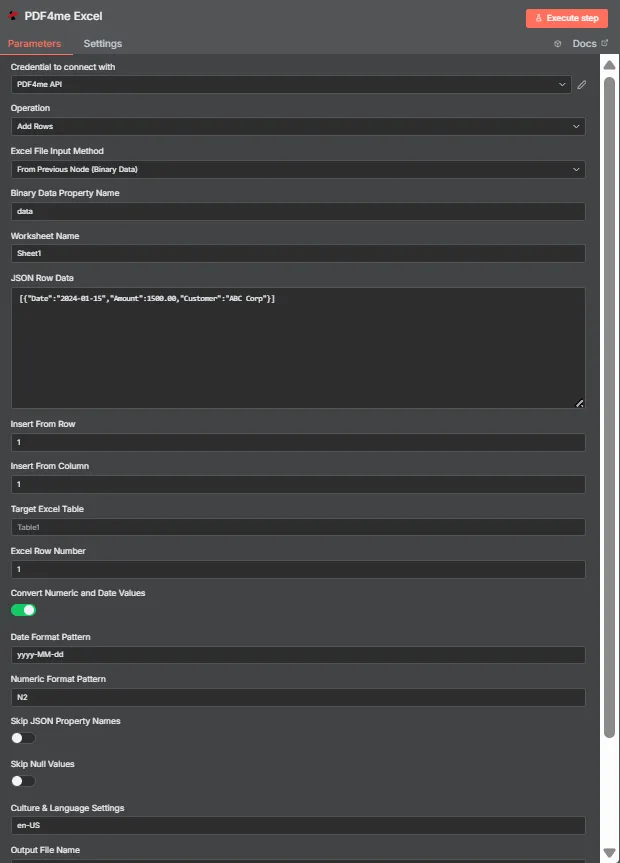
JSON Data Baris menyimpan JSON susunan objek datar. Target Excel Tabel di sini kosong, jadi Sisipkan Dari Baris dan Sisipkan Dari Kolom akan menempatkan data di sel A1.
Mode Tabel vs Mode Koordinat
| Pertanyaan | Mode tabel | Mode koordinat |
|---|---|---|
| How you switch to it | Name a table in Target Excel Table | Leave Target Excel Table blank |
| How columns are matched | JSON keys matched against table headers | Values written in key order from the start cell |
| Does column order matter | No, headers drive placement | Yes, position drives placement |
| Which fields control it | Target Excel Table and Excel Row Number | Insert From Row and Insert From Column |
| Best for | Structured sheets that already have a table | Blank sheets or a fixed reporting layout |
| Overwrite risk | Lower, rows follow the table structure | Higher, the start cell is written to directly |
Parameter apa saja yang dibutuhkan untuk menambahkan baris?
| Parameter | Diperlukan | Apa fungsinya? | Contoh |
|---|---|---|---|
| Credential to connect with | Required | The PDF4me API credential the node authenticates with. | PDF4me API |
| Operation | Required | The action this node performs. Select Add Rows. | Add Rows |
| Excel File Input Method | Required | How the workbook reaches the node: from the previous node as binary data, as a Base64 string, or from a URL. | From Previous Node (Binary Data) |
| Binary Data Property Name | Conditional | Name of the binary property holding the .xlsx. Appears when the workbook comes from the previous node. | data |
| Worksheet Name | Required | Sheet the rows are written to. Match the sheet tab name exactly. | Sheet1 |
| JSON Row Data | Required | JSON array of flat objects. Each object becomes one row and each key maps to a column. | [{"Date":"2024-01-15","Amount":1500.00}] |
| Insert From Row | Conditional | Row number the data starts at, counting from 1. Used in coordinate mode when no table is named. | 1 |
| Insert From Column | Conditional | Column number the data starts at, counting from 1 for column A. Used in coordinate mode. | 1 |
| Target Excel Table | Optional | Name of an existing table to write into. Filling this in switches the node to header matching instead of coordinates. | Table1 |
| Excel Row Number | Conditional | Row index inside the named table where insertion begins. Used in table mode. | 1 |
| Convert Numeric and Date Values | Optional | Toggle that turns numeric and date strings into real Excel values rather than text. Ships enabled. | enabled |
| Date Format Pattern | Optional | Pattern applied to converted dates. Match it to the shape of the dates in your JSON. | yyyy-MM-dd |
| Numeric Format Pattern | Optional | Format applied to converted numbers, such as two decimal places. | N2 |
| Skip JSON Property Names | Optional | Toggle that omits the JSON keys, writing only values. Ships disabled so headers are included. | disabled |
| Skip Null Values | Optional | Toggle that leaves cells untouched where a JSON value is null instead of clearing them. Ships disabled. | disabled |
| Culture and Language Settings | Optional | Culture code used when parsing numbers and dates, which decides separator handling. | en-US |
| Output File Name | Optional | Filename of the returned workbook. Keep a valid Excel extension. | excel_with_rows.xlsx |
Keluaran
| Bidang | Jenis | Isi di dalamnya |
|---|---|---|
| fileName | String | Name of the returned workbook after the rows were written. |
| fileSize | Number | Size of the returned workbook in bytes. |
| success | Boolean | Whether the insertion completed. Branch on this so failures surface as alerts. |
| originalFileName | String | Name of the input workbook as supplied to the node. |
| worksheetName | String | The worksheet the rows were written to. |
| rowsAdded | Number | How many rows were inserted. The most useful verification signal the node returns. |
| insertFromRow | Number | Starting row used, echoed back when running in coordinate mode. |
| insertFromColumn | Number | Starting column used, echoed back when running in coordinate mode. |
| tableName | String | The table written into, or null when coordinate mode was used. |
| excelRowNumber | Number | Row index inside the table where insertion began, in table mode. |
| convertNumericAndDate | Boolean | Whether numeric and date conversion was applied. |
| dateFormat | String | The date pattern applied during conversion. |
| numericFormat | String | The numeric format applied during conversion. |
| cultureName | String | The culture code used to parse numbers and dates. |
| message | String | Human-readable summary, including the row count and worksheet name. |
Buku kerja yang telah diperbarui itu sendiri dikembalikan sebagai data biner, siap untuk ditulis ke penyimpanan, dilampirkan ke email, atau diteruskan ke proses selanjutnya. Excel melangkah.
Bagaimana Cara Mengatur Penambahan Baris di n8n?
- Tambahkan PDF4me Excel Tambahkan node ini ke alur kerja Anda dan atur. Operasi ke Tambahkan Baris.
- Pilih Anda PDF4me atau buat yang baru dan tempelkan kredensial Anda API kunci.
- Pilih salah satu Excel Metode Input File dan masukkan buku kerja melalui kolom yang muncul di bawahnya.
- Mengatur Nama Lembar Kerja ke tab lembar kerja yang tepat yang sedang Anda tulis.
- Letakkan JSON susunan objek datar menjadi JSON Data Baris, satu objek per baris.
- Untuk menggunakan mode tabel, masukkan nama tabel di Target Excel Meja dan mengatur Excel Baris NumberUntuk menggunakan koordinat, biarkan tabel kosong dan atur Sisipkan Dari Baris Dan Sisipkan Dari Kolom.
- Meninggalkan Mengonversi Nilai Numerik dan Tanggal diaktifkan, lalu diatur Pola Format Tanggal, Pola Format Numerik, Dan Latar Belakang Budaya dan Bahasa untuk mencocokkan data Anda.
- Mengatur Nama File Output, jalankan node tersebut, dan periksa
rowsAddeddalam respons sebelum meneruskan buku kerja tersebut.
Pengaturan Umum
Contoh Alur KerjaCommon n8n workflow patterns using Add Rows.
- Webhook menerima pengajuan formulir sebagai JSON.
- Fungsi Tambah Baris menambahkan data ke tabel bernama di buku kerja bersama.
- Tim tersebut membaca lembar kerja tanpa ada yang memasukkan data ulang.
- Terjadwal HTTP Permintaan tersebut mengambil data dari internal. API.
- Node Kode meratakan respons menjadi array biasa.
- Fungsi Tambah Baris menuliskannya ke dalam templat pelaporan pada koordinat tetap.
- Pekerjaan malam hari membuka peluang baru karena JSON.
- Mode tabel mencocokkan kunci dengan header yang sudah ada.
- Perubahan urutan kolom pada sumber data tidak akan merusak lembar kerja.
- Fungsi Tambah Baris mengembalikan baris yang ditambahkan bersama dengan buku kerja.
- Node IF membandingkannya dengan panjang array input.
- Ketidaksesuaian akan memicu peringatan alih-alih mengirimkan laporan singkat.
Tips Praktis
Lembar Panduan Singkat
| Bidang | Nilai |
|---|---|
| Operation | Add Rows |
| Excel File Input Method | From Previous Node (Binary Data) |
| Binary Data Property Name | data |
| Worksheet Name | Sheet1 |
| JSON Row Data | [{"Date":"2024-01-15","Amount":1500.00}] |
| Insert From Row / Column | 1 / 1 |
| Target Excel Table | Table1 |
| Excel Row Number | 1 |
| Convert Numeric and Date Values | enabled |
| Date Format Pattern | yyyy-MM-dd |
| Numeric Format Pattern | N2 |
| Culture and Language Settings | en-US |
| Output File Name | excel_with_rows.xlsx |