AI-Memproses Kartu Kesehatan di n8n
AI-Proses Kartu Kesehatan adalah sebuah PDF4me tindakan node di n8n yang membaca kartu asuransi kesehatan dan mengembalikan detailnya sesuai struktur yang telah ditentukan. JSONGunakan fitur ini untuk mengambil ID anggota, nomor grup, jenis paket, dan kode pengiriman resep dari hasil pemindaian atau foto, alih-alih mengetiknya satu per satu dari kartu tersebut.
Fungsi node ini
PDF4me: AI-Proses Kartu Kesehatan mengambil gambar kartu atau PDF dan mengembalikan Data kesehatan Objek, bukan berkas. Ia membaca identitas anggota, detail rencana, dan rxBin, rxPcn, Dan rxGroup kode perutean resep, dan laporan skor kepercayaan per bidang Sehingga pembacaan yang tidak pasti dapat dialihkan ke manusia. Sistem ini mengekstrak data; keputusan tentang bagaimana data tersebut kemudian disimpan dan ditangani tetap menjadi wewenang Anda.
Memverifikasi Identitas Anda API Meminta
Setiap PDF4me simpul di n8n memerlukan validitas Kredensial untuk terhubung denganBuat atau pilih salah satu yang sesuai dengan kebutuhan Anda. PDF4me API kunci agar alur kerja dapat mengautentikasi permintaan ekstraksi dengan aman.
Fakta Penting yang Tidak Boleh Anda Lewatkan
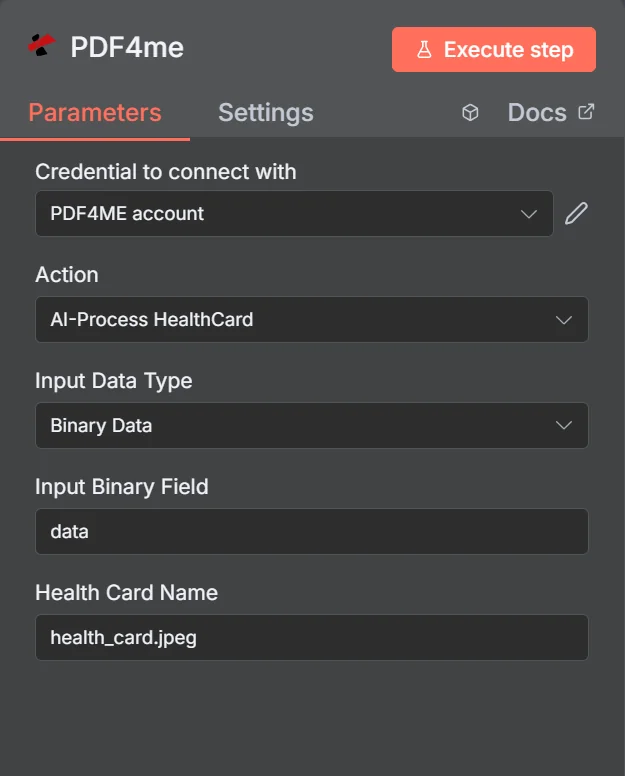
Tindakan tersebut tercantum sebagai AI-Proses Kartu Kesehatan. Dengan Data Biner yang dipilih, panel hanya memerlukan Kolom Input Biner dan Nama Kartu Kesehatan, sehingga ekstensi pada nama file adalah yang menentukan deteksi format.
Analisis Kartu Kesehatan vs Generik OCR
| Pertanyaan | AI-Proses Kartu Kesehatan | Ekstraksi teks generik |
|---|---|---|
| What you get back | Named fields such as memberId and rxBin | A block of unstructured text |
| Layout differences | Handled, fields are identified by meaning | Not handled, position shifts break parsing |
| Quality signal | Per-field confidence scores | None beyond whether text was found |
| Work needed after | Map fields and check confidence | Write and maintain regex per insurer |
| Best for | Cards from many different insurers | One fixed, unchanging document layout |
Parameter Apa yang Digunakan? AI-Membutuhkan Kartu Kesehatan?
Ketiga kolom sumber tersebut saling eksklusif. Hanya kolom yang sesuai dengan milik Anda yang akan digunakan. Tipe Data Masukan muncul di panel, itulah sebabnya hal tersebut ditandai sebagai bersyarat dan bukan wajib.
| Parameter | Diperlukan | Apa fungsinya? | Contoh |
|---|---|---|---|
| Credential to connect with | Required | The PDF4me account credential the node authenticates with. | PDF4ME account |
| Action | Required | The action this node performs. Select AI-Process HealthCard. | AI-Process HealthCard |
| Input Data Type | Required | How the card image reaches the node: binary data from a previous node, a Base64 string, or a URL. | Binary Data |
| Input Binary Field | Conditional | Name of the binary property holding the card image. Appears when Input Data Type is Binary Data. | data |
| Base64 Health Card Content | Conditional | The card image encoded as a Base64 string. Appears when Input Data Type is Base64 String. | JVBERi0xLjQKJ... |
| Health Card URL | Conditional | Publicly reachable URL of the card image. Appears when Input Data Type is URL. | https://example.com/card.jpeg |
| Health Card Name | Required | Filename of the submitted card including the extension. Drives format detection, so keep it accurate. | health_card.jpeg |
Keluaran
Aksi ini mengembalikan data, bukan file. Kolom respons tingkat atas:
| Bidang | Jenis | Isi di dalamnya |
|---|---|---|
| success | Boolean | Whether the extraction completed. Branch on this before reading any field. |
| message | String | Human-readable status text describing the result. |
| processedData | Object | Wrapper holding healthData, status, errors, and the job identifiers. |
| processedData.status | String | Overall processing status for the run. |
| processedData.errors | Array | Errors encountered during extraction. Empty when the read was clean. |
| processedData.jobId | String | Unique identifier for the processing job, useful when reporting an issue. |
| processingTimestamp | String | ISO 8601 timestamp for when processing completed. |
Di dalam processedData.healthData:
| Bidang | Jenis | Isi di dalamnya |
|---|---|---|
| memberId | String | The member identification number printed on the card. |
| memberName | String | Full name of the insured member. |
| dateOfBirthStr | String | Member date of birth as read from the card. |
| insuranceProvider | String | Name of the insurer that issued the card. |
| groupNumber | String | Group or policy number for the plan. |
| planType | String | Plan category such as PPO, HMO, or EPO. |
| effectiveDateStr | String | Date the coverage takes effect. |
| rxBin | String | Prescription BIN routing code, usually printed on the reverse. |
| rxPcn | String | Prescription processor control number, usually on the reverse. |
| rxGroup | String | Prescription group identifier, usually on the reverse. |
| copayInfo | Array | Copay amounts per service type where the card lists them. |
| confidence | Object | Per-field confidence scores. Use these to gate automatic acceptance. |
Bagaimana Cara Saya Mengaturnya? AI-Memproses Kartu Kesehatan di n8n?
- Tambahkan PDF4me Tambahkan node ini ke alur kerja Anda dan atur. Tindakan ke AI-Proses Kartu Kesehatan.
- Pilih Anda PDF4me atau buat yang baru dan tempelkan kredensial Anda API kunci.
- Mengatur Tipe Data Masukan dan masukkan kartu melalui kolom yang sesuai.
- Mengatur Nama Kartu Kesehatan dengan ekstensi yang benar, misalnya
health_card.jpeg. - Jalankan node dan periksa.
processedData.healthDatapada output. - Tambahkan node IF yang memeriksa
successdan yang relevanconfidenceskor. - Teruskan ekstraksi yang meyakinkan dan kirim sisanya ke antrian peninjauan manusia.
- Tentukan dengan cermat apa yang akan disimpan di tahap selanjutnya, dan hanya simpan kolom yang benar-benar dibutuhkan oleh proses Anda.
Pengaturan Umum
Contoh Alur KerjaCommon n8n workflow patterns using AI-Process HealthCard.
- Pasien baru mengunggah foto kartu mereka melalui sebuah formulir.
- AI-Proses HealthCard membaca detail anggota dan paket.
- Kolom-kolom tersebut secara otomatis terisi dalam catatan penerimaan pasien agar dapat dikonfirmasi oleh staf.
- Sisi belakang kartu dikirimkan ke node.
- rxBin, rxPcn, dan rxGroup dikembalikan sebagai field terpisah.
- Klaim tersebut diproses tanpa ada yang menyalin kode-kodenya.
- Setiap ekstraksi menghasilkan skor kepercayaan per bidang.
- Node IF membandingkannya dengan ambang batas yang Anda terima.
- Hanya kartu yang tidak pasti yang sampai ke seseorang, sehingga upaya peninjauan tetap kecil.
- Kartu pengganti akan tiba seiring dengan perpanjangan paket langganan.
- Node tersebut membaca effectiveDateStr dan kolom rencana.
- Data diperbarui sebelum detail lama menyebabkan penolakan.
Tips Praktis
Lembar Panduan Singkat
| Bidang | Nilai |
|---|---|
| Action | AI-Process HealthCard |
| Input Data Type | Binary Data |
| Input Binary Field | data |
| Health Card Name | health_card.jpeg |
| Credentials | PDF4ME account |
| Key output path | processedData.healthData |
| Quality gate | processedData.healthData.confidence |