Hamparan PDFs di dalam n8n
Hamparan PDFs adalah sebuah PDF4me tindakan node di n8n yang menempatkan seseorang PDF di atas yang lain, menggabungkan keduanya ke tempat yang sama. pages Alih-alih menambahkannya. Gunakan fitur ini untuk membubuhkan stempel kop surat yang telah dirancang di atas konten yang dihasilkan, menerapkan bingkai sertifikat, atau menempatkan templat yang telah disetujui di atas dokumen yang masuk tanpa menambahkan satu halaman pun.
Fungsi node ini
PDF4me: Hamparan PDFs membutuhkan dua orang PDFs, A basis yang berfungsi sebagai latar belakang dan lapisan yang berada di atas, dan mengembalikan satu dokumen di mana keduanya muncul pada tempat yang sama. pagesSetiap berkas memiliki tipe inputnya sendiri, sehingga basisnya dapat berasal dari node sebelumnya sebagai Data Biner sementara lapisannya diambil dari... URLTidak seperti penggabungan, jumlah halaman tidak bertambah, itulah mengapa ini merupakan alat yang tepat untuk kop surat, bingkai, dan stempel templat.
Memverifikasi Identitas Anda API Meminta
Setiap PDF4me simpul di n8n memerlukan validitas Kredensial untuk terhubung denganBuat atau pilih salah satu yang sesuai dengan kebutuhan Anda. PDF4me API kunci agar alur kerja dapat mengautentikasi permintaan overlay dengan aman.
Fakta Penting yang Tidak Boleh Anda Lewatkan
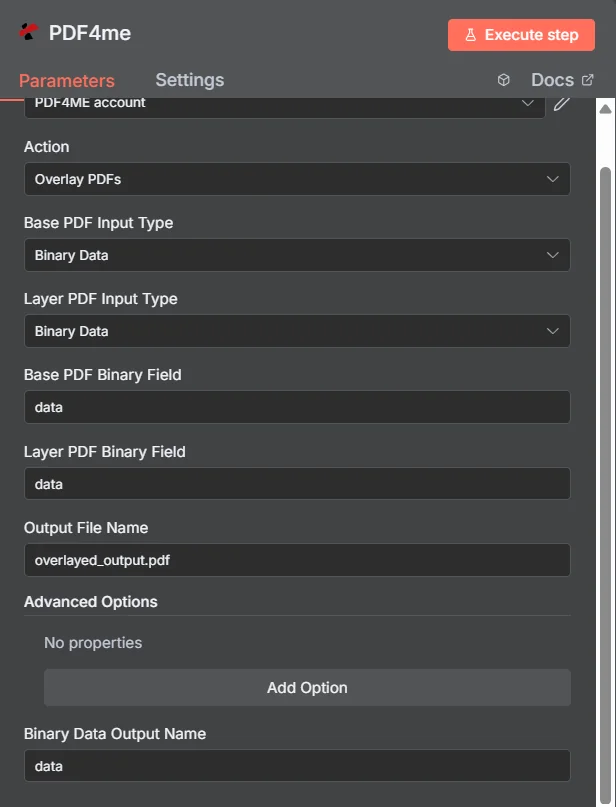
PDF4me Hamparan PDFs panel parameter di n8n, dengan kedua tipe input diatur ke Data Biner
Overlay vs Merge vs Watermark
Tiga cara untuk menambahkan konten tambahan ke dalam PDF, masing-masing menghasilkan dokumen yang berbeda.
| Mendekati | Pengaruh pada pages | Paling cocok |
|---|---|---|
| Overlay PDFs | Both documents appear on the same pages, page count unchanged | Branding that already exists as a designed PDF, such as a letterhead or certificate frame |
| Merge PDFs | Documents follow one another, page counts add up | Content that genuinely belongs in sequence as one longer document |
| Add watermark | Simple text or a single image drawn onto the existing pages | A short notice such as DRAFT or CONFIDENTIAL, where no designed PDF layer exists |
Parameter apa yang digunakan oleh Overlay? PDFs Membutuhkan?
Diperlukan: Aksi, kedua tipe input, kolom sumber yang sesuai dengan setiap tipe input, dan Nama File Output. Nama Output Data Biner dan apa pun di bawah Opsi Lanjutan memiliki nilai default yang berfungsi.
| Parameter | Diperlukan | Apa fungsinya? | Contoh |
|---|---|---|---|
| Action | Required | Selects the PDF4me node action to run. Choose Overlay PDFs. | Overlay PDFs |
| Base PDF Input Type | Required | Format of the background PDF. Choose Binary Data, Base64 String, or URL. Independent of the layer setting. | Binary Data |
| Layer PDF Input Type | Required | Format of the PDF placed on top. Choose Binary Data, Base64 String, or URL. Independent of the base setting. | Binary Data |
| Base PDF Binary Field | Conditional | Name of the binary property holding the base PDF. Required when Base PDF Input Type is Binary Data. | data |
| Layer PDF Binary Field | Conditional | Name of the binary property holding the layer PDF. Required when Layer PDF Input Type is Binary Data. | data |
| Base PDF Base64 Content | Conditional | Base64-encoded content of the base PDF. Required when Base PDF Input Type is Base64 String. | JVBERi0xLjQK... |
| Layer PDF Base64 Content | Conditional | Base64-encoded content of the layer PDF. Required when Layer PDF Input Type is Base64 String. | JVBERi0xLjQK... |
| Base PDF File URL | Conditional | Publicly reachable HTTPS URL to the base PDF. Required when Base PDF Input Type is URL. | https://example.com/base.pdf |
| Layer PDF File URL | Conditional | Publicly reachable HTTPS URL to the layer PDF. Required when Layer PDF Input Type is URL. | https://example.com/letterhead.pdf |
| Output File Name | Required | Filename for the combined PDF. Include the .pdf extension. | overlayed_output.pdf |
| Binary Data Output Name | Optional | Name of the binary property the output item exposes. Defaults to data. | data |
| Advanced Options | Optional | Collection for extra processing settings, added with Add Option. Leave empty unless you have a specific requirement. | No properties |
Bidang Keluaran
Satu kali lari yang sukses akan menghasilkan satu n8n barang yang membawa gabungan PDF.
| Bidang | Jenis | Isi di dalamnya |
|---|---|---|
Binary (data) | Binary | The combined PDF with the layer placed over the base, under Binary Data Output Name (default data). |
fileName | String | Generated filename, matching Output File Name. |
mimeType | String | MIME type of the output, always application/pdf. |
fileSize | Number | Size of the combined PDF in bytes. |
docName | String | Document name reference for the processed file, matching fileName. |
overlayCompleted | Boolean | Confirms the overlay operation finished, useful as an explicit check that the layer was applied. |
layersProcessed | Number | Count of PDF layers combined into the final document. |
success | Boolean | True when the operation completed, false on failure. Use it to branch error handling. |
message | String | Human-readable status message, carrying success confirmation or error detail. |
Bagaimana Cara Mengatur Overlay? PDFs di dalam n8n?
- Menambahkan PDF4me untuk Anda n8n alur kerja dan pilih Hamparan PDFs tindakan.
- Di dalam Kredensial untuk terhubung dengan, pilih milikmu PDF4me kredensial atau klik Buat Kredensial Baru dan tempelkan milik Anda API kunci.
- Mengatur Basis PDF Jenis Masukan Dan Lapisan PDF Jenis MasukanMereka bersifat independen, jadi setiap file dapat tiba dengan cara yang berbeda.
- Isilah kolom sumber yang sesuai, misalnya Basis PDF Bidang Biner Dan Lapisan PDF Bidang Biner, keduanya secara default
data. - Mengatur Nama File Output (harus diakhiri dengan)
.pdf). - Eksekusi node dan arahkan gabungan tersebut. PDF, terpapar di bawah Nama Keluaran Data Biner, ke langkah selanjutnya.
Pengaturan Umum
Contoh Alur KerjaCommon n8n workflow patterns using Overlay PDFs.
- Dokumen dihasilkan dari templat tanpa merek.
- Hamparan PDFs menggunakan kop surat yang telah disetujui PDF diambil dari sebuah URL sebagai lapisan.
- Hasil yang sudah diberi merek dikirim tanpa disentuh oleh desainer.
- Data penyelesaian kursus menghasilkan gambaran yang jelas. PDF dengan nama penerima.
- Hamparan PDFs menempatkan bingkai sertifikat yang telah dirancang di atasnya.
- Setiap sertifikat yang telah selesai akan dikirimkan melalui email kepada penerimanya.
- Sebuah dokumen menyelesaikan langkah persetujuan dalam alur kerja.
- Hamparan PDFs Menerapkan lapisan stempel yang telah dirancang dan disetujui.
- Salinan yang telah dicap dimasukkan ke dalam sistem pencatatan.
- Node Loop Over Items mengiterasi folder berisi dokumen pemasok yang masuk.
- Hamparan PDFs menerapkan lapisan yang sama PDF dari sebuah URL kepada masing-masing.
- Setiap dokumen masuk ke dalam arsip dengan kerangka yang konsisten.
Tips Praktis
Lembar Panduan Singkat
| Bidang | Nilai |
|---|---|
| Action | Overlay PDFs |
| Base PDF Input Type | Binary Data |
| Layer PDF Input Type | Binary Data |
| Base PDF Binary Field | data |
| Layer PDF Binary Field | data |
| Output File Name | overlayed_output.pdf |
| Binary Data Output Name | data |
| Advanced Options | No properties |
| Credentials | PDF4me API credential |