Ganti Teks dengan Gambar di n8n
Ganti Teks dengan Gambar adalah sebuah n8n simpul oleh PDF4me yang menemukan placeholder teks yang tepat di dalam sebuah PDF dan menggantinya dengan logo, tanda tangan, atau gambar produk dengan dimensi yang sesuai. Gunakan untuk branding template, penyisipan tanda tangan, atau personalisasi visual otomatis tanpa perlu mengedit secara manual. PDF.
Fungsi node ini
PDF4me: Ganti Teks dengan Gambar memindai PDF Fungsi ini menerima string teks yang tepat dan mengganti setiap kemunculan yang cocok dengan gambar, yang diskalakan sesuai tinggi dan lebar yang Anda pilih, pada halaman yang Anda targetkan. Menerima teks sumber dan teks yang sesuai. PDF dan gambar pengganti melalui Data Biner, Base64 Tali, atau URL, secara independen. Ideal untuk menyisipkan logo, tanda tangan, stempel, atau foto produk ke dalam templat. PDFs.
Memverifikasi Identitas Anda API Meminta
Setiap PDF4me simpul di n8n memerlukan validitas Kredensial untuk terhubung denganBuat atau pilih salah satu yang sesuai dengan kebutuhan Anda. PDF4me API kunci agar alur kerja dapat mengautentikasi permintaan penggantian secara aman.
Fakta Penting yang Tidak Boleh Anda Lewatkan
[LOGO_DI_SINI] Hanya mencocokkan string persis tersebut, bukan sebagian atau versi yang berbeda huruf besar/kecil.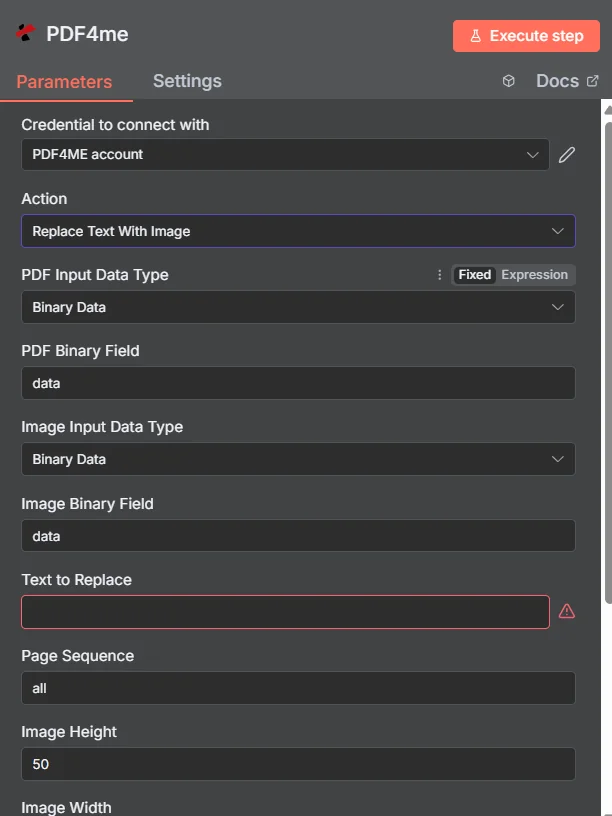
PDF4me Panel parameter node Ganti Teks dengan Gambar di n8n
Parameter apa saja yang dibutuhkan oleh fungsi Ganti Teks dengan Gambar?
Diperlukan: PDF Tipe Data Masukan, Tipe Data Masukan Gambar, Teks yang Akan Diganti, Tinggi Gambar, Lebar Gambar, dan Nama File Keluaran. Kolom bersyarat hanya muncul ketika Tipe Data Masukan induknya dipilih. Urutan Halaman, Async, dan Nama Output Data Biner bersifat opsional dengan nilai default yang sudah ada.
| Parameter | Diperlukan | Apa fungsinya? | Contoh |
|---|---|---|---|
| PDF Input Data Type | Required | Format of the source PDF input. Choose Binary Data (from a previous node), Base64 String, or URL. | Binary Data |
| PDF Binary Field | Conditional | Name of the binary property on the incoming n8n item that holds the source PDF. Required when PDF Input Data Type is Binary Data. | data |
| Base64 PDF Content | Conditional | Base64-encoded source PDF content. Required when PDF Input Data Type is Base64 String. | JVBERi0xLjQK... |
| PDF URL | Conditional | Publicly reachable HTTPS URL to the source PDF. Required when PDF Input Data Type is URL. | https://example.com/sample.pdf |
| Image Input Data Type | Required | Format of the replacement image input. Choose Binary Data, Base64 String, or URL, independent of the PDF input type. | Binary Data |
| Image Binary Field | Conditional | Name of the binary property on the incoming n8n item that holds the replacement image. Required when Image Input Data Type is Binary Data. | data |
| Base64 Image Content | Conditional | Base64-encoded replacement image content. Required when Image Input Data Type is Base64 String. | /9j/4AAQSkZJRgAB... |
| Image URL | Conditional | Publicly reachable HTTPS URL to the replacement image. Required when Image Input Data Type is URL. | https://example.com/logo.png |
| Text to Replace | Required | The exact text string to find and replace with the image, matched precisely including case and punctuation. | [LOGO_HERE] |
| Page Sequence | Optional | Pages to search for the placeholder. Use all, specific pages (1,3,5), or a range (1-5). Default all. | all |
| Image Height | Required | Height in pixels to scale the replacement image to, maintaining aspect ratio. | 50 |
| Image Width | Required | Width in pixels to scale the replacement image to, maintaining aspect ratio. | 100 |
| Output File Name | Required | Filename for the resulting PDF, must include the .pdf extension. | replace_text_with_image.pdf |
| Async | Optional | Enables background processing for large PDFs. Default false. | false |
| Binary Data Output Name | Optional | Name of the binary property the output item exposes. Default is data. | data |
Bidang Keluaran
Satu kali lari yang sukses akan menghasilkan satu n8n barang yang dibawa JSON metadata dan biner yang diperbarui PDF.
| Bidang | Jenis | Isi di dalamnya |
|---|---|---|
success | Boolean | True when the replacement succeeded. Use to route error-handling branches. |
message | String | Human-readable status message for the replacement result. |
fileName | String | Generated filename, matching Output File Name. |
mimeType | String | MIME type of the output, always application/pdf. |
fileSize | Number | Size of the resulting PDF in bytes. |
pagesProcessed | Number | Number of pages searched for the placeholder text. |
Binary (data) | Binary | The updated PDF under Binary Data Output Name (default data). Pass into Write Binary File, Email, or any cloud-storage upload. |
Bagaimana Cara Mengatur Penggantian Teks dengan Gambar di n8n?
- Menambahkan PDF4me untuk Anda n8n alur kerja dan pilih Ganti Teks dengan Gambar tindakan.
- Di dalam Kredensial untuk terhubung dengan, pilih milikmu PDF4me kredensial atau klik Buat Kredensial Baru dan tempelkan milik Anda API kunci.
- Mengatur PDF Tipe Data Masukan dan menyediakan sumbernya PDF melalui PDF Bidang Biner, Base64 PDF Isi, atau PDF URL.
- Mengatur Tipe Data Input Gambar dan menyediakan gambar pengganti melalui Bidang Biner Gambar, Base64 Konten Gambar, atau Gambar URL.
- Memasuki Teks yang Akan Diganti persis seperti yang terlihat di PDF, dan menetapkan Urutan Halaman Jika Anda perlu menargetkan halaman tertentu.
- Mengatur Tinggi Gambar Dan Lebar Gambar untuk mengubah skala gambar pengganti, dan mengatur Nama File Output.
- Memungkinkan Async untuk ukuran besar PDFs Jika diperlukan, jalankan node dan arahkan pembaruan tersebut. PDF ke langkah selanjutnya.
Pengaturan Umum
Contoh Alur KerjaCommon n8n workflow patterns using Replace Text With Image.
- Webhook CRM akan aktif ketika proposal baru dibuat untuk klien.
- PDF4me Fungsi Ganti Teks dengan Gambar dijalankan dengan Teks yang Akan Diganti diatur ke
[LOGO_KLIEN]dan Tipe Data Input Gambar URL menunjuk ke logo klien. - Proposal yang telah diberi merek dikirim melalui email kepada perwakilan penjualan untuk tinjauan akhir.
- Kontrak dibuat melalui PDF4me Buat Dokumen dengan
[TANDA TANGAN]placeholder. - PDF4me Fungsi Ganti Teks dengan Gambar berjalan dengan gambar tanda tangan penandatangan dan Urutan Halaman hanya menargetkan halaman terakhir.
- Kontrak yang tampak sudah ditandatangani tersebut diarsipkan ke SharePoint.
- Node Loop Over Items mengiterasi catatan produk dari basis data inventaris.
- PDF4me Fitur Ganti Teks dengan Gambar berjalan per item, mengganti satu teks dengan gambar.
[GAMBAR PRODUK]Placeholder dengan foto setiap produk dari penyimpanan cloud. - Setiap halaman katalog yang dipersonalisasi digabungkan di tahap selanjutnya menjadi satu halaman yang dapat didistribusikan. PDF.
- Webhook persetujuan akan aktif setelah seorang manajer menandai dokumen sebagai disetujui dalam alat internal.
- PDF4me Fitur Ganti Teks dengan Gambar berjalan dengan
[CAP PERSETUJUAN]Placeholder diganti dengan grafik persetujuan. - Yang sudah final PDF diarsipkan dengan tanggal persetujuan dalam nama file.
Tips Praktis
Lembar Panduan Singkat
| Bidang | Nilai |
|---|---|
| Action | Replace Text With Image |
| PDF Input Data Type | Binary Data |
| PDF Binary Field | data |
| Image Input Data Type | Binary Data |
| Image Binary Field | data |
| Text to Replace | [LOGO_HERE] |
| Page Sequence | all |
| Image Height | 50 |
| Image Width | 100 |
| Output File Name | replace_text_with_image.pdf |
| Credentials | PDF4me API credential |