Balik Gambar di n8n
Fungsi node ini
PDF4me - Balik Gambar Memantulkan gambar secara horizontal, vertikal, atau ke kedua arah dan mengembalikan hasilnya sebagai data biner di dalam n8n alur kerja. Berikan gambar sumber sebagai data biner dari node sebelumnya, sebuah Base64-string yang dikodekan, atau publik URLHasil pembalikan gambar langsung tersedia untuk diunggah ke penyimpanan cloud, email, basis data, atau langkah pemrosesan gambar selanjutnya - tanpa pengeditan manual, tanpa alat eksternal.
Memverifikasi Identitas Anda API Meminta
Setiap PDF4me simpul di n8n memerlukan validitas KredensialBuat atau pilih kredensial yang menyimpan informasi Anda. PDF4me API kunci agar node dapat mengautentikasi permintaan pemrosesan gambar dengan aman.
Fakta Penting yang Tidak Boleh Anda Lewatkan
hasil.png, node hilir mungkin melihat MIME Ketidaksesuaian tipe. Cocokkan ekstensi dengan format gambar sebenarnya untuk penyerahan yang bersih ke node penyimpanan atau email.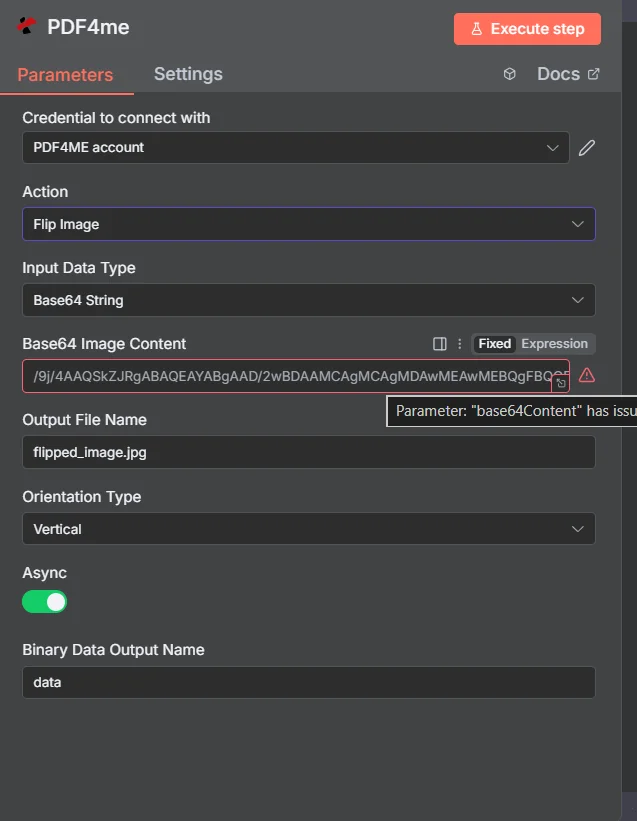
Atur Tipe Data Input, petakan sumber gambar, atur Nama File Output dengan ekstensi yang benar, dan pilih Tipe Orientasi sebelum menjalankan alur kerja.
Parameter
Diperlukan: Tipe Data Masukan, kolom gambar yang sesuai dengan tipe tersebut (Kolom Biner Masukan, Base64 Konten Gambar, atau Gambar URL), Nama File Output, Tipe Orientasi, dan Nama Output Data Biner. Async bersifat opsional.
| Parameter | Diperlukan | Apa fungsinya? | Contoh |
|---|---|---|---|
| Input Data Type | Yes | Format of the source image. Choose Binary Data to map from a prior node, Base64 String to supply encoded image data, or URL to point to a publicly accessible image file. | Binary Data |
| Input Binary Field | Yes (Binary Data) | The binary property name from the prior node that holds the image. Use the n8n expression to reference it. | {{$binary.data}} |
| Base64 Image Content | Yes (Base64) | Base64-encoded string of the image to flip. JPEG, PNG, GIF, and BMP all accepted. | /9j/4AAQSkZJRgA... |
| Image URL | Yes (URL) | Publicly accessible URL to the source image. PDF4me downloads and flips the image from this address. | https://example.com/photo.jpg |
| Output File Name | Yes | Filename for the returned flipped image, including extension. Must match the actual image format to avoid MIME mismatches in downstream nodes. | flipped_image.jpg |
| Orientation Type | Yes | Direction to flip the image. Horizontal mirrors left-to-right. Vertical mirrors top-to-bottom. Horizontal and Vertical applies both simultaneously. | Horizontal |
| Async | No | When true, the operation runs asynchronously and returns immediately without waiting for the result. Useful for large images in batch workflows. | false |
| Binary Data Output Name | Yes | Key name under which the flipped image binary is stored in the n8n output. Downstream nodes reference the image by this name. | data |
Pengaturan Cepat
- Tambahkan PDF4me simpul ke Anda n8n alur kerja dan pilih Balik Gambar sebagai tindakan tersebut.
- Pilih atau buat Kredensial dengan milikmu PDF4me API kunci.
- Mengatur Tipe Data Masukan dan isi kolom yang sesuai - Data Biner, Base64 Konten Gambar, atau Gambar URL.
- Memasuki Nama File Output dengan ekstensi yang tepat.
- Memilih Tipe Orientasi - Horizontal, Vertikal, atau Horizontal dan Vertikal.
- Mengatur Nama Keluaran Data Biner (bawaan:
data) dan klik Eksekusi NodeGambar yang dibalik sudah siap dalam bentuk biner keluaran.
Contoh Alur Kerja
Contoh Alur KerjaCommon n8n workflow patterns using Flip Image.
- Sebuah HTTP Node permintaan mengambil gambar produk URLdari sistem PIM API.
- Node Split In Batches memproses setiap gambar. URL secara individu.
- Flip Image berjalan dengan Tipe Data Input diatur ke URL, Tipe Orientasi diatur ke Horizontal, sehingga menciptakan cerminan kiri-kanan dari setiap foto produk.
- Google Drive mengunggah setiap gambar yang telah dibalik ke folder "Mirrored Assets" yang diberi nama berdasarkan SKU produk.
- Dropbox Watch Folder akan aktif ketika gambar yang dipindai tiba di folder penerimaan.
- Flip Image dijalankan dengan Tipe Orientasi diatur ke Vertikal untuk memperbaiki orientasi terbalik dari pemindai.
- Gambar yang telah dikoreksi diunggah ke folder "Pemindaian yang Diproses".
- Notifikasi Slack mengkonfirmasi bahwa gambar yang telah dikoreksi siap untuk tim dokumen.
- Airtable akan aktif ketika data gambar baru ditambahkan ke basis kalender konten.
- HTTP Permintaan mengunduh gambar asli dari lampiran Airtable. URL.
- Flip Image membuat versi yang dicerminkan secara horizontal untuk bingkai "setelah" pada postingan perbandingan berdampingan.
- Kedua gambar diunggah ke S3 dan catatan Airtable diperbarui dengan aset yang dicerminkan. URL.