Uraikan Dokumen di n8n
PDF4me Uraikan Dokumen menjalankan templat parse yang Anda simpan terhadap PDF di dalam sebuah n8n alur kerja dan mengembalikan bidang yang diekstrak sebagai data terstruktur. Masukkan data biner dari node sebelumnya, sebuah Base64 string, atau publik URL, merujuk pada templat dengan ID Parse, dan salurkan hasilnya JSON, XML, atau CSV langsung ke Set, IF, Permintaan HTTP, atau hilir lainnya n8n Node. Template tersebut membawa logika ekstraksi, sehingga node yang sama mengekstrak faktur, kontrak, tanda terima, dan tata letak khusus apa pun yang telah Anda konfigurasi.
Sebelum Anda menjalankan node ini: buat templat parse di PDF4me Dasbor. Tentukan kunci tangkapan Anda dan pilih Ekspresi Regex untuk pola yang stabil atau JavaScript Ekspresi untuk logika kondisional. The n8n referensi node yang templat oleh ID Parse. Melihat Siapkan Informasi Penguraian untuk Dokumen Untuk pengaturan lengkap, contoh Regex (INV-\d{6,10}, \d{2}/\d{2}/\d{4}), dan dua pekerja JavaScript Contoh pengklasifikasi ekspresi.
Memverifikasi Identitas Anda API Meminta
Yang PDF4me simpul di n8n memerlukan PDF4me API kredensialBuat kredensial sekali di n8n dengan milikmu API ambil kunci dari dasbor, lalu rujuk kunci tersebut dari setiap PDF4me simpul dalam alur kerja Anda.
Fakta Penting yang Tidak Boleh Anda Lewatkan
teks variabel untuk klasifikasi dan aturan cadangan.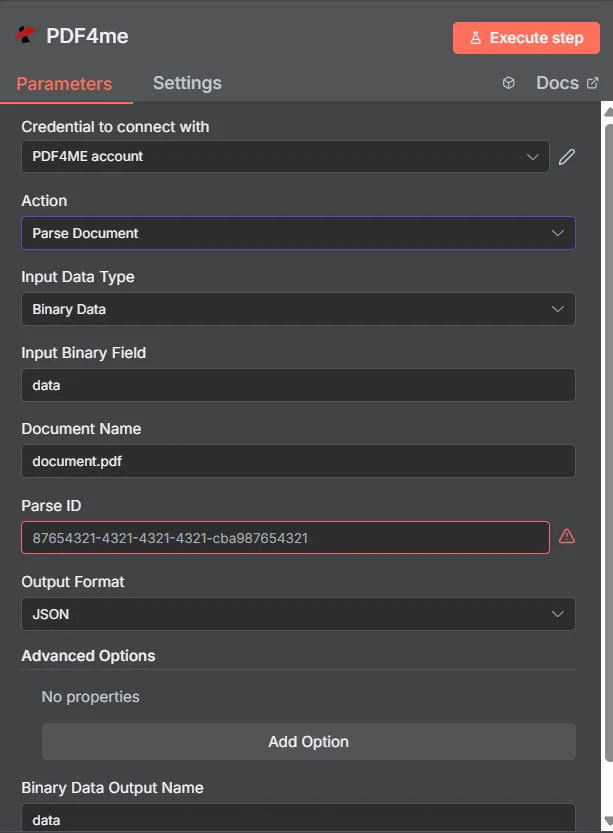
Parameter
| Parameter | Diperlukan | Apa fungsinya? | Contoh |
|---|---|---|---|
| Input Data Type | Yes | How the PDF reaches the node. Binary Data (from a prior node), Base64 String (inline encoded), or URL (public file URL). | Binary Data |
| Input Binary Field | Conditional | Name of the binary field on the input item containing the PDF. Required when Input Data Type is Binary Data. | data |
| Base64 PDF Content | Conditional | Base64 encoded PDF content. Required when Input Data Type is Base64 String. No data: prefix. | JVBERi0xLjQK... |
| PDF URL | Conditional | Publicly reachable URL of the PDF. Required when Input Data Type is URL. The PDF4me service downloads and processes it. | https://example.com/invoice.pdf |
| Document Name | Yes | Source filename including .pdf extension. Used for format detection and error tracing. | invoice.pdf |
| Parse ID | Yes | TemplateId GUID from the PDF4me dashboard. Identifies the parse template (capture keys + extraction rules) to apply. | 12345678-1234-1234-1234-123456789abc |
| Output Format | Yes | Shape of the returned data. JSON (default, structured object), XML (hierarchical), or CSV (flat tabular). JSON is the right choice for almost every n8n workflow. | JSON |
| Output Binary Field Name | Yes | Name of the binary field the node attaches the parsed output to on the output item. Reference it from downstream nodes. | data |
| Custom Profiles | No | Advanced JSON-style overrides for parsing behaviour (output sub-format, include metadata flag, etc). Leave empty for default behaviour. | { "outputDataFormat": "json", "includeMetadata": true } |
Jenis ekspresi dalam templat parse Anda
Aturan pengambilan data terdapat di dalam templat, bukan di dalam n8n node. Kedua tipe ekspresi tersebut disertakan dengan setiap node. PDF4me akun.
Ekspresi RegexPola yang stabilINV-\d{6,10}), tanggal (\d{2}/\d{2}/\d{4}), jumlah ($?\d{1,3}(?:,\d{3})*(?:.\d{2})?). Sekitar 80% kunci produksi.Ekspresi JavaScriptLogika kondisional dan pengklasifikasiteks; mengembalikan string. Klasifikasi multi-marker, aturan cadangan, normalisasi tanggal. Lihat Siapkan Informasi Penguraian untuk Dokumen untuk dua sampel kerja.Keluaran
| Bidang | Jenis | Isi di dalamnya |
|---|---|---|
fileName | String | Generated output filename with timestamp and extension matching Output Format (.json / .xml / .csv). |
mimeType | String | MIME type of the output (application/json, application/xml, text/csv). |
fileSize | Number | Size of the parsed output in bytes. |
success | Boolean | true on a successful parse, false otherwise. Wire into an IF node for branching. |
message | String | Status message. Document parsed successfully on the happy path, or a descriptive error. |
docName | String | Original input filename, preserved for audit trails. |
Data key/value yang telah diurai itu sendiri berada di field biner yang Anda beri nama di Nama Bidang Biner Keluaran.
Contoh alur kerja
Pola alur kerja n8n umumTypical ways to chain Parse Document into an n8n workflow.
- Gmail Trigger akan aktif saat ada faktur baru yang diberi label vendor-invoice.
- Filter hanya akan meneruskan lampiran yang berakhiran .pdf.
- Parse Document menjalankan templat Faktur terhadap lampiran biner.
- Atur peta node yang diuraikan invoiceNumber, totalAmount, invoiceDate.
- Perintah INSERT di Postgres menulis baris ke dalam tabel accounts_payable.
- Webhook menerima PDF dari portal unggahan mitra.
- Parse Document menjalankan template dengan sebuah JavaScript Ekspresi kunci yang mengembalikan tipe dokumen.
- Alihkan rute node pada tipe yang dikembalikan (faktur / pesanan / tanda terima) ke cabang hilir spesifik tipe tersebut.
- Setiap cabang mengirimkan bidang yang telah diuraikan ke sistem tujuan yang tepat.
- Pemicu terjadwal akan aktif setiap 15 menit.
- S3 List + Get Object memuat setiap objek baru PDF di dalam bucket masuk.
- Parse Document menjalankan templat terhadap setiap item biner.
- Fungsi Airtable Create Record menulis kolom-kolom yang telah diuraikan ke dalam basis data pelacakan.