Buat Uang Kertas QR Swiss di n8n
Fungsi node ini
PDF4meBuat Uang Kertas QR Swiss menghasilkan slip pembayaran QR Swiss yang sepenuhnya sesuai dan tertanam di dalamnya PDF dokumen melalui Anda n8n Alur kerja otomatisasi. Berikan PDF faktur melalui data biner, base64, URL, atau tanpa dokumen latar belakang sama sekali, node tersebut menghasilkan uang kertas QR Swiss standar dengan rincian kreditur dan debitur, IBAN, nomor referensi, label multibahasa, dan format keluaran yang dapat dikonfigurasi. dalam satu langkah otomatis. Sepenuhnya kompatibel dengan semua bank Swiss, PostFinance, dan Standar Pembayaran Swiss (SPS) spesifikasi.
Memverifikasi Identitas Anda API Meminta
Setiap PDF4me simpul di n8n memerlukan validitas Kredensial untuk terhubung denganBuat atau pilih salah satu yang sesuai dengan kebutuhan Anda. PDF4me API kunci agar alur kerja dapat mengautentikasi permintaan pembuatan uang kertas QR Swiss dengan aman.
Fakta Penting yang Tidak Boleh Anda Lewatkan
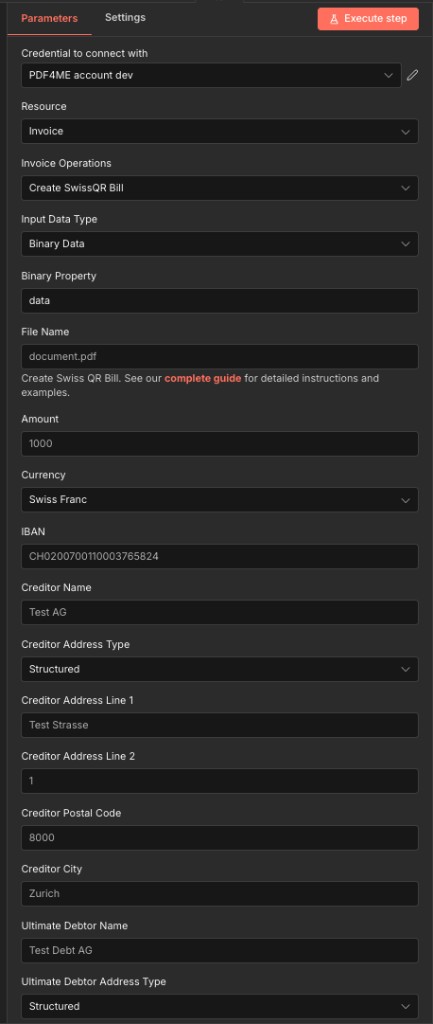
Panel atas, koneksi, jenis input, detail pembayaran, dan kolom alamat kreditor
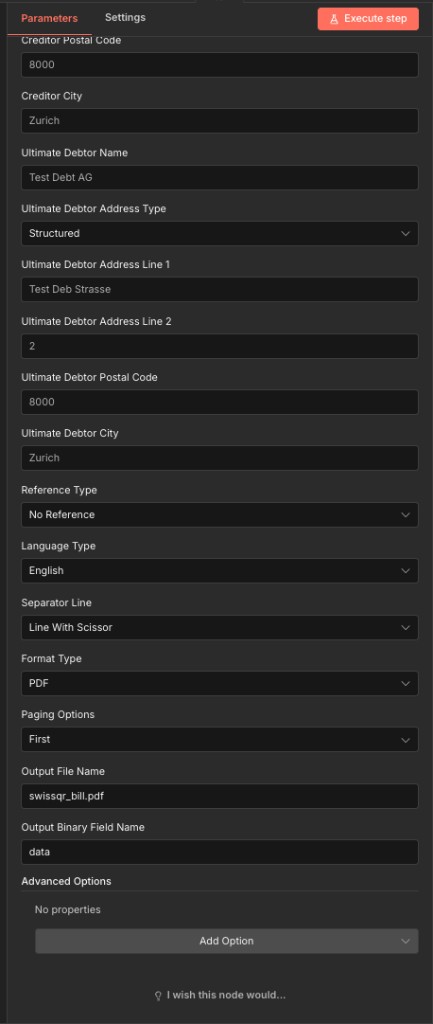
Panel bawah, alamat debitur, jenis referensi, bahasa, format, penomoran halaman, dan konfigurasi keluaran.
Parameter
Diperlukan dalam n8n UI: Kredensial untuk terhubung, Tipe Data Masukan, Jumlah, Mata Uang, IBAN, Nama Kreditur, Jenis Alamat Kreditur, Jenis Alamat Debitur Utama, Jenis Referensi, Jenis Bahasa, Baris Pemisah, Jenis Format, dan (bila Jenis Format adalah PDFOpsi Penomoran Halaman. Semua kolom alamat, kode pos, dan kota ditandai sebagai opsional. UI tetapi adalah Sangat direkomendasikan untuk uang kertas QR Swiss yang valid., spesifikasi Standar Pembayaran Swiss dan PDF4me API Perlakukan parameter tersebut sebagai parameter yang benar-benar diperlukan untuk penggunaan produksi. Payload eksekusi selalu mengirimkannya (sebagai string kosong jika kosong).
| Parameter | Diperlukan | Apa fungsinya? | Contoh |
|---|---|---|---|
| Input Data Type | Conditional | How the source PDF is supplied. None generates a standalone QR bill with no background document. Binary Data reads from a previous n8n node: the most common option. Base64 String accepts encoded file content. URL downloads from a public link. | Binary Data |
| Binary Property Name | Conditional | Name of the binary field from the previous node. Required when Input Data Type is Binary Data. Maps to the output binary field of a prior download or file node. | data |
| Base64 Content | Conditional | Base64-encoded PDF content. Required when Input Data Type is Base64 String. | JVBERi0xLjQK... |
| File URL | Conditional | Public URL to the source PDF file. Required when Input Data Type is URL. | https://example.com/invoice.pdf |
| File Name | Conditional | Filename of the source PDF input. Shown only when Input Data Type is Binary Data, Base64 String, or URL: hidden for None. Include the .pdf extension. | document.pdf |
| Amount | Yes | Payment amount for the Swiss QR bill. Enter without leading zeroes (per the node field description). Must be a positive number with up to two decimal places. | 1000 |
| Currency | Yes | Currency for the QR bill. Only two options accepted: CHF (Swiss Franc, standard for domestic Swiss payments) or EUR (cross-border transactions). | CHF |
| IBAN | Yes | Creditor's Swiss IBAN. Must start with CH followed by 19 digits and be linked to a valid PostFinance or Swiss bank account. An invalid IBAN halts the workflow. | CH0200700110003765824 |
| Creditor Name | Yes | Full name of the creditor company or individual as registered with the bank. Printed on the generated QR bill in the creditor section. | Test AG |
| Creditor Address Type | Yes | Address format for creditor information. Sent as code S (Structured: components stored separately for maximum SPS compliance) or K (Combined, two free-form lines). | Structured (S) |
| Creditor Address Line 1 | No | Street name for the creditor's address. Marked optional in the UI but required for valid Swiss QR bills: always provide it. When Address Type is Structured, enter the street name only. | Test Strasse |
| Creditor Address Line 2 | No | House number or secondary address detail. Used as the second address line when Creditor Address Type is Structured. | 1 |
| Creditor Postal Code | No | Swiss postal code for the creditor's address. Marked optional in the UI but required for valid Swiss QR bills. Must be a 4-digit Swiss postal code matching the creditor city. | 8000 |
| Creditor City | No | Swiss city name for the creditor's address. Marked optional in the UI but required for valid Swiss QR bills. Must correspond to the postal code entered above. | Zurich |
| Ultimate Debtor Name | No | Full name of the party who will pay the bill. Marked optional in the UI but required for valid Swiss QR bills with a known debtor. Appears in the payment section of the printed QR bill. | Test Debt AG |
| Ultimate Debtor Address Type | Yes | Address format for the ultimate debtor. Sent as code S (Structured: recommended for automated Swiss banking) or K (Combined, two free-form lines). | Structured (S) |
| Ultimate Debtor Address Line 1 | No | Street name for the debtor's address. Marked optional in the UI but required for valid Swiss QR bills with a known debtor. | Test Deb Strasse |
| Ultimate Debtor Address Line 2 | No | House number or secondary address line for the debtor. Used as the second line when Ultimate Debtor Address Type is Structured. | 2 |
| Ultimate Debtor Postal Code | No | Swiss postal code for the debtor's address. Marked optional in the UI but required for valid Swiss QR bills with a known debtor. | 8000 |
| Ultimate Debtor City | No | Swiss city name for the debtor's address. Marked optional in the UI but required for valid Swiss QR bills with a known debtor. | Zurich |
| Reference Type | Yes | Sent as code NON (No Reference: simple payments), QRR (QR Reference, 27-digit numeric for PostFinance/Swiss bank reconciliation), or SCOR (Creditor Reference, ISO 11649 for SEPA-compatible cross-border payments). | NON |
| Language Type | Yes | Display language for QR bill labels and printed text. Options: English, German, French, Italian. Choose the language matching the recipient's Swiss region. | English |
| Separator Line | Yes | Visual separator between the invoice body and the QR bill tear-off section. Note the node field name is spelled "seperatorLine". Options: Line With Scissor (Swiss standard), Simple Line, No Line. | Line With Scissor |
| Format Type | Yes | Output file format for the generated QR bill. PDF is recommended for print-ready documents. PNG and JPEG for digital delivery. TIFF for archival quality. Empty or null for raw data output. | PDF |
| Paging Options | Conditional | Controls where the QR bill slip is placed in the output document. Required when Format Type is PDF. Options: First, Last, Add Page At End, Custom. | First |
| Page Number | Conditional | Specific page index for placing the QR bill. Shown and required only when Format Type is PDF and Paging Options is Custom. | 3 |
| Output File Name | No | Filename for the generated Swiss QR bill document. Default value is provided by the node. Include the extension matching your chosen Format Type. | swissqr_bill.pdf |
| Output Binary Field Name | No | Name of the binary field in the n8n output that holds the generated QR bill file. Default is data. Used to reference the file in subsequent workflow nodes. | data |
Opsi Lanjutan
Semua bidang di dalam Opsi Lanjutan Koleksi ini bersifat opsional dan memberikan kontrol tambahan atas muatan tagihan QR. Tambahkan koleksi ini melalui Tambahkan Opsi di UI node.
referensipesan tidak terstrukturInformasi penagihanav1av2profilOpsi Tipe Data Input
Pilih bagaimana sumbernya PDF memasuki node. Setiap opsi sesuai dengan pola alur kerja yang berbeda.
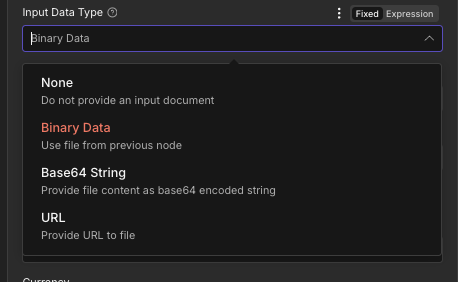
Menu tarik-turun Tipe Data Input, empat opsi mengontrol bagaimana sumber data dimasukkan. PDF disuplai ke node
Tidak adaTidak ada dokumen latar belakang.Data BinerBerkas dari node sebelumnya, paling umumdata).String Base64Konten file yang dikodekan Base64URLUnduh dari tautan publikOpsi Jenis Alamat
Berlaku untuk keduanya Jenis Alamat Kreditur Dan Jenis Alamat Debitur UtamaPilih bagaimana komponen alamat disimpan dalam data kode QR.
TersusunDisarankan, pisahkan kolom alamat.GabunganDua baris alamat bebas bentuk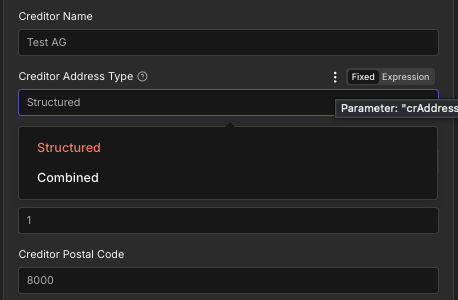
Jenis Alamat Kreditur, Terstruktur vs Gabungan
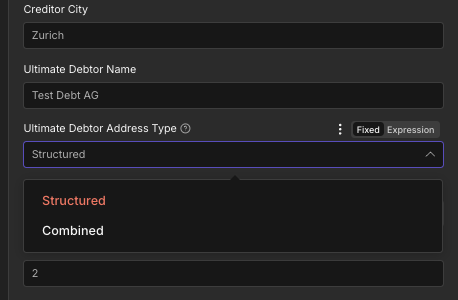
Jenis Alamat Debitur Utama, pilihan yang sama seperti untuk kreditur.
Opsi Jenis Referensi
Mengontrol standar referensi pembayaran mana yang disematkan dalam kode QR. Ini memengaruhi bagaimana pembayaran dicocokkan dengan faktur dalam sistem perbankan Anda.
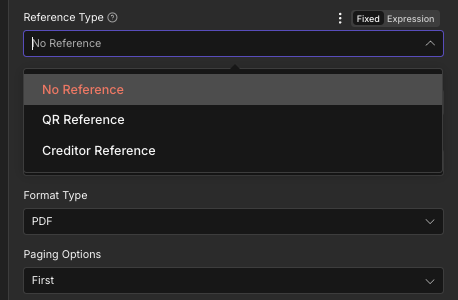
Jenis Referensi, Tanpa Referensi, Referensi QR, atau Referensi Kreditur
Tidak ada referensiSecara default, tidak ada referensi terstruktur.Referensi QRRekonsiliasi bank Swiss, angka 27 digitReferensi KrediturISO 11649lintas batas SEPA pembayaranOpsi Jenis Format
Mengontrol format file dari output tagihan QR yang dihasilkan.
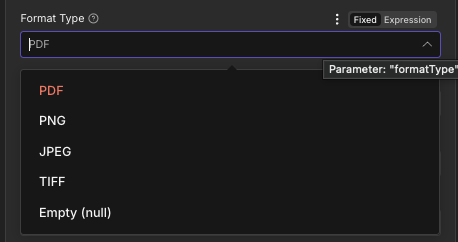
Menu tarik-turun Tipe Format, PDF, PNG, JPEG, TIFF, atau Kosong (null)
PDFDefault, siap cetakPNGPengiriman melalui web dan digitalJPEGGambar yang ramah emailBERTENGKARKualitas arsipKosong (null)Keluaran data mentahOpsi Paging
Mengontrol letak slip tagihan QR di dalam dokumen keluaran relatif terhadap halaman faktur yang sudah ada.
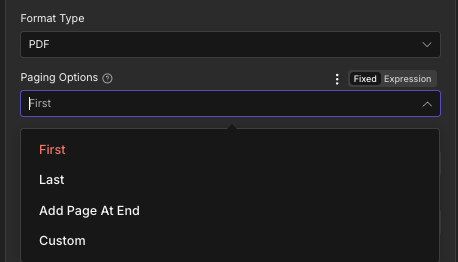
Opsi Penomoran Halaman: Pertama, Terakhir, Tambah Halaman di Akhir, atau Kustom
PertamaSecara default, tagihan QR di halaman 1TerakhirKode QR tagihan di halaman terakhirTambahkan Halaman di AkhirHalaman tagihan QR khusus yang paling umumKebiasaanPenempatan halaman spesifikBidang Keluaran
| Bidang | Jenis | Isi di dalamnya |
|---|---|---|
fileName | String | Filename of the generated Swiss QR bill document, for example swissqr_bill.pdf. Map into an upload or email node as the destination filename. |
mimeType | String | MIME type of the output file, for example application/pdf. Useful for content type validation in downstream HTTP or storage nodes. |
fileSize | Number | Size of the generated QR bill file in bytes. Useful for storage planning, bandwidth monitoring, and conditional routing in the workflow. |
success | Boolean | True when the Swiss QR bill was created successfully. False if an error occurred during generation. Use this field to route error handling branches in your workflow. |
message | String | Human-readable status message confirming success or describing the error encountered. Useful for logging and error notification steps. |
Pengaturan Cepat
- Menambahkan PDF4me untuk Anda n8n Alur kerja. Atur Sumber ke Faktur Dan Operasi Faktur ke Buat Tagihan SwissQR.
- Di dalam Kredensial untuk terhubung dengan, pilih milikmu PDF4me kredensial atau klik Buat Kredensial Baru dan tempelkan milik Anda API kunci.
- Mengatur Tipe Data Masukan: menghubungkan output biner dari node sebelumnya (Data Biner), menyediakan Base64 tali, menyediakan publik URL, atau pilih Tidak Ada untuk slip QR terpisah.
- Masuk Jumlah, Mata uang (Franc Swiss untuk pembayaran CHF), dan IBAN (Swiss CH yang valid) IBAN (diawali dengan CH).
- Isi semuanya Kreditor Kolom yang tersedia: Nama, Jenis Alamat (Disarankan menggunakan alamat terstruktur), Baris Alamat 1, Baris Alamat 2, Kode Pos, dan Kota.
- Isi semuanya Debitur Utama kolom yang berisi nama lengkap dan alamat pihak yang membayar.
- Mengatur Jenis Referensi (Tidak ada referensi adalah pengaturan default), Jenis Bahasa (Bahasa Inggris, Jerman, Prancis, atau Italia), dan Garis Pemisah (Garis dengan Gunting adalah standar Swiss).
- Konfigurasi Jenis Format (PDF direkomendasikan) dan Opsi Paging (Tambahkan Halaman di Akhir untuk melampirkan halaman tagihan QR ke faktur yang sudah ada).
- Mengatur Nama File Output ke
swissqr_bill.pdfDan Nama Bidang Biner Keluaran kedata. - Hubungkan output ke node berikutnya: pengirim email, unggahan ke penyimpanan cloud, penulisan ke basis data, dan jalankan alur kerja.
Contoh Alur Kerja
Contoh Alur KerjaCommon n8n workflow patterns using Create Swiss QR Bill.
- Pemicu Jadwal akan aktif pada tanggal satu setiap bulan untuk memulai proses penagihan.
- Node Google Drive mencantumkan semua faktur. PDFs di dalam folder penagihan bulanan, satu per pelanggan.
- Node Loop Over Items akan mengulangi proses melalui setiap file. Untuk setiap file, node Google Drive Download akan mengambil konten biner.
- PDF4me Create Swiss QR Bill menambahkan slip pembayaran QR yang sesuai ke setiap faktur menggunakan Jumlah yang ditentukan pelanggan. IBAN, dan alamat dipetakan dari catatan pelanggan Google Sheets. Jenis Bahasa diatur ke Bahasa Jerman. Opsi Penomoran Halaman adalah Tambah Halaman di Akhir.
- Node Gmail mengirimkan tagihan QR. PDF Sebagai lampiran email untuk setiap pelanggan. Nama file menggunakan ID pelanggan agar mudah dirujuk.
- Webhook Trigger akan aktif ketika pesanan dikonfirmasi di platform e-commerce.
- Sebuah HTTP Node permintaan menghasilkan faktur. PDF dari sebuah HTML template yang menggunakan data pesanan.
- PDF4me Create Swiss QR Bill melampirkan slip QR yang sesuai ke faktur. PDFJumlah dan detail debitur dipetakan dari payload webhook. Tipe Referensi diatur ke Referensi Kreditur untuk rekonsiliasi. Tipe Bahasa adalah Prancis untuk Swiss berbahasa Prancis.
- Microsoft SharePoint Node mengunggah tagihan QR yang telah selesai. PDF ke folder arsip Pesanan.
- Sebuah HTTP Node permintaan memperbarui status pesanan menjadi Faktur Terkirim. CRM sistem.
- Pemicu Jadwal akan aktif setiap Senin pagi untuk memeriksa akun langganan yang jatuh tempo.
- Sebuah node PostgreSQL melakukan query ke semua akun dengan saldo terutang yang berusia lebih dari 14 hari.
- Node Loop Over Items memproses setiap pelanggan. PDF4me Fungsi Create Swiss QR Bill dipanggil dengan Input Data Type diatur ke None, tanpa latar belakang. PDF, menghasilkan tagihan QR mandiri yang bersih. Nama dan alamat debitur dipetakan dari catatan basis data. Jenis Referensi adalah Tanpa Referensi. Jenis Bahasa adalah Italia untuk Swiss berbahasa Italia.
- Microsoft Outlook Node mengirimkan email pengingat pembayaran kepada setiap pelanggan beserta tagihan QR terpisah. PDF terlampir.
- Sebuah node PostgreSQL mencatat stempel waktu pengiriman pengingat dan menambah jumlah pengingat untuk setiap akun.