Ekstrak Metadata dari Word menggunakan Make
Ekstrak Metadata adalah sebuah Make modul oleh PDF4me yang membaca properti bawaan dan kustom dokumen Word, judul, penulis, subjek, kata kunci, tanggal pembuatan, tanggal modifikasi, dan mengembalikannya sebagai struktur yang terorganisasi. JSONGunakan ini untuk pengatalogan dokumen, jejak audit kepatuhan, atau mengisi sistem manajemen konten tanpa harus membuka setiap file secara manual.
Fungsi modul ini
PDF4me Ekstrak Metadata dari Word Membaca properti bawaan (judul, penulis, subjek, kata kunci, perusahaan, tanggal pembuatan, tanggal modifikasi, jumlah halaman, jumlah kata) dan properti dokumen kustom apa pun dari file Word, lalu mengembalikannya sebagai struktur yang terstruktur. JSON objek di dalam Anda Make skenario.
Bagaimana Cara Saya Mengautentikasi Saya? Make Skenario?
Setiap PDF4me modul di Make memerlukan validitas KoneksiBuat atau pilih salah satu yang sesuai dengan kebutuhan Anda. PDF4me API kunci agar skenario tersebut dapat mengautentikasi permintaan ekstraksi metadata dengan aman.
Fakta Penting yang Tidak Boleh Anda Lewatkan
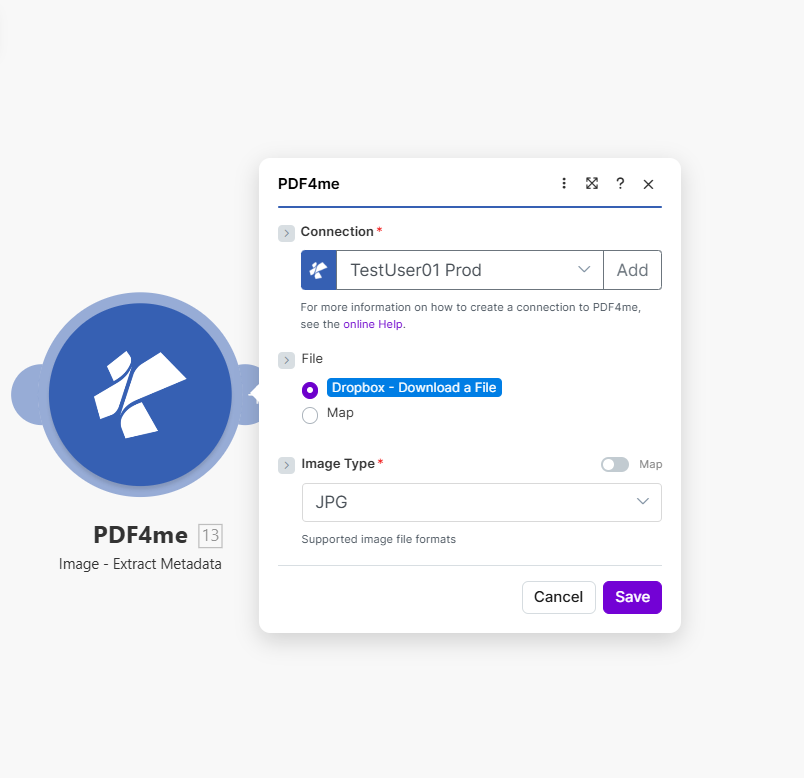
Petakan Nama File dan Dokumen, lalu jalankan skenario untuk menerima properti dokumen Word bawaan dan kustom sebagai JSON.
Parameter
Diperlukan: Informasi koneksi, nama file, dan dokumen harus disertakan.
| Parameter | Diperlukan | Apa fungsinya? | Contoh |
|---|---|---|---|
| Connection | Required | PDF4me API connection. Click Add and paste your API key if connecting for the first time. | My PDF4me connection |
| File Name | Required | Filename of the Word document with proper extension (.doc or .docx), used for processing identification. | document.docx |
| Document | Required | Word file buffer mapped from a preceding module such as Dropbox, Google Drive, or SharePoint. | [Buffer from Get File] |
Bidang Keluaran
| Bidang | Jenis | Isi di dalamnya |
|---|---|---|
Metadata | Object | Container object with all extracted document properties, both built-in and custom. |
Title | String | The document title property. |
Author | String | The document author property. |
Subject | String | The document subject property. |
Keywords | String | The document keywords/tags property. |
CreatedDate | String | The document creation timestamp. |
ModifiedDate | String | The document last-modified timestamp. |
PageCount | Number | Total number of pages in the document. |
WordCount | Number | Total word count in the document. |
Success | Boolean | True if metadata extraction completed successfully; false if it failed. |
Bagaimana Cara Mengatur Ekstrak Metadata di Make?
- Menambahkan PDF4me → Ekstrak Metadata untuk Anda Make skenario.
- Pilih Koneksi (atau klik) Menambahkan untuk membuat satu dengan milikmu PDF4me API kunci).
- Peta Nama File ke nama file dengan ekstensi (
.docatau.docx). - Peta Dokumen ke konten biner dari modul sumber: Dropbox, Google Drive, atau SharePoint.
- Jalankan skenario tersebut. The
MetadataObjek muncul dalam output, siap untuk dipetakan ke dalam katalog, log kepatuhan, atau CMS.
Pengaturan Umum
Contoh Alur KerjaCommon Make scenario patterns using Extract Metadata.
- Pemicu Dropbox Watch Folder akan aktif ketika dokumen Word baru diunggah ke pustaka.
- Ekstrak Metadata membaca judul, penulis, kata kunci, dan tanggal dari file.
- Langkah "Create Record" di Airtable mengindeks dokumen dengan properti yang diekstrak untuk pencarian dan pemfilteran.
- Tag dihasilkan secara otomatis dari properti Kata Kunci untuk katalog dokumen.
- Pemicu terjadwal akan mencantumkan semua dokumen terkontrol dalam folder kepatuhan.
- Iterator akan berulang melalui setiap file, Dapatkan File → Ekstrak Metadata.
- Filter menandai dokumen yang ModifiedDate berada di luar jangka waktu peninjauan yang diharapkan.
- Dokumen yang ditandai dan metadata-nya dicatat dalam laporan audit kepatuhan.
- Sebuah dokumen masuk ke folder sementara yang terhubung ke Make.
- Ekstrak Metadata membaca judul, penulis, subjek, dan kata kunci.
- Sebuah HTTP modul POSTproperti yang diekstrak ke CMS API untuk membuat catatan konten baru.
- Dokumen asli dipindahkan ke folder arsip setelahnya. CMS Rekaman telah dikonfirmasi berhasil dibuat.
Tips Praktis
Lembar Panduan Singkat
| Bidang | Nilai |
|---|---|
| Module | Extract Metadata (Word) |
| Connection | PDF4me API key |
| Supported extensions | .doc, .docx |
| Key output fields | Metadata.Title, Author, Subject, Keywords, CreatedDate, ModifiedDate |
| Empty property behavior | Returns empty string, not an error |
| Custom properties | Included when present in the source template |
Pertanyaan Umum
Studi Kasus & Aplikasi Industri
- Compliance & Audit
- Content Management
- Legal & Professional
- Publishing & Documentation
- Jejak Audit DokumenEkstrak tanggal modifikasi dan penulis untuk bukti audit kepatuhan.
- Pelacakan Kontrol VersiPantau versi dokumen menggunakan stempel waktu pembuatan dan modifikasi.
- Verifikasi Penulis: Memvalidasi kesesuaian penulis dokumen dengan daftar personel yang berwenang
- Penegakan Kebijakan RetensiPeriksa tanggal pembuatan dan bandingkan dengan jadwal retensi untuk pengambilan keputusan pengarsipan.
- Manajemen Dokumen Terkendali: Melacak properti dokumen untuk kepatuhan ISO/manajemen mutu
- CMS Integrasi: Mengisi sistem manajemen konten dengan judul dokumen, penulis, dan kata kunci
- Pengindeksan PencarianEkstrak kata kunci dan subjek untuk pengindeksan mesin pencari teks lengkap.
- Klasifikasi DokumenMengkategorikan dokumen berdasarkan metadata subjek dan kata kunci.
- Pengatalogan Perpustakaan: Mengindeks pustaka dokumen perusahaan menggunakan properti yang diekstrak
- Pembuatan TagBuat tag dokumen secara otomatis dari kata kunci dan bidang subjek.
- Pelacakan Dokumen PerkaraEkstrak metadata untuk sistem manajemen dokumen perkara hukum.
- Pengindeksan Dokumen Penemuan: Mengkatalogkan dokumen penemuan berdasarkan penulis, tanggal, dan subjek untuk ditinjau
- Manajemen KontrakEkstrak pihak-pihak kontrak, tanggal, dan pokok-pokok perjanjian untuk pengisian basis data kontrak.
- Pembuatan Log Hak AksesGunakan metadata dokumen untuk menghasilkan entri log hak akses secara otomatis.
- Produksi Dokumen: Melacak metadata dokumen produksi untuk sistem basis data litigasi
- Pelacakan ManuskripEkstraksi nama pengarang, judul, dan jumlah kata untuk sistem manajemen manuskrip.
- Alur Kerja Penerbitan: Mengarahkan dokumen berdasarkan metadata penulis dan tanggal modifikasi
- Kepatuhan terhadap Panduan GayaPeriksa apakah properti dokumen sesuai dengan persyaratan panduan gaya penerbitan.
- Analisis KontenMenganalisis statistik dokumen (jumlah kata, jumlah halaman) untuk perencanaan konten.
- Koordinasi Multi-PenulisMelacak penulis dokumen dan tanggal modifikasi dalam proyek kolaboratif