Lewati ke konten utama

PDF Hapus tautan hiperteks di Make

Fungsi modul ini

PDF4me, PDF - Hapus tautan menghapus semua anotasi hyperlink yang dapat diklik dari halaman tertentu dari PDF tanpa menyentuh teks yang terlihat. Tentukan halaman individual, rentang, atau seluruh dokumen dalam satu langkah. Alat seperti UPDF dan Adobe Acrobat memerlukan pengeditan file satu per satu secara manual, modul ini melakukannya secara otomatis di dalam aplikasi Anda. Make skenario untuk setiap dokumen yang melewatinya.

Postingan Blog Terkait
Belum ada postingan blog untuk fitur ini — akan segera hadir.
Sementara itu, jelajahi blog PDF4me untuk menemukan tutorial dan alur kerja di berbagai platform.
Kunjungi blog ini

Mengautentikasi Permintaan API Anda

Setiap PDF4me modul di Make memerlukan validitas KoneksiBuat atau pilih salah satu yang sesuai dengan kebutuhan Anda. PDF4me API kunci agar skenario dapat memanggil layanan penghapusan hyperlink dengan aman.

Fakta Penting yang Tidak Boleh Anda Lewatkan

Teks tetap ada, hanya anotasi tautan yang dihapus.

Teks tautan yang dapat diklik tetap berada di tempatnya, dengan font dan warna yang sama. Pembaca dapat membacanya, tetapi mengkliknya tidak lagi menghasilkan apa pun.

Semua tautan di halaman target dihapus sekaligus.

Setiap hyperlink pada halaman yang Anda tentukan akan dihapus dalam satu kali proses, tidak ada URL-filter tingkat. Jika Anda memerlukan penghapusan selektif, jalankan Ekstrak Hyperlink terlebih dahulu untuk merencanakan halaman mana yang akan ditargetkan.

PDF Bookmark dan tautan daftar isi tidak terpengaruh.

Internal PDF Navigasi bookmark dan jangkar daftar isi sama sekali tidak diubah. Hanya tautan eksternal yang diubah. URL Hyperlink dan anotasi href yang dapat diklik di dalam halaman dihilangkan.
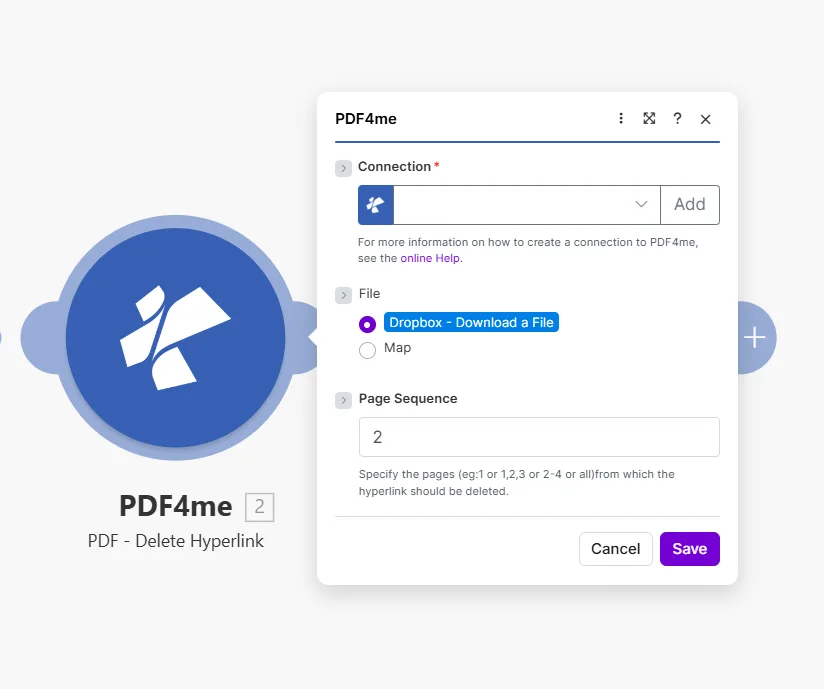
Buat modul Hapus Hyperlink PDF4me PDF menampilkan kolom Koneksi kosong dengan tombol Tambah, File diatur ke Dropbox - Unduh File dengan opsi Peta di bawahnya, dan kolom Urutan Halaman diatur ke 2 dengan petunjuk Tentukan halaman misalnya 1 atau 1,2,3 atau 2-4 atau semua halaman tempat hyperlink harus dihapus.

Masukkan satu halaman, daftar yang dipisahkan koma, rentang, atau all untuk menghapus semua tautan dari seluruh dokumen.

Parameter

Diperlukan: Ketiga parameter tersebut, Connection, File, Dan Page Sequence, harus disediakan agar modul dapat berjalan.

ParameterDiperlukanApa fungsinya?Contoh
ConnectionYesPDF4me API connection used to authenticate hyperlink deletion requests. Click Add to create one with your API key.Your PDF4me connection
FileYesSource PDF. Choose Dropbox - Download a File for a direct Dropbox trigger, or Map to supply the filename and binary content from a prior module.Dropbox - Download a File
Page SequenceYesWhich pages to strip of hyperlinks. Accepts a single page, comma-separated list, a range, or all to clean the entire document at once.2 or 1,2,3 or 2-4 or all

Pengaturan Cepat

  1. Menambahkan PDF4mePDF - Hapus tautan untuk Anda Make skenario.
  2. Pilih Connection (atau klik) Menambahkan untuk membuat satu dengan milikmu API kunci).
  3. Mengatur File ke Dropbox - Unduh File atau Peta dari modul sebelumnya yang menghasilkan PDF biner.
  4. Masukkan halaman yang akan dibersihkan ke dalam Page Sequence: menggunakan all untuk menghapus tautan dari setiap halaman sekaligus.
  5. Menyimpan lalu klik Jalankan sekaliOutputnya berisi... Document Name Dan Document Data: itu PDF dengan semua hyperlink dihapus pada halaman yang ditentukan.

Contoh Alur Kerja

Contoh Alur KerjaCommon Make scenario patterns that use PDF - Delete Hyperlink to sanitize, prepare, and archive documents.
Bersihkan dokumen sebelum dikirim ke klien.
  1. Proposal yang sudah selesai PDF ditempatkan di folder "Siap untuk Klien" di Google Drive.
  2. PDF - Hapus Tautan Hyperlink berlari dengan Page Sequence diatur ke all.
  3. Tautan yang dikembalikan tidak ada PDF dilampirkan pada pesan Gmail dan dikirim ke klien.
  4. Salinan kerja asli di folder sumbernya mempertahankan semua tautan internal tetap utuh.
Buat versi siap cetak secara otomatis.
  1. Pengajuan melalui Typeform menandai kontrak sebagai disetujui dan memicu skenario tersebut.
  2. PDF - Hapus Tautan Hyperlink menghapus semua tautan dari setiap halaman.
  3. Tanpa tautan PDF diunggah ke folder "Print Queue" di Dropbox.
  4. Gmail memberi tahu tim pencetakan bahwa pekerjaan baru sudah siap.
Cuplikan arsip bulanan tanpa tautan aktif.
  1. Skenario terjadwal dijalankan pada tanggal 1 setiap bulan.
  2. Google Drive mengunduh dokumen yang sedang aktif saat ini.
  3. PDF - Hapus Tautan Hyperlink Menghapus semua tautan dari setiap halaman.
  4. Cuplikan statis diunggah ke folder "Arsip / [bulan]", tanpa tautan mati, tanpa pengalihan usang.

Pertanyaan yang Sering Diajukan

Does removing a hyperlink also delete the visible text?+
No. The module removes only the URI annotation: the invisible clickable layer, while leaving all visible text completely intact. The anchor text stays in its original position with the same font, size, colour, and formatting. Readers can still read the text; it just no longer responds to clicks or open a URL. This makes the module safe for sanitizing documents before print or client distribution, since the content itself is not altered. If you also need to remove or replace the visible text, add a Find and Replace module before or after Delete Hyperlink.
Can I target just one specific link and keep others on the same page?+
The module removes all hyperlinks from the pages you specify: there is no URL-level or text-level filter within a single Page Sequence value. If a page contains five links and you want to remove only one, this is straightforward only when the link you want to keep is on a different page. For more granular control, run Extract Hyperlinks first to get a full list of links and which pages they appear on, then decide which pages to pass to Delete Hyperlink. If links you want to keep share a page with those you want to remove, use Create Hyperlinks afterward to re-add the ones you want to preserve.
What page formats does Page Sequence accept?+
Page Sequence accepts four formats: a single page number like 1, a comma-separated list like 1,2,5, a hyphenated range like 3-7, or the word all to process every page in the document at once. For a 40-page report where you want to strip links from the cover and the appendix only, enter 1,35-40. Using all is the safest default when you want a fully link-free PDF in one step, since it covers every page regardless of total page count. The module returns an error if you specify a page that does not exist in the document, so use Get Document Information first when the total page count is unknown.
Does it affect internal bookmark links or the table of contents?+
No. The module only removes URI annotation objects: the clickable external URL links embedded in the PDF. Internal PDF bookmarks in the outline navigation panel, named destination anchors, and table-of-contents click-through links that jump to another page within the same document are stored as different annotation or action types and are completely unaffected. Readers can still navigate long documents using the table of contents after external links are sanitized. Cross-reference links pointing to headings within the document also remain intact.
Is my original source file changed in any way?+
No. PDF4me processes a server-side copy and streams the result back to Make as a new binary document in the Document Data output field. Your source file: whether in Dropbox, Google Drive, OneDrive, SharePoint, or passed as an email attachment binary, is never written to or modified. The original remains exactly as it was before the scenario ran. If you want to replace the source file with the sanitized version, add an upload module after Delete Hyperlink and explicitly overwrite the original path, that is a deliberate action your scenario takes, not something the PDF4me module does on its own.

Modul Terkait

Dapatkan Bantuan