Gambar - Putar dengan EXIF Data - Orientasi Otomatis untuk Make
Putar dengan EXIF Data adalah sebuah Make modul oleh PDF4me yang membaca EXIF Label orientasi pada JPG atau PNG Aplikasi ini mengambil gambar dan memutarnya ke posisi tegak yang benar secara otomatis. Gunakan untuk memperbaiki foto ponsel pintar yang miring sebelum diunggah ke galeri, dicetak, atau disimpan. PDF, tanpa perlu memutar sudut secara manual.
Fungsi modul ini
PDF4me Putar dengan EXIF Data menghadirkan rotasi gambar otomatis berdasarkan EXIF metadata orientasi di dalam Make skenario. Ini membaca EXIF Mengambil tag orientasi dari gambar (umumnya pada foto dari ponsel pintar dan kamera) dan menerapkan rotasi yang benar, sehingga memungkinkan tampilan foto yang tepat, persiapan cetak, penerbitan web, dan alur kerja koreksi orientasi otomatis.
Bagaimana Cara Saya Mengautentikasi Saya? Make Skenario?
Untuk mengakses PDF4me Web API melalui MakeSetiap permintaan harus menyertakan validitas Koneksi memegangmu PDF4me API kunci. Ini memungkinkan komunikasi yang aman dan terautentikasi antara Anda Make skenario dan PDF4melayanan rotasi gambar.
Fakta Penting yang Tidak Boleh Anda Lewatkan
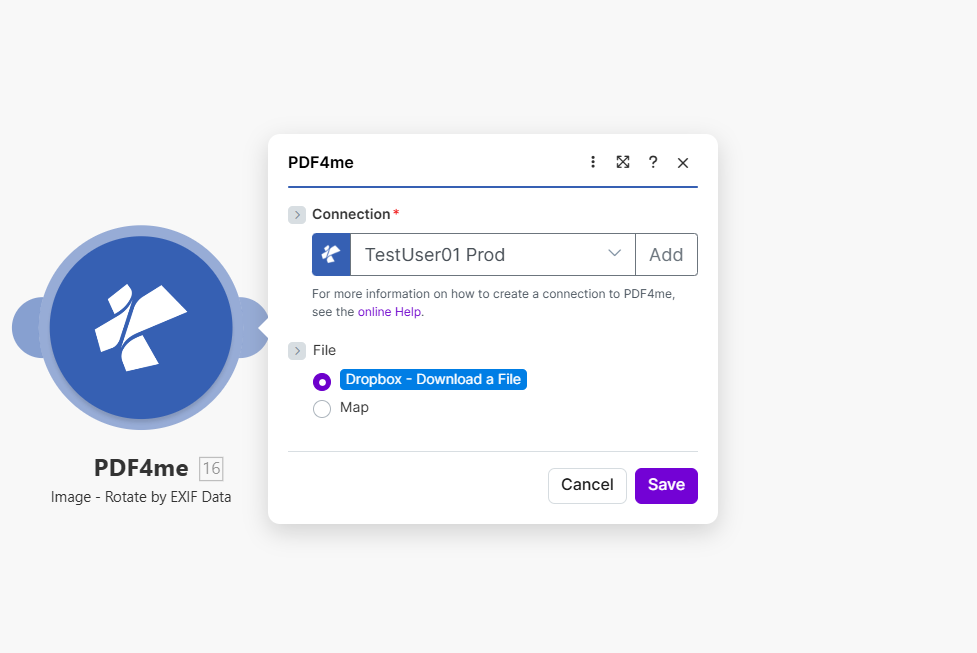
Petakan gambar sumber, atur Nama File Gambar dan Tipe Gambar. Modul membaca EXIF Tag orientasi dan memutar gambar secara otomatis.
Parameter apa yang digunakan untuk memutar? EXIF Butuh Data?
Diperlukan: Informasi koneksi, file, nama file gambar, dan tipe gambar harus disertakan.
| Parameter | Diperlukan | Apa fungsinya? | Contoh |
|---|---|---|---|
| Connection | Required | PDF4me API connection. Click Add and paste your API key the first time. Reused automatically across all PDF4me modules in your scenarios. | My PDF4me connection |
| File | Required | Binary content of the source image. Map from Dropbox, Google Drive, HTTP, or any previous module that outputs image binary data. | 1. Data |
| Image File Name | Required | Filename of the image with extension. Map from the previous module output or set explicitly. | photo.jpg |
| Image Type | Required | Format of the source image. Must match the actual file: JPG for JPEG images, PNG for PNG images. | JPG |
Keluaran
| Bidang | Jenis | Isi di dalamnya |
|---|---|---|
Image Name | String | Output image filename with corrected orientation. |
Image Data | Buffer | The image with EXIF-based rotation already applied, ready for upload or downstream processing. |
Pengaturan Umum
Contoh Alur KerjaCommon Make scenario patterns using Rotate by EXIF Data.
- Fitur "Watch Files" Dropbox akan aktif ketika foto baru masuk ke folder unggahan.
- Iterator memproses setiap gambar baru jika unggahan dilakukan secara batch.
- Opsi "Rotate by EXIF Data" mengoreksi orientasi menggunakan tag EXIF milik gambar itu sendiri.
- Langkah Unggah Dropbox menyimpan gambar yang telah dikoreksi ke folder perpustakaan foto utama.
- Langkah pembaruan indeks katalog menyegarkan daftar perpustakaan dengan file yang telah dikoreksi.
- Sebuah pemicu akan aktif ketika foto produk baru diunggah untuk toko online.
- Fungsi Rotate by EXIF Data mengoreksi orientasi sebelum perubahan ukuran atau kompresi terjadi di tahap selanjutnya.
- Langkah Kompres Gambar secara opsional mengurangi ukuran file untuk pemuatan halaman yang lebih cepat.
- Langkah Unggah ke CDN mempublikasikan gambar yang telah dikoreksi dan dioptimalkan.
- Langkah pembaruan catatan produk menghubungkan URL gambar yang telah dikoreksi ke daftar produk.
- Aplikasi inspeksi seluler mengunggah foto yang diambil di lapangan ke folder bersama.
- Fitur Putar berdasarkan Data EXIF mengoreksi gambar yang miring atau terbalik yang diambil saat bergerak di sekitar lokasi.
- Gambar yang telah dikoreksi disematkan ke dalam laporan PDF menggunakan modul pembuatan dokumen.
- Laporan yang sudah selesai diunggah ke arsip inspeksi bersama.
- Notifikasi email memberi tahu manajer peninjau bahwa laporan sudah siap.
Tips Praktis
Lembar Panduan Singkat
| Bidang | Nilai |
|---|---|
| Module | Rotate by EXIF Data |
| Connection | PDF4me API key |
| File | Binary image content from a previous module |
| Image File Name | filename.jpg or filename.png |
| Image Type (JPEG) | JPG |
| Image Type (PNG) | PNG |
| Rotation angle input | None needed, read from EXIF tag automatically |
| Output fields | Image Name, Image Data |
Pertanyaan yang Sering Diajukan
Studi Kasus & Aplikasi Industri
- Photography & Media
- E-Commerce & Retail
- Real Estate & Property
- Document Processing
- Perpustakaan Foto: Orientasi yang benar dalam koleksi foto
- Foto Stok: Siapkan gambar untuk perpustakaan stok
- Fotografi Acara: Perbaiki orientasi pada kumpulan foto acara
- Koreksi PotretPastikan orientasi potret sudah benar.
- Foto Produk: Orientasi gambar produk yang benar
- Gambar Katalog: Siapkan gambar untuk katalog
- Foto Daftar: Perbaiki orientasi untuk daftar di marketplace
- Gambar GaleriPastikan tampilan yang benar di galeri
- Foto Properti: Orientasi foto listing yang benar
- Tur VirtualPerbaiki orientasi gambar tur
- Foto InspeksiSiapkan gambar inspeksi.
- Materi Pemasaran: Orientasi foto pemasaran yang benar
- PDF Penciptaan: Koreksi gambar terlebih dahulu PDF penyematan
- Laporkan GambarPerbaiki orientasi pada grafik laporan.
- Grafik PresentasiSiapkan gambar untuk presentasi.
- Dokumentasi: Tangkapan layar dan diagram yang benar