Google Docs templat di Make
Yang Google Docs keluarga adalah sebuah Make Opsi Hasilkan Dokumen Tunggal yang menggunakan templat yang dirancang di Google Docs dan diekspor sebagai .docxIni menggabungkan dokumen yang diekspor, yang membawa placeholder bergaya kumis, dengan dokumen Anda. JSON data dan output a PDF atau Word berkas. Pilih ini saat tim Anda membuat templat di Google Docs.
Sebelum Anda Mulai
templat google-docs.docx sudah diekspor dan siap.google-docs-data.json (direkomendasikan), test.xml, atau test.csvNama-nama placeholder sesuai dengan kunci data.Paket File Sampel
Unduh file di bawah ini. Satu Google Docs templat ditambah data yang cocok di JSON, XML, Dan CSV.
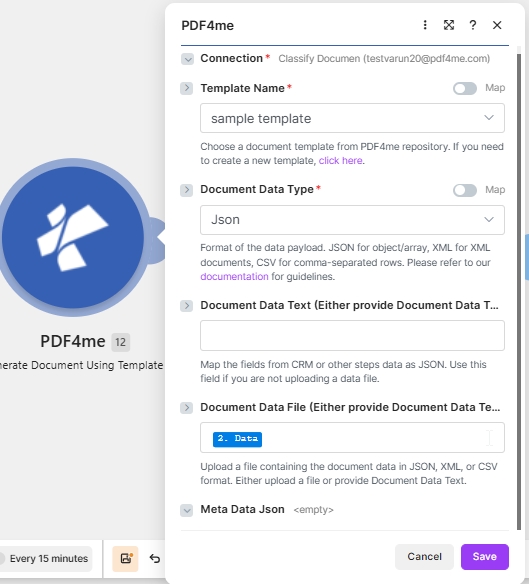
Konfigurasi target: Google Docs ekspor .docx + JSON di dalam Teks Data Dokumen + PDF Keluaran.
Apakah yang Google Docs templat templat di Make?
Yang Google Docs Keluarga memungkinkan Anda membuat templat di Google Docs, ekspor sebagai .docx, dan gabungkan dengan data di MakeKarena file yang diekspor adalah sebuah .docxAnda memilih PDF4me Word Template sebagai Tipe File Template. Ini adalah opsi paling sederhana untuk tim yang lebih menyukai Google Workspace lebih Microsoft Word untuk desain templat.
Bagaimana cara mengkonfigurasinya? Google Docs templat di Make?
Atur kolom modul seperti di bawah ini. Kolom yang wajib diisi ditandai dengan tanda bintang merah. Make UI.
| Parameter | Diperlukan | Apa fungsinya? | Contoh |
|---|---|---|---|
| Connection | Required | PDF4me connection for the scenario. Click Add to create one with your API key. | My PDF4me connection |
| Template File Type | Required | Set to PDF4me Word Template for this template family. | PDF4me Word Template |
| Output Type | Required | Format of the generated document. PDF for a locked file or Word for an editable one. | PDF |
| Template Name | Required | Template file name including extension. Map from the prior module file name output. | google-docs-template.docx |
| Template | Required | Template file binary. Map from the prior module data output (for example 1. Data from Dropbox Download a File). | 1. Data |
| Document DataType | Required | Choose Json for JSON payloads (most common) or Xml when the upstream system returns XML. | Json |
| Document Data Text | Conditional | Inline JSON or XML data. Use when Document Data File is empty. | google-docs-data.json |
| Document Data File | Conditional | Mapped data file from a prior module. Use when Document Data Text is empty. | 1. Data |
Keluaran
Modul ini mengembalikan satu bundel per eksekusi. File yang dihasilkan ditempatkan di... Tanggal Dokumen kolom keluaran.
| Bidang | Jenis | Isi di dalamnya |
|---|---|---|
Doc Data | Binary | The generated PDF document. Map into a downstream Upload File or Send Email Attachment module. |
File Name | String | Output filename based on Template Name with the extension matching Output Type. |
Mime Type | String | MIME type of the generated document. |
Pola produksi
Buat pola umum untuk templat Google DocsReplace the manual test with these once the sample works.
- Dropbox atau Google Drive toko
templat google-docs.docx. - Mengunduh File akan memuat templat sebagai data biner.
- Hasilkan Dokumen Peta Tunggal Nama Templat dan Templat.
- Data dibangun dari Sheets atau webhook sebagai JSON.
- Webhook menerima muatan data.
- Generate Document Single menggabungkannya dengan templat.
- Tipe Output adalah PDF.
- Kirim Email atau Unggah File akan mengirimkan Data Dokumen.
- Pencarian data menghasilkan banyak baris.
- Iterator mengulang satu catatan dalam satu waktu.
- Fungsi Generate Document Single dijalankan sekali per record.
- Setiap file diunggah ke folder khusus untuk setiap catatan.
Pertanyaan yang Sering Diajukan
Panduan Terkait
Untuk mesin templat yang mendasarinya, lihat Kata-kata Aspose untuk .NET dokumentasi dan Make referensi struktur data.