Menguraikan Dokumen di Make
PDF4me Menguraikan Dokumen menjalankan templat parse yang Anda simpan terhadap PDF di dalam Make skenario dan mengembalikan bidang yang diekstrak siap untuk dipetakan ke modul berikutnya. Salurkan Konten File dari Dropbox, Google Drive, OneDrive, atau HTTP, merujuk pada templat dengan Nama Templat (TemplateId), dan mengarahkan nilai yang telah diurai langsung ke Airtable, Google Sheets, basis data, atau email selanjutnya. Templat tersebut membawa logika ekstraksi, sehingga satu panggilan modul mencakup faktur, kontrak, tanda terima, dan tata letak khusus apa pun yang telah Anda konfigurasi.
Sebelum Anda menjalankan modul ini: buat templat parse di PDF4me Dasbor. Tentukan kunci tangkapan Anda dan pilih Ekspresi Regex untuk pola yang stabil atau JavaScript Ekspresi untuk logika kondisional. Itu Make modul merujuk pada templat tersebut dengan ID Templat. Melihat Siapkan Informasi Penguraian untuk Dokumen Untuk pengaturan lengkap, contoh Regex (INV-\d{6,10}, \d{2}/\d{2}/\d{4}), dan dua pekerja JavaScript Contoh pengklasifikasi ekspresi.
Memverifikasi Identitas Anda API Meminta
Yang PDF4me modul di Make memerlukan validitas KoneksiBuat atau pilih salah satu yang sesuai dengan kebutuhan Anda. PDF4me API kunci agar skenario dapat mengautentikasi dan mengurai permintaan dengan aman.
Fakta Penting yang Tidak Boleh Anda Lewatkan
teks variabel untuk klasifikasi dan aturan cadangan.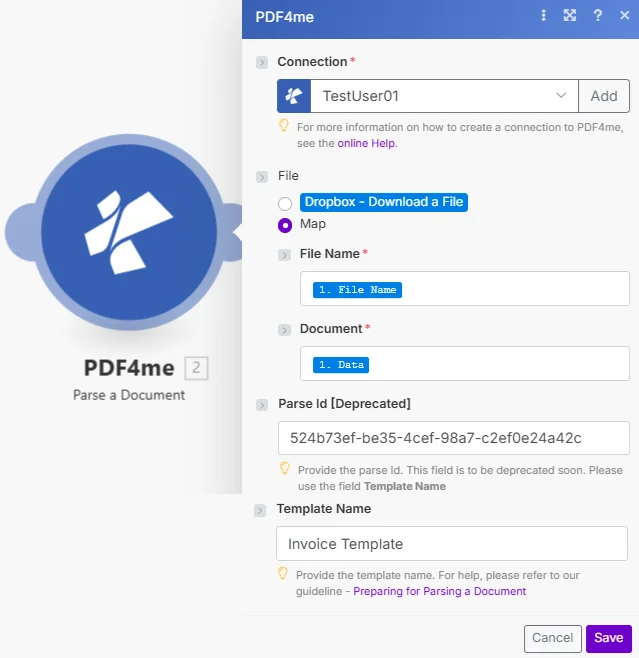
Parameter
| Parameter | Diperlukan | Apa fungsinya? | Contoh |
|---|---|---|---|
| Connection | Yes | PDF4me connection that authenticates the module. Click Add to create one with your API key, or pick an existing connection from the dropdown. | PDF4me production |
| File Content | Yes | Binary PDF mapped from a previous module: Dropbox Download a File, Google Drive Get a File, OneDrive Download a File, HTTP Get a File, Gmail Get an Attachment, or any module that returns a file. | 1. Data |
| File Name | Yes | Source filename including .pdf extension. Usually mapped from the same upstream module File Name output. | 1. File Name |
| Template Name | Yes | TemplateId GUID from the PDF4me dashboard. Identifies which parse template (capture keys + extraction rules) the module should apply. | 12345678-1234-1234-1234-123456789abc |
Jenis ekspresi dalam templat parse Anda
Ekspresi RegexPola yang stabilINV-\d{6,10}), tanggal (\d{2}/\d{2}/\d{4}), jumlah ($?\d{1,3}(?:,\d{3})*(?:.\d{2})?). Sekitar 80% kunci pengambilan produksi.Ekspresi JavaScriptLogika kondisional dan pengklasifikasiteks; mengembalikan string. Klasifikasi multi-marker, aturan cadangan, normalisasi tanggal. Lihat Siapkan Informasi Penguraian untuk Dokumen untuk dua sampel kerja.Keluaran
Modul tersebut mengembalikan satu Bundel per eksekusi dengan pengidentifikasi jejak ditambah data kunci/nilai yang diuraikan siap untuk dipetakan ke modul berikutnya.
| Bidang | Isi di dalamnya |
|---|---|
Trace-Id | Unique identifier for the parse operation. Useful for audit logs and error troubleshooting. |
Parsed fields | One field per capture key defined in the template (for example invoiceNumber, totalAmount, invoiceDate). Pick them directly in the visual mapper of any downstream module. |
Contoh skenario
Pola skenario Make yang umumTypical ways to chain Parse a Document into a Make flow.
- Gmail Watch Emails mengirimkan notifikasi saat ada faktur vendor baru.
- Iterator berulang melalui setiap PDF lampiran.
- Fungsi Parse a Document menjalankan templat Faktur terhadap lampiran biner.
- Fungsi "Buat Rekaman" di Airtable akan menulis invoiceNumber, totalAmount, dan invoiceDate ke dalam tabel AP.
- Dropbox Watch Files akan aktif saat ada unggahan baru di /receipts.
- Dropbox Download a File memuat setiap file PDF biner.
- Menguraikan Dokumen mengekstrak vendor, tanggal, item, dan total menggunakan templat Tanda Terima.
- Fitur Tambah Baris di Google Sheets menambahkan nilai yang telah diuraikan ke pelacak pengeluaran.
- HTTP Webhook menerima permintaan masuk. PDF.
- Mengurai Dokumen menjalankan templat dengan JavaScript Ekspresi kunci yang mengembalikan tipe dokumen.
- Router menghubungkan cabang berdasarkan kolom tipe (faktur/pesanan/kwitansi) ke cabang hilir yang spesifik untuk tipe tersebut.
- Setiap cabang mengirimkan nilai yang telah diuraikan ke sistem tujuannya masing-masing.