Perbarui Baris di Excel - Pengubah Data untuk Make
PDF4me Perbarui Baris di Excel adalah sebuah Make Modul yang memodifikasi baris yang sudah ada dalam buku kerja .xlsx atau .xls menggunakan JSON Array, yang secara otomatis mencocokkan nama properti dengan header kolom. Gunakan untuk menyinkronkan perubahan basis data, menyegarkan dasbor, atau memperbarui. CRM catatan di Excel tanpa menyisipkan atau menghapus baris.
Fungsi modul ini
PDF4me Perbarui Baris di Excel memodifikasi sel dalam baris yang ada menggunakan JSON array, tanpa menyisipkan atau menghapus baris. Nama properti di setiap JSON Objek dicocokkan dengan header kolom secara otomatis, dengan opsi konversi otomatis string ke angka atau tanggal, penguraian khusus budaya, pemformatan tanggal/angka khusus, dan kontrol atas cara penanganan nilai null.
Bagaimana Cara Saya Mengautentikasi Saya? Make Skenario?
Setiap PDF4me modul di Make memerlukan validitas KoneksiBuat atau pilih salah satu yang sesuai dengan kebutuhan Anda. PDF4me API kunci agar skenario dapat diautentikasi Excel Pembaruan baris dilakukan dengan aman.
Fakta Penting yang Tidak Boleh Anda Lewatkan
[{"Name":"John"}]Objek polos tanpa tanda kurung akan menyebabkan kesalahan.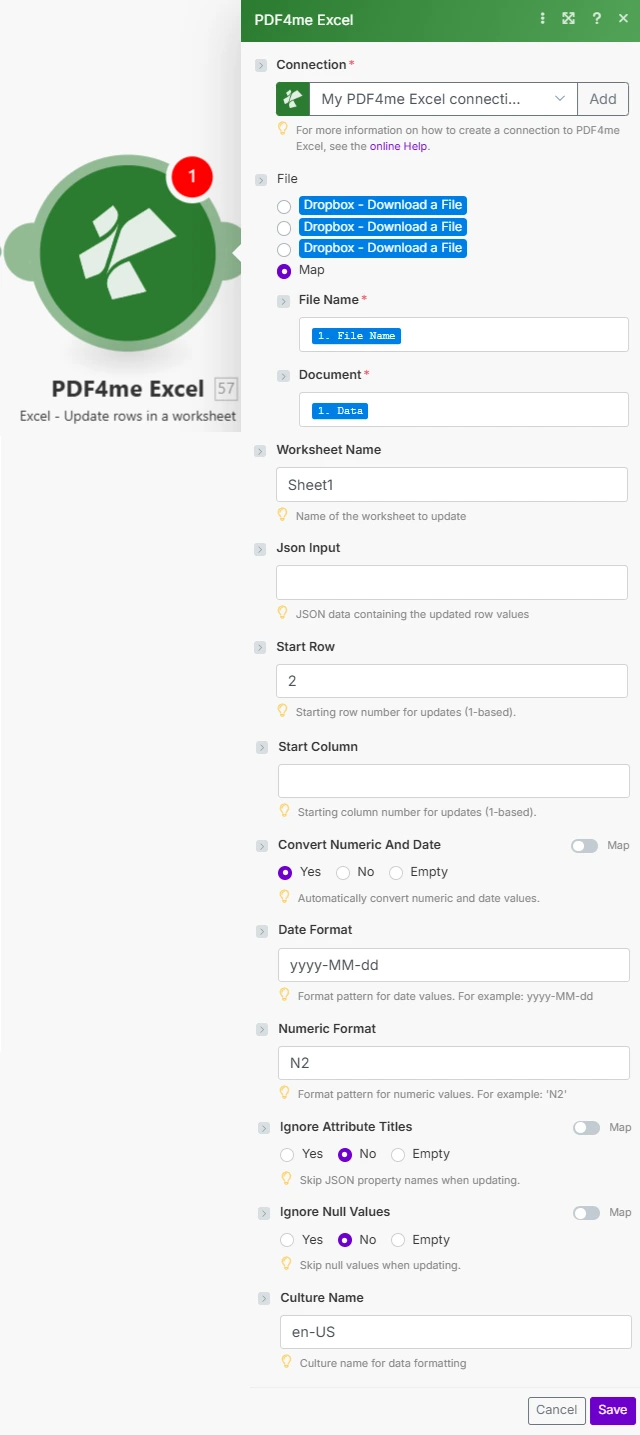
Atur File ke Map, hubungkan Nama File dan Dokumen dari modul sebelumnya, lalu berikan Input Json dan opsi konversi baris/tipe.
Parameter
Diperlukan: Informasi koneksi, nama file, dokumen, dan input JSON harus diberikan. Json Input pastilah JSON Array objek, objek tunggal tidak didukung. Semua parameter lainnya bersifat opsional dan menggunakan nilai default modul jika dibiarkan kosong.
| Parameter | Diperlukan | Apa fungsinya? | Contoh |
|---|---|---|---|
| Connection | Required | PDF4me API connection. Click Add and paste your API key if connecting for the first time. | My PDF4me Excel connection |
| File Name | Required | Filename of the Excel workbook including extension, used for output file identification. | sales_data.xlsx |
| Document | Required | Excel file buffer mapped from a preceding module such as Dropbox Download a File or Google Drive. | [Buffer from Get File] |
| Worksheet Name | Optional | Name of the worksheet to update. Defaults to Sheet1 if left blank. Worksheet matching is case-sensitive. | Sheet1 |
| Json Input | Required | JSON array of objects, one object per row to update. Property names are matched to column headers automatically. | [{"Product":"Widget","Price":55.99}] |
| Start Row | Optional | 1-based row number where updates begin. Row 1 is usually the header row, so data updates typically start at row 2. | 2 |
| Start Column | Optional | 1-based column offset used for header matching, allows skipping initial columns. | 1 |
| Convert Numeric And Date | Optional | Yes converts JSON strings to Excel numbers and dates using Date Format and Numeric Format. No writes values as-is. | Yes |
| Date Format | Optional | Excel date format pattern applied when Convert Numeric And Date is Yes. | yyyy-MM-dd |
| Numeric Format | Optional | Excel numeric format pattern applied when Convert Numeric And Date is Yes. | N2 |
| Ignore Attribute Titles | Optional | Yes makes JSON property name matching case-insensitive against column headers. | No |
| Ignore Null Values | Optional | Yes skips updating any cell whose JSON value is null, preserving the existing cell content. No overwrites it as empty. | No |
| Culture Name | Optional | Culture code used to parse incoming date and number strings before conversion, important for international data. | en-US |
Bidang Keluaran
| Bidang | Jenis | Isi di dalamnya |
|---|---|---|
Name | String | Output Excel filename, matches the File Name input. |
Doc Data | Buffer | The Excel document with the modified rows, in buffer format, ready to upload or attach. |
Bagaimana Cara Mengatur Pembaruan Baris di Make?
- Menambahkan PDF4me → Memperbarui baris dalam lembar kerja untuk Anda Make skenario.
- Pilih Koneksi (atau klik) Menambahkan untuk membuat satu dengan milikmu PDF4me API kunci).
- Di bawah Mengajukan, memilih Peta dan kawat Nama File Dan Dokumen dari modul sebelumnya (Dropbox, Google Drive, atau HTTP).
- Mengatur Nama Lembar Kerja jika bukan Sheet1.
- Bangun Input JSON array sehingga nama properti setiap objek sesuai dengan header kolom Anda, satu objek per baris untuk diperbarui.
- Mengatur Baris Awal ke baris data pertama (biasanya
2jika baris 1 berisi header). - Memungkinkan Konversi Angka dan Tanggal dan mengatur Format Tanggal / Format Numerik jika milikmu JSON nilai adalah string yang seharusnya menjadi Excel angka atau tanggal. Jalankan skenario, buku kerja yang diperbarui akan dikembalikan sebagai buffer.
Pengaturan Umum
Contoh Alur KerjaCommon Make scenario patterns using Update Rows in Excel.
- Pemicu terjadwal berjalan pada interval tetap untuk mengambil data yang berubah sejak sinkronisasi terakhir.
- A SQL pertanyaan atau API format panggilan mengubah catatan yang telah diubah menjadi JSON array yang sesuai dengan judul kolom lembar kerja.
- Get File mengambil master Excel Laporan dapat diunggah ke Dropbox atau Google Drive.
- Update Rows menulis nilai baru mulai dari Baris Awal 2, dengan opsi Konversi Numerik dan Tanggal diaktifkan.
- Buku kerja yang telah diperbarui diunggah kembali ke lokasi yang sama, menggantikan versi sebelumnya.
- Webhook akan aktif ketika sebuah CRM Catatan peluang telah diperbarui.
- Skenario tersebut membangun sebuah JSON objek dengan tahapan, jumlah, dan tanggal penutupan yang diperbarui untuk peluang tersebut.
- Get File mengambil buku kerja pelacakan peluang.
- Update Rows memodifikasi baris yang sesuai, dengan Ignore Attribute Titles diatur ke Yes untuk pencocokan header yang fleksibel.
- Buku kerja yang telah diperbarui disimpan kembali ke penyimpanan bersama untuk tim penjualan.
- Suatu peristiwa sistem inventaris dipicu ketika jumlah stok berubah untuk satu atau lebih SKU.
- Skenario tersebut memformat SKU dan kuantitas yang diubah menjadi sebuah JSON susunan.
- Get File mengambil buku kerja inventaris utama dari SharePoint.
- Update Rows menuliskan level stok saat ini, dengan Ignore Null Values diatur ke Yes untuk mempertahankan kolom yang tidak terkait.
- Buku kerja inventaris yang diperbarui disimpan kembali ke SharePoint untuk visibilitas gudang.
Tips Praktis
Lembar Panduan Singkat
| Bidang | Nilai |
|---|---|
| Module | Update Rows in a worksheet |
| Connection | PDF4me API key |
| Default worksheet | Sheet1 |
| Json Input shape | [{"Column":"Value"}, ...] (array, always) |
| Typical Start Row | 2 (skips header row) |
| Type conversion toggle | Convert Numeric And Date = Yes |
| Default date/numeric format | yyyy-MM-dd / N2 |
| Default culture | en-US |
Pertanyaan Umum
Studi Kasus & Aplikasi Industri
- Sales & Marketing
- Finance & Accounting
- Human Resources
- Operations & Supply Chain
- CRM Pembaruan Peluang: Ubah baris peluang di Excel dengan status terbaru, jumlah, dan tanggal penutupan.
- Pembaruan Kinerja KampanyePerbarui baris metrik kampanye dengan tayangan, klik, dan konversi terkini.
- Pembaruan Skor Prospek: Perbarui data penilaian prospek di Excel lembar pelacakan dari otomatisasi pemasaran
- Sinkronisasi Basis Data Pelanggan: Perbarui baris data pelanggan dengan informasi kontak terbaru dan riwayat pembelian
- Pembaruan Prakiraan Penjualan: Ubah baris perkiraan dengan data pipeline yang diperbarui dan probabilitas kemenangan
- Pembaruan TransaksiUbah baris transaksi dengan jumlah, tanggal, atau kode akun yang telah dikoreksi.
- Pembaruan Saldo Akun: Perbarui baris saldo akun dengan saldo terkini dari sistem akuntansi
- Pembaruan Pelacakan Anggaran: Ubah baris pengeluaran aktual dalam templat anggaran vs. aktual
- Pembaruan Laporan PengeluaranPerbarui baris pengeluaran dengan status persetujuan dan jumlah penggantian.
- Pembaruan Status Faktur: Memperbarui baris faktur dengan status pembayaran dan tanggal dari sistem penagihan
- Pembaruan Catatan Karyawan: Memodifikasi data karyawan dengan promosi, perubahan gaji, dan transfer departemen
- Pembaruan KehadiranPerbarui baris kehadiran dengan waktu masuk/keluar yang benar dan penggunaan cuti.
- Pembaruan Skor KinerjaPerbarui baris skor ulasan dengan peringkat dan kemajuan tujuan yang diperbarui.
- Pembaruan Pendaftaran Manfaat: Ubah baris pendaftaran dengan pilihan paket dan perubahan tanggungan
- Pembaruan Status PelatihanPerbarui baris penyelesaian pelatihan dengan tanggal dan status sertifikasi.
- Pembaruan Tingkat Persediaan: Memodifikasi baris tingkat stok dengan pembaruan kuantitas secara real-time dari gudang
- Pembaruan Status Pesanan: Perbarui baris pesanan dengan status pemenuhan dan pengiriman terkini
- Pembaruan ProduksiPerbarui baris proses produksi dengan output aktual, waktu henti, dan metrik kualitas.
- Pembaruan PemasokUbah baris pemasok dengan informasi kontak, waktu tunggu, dan harga yang diperbarui.
- Pembaruan Status PeralatanPerbarui baris peralatan dengan tanggal perawatan dan status operasional.