Perbarui Hyperlink - Pengelola Tautan untuk Make
PDF4me Perbarui Tautan Hyperlink adalah sebuah Make modul yang mencari yang sudah ada PDF tautan hiperteks atau teks URL dan menggantinya secara massal, tanpa menyentuh bagian dokumen lainnya. Gunakan untuk memperbaiki tautan yang rusak, melakukan migrasi. URLs setelah restrukturisasi situs web, atau memperbarui branding di sejumlah besar PDFs.
Fungsi modul ini
PDF4me Perbarui Tautan Hyperlink mencari PDFtautan hiperteks yang ada berdasarkan teks yang terlihat atau URL, lalu mengganti kecocokan secara massal. Setiap item Hyperlink dapat menargetkan teks atau URL, mengganti sebagian atau seluruh nilai, dan secara opsional memperlakukan nilai pencarian sebagai ekspresi reguler untuk pencocokan berbasis pola di banyak tautan sekaligus.
Bagaimana Cara Saya Mengautentikasi Saya? Make Skenario?
Setiap PDF4me modul di Make memerlukan validitas KoneksiBuat atau pilih salah satu yang sesuai dengan kebutuhan Anda. PDF4me API kunci agar skenario tersebut dapat mengautentikasi permintaan pembaruan hyperlink secara aman.
Fakta Penting yang Tidak Boleh Anda Lewatkan
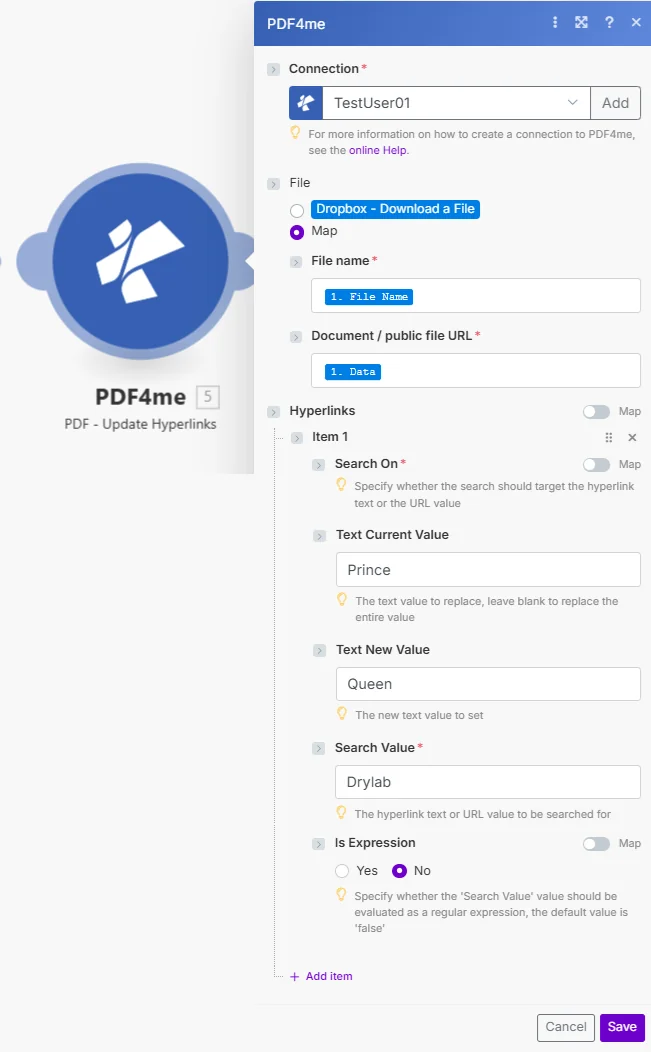
Atur File ke Peta, hubungkan nama File dan URL Dokumen/file publik, lalu tambahkan satu item Hyperlink per pola tautan untuk memperbarui.
Parameter
Diperlukan: Koneksi, Nama File, URL Dokumen/file publik, dan setidaknya satu item Hyperlink dengan Pencarian Aktif dan Nilai Pencarian harus disediakan. Nilai Teks Saat Ini, Nilai Teks Baru, dan Ekspresi Is bersifat opsional untuk setiap item.
| Parameter | Diperlukan | Apa fungsinya? | Contoh |
|---|---|---|---|
| Connection | Required | PDF4me API connection. Click Add and paste your API key if connecting for the first time. | My PDF4me connection |
| File Name | Required | Filename of the source PDF including extension, used for output file identification. | brochure.pdf |
| Document / public file URL | Required | Binary PDF content mapped from a preceding module, or a public URL to the file. | [Buffer from Get File] |
| Hyperlinks > Search On | Required | Whether this item searches the hyperlink text or the URL value. | Text |
| Hyperlinks > Text Current Value | Optional | The text or URL substring to replace. Leave blank to replace the entire matched value. | Prince |
| Hyperlinks > Text New Value | Optional | The new text or URL value to set in place of the match. | Queen |
| Hyperlinks > Search Value | Required | The hyperlink text or URL value to search for in the document. | Drylab |
| Hyperlinks > Is Expression | Optional | Yes evaluates Search Value as a regular expression instead of a literal match. Defaults to No. | No |
Bidang Keluaran
| Bidang | Jenis | Isi di dalamnya |
|---|---|---|
Name | String | Output PDF filename with updated hyperlinks. |
Doc Data | Buffer | The PDF document with modified links, in buffer format, ready to upload or attach. |
Bagaimana Cara Saya Mengatur Pembaruan Hyperlink di Make?
- Menambahkan PDF4me → PDF - Perbarui tautan untuk Anda Make skenario.
- Pilih Koneksi (atau klik) Menambahkan untuk membuat satu dengan milikmu PDF4me API kunci).
- Di bawah Mengajukan, memilih Peta dan kawat Nama File Dan URL dokumen/file publik dari modul sebelumnya.
- Klik Tambahkan item di bawah Tautan hiper untuk setiap pola tautan yang ingin Anda perbarui.
- Mengatur Cari di ke
TextatauURL, lalu isi Nilai Pencarian dengan apa yang harus ditemukan. - Mengatur Nilai Teks Saat Ini (atau biarkan kosong untuk mengganti seluruh kecocokan) dan Teks Nilai Baru dengan penggantian tersebut.
- Mengatur Apakah Ekspresi ke
YesJika Nilai Pencarian adalah ekspresi reguler, maka jalankan skenario tersebut. Versi yang diperbarui PDF dikembalikan sebagai buffer.
Pengaturan Umum
Contoh Alur KerjaCommon Make scenario patterns using Update Hyperlinks.
- Pemicu terjadwal diaktifkan setiap bulan untuk meninjau publikasi. PDFs.
- Get File mengambil setiap PDF dari Dropbox atau Google Drive dalam sebuah loop Iterator.
- Pembaruan tautan hiperteks menggantikan tautan yang diketahui rusak atau dialihkan. URLs menggunakan satu item Hyperlink untuk setiap tautan yang diketahui bermasalah.
- Yang telah dikoreksi PDF diunggah kembali ke penyimpanan, menggantikan versi sebelumnya.
- Sebuah skenario akan terpicu setelah tim pemasaran mengkonfirmasi bahwa struktur situs baru telah aktif.
- Iterator memproses setiap PDF yang merujuk pada domain lama.
- Pembaruan Hyperlink mengaktifkan Pencarian URL, Apakah Ekspresi tersebut bernilai Ya, dan mencocokkan pola domain lama dengan pola domain baru dalam satu item.
- Diperbarui PDFs Data disimpan ke pustaka dokumen dan indeks pencarian diperbarui.
- Proyek rebranding memicu peninjauan ulang secara menyeluruh terhadap semua pemasaran. PDFs.
- Update Hyperlinks menjalankan beberapa item: satu untuk perubahan domain, satu untuk pegangan media sosial, dan satu untuk teks tautan email kontak.
- Setiap PDF diproses melalui konfigurasi Hyperlink yang sama dalam sebuah Iterator.
- Diubah mereknya PDFs diunggah ke folder materi yang telah diperbarui dan siap untuk didistribusikan.
Tips Praktis
Lembar Panduan Singkat
| Bidang | Nilai |
|---|---|
| Module | PDF - Update Hyperlinks |
| Connection | PDF4me API key |
| Search On options | Text or URL |
| Blank Text Current Value | Replaces the entire matched value |
| Is Expression | Yes = regex match, No = literal match (default) |
| Multiple updates | Add one Hyperlinks item per link pattern |
| Output | Name + Doc Data buffer |
Pertanyaan Umum
Studi Kasus & Aplikasi Industri
- Web Publishing & Content
- Marketing & Communications
- Documentation & Technical
- Corporate & Business
- Perbaikan Tautan Rusak: Perbarui hyperlink yang rusak di PDFs
- URL Migrasi: Mengubah URLs setelah restrukturisasi situs web
- Perubahan DomainPerbarui tautan setelah migrasi domain
- Pengalihan Pembaruan: Ganti pengalihan URLs dengan ujian akhir
- RebrandingPerbarui semua tautan yang terkait dengan merek.
- Pembaruan Kampanye: Ubah yang spesifik untuk kampanye URLs
- Tautan Media SosialPerbarui profil media sosial Anda URLs
- Informasi Kontak: Ubah tautan email dan situs web
- Pemeliharaan DokumentasiPastikan tautan dokumen teknis selalu diperbarui.
- API Pembaruan Referensi: Memperbarui API dokumentasi URLs
- Referensi Eksternal: Memelihara tautan sumber daya eksternal
- Pembaruan Versi: Ubah tautan ke dokumen versi baru
- Pembaruan Kebijakan: Perbarui tautan referensi kebijakan
- Tautan Intranet: Ubah portal internal URLs
- Tautan Sumber DayaPerbarui tautan sumber daya karyawan
- Tautan MitraUbah mitra dan vendor URLs