Buat Tagihan SwissQR di Make
Fungsi modul ini
PDF4me Buat Tagihan SwissQR menambahkan Swiss yang sesuai QR slip pembayaran tagihan ke rekening yang sudah ada PDF dokumen. Ini menambahkan bagian standar lengkap yang dipersyaratkan oleh Standar Pembayaran Swiss (ISO 20022) untuk pembuatan faktur di Swiss dan Liechtenstein. Berikan faktur Anda PDF, rincian kreditur dan debitur, IBAN, jumlah, dan referensi, dan modul tersebut mengembalikan dokumen yang sama dengan slip pembayaran terlampir. Setiap bank Swiss menerima output tersebut untuk memulai pembayaran melalui aplikasi perbankan seluler.
Memverifikasi Identitas Anda API Meminta
Setiap PDF4me modul di Make memerlukan validitas KoneksiBuat atau pilih salah satu yang sesuai dengan kebutuhan Anda. PDF4me API kunci agar skenario tersebut dapat mengautentikasi Swiss QR Pembuatan tagihan secara aman.
Fakta Penting yang Tidak Boleh Anda Lewatkan
Parameter
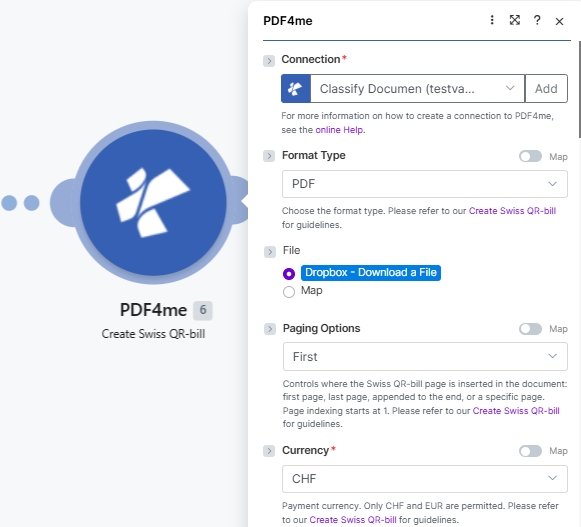
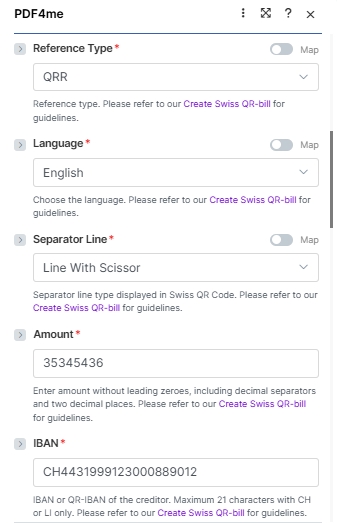
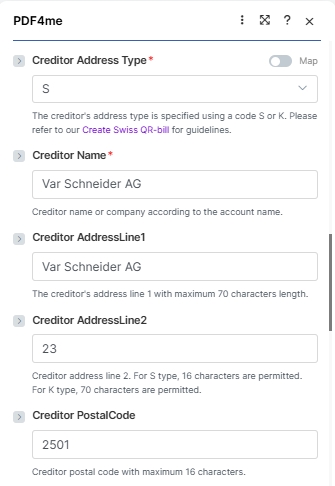
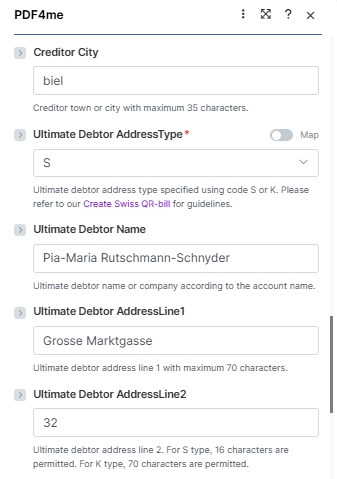
Modul ini menampilkan 26 bidang yang dikelompokkan menjadi empat blok logis: koneksi + file sumber, hal-hal penting pembayaran, blok kreditur, blok debitur, Dan referensi pembayaranTangkapan layar di bawah ini mencerminkan urutan kolom yang persis sama seperti pada Make UI.
Wajib (tanda bintang merah di dalam UI): Koneksi, Tipe Format, Opsi Penomoran Halaman, Mata Uang, Tipe Referensi, Bahasa, Garis Pemisah, Jumlah, IBAN, Jenis Alamat Kreditur, Nama Kreditur, Debitur Utama AddressType. Bersyarat: Nama File + Dokumen saat File diatur ke Map; Nomor Halaman hanya ketika Opsi Paging diatur ke Kustom (nomor halaman). Opsional: semua kolom alamat kreditur/debitur yang tersisa ditambah Referensi, Pesan Tidak Terstruktur, Info Penagihan, dan AV1/AV2 Parameter.
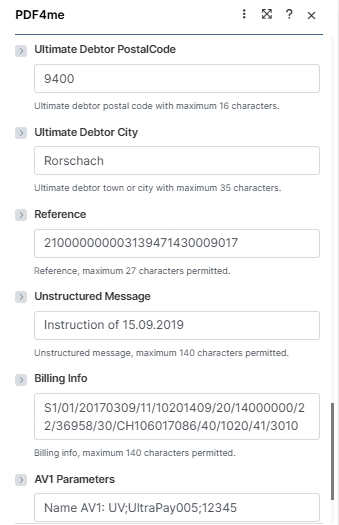
| Parameter | Diperlukan | Apa fungsinya? | Contoh |
|---|---|---|---|
| Connection | Yes | PDF4me connection. Click Add and paste your API key the first time, then reuse the connection across every PDF4me module. | test prod account |
| Format Type | Yes | Output container format. PDF for printable invoices and email attachments; PNG, JPEG, or TIFF for image output (no Paging Options applies in image modes). Empty falls back to the connector default. See the dropdown reference card below. | PDF |
| File | Conditional | How the source PDF arrives. Radio: Dropbox - Download a File (or any other storage module), PDF4me Dev - Create Swiss QR Bill (chain from a prior PDF4me action), or Map (bind File Name and Document from a prior module manually). Skip the source file entirely for a standalone payment slip. | Map |
| File Name | Conditional | Filename of the source PDF including .pdf extension. Required when File is set to Map. Mapped from the prior module File Name output. | 1. File Name |
| Document | Conditional | Binary content of the source PDF. Required when File is set to Map. Mapped from the prior module Data / binary output. | 1. Data |
| Paging Options | Yes | Where the Swiss QR-bill page is inserted (PDF Format Type only). Options: Empty (default), First (new page 1), Last (appended), Add page at the end (alias for Last), Custom (page number) (insert at the page number you supply in the Page Number field). See the dropdown reference card below. | Custom (page number) |
| Page Number | Conditional | The 1-based page number where the Swiss QR-bill is inserted. Required when Paging Options is Custom (page number); ignored for every other Paging Options value. Page indexing starts at 1. | 3 |
| Currency | Yes | Payment currency. Only CHF and EUR are permitted by the Swiss Payment Standards. | CHF |
| Reference Type | Yes | Format of the payment reference. QRR (Swiss QR Reference, 27-digit numeric, used with QR-IBAN), SCOR (ISO 11649 creditor reference), NON (no reference). | QRR |
| Language | Yes | Language for the printed QR-bill text (Payment part labels: Account / Payable to, Reference, Currency, Amount). German, French, Italian, English. | English |
| Separator Line | Yes | Separator line style displayed in the QR-bill section. Line With Scissor (line + scissor pictogram, standard print), Only Line (line, no pictogram), or No Line (eBill / e-invoice). Note: the Make UI labels the field "Seperator Line" (the engine accepts either spelling. | Line With Scissor |
| Amount | Yes | Payment amount in two decimal places without leading zeroes. Use the locale decimal separator your Culture & Language Settings expect. | 35345436 |
| IBAN | Yes | IBAN or QR-IBAN of the creditor. Maximum 21 characters with CH or LI country codes only. QR-IBAN required when Reference Type is QRR. | CH4431999123000889012 |
| Creditor Address Type | Yes | Address format for the creditor: S (Structured, separate PostalCode and City fields) or K (Combined, two free-text AddressLine fields). | S |
| Creditor Name | Yes | Creditor name or company according to the bank account. Maximum 70 characters. | Var Schneider AG |
| Creditor AddressLine1 | No | Creditor primary address line. Maximum 70 characters. | Var Schneider AG |
| Creditor AddressLine2 | No | Creditor secondary address line. 16 characters when address type is S; 70 characters when type is K. | 23 |
| Creditor PostalCode | No | Creditor postal code. Maximum 16 characters. | 2501 |
| Creditor City | No | Creditor town or city. Maximum 35 characters. | biel |
| Ultimate Debtor AddressType | Yes | Address format for the debtor: S (Structured) or K (Combined). Same rules as Creditor Address Type. | S |
| Ultimate Debtor Name | No | Debtor name or company according to the bank account. Maximum 70 characters. | Pia-Maria Rutschmann-Schnyder |
| Ultimate Debtor AddressLine1 | No | Debtor primary address line. Maximum 70 characters. | Grosse Marktgasse |
| Ultimate Debtor AddressLine2 | No | Debtor secondary address line. 16 characters (S) or 70 characters (K). | 32 |
| Ultimate Debtor PostalCode | No | Debtor postal code. Maximum 16 characters. | 9400 |
| Ultimate Debtor City | No | Debtor town or city. Maximum 35 characters. | Rorschach |
| Reference | No | Payment reference number. Maximum 27 characters. Format depends on Reference Type (QRR: 27-digit numeric with mod-10 check; SCOR: ISO 11649; NON: leave empty). | 210000000003139471430009017 |
| Unstructured Message | No | Free-text payment description shown in the Additional information block. Maximum 140 characters. | Instruction of 15.09.2019 |
| Billing Info | No | Structured billing information (Swico, etc) shown alongside the Unstructured Message. Maximum 140 characters. | S1/01/20170309/11/10201409/20/14000000/22/36958/30/CH106017086/40/1020/41/3010 |
| AV1 Parameters | No | Alternative scheme parameter 1 (e.g. eBill identifier). Maximum 100 characters. Convention: "Name AV1: UV;…". | Name AV1: UV;UltraPay005;12345 |
| AV2 Parameters | No | Alternative scheme parameter 2. Maximum 100 characters. Same convention as AV1 when a second alternative scheme is required. | Name AV2: XY;Service002;67890 |
Opsi Jenis Format
Yang Make UI Menampilkan 5 nilai. Pilih PDF untuk faktur yang dapat dicetak dan lampiran email; format gambar berguna saat Anda menyematkan QR menyelipkan diri ke dalam templat PDF nanti atau tampilkan langsung di dalam isi email.
PDFPNGJPEGTIFFEmptyReferensi Opsi Paging
Hanya berlaku jika Tipe Format adalah PDF. Jenis Format Gambar (PNG, JPEG, TIFF) Abaikan Opsi Penomoran Halaman karena tidak ada dokumen multi-halaman untuk disisipkan.
FirstLastAdd page at the endCustom (page number)EmptyPengaturan Cepat
- Menambahkan PDF4me ke Buat Tagihan SwissQR di dalam dirimu Make skenario.
- Pilih Koneksi (atau klik) Menambahkan untuk membuat satu dengan milikmu API kunci).
- Mengatur Jenis Format ke
PDF(atauPNG/JPEG/TIFF(untuk keluaran gambar). Atur Opsi Paging keFirst,Last,Add page at the end, atauCustom (page number)Jika Anda memilih Kustom (nomor halaman), juga isi Nomor Halaman dengan indeks berbasis 1 di mana slip tersebut seharusnya berada (misalnya,3). - Mengatur Mengajukan ke modul penyimpanan seperti Dropbox - Unduh Fileatau pilih Map dan mengikat Nama File Dan Dokumen dari langkah sebelumnya. Lewati grup File sepenuhnya untuk versi mandiri. QR terpeleset.
- Isilah kolom pembayaran yang diperlukan dengan nilai dari tangkapan layar di atas: Mata uang (
CHFatauEUR), Jenis Referensi (QRR), Bahasa (English), Garis Pemisah (Line With Scissor), Jumlah, IBAN (maksimal 21 karakter, CH atau LI), Jenis Alamat Kreditur (SatauK), Nama Kreditur, Dan Debitur Utama AddressType. - Tambahkan kolom alamat kreditur dan debitur, lalu (opsional) isi Referensi, Pesan Tidak Terstruktur, Informasi Penagihan, Dan AV1 / AV2 Parameter untuk data pembayaran yang lebih lengkap.
- Simpan dan jalankan. Output modul
Doc Databerisi sumber PDF dengan orang Swiss QR-halaman tagihan disisipkan pada posisi yang dipilih pada langkah 3 (atau terpisah) QR (kesalahan terjadi ketika tidak ada file sumber yang diberikan).
Contoh Alur Kerja
Contoh Alur KerjaCommon Make scenario patterns using Create SwissQR Bill.
- Penambahan baris baru ke register faktur Google Sheets memicu skenario ini.
- Google Drive mengunduh faktur kosong. PDF templat.
- Buat SwissQR Bill memetakan semua kolom pembayaran, termasuk Jumlah, IBAN, Referensi, dan detail Kreditur dan Debitur, langsung dari kolom lembar kerja.
- Gmail mengirimkan faktur yang sudah selesai dengan tanda tangan Swiss. QR Tagihan terlampir pada alamat email pelanggan yang tertera di lembar tersebut.
- Pemicu terjadwal berjalan pada tanggal 1 setiap bulan.
- Airtable menampilkan semua catatan langganan aktif.
- Iterator memproses setiap pelanggan secara individual. Buat Tagihan SwissQR menghasilkan faktur yang dipersonalisasi dengan jumlah langganan, detail pelanggan yang dipetakan sebagai Debitur Utama, dan Referensi unik untuk setiap catatan.
- Gmail mengirimkan faktur kepada setiap pelanggan. Airtable diperbarui dengan stempel waktu pengiriman.
- Webhook akan aktif ketika faktur disetujui di ERP sistem.
- HTTP mengunduh faktur yang telah disetujui PDF.
- Buat Tagihan SwissQR yang melampirkan slip pembayaran menggunakan ERP-disediakan IBAN, jumlah, dan nomor referensi.
- Faktur yang telah selesai diunggah ke SharePoint folder piutang dan tim akuntansi diberitahu melalui Microsoft Teams.