Membuat Faktur Elektronik ZUGFeRD 2.0+ di Make: Alur Kerja Dropbox 4 Modul
ZUGFeRD 2.0+ (juga dikenal sebagai Faktor-X di Prancis dan XRechnung di sektor publik Jerman) adalah sebuah faktur hybrid PDF/A-3 dengan XML yang dapat dibaca mesin yang tertanam di dalam PDF. Satu file yang dapat digunakan baik oleh manusia maupun sistem ERP. Panduan ini menjelaskan langkah-langkah persis yang ditunjukkan pada tangkapan layar: PDF faktur dasar dan XML ZUGFeRD 2.0+ di Dropbox menjadi faktur elektronik hibrida yang sesuai dengan standar EN16931. /pdf4meoutput/, di dalam 4. Buat modul, tanpa kode..
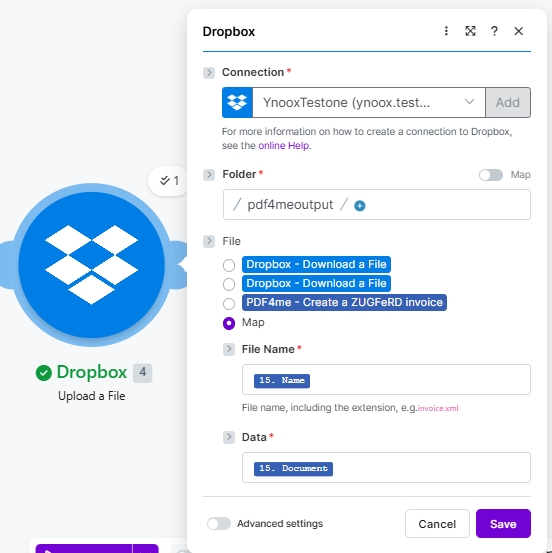
Empat modul Make end-to-end. Dua Dropbox Unduh File Langkah-langkahnya adalah mengambil PDF dasar dan XML ZUGFeRD 2.0+ (tangkapan layar menunjukkan YnooxTestone koneksi plus jalur /pdf4metest/Faktur Zugfred/SimplePdf.pdf Dan /pdf4metest/Faktur Zugfred/versi2.xml). PDF4me Buat faktur ZUGFeRD menyematkan XML ke dalam PDF dengan Mode Keluaran XML dengan PDF, Versi ZUGFeRD 2+, Tingkat Kesesuaian EN16931, Buat Faktur dalam Format PDF Ya, Bahasa dariDropbox Unggah File menuliskan hasilnya PDF/A-3 hibrida ke /pdf4meoutput/ dengan File diatur ke Peta, Nama Berkas 15. NamaData 15. DokumenOutputnya dapat dibuka di pembaca PDF mana pun dan diuraikan dengan baik di ERP mana pun yang mendukung ZUGFeRD / Factur-X / XRechnung.
Pertama, Tingkat Kesesuaian Harus sesuai dengan apa yang diharapkan oleh sistem ERP pembeli atau penerima Anda. EN16931 (Comfort) adalah standar hukum Jerman dan pilihan aman untuk B2B di Uni Eropa; XRECH diperlukan untuk pembuatan faktur B2G (sektor publik) di Jerman; DASAR Hal ini berlaku untuk sebagian besar pembeli lainnya. Kedua, Versi ZUGFeRD harus 2+ untuk segala sesuatu yang sesuai dengan standar EN 16931. Warisan 1.0 Menggunakan BASIC / COMFORT / EXTENDED dan tidak kompatibel dengan receiver EN 16931. Pilih 2+ kecuali jika penerima secara eksplisit meminta versi 1.0.
Pertanyaan umum di dunia nyata yang dapat dipecahkan oleh solusi ini.
Orang-orang mencari solusi untuk masalah ini dengan menggunakan frasa seperti:
- "Bagaimana cara membuat faktur ZUGFeRD dengan XML ter embedded di Make?" Skenario 4 modul ini melakukannya secara menyeluruh: templat PDF plus faktur XML sebagai input, dan output berupa PDF/A-3 hibrida.
- "Apakah ZUGFeRD sama dengan Factur-X?" Ya. Format teknis yang sama dengan nama berbeda. File ZUGFeRD 2.x diterima oleh sistem yang mengharapkan Factur-X dan sebaliknya.
- "Tingkat Kepatuhan mana yang harus saya pilih?" EN16931 untuk B2B (sesuai dengan standar hukum Jerman dan EU EN 16931), XRECHNUNG untuk sektor publik Jerman (B2G), BASIC untuk kompatibilitas warisan yang paling luas.
- "Apakah saya perlu menulis XML sendiri?" Tidak, tetapi untuk skenario ini, tangkapan layar menggunakan faktur XML yang sudah ada. Modul ini juga menerima input JSON atau CSV dan akan membuat XML untuk Anda.
- "Bagaimana jika pembeli saya hanya membutuhkan XML, bukan PDF?" Atur Mode Output ke
XML Onlydan modul tersebut hanya mengembalikan file faktur XML, bukan file hibrida.
Apa yang sedang Anda bangun
Skenario Make yang dapat digunakan kembali yang menghasilkan faktur elektronik hibrida ZUGFeRD 2.0+ yang sepenuhnya sesuai dari file PDF dasar dan file faktur XML. Pemicunya dapat berupa manual, terjadwal (seperti yang ditunjukkan), pemantauan file Dropbox, atau webhook HTTP. Outputnya adalah satu file tunggal yang memenuhi persyaratan PDF yang dapat dibaca manusia dan persyaratan XML yang dapat dibaca mesin untuk mandat faktur elektronik Uni Eropa.
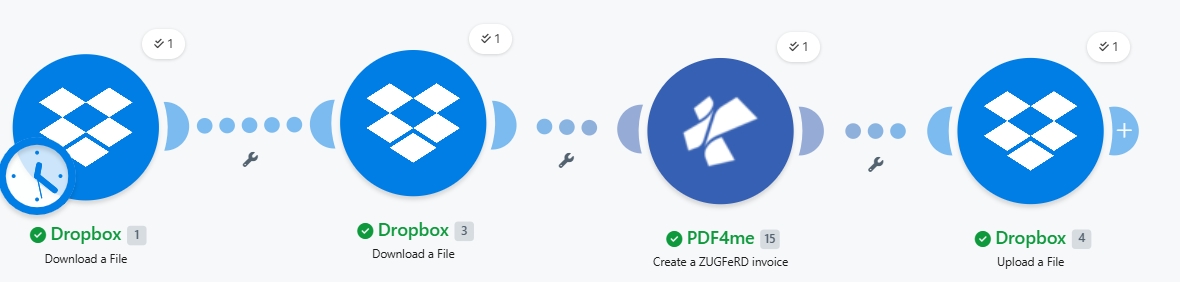
Empat modul ujung-ke-ujung. Dua unduhan, satu aksi PDF4me, satu unggahan. Lencana jam pada Modul 1 menunjukkan pemicu terjadwal; ubah ke manual / pantau file / webhook agar sesuai dengan kasus penggunaan Anda.
Apa yang Anda butuhkan
- Membuat akun dengan skenario yang sedang dibuka. Buat akun Make jika Anda membutuhkannya.
- Kunci API PDF4me. Dapatkan kunci API Anda dan terhubung pada modul PDF4me pertama. Lihat Hubungkan PDF4me untuk Membuat.
- Dropbox dengan folder sumber (misalnya,
/pdf4metest/Faktur Zugfred/) yang berisi templat PDF dan faktur XML, ditambah folder keluaran (/pdf4meoutput/). - PDF dasar (tangkapan layar menggunakan
SimplePdf.pdf). Tidak memerlukan markup tata letak apa pun. Modul ini menyematkan XML sebagai lampiran PDF/A-3. - Faktur XML ZUGFeRD 2.0+Gunakan milikmu sendiri, atau ambil yang lain. Contoh XML 2.0 untuk mengikuti.
Referensi singkat: fungsi setiap parameter
Susun skenarionya
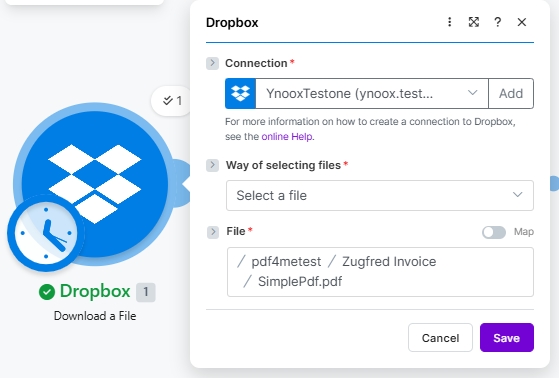
Modul 1: Mengunduh File dari Dropbox (PDF dasar)
Ambil file PDF sumber tempat XML ZUGFeRD akan disematkan sebagai lampiran PDF/A-3.
| Bidang | Nilai yang digunakan dalam proses ini |
|---|---|
| Connection | YnooxTestone (ynoox.test...). your Dropbox connection |
| Way of selecting files | Select a file |
| File | /pdf4metest/Zugfred Invoice/SimplePdf.pdf |
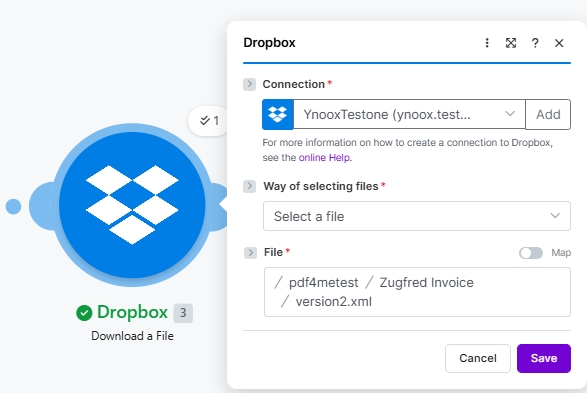
Modul 2: Mengunduh File dari Dropbox (ZUGFeRD 2.0+ XML)
Unduh file faktur XML ZUGFeRD. XML tersebut berisi setiap detail faktur; PDF hanyalah pembungkus visualnya.
| Bidang | Nilai yang digunakan dalam proses ini |
|---|---|
| Connection | YnooxTestone (ynoox.test...). same Dropbox connection |
| Way of selecting files | Select a file |
| File | /pdf4metest/Zugfred Invoice/version2.xml |
Modul 3: PDF4me Membuat faktur ZUGFeRD
Aksi yang melakukan penyematan sebenarnya. Petakan kedua file yang diunduh sebagai input, pilih pengaturan kesesuaian Anda, dan jalankan.
| Kelompok | Bidang | Nilai |
|---|---|---|
| Auth | Connection | Classify Documen (testva...). PDF4me connection |
| Source | File (PDF template) | Map → Module 1 File Name + Data |
| Source | Input Format | XML |
| Source | File (XML invoice) | Map → Module 2 File Name + Data (a second File picker appears when Input Format is XML) |
| Output | Output Mode | XML With PDF (hybrid PDF/A-3) |
| Output | ZUGFeRD Version | 2+ |
| Output | Conformance Level | EN16931 |
| Output | Render Invoice on PDF | Yes |
| Output | Language | de |
Modul 4: Mengunggah File ke Dropbox
Simpan kembali faktur elektronik hybrid PDF/A-3 ke dalam folder output.
| Bidang | Nilai yang digunakan dalam proses ini |
|---|---|
| Connection | YnooxTestone (ynoox.test...) |
| Folder | /pdf4meoutput/ |
| File | Map (so File Name and Data come from the PDF4me step) |
| File Name | 15. Name (dynamic content from PDF4me Module 3) |
| Data | 15. Document (dynamic content from PDF4me Module 3) |
Simpan dan klik Jalankan sekaliPDF/A-3 hibrida tersebut hadir di /pdf4meoutput/ dalam beberapa detik.
File contoh (XML, JSON, CSV)
Anda dapat mengganti Modul 2 (XML) dengan salah satu input ini dan mengubahnya Format Masukan oleh karena itu.
versi2.xml pada rangkaian di atas.