Tambahkan Tagihan QR Swiss ke PDF Faktur Apa Pun di Power Automate: Alur Kerja Dropbox 4 Langkah
Setiap faktur Swiss harus mencantumkan Uang Kertas QR Swiss Sehingga bank dan perangkat lunak akuntansi dapat memindai dan memproses pembayaran secara otomatis. Dengan Power Automate dan PDF4me, tambahannya adalah... alur empat aksi: Pemicu manual, Dropbox Dapatkan isi file, PDF4me Kode Batang - Buat Tagihan SwissQRDropbox Buat berkas. Tangkapan layar di bawah ini menunjukkan proses persis yang terekam di kanvas. Sebuah faktur 10 halaman di /pdf4metest/sample menjadi faktur yang sesuai dengan peraturan Swiss dengan slip pembayaran terlampir dan diunggah ke /pdf4meoutput dengan nama file yang unik. Siap digunakan dalam waktu kurang dari 10 menit.
Empat tindakan Power Automate. Pemicu manual memulai alur kerja. Dropbox Dapatkan isi file membaca /pdf4metest/sample/10 page.pdf dengan Infer Content Type diatur ke Ya. PDF4me Kode Batang - Buat Tagihan SwissQR menambahkan halaman tagihan QR yang sesuai dengan Standar Pembayaran Swiss (Tipe Format Keluaran) PNG dalam putaran ini; beralih ke PDF untuk output hibrida, IBAN CH4431999123000889012, Jumlah 5253531, Mata uang CHFJenis Referensi QRR, Bahasa Bahasa inggris, Garis Pemisah GarisDenganGuntingKreditur: Var Schneider AG, Debitur Utama: Pia-Maria Rutschmann-Schnyder, Referensi 210000000003139471430009017Opsi Penomoran Halaman kebiasaanNomor Halaman 3, Nama Berkas abc.pdfDropbox Buat berkas menulis kepada /pdf4meoutput dengan Nama File yang dibuat dari guid() + header/NamaBerkas untuk keunikan. Hasilnya adalah file yang dapat dipindai oleh bank Swiss di dalam folder arsip.
Pertama, IBAN harus diawali dengan CH atau LI dan maksimal 21 karakter. Untuk Tipe Referensi QRR, IBAN harus berupa... QR-IBAN, bukan IBAN standar. Kedua, ketika Tipe Referensi adalah QRR, itu Kolom referensi adalah string numerik 27 digit dengan digit pemeriksa mod-10.Jika Anda tidak memilikinya, ubah Tipe Referensi menjadi SKOR (ISO 11649) atau NON dan biarkan kolom Referensi kosong. Bank menolak nilai referensi yang salah ketik, bukan gambar QR-nya.
Pertanyaan umum di dunia nyata yang dapat dipecahkan oleh solusi ini.
Orang-orang mencari solusi untuk masalah ini dengan menggunakan frasa seperti:
- "Bagaimana cara menambahkan tagihan QR Swiss ke faktur PDF saya secara otomatis di Power Automate?" Alur 4 langkah ini melakukannya: seret PDF ke Dropbox, picu alur, file faktur yang dilengkapi QR akan masuk ke folder output.
- "Bisakah Power Automate menghasilkan tagihan QR Swiss dari faktur yang sudah ada?" Ya, melalui tindakan PDF4me Barcode - Create SwissQR Bill. Hasilnya adalah PDF yang sama dengan slip yang ditambahkan di halaman pertama/terakhir/halaman tertentu.
- "Apakah saya memerlukan langganan perpustakaan kode QR atau generator QR Swiss?" Tidak. Aksi PDF4me menyembunyikan pembuatan QR, perhitungan referensi mod-10, dan tata letak Standar Pembayaran Swiss lengkap di balik satu langkah Power Automate.
- "Bagaimana jika saya tidak memiliki file PDF sumber, dapatkah saya membuat slip QR terpisah?" Ya. Lewati kolom Konten File dan Nama File di bawah Parameter Lanjutan; tindakan ini akan menghasilkan faktur QR terpisah dalam Tipe Format Output yang dipilih (PDF / PNG / JPEG / Tiff).
- "Akankah bank-bank Swiss menerima hasil ini?" Tindakan ini menghasilkan slip yang sesuai dengan Standar Pembayaran Swiss ISO 20022. Setiap aplikasi perbankan seluler bank Swiss dapat memindainya untuk memulai pembayaran.
Apa yang sedang Anda bangun
Alur Power Automate 4 aksi yang dapat digunakan kembali. Pemicu aktif, faktur sumber diambil dari Dropbox (atau SharePoint / OneDrive / Outlook), aksi PDF4me menambahkan faktur QR, dan file yang telah diisi diunggah dengan nama yang diawali dengan GUID. Pola yang sama berlaku untuk faktur pelanggan keluar, eksekusi batch terjadwal, atau pemrosesan piutang berbasis peristiwa.
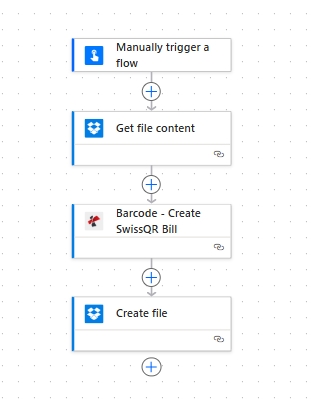
Empat aksi, dari atas ke bawah. Pemicu manual memudahkan pengujian alur kerja; dapat diganti dengan pemicu penyimpanan apa pun yang digunakan dalam produksi.
Apa yang Anda butuhkan
- Power Automate akun dengan arus kas terbuka. Open Power Automate.
- Kunci API PDF4me. Dapatkan kunci API AndaMasuk ke konektor PDF4me Connect saat pertama kali Anda melakukan drop action.
- Dropbox dengan folder sumber (misalnya,
/pdf4metest/sampel) dan folder keluaran (/pdf4meoutputSemua platform penyimpanan dapat digunakan: SharePoint, OneDrive, atau Dataverse dipetakan dengan cara yang sama. - Faktur PDF. Unduh contoh 10 halaman Digunakan dalam tangkapan layar agar mudah diikuti.
- Data pembayaran Swiss: A CH atau LI IBAN, jumlah, mata uang (
CHFatauEUR), dan blok nama/alamat kreditur + debitur. Referensi bidang lengkap di dokumen tindakan.
Referensi cepat: parameter kunci
Bangun alurnya
Tindakan 1: Memicu alur secara manual
Pemicu manual adalah cara tercepat untuk pengujian. Dalam produksi, ganti dengan... Dropbox Saat sebuah file dibuat, SharePoint Saat sebuah file dibuat, OneDrive Saat file dibuat, Outlook Saat email baru tiba, Kambuh, atau Webhooks tergantung pada alur kerja AR Anda.
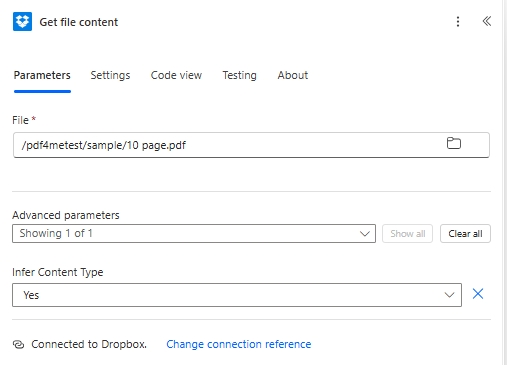
Aksi 2: Dropbox - Dapatkan isi file
Ambil faktur sumber dari folder input Anda.
| Bidang | Nilai yang digunakan dalam proses ini |
|---|---|
| File | /pdf4metest/sample/10 page.pdf |
| Infer Content Type | Yes |
Aksi 3: Kode Batang PDF4me - Buat Tagihan SwissQR
Cari PDF4me dan pilih Kode Batang - Buat Tagihan SwissQRTindakan ini menampilkan kolom pembayaran di panel utama dan 4 kolom di bawah Parameter Lanjutan (Opsi Penomoran Halaman, Nomor Halaman, Konten File, Nama File). Konfigurasi:
| Kelompok | Bidang | Nilai |
|---|---|---|
| Output | Output Format Type | PNG |
| Payment | IBAN | CH4431999123000889012 |
| Payment | Amount | 5253531 |
| Payment | Currency | CHF |
| Payment | Reference Type | QRR |
| Payment | Language Type | English |
| Payment | Seperator Line | LineWithScissor |
| Creditor | Creditor Name | Var Schneider AG |
| Creditor | Creditor Address Type | S |
| Creditor | Creditor: Address Line 1 | Var Schneider AG |
| Creditor | Creditor: Address Line 2 | 23 |
| Creditor | Creditor PostalCode | 2501 |
| Creditor | Creditor City | biel |
| Debtor | Ultimate Debtor Name | Pia-Maria Rutschmann-Schnyder |
| Debtor | Ultimate Debtor AddressType | S |
| Debtor | Ultimate Debtor: Address Line 1 | Grosse Marktgasse |
| Debtor | Ultimate Debtor: Address Line 2 | 33 |
| Debtor | Ultimate Debtor PostalCode | 9400 |
| Debtor | Ultimate Debtor City | biel |
| Ref/Msg | Reference | 210000000003139471430009017 |
| Ref/Msg | Unstructured Message | Instruction of 15.09.2019 |
| Ref/Msg | Billing Info | S1/01/20170309/11/10201409/20/14000000/22/36958/30/CH106017086/40/1020/41/3010 |
| Ref/Msg | AV1 Parameters | Name AV1: UV;UltraPay005;12345 |
| Ref/Msg | Av2 Parameters | Name AV2: XY;XYService;54321 |
| Advanced | Paging Options | custom |
| Advanced | Page Number | 3 |
| Advanced | File Content | File Content (from Action 2) |
| Advanced | File Name | abc.pdf |
Aksi 4: Dropbox - Buat file
Simpan berkas yang telah diisi ke folder keluaran. Buat Nama Berkas yang unik dengan guid() agar tayangan ulang tidak bentrok.
| Bidang | Nilai yang digunakan dalam proses ini |
|---|---|
| Folder Path | /pdf4meoutput |
| File Name | guid() + headers/FileName (concat expression for a unique-per-run name) |
| File Content | File Content (from Action 3, dynamic content) |
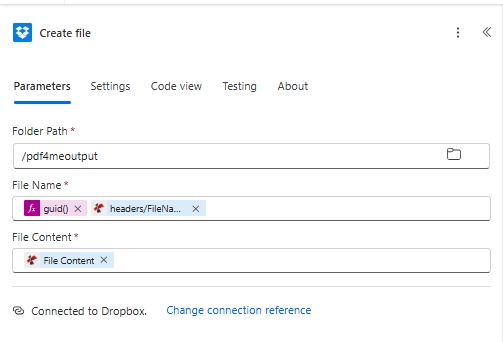
Yang guid() Ekspresi dalam Nama File menjamin nama unik di setiap eksekusi. Menempatkannya di sebelah header/NamaBerkas Output dari PDF4me mempertahankan nama faktur asli dalam nama file.
Simpan dan klik TesBerkas yang dapat dipindai oleh bank Swiss tersebut sampai di... /pdf4meoutput.