Tambahkan Tagihan QR Swiss ke PDF Faktur Apa Pun di Make: Alur Kerja Dropbox 3 Modul
Setiap faktur Swiss harus mencantumkan Uang Kertas QR Swiss Sehingga bank dan perangkat lunak akuntansi dapat memindai dan memproses pembayaran secara otomatis. Dengan Make dan PDF4me, tambahannya adalah... skenario tiga modulDropbox Unduh File, PDF4me Buat uang kertas QR SwissDropbox Unggah File. Tangkapan layar di bawah ini menunjukkan langkah persis yang ditampilkan di kanvas: faktur 10 halaman di /pdf4metest/Files/10 page.pdf menjadi faktur yang sesuai dengan peraturan Swiss dengan slip pembayaran terlampir dan disimpan ke /pdf4meoutput/Siap diproduksi dalam waktu kurang dari 10 menit.
Tiga modul Make. Dropbox Unduh File mengambil faktur sumber (tangkapan layar menunjukkan) YnooxTestone koneksi, Pilih sebuah berkas, jalur /pdf4metest/Files/10 page.pdf). PDF4me Buat uang kertas QR Swiss menambahkan halaman tagihan QR yang sesuai dengan Standar Pembayaran Swiss (Jenis Format) PDFOpsi Penomoran Halaman Pertama, Mata uang CHF, IBAN yang dimulai dengan CH(blok kreditur + debitur lengkap). Dropbox Unggah File menulis hasilnya ke /pdf4meoutput/ dengan File diatur ke Peta, Nama Berkas = 6. Nama, Data = 6. DokumenFile PDF yang dihasilkan siap untuk dikirim melalui email dan dipindai menggunakan aplikasi seluler bank Swiss mana pun.
Pertama, IBAN harus diawali dengan CH atau LI dan maksimal 21 karakter. Untuk tipe referensi QRR, IBAN harus berupa... QR-IBAN, bukan IBAN standar. Kedua, ketika Tipe Referensi adalah QRR, itu Kolom referensi adalah string numerik 27 digit dengan digit pemeriksa mod-10.; jika Anda tidak memilikinya, atur Tipe Referensi ke SKOR (ISO 11649) atau NON dan biarkan kolom Referensi kosong. Bank menolak nilai referensi yang salah ketik, bukan gambar QR-nya.
Pertanyaan umum di dunia nyata yang dapat dipecahkan oleh solusi ini.
Orang-orang mencari solusi untuk masalah ini dengan menggunakan frasa seperti:
- "Bagaimana cara menambahkan tagihan QR Swiss ke faktur PDF saya secara otomatis?" Unggah faktur ke Dropbox; skenario 3 modul ini akan menangani sisanya, termasuk IBAN, jumlah, referensi, dan detail kreditur/debitur.
- "Bisakah Make membuat faktur QR Swiss dari faktur yang sudah ada?" Ya. Melalui modul PDF4me Create Swiss QR-bill. Hasilnya adalah PDF yang sama dengan slip pembayaran yang dilampirkan pada halaman yang Anda pilih (pertama / terakhir / spesifik).
- "Apakah saya memerlukan templat Excel atau pustaka kode QR?" Tidak. Modul ini menyembunyikan semua pembuatan kode QR, perhitungan referensi mod-10, dan tata letak Standar Pembayaran Swiss di balik satu langkah yang dapat dikonfigurasi.
- "Bagaimana jika saya tidak memiliki PDF faktur yang sudah ada? Bisakah saya tetap membuat slip QR terpisah?" Ya. Lewati grup File sepenuhnya dan modul akan mengembalikan PDF tagihan QR Swiss yang berdiri sendiri.
- "Akankah bank-bank Swiss benar-benar menerima hasil ini?" Modul ini menghasilkan slip yang sesuai dengan Standar Pembayaran Swiss ISO 20022. Setiap aplikasi perbankan seluler bank Swiss dapat memindainya untuk memulai pembayaran.
Apa yang sedang Anda bangun
Skenario Make 3 modul yang dapat digunakan kembali. Pemicu aktif (manual, terjadwal, pemantauan file, apa pun), faktur sumber diambil, tagihan QR Swiss ditambahkan, dan hasilnya disimpan. Pola yang sama berlaku untuk pengujian sekali jalan, menjalankan batch terjadwal, atau pemrosesan faktur yang sepenuhnya berbasis peristiwa.
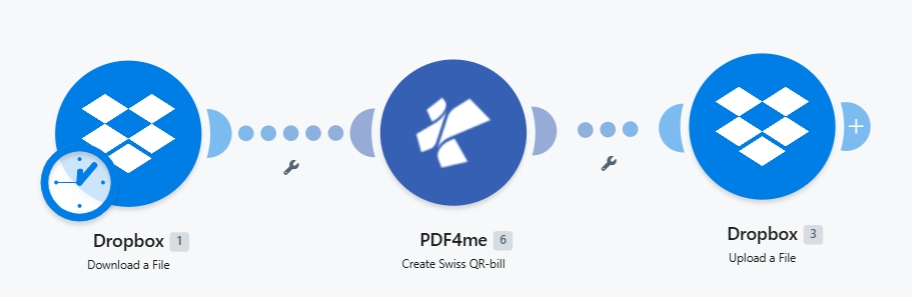
Tiga modul ujung-ke-ujung. Lencana jam pada Dropbox 1 menunjukkan pemicu terjadwal. Ganti ke manual atau webhook agar sesuai dengan kasus penggunaan Anda.
Apa yang Anda butuhkan
- Membuat akun dengan skenario yang sedang dibuka. Buat akun Make jika Anda membutuhkannya.
- Kunci API PDF4me. Dapatkan kunci API Anda dan tambahkan saat PDF4me meminta Koneksi. Lihat Hubungkan PDF4me untuk Membuat.
- Dropbox dengan folder sumber (misalnya,
/pdf4metest/File/) dan folder keluaran (/pdf4meoutput/Semua layanan penyimpanan bekerja dengan cara yang sama. Ganti dengan Google Drive, OneDrive, atau SharePoint sesuai kebutuhan. - Faktur PDF (tangkapan layar menggunakan
10 halaman.pdf). Opsional: lewati file sumber dan hasilkan slip QR mandiri hanya dari data pembayaran. - Data pembayaran Swiss: A CH atau LI IBAN, jumlah, mata uang (
CHFatauEUR), dan blok nama/alamat kreditur + debitur. Referensi bidang lengkap di dokumen tindakan.
Bangun skenarionya
Modul 1: Dropbox - Mengunduh File
Ambil faktur sumber dari folder input Anda.
| Bidang | Nilai yang digunakan dalam proses ini |
|---|---|
| Connection | YnooxTestone (ynoox.test...). your Dropbox connection |
| Way of selecting files | Select a file |
| File | /pdf4metest/Files/10 page.pdf |
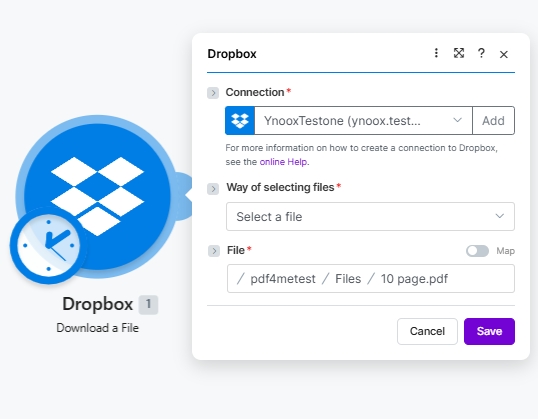
Konfigurasi Unduh File Dropbox. Pilih file melalui pemilih jalur atau, untuk pemrosesan batch, gunakan Cari file dan mengikat File secara dinamis.
Modul 2: PDF4me - Membuat Tagihan QR Swiss
Cari PDF4me dan pilih Buat uang kertas QR SwissModul ini mengekspos 26 field. Referensi lengkap per field (dengan 5 tangkapan layar UI terperinci dan contoh nilai seperti Var Schneider AG, CH4431999123000889012, Pia-Maria Rutschmann-Schnyder) terdapat di Buat Tagihan SwissQR di Make Halaman aksi. Minimal yang perlu diatur:
| Kelompok | Bidang | Nilai |
|---|---|---|
| Source | File | Dropbox - Download a File (pulls from Module 1 automatically) |
| Output | Format Type | PDF |
| Output | Paging Options | First (also: Last, or a specific 1-based page number) |
| Payment | Currency | CHF (or EUR) |
| Payment | Reference Type | QRR, SCOR, or NON |
| Payment | Language | English / German / French / Italian |
| Payment | Separator Line | Line With Scissor, Only Line, or No Line |
| Payment | Amount | e.g. 1250.00 |
| Payment | IBAN | CH or LI IBAN, max 21 chars |
| Creditor | Creditor Address Type | S (Structured) or K (Combined) |
| Creditor | Creditor Name | Company name on the account |
| Debtor | Ultimate Debtor AddressType | S or K |
Isi kolom alamat kreditur dan debitur sesuai pilihan Jenis Alamat Anda, lalu isi parameter opsional Referensi / Pesan Tidak Terstruktur / Info Penagihan / AV1 / AV2.
Modul 3: Dropbox - Mengunggah File
Tulis file PDF yang telah diisi ke folder keluaran.
| Bidang | Nilai yang digunakan dalam proses ini |
|---|---|
| Connection | YnooxTestone (ynoox.test...). same Dropbox connection as Module 1 |
| Folder | /pdf4meoutput/ |
| File | Map (so File Name and Data come from the PDF4me step) |
| File Name | 6. Name (dynamic content from PDF4me Module 2) |
| Data | 6. Document (dynamic content from PDF4me Module 2) |
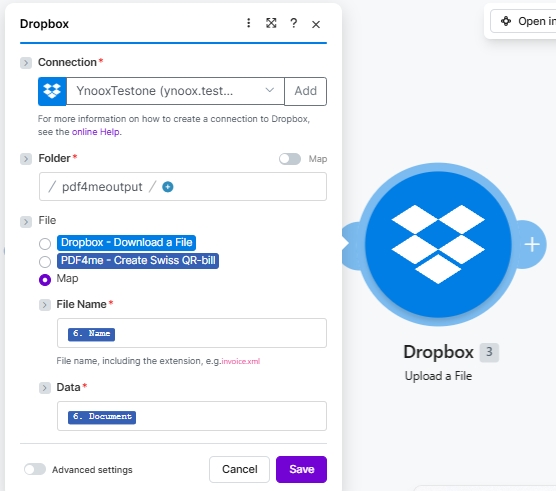
Radio File disetel ke Peta Menampilkan Nama File dan Data sebagai slot terpisah. Ikat keduanya ke output Modul 2 PDF4me sehingga PDF yang terisi akan terkirim secara utuh.
Simpan dan klik Jalankan sekaliFaktur yang telah diisi akan muncul di /pdf4meoutput/ dalam beberapa detik.
Apa yang masuk ke folder output?
Sebuah file PDF tunggal yang diberi nama sesuai dengan sumbernya (misalnya, 10 page.pdf) dengan halaman tagihan QR Swiss yang disisipkan pada posisi yang dipilih di Opsi Paging (First menempatkannya sebagai halaman 1 yang baru; Last (menambahkannya di bagian akhir). Buka file di penampil PDF apa pun dan bagian tagihan QR akan menampilkan kode QR pembayaran, blok Akun/Dibayarkan yang dapat dibaca manusia, Jumlah, Mata Uang, Referensi, dan alamat kreditur/debitur. Arahkan aplikasi perbankan Swiss ke kode QR dan pembayaran akan terisi otomatis.