Ekstraksi AI dan Penggantian Nama Cerdas untuk PDF Apa Pun di Make: Alur Kerja Dropbox 4 Modul dengan PDF4me AI - Pengurai Dokumen
Bagian tersulit dari otomatisasi faktur vendor selalu terletak pada penamaan file. Sebuah folder yang penuh dengan 2030703747 (1).pdf Dan Scan_2026-04-12_invoice.pdf tidak dapat dicari, tidak dapat diurutkan, dan tidak mungkin diaudit. PDF4me AI - Pengurai Dokumen ditambah modul Make Parse JSON yang memperbaiki hal itu di 4 modul, tanpa kodeAI mengekstrak nama vendor dari PDF, dan skenario yang sama mengunggah ulang file tersebut sebagai Acme Industries.pdfScreenshot di bawah ini menjelaskan secara detail jalannya simulasi yang terekam di kanvas.
Empat modul Buat. Dropbox Unduh File mengambil PDF vendor mentah (tangkapan layar menunjukkan) YnooxTestone koneksi, jalur /pdf4metest/sample/2030703747 (1).pdf). PDF4me AI - Pengurai Dokumen Memetakan Nama File dan Dokumen dari langkah sebelumnya dan menjalankannya ekstraksi_faktur_default sebagai ID Penganalisis AIJSON Mengurai JSON mengubah Teks Dokumen menghasilkan output berupa token yang dapat dipetakan secara individual. Dropbox Unggah File menulis kepada /pdf4meoutput/ dengan Nama File = 6. vendorName + .pdf Dan Data = 1. Data dari unduhan asli. Hasilnya: PDF yang sama masuk ke folder output Anda dengan nama file yang bermakna, tanpa campur tangan manusia.
Dua pilihan desain. Pertama, Data pada modul Unggah terikat pada Modul 1 (Data Dropbox asli), bukan Modul 3. Parser AI hanya perlu mengekstrak metadata; unggahan menggunakan kembali file asli yang tidak diubah, sehingga tidak ada pengkodean ulang, tidak ada kehilangan kualitas, dan satu langkah lebih sedikit. Kedua, Nama File menggunakan token yang diuraikan ditambah literal. .pdf ekstensi (tangkapan layar menunjukkan) 6. vendorName diikuti oleh teks yang diketik .pdf) sehingga file yang telah diganti namanya tetap memiliki ekstensi yang valid terlepas dari apa pun yang dikembalikan oleh AI.
Pertanyaan umum di dunia nyata yang dapat dipecahkan oleh solusi ini.
Orang-orang mencari solusi untuk masalah ini dengan menggunakan frasa seperti:
- "Bagaimana cara mengganti nama file PDF secara otomatis berdasarkan isinya?" Skenario 4 modul ini berhasil: AI membaca nama vendor, dan unggahan menggunakannya sebagai nama file. Tidak ada pekerjaan manual sama sekali.
- "Bisakah Make mengekstrak nama vendor dari PDF dan menggunakannya di tempat lain?" Ya. Langkah JSON Parse JSON tepat setelah AI - Document Parser mengekspos setiap field yang diekstrak sebagai token yang dapat dipetakan secara individual (vendorName, invoiceNumber, totalAmount, dll).
- "Apakah ada pengurai dokumen AI di Make?" Ya. Modul PDF4me AI - Document Parser. Modul ini berbasis templat (Analyzer Template), sehingga modul yang sama dapat menangani faktur, kwitansi, kontrak, dan formulir khusus.
- "Bagaimana cara mengekstrak JSON terstruktur dari PDF tanpa melatih model?" Pilih Templat Analisis bawaan (
default_invoice_extractionuntuk AP) atau buat yang khusus di dasbor PDF4me. Tidak diperlukan pelatihan. - "Bisakah saya mengganti nama file output menggunakan salah satu field yang diekstrak?" Ya. Setelah mengurai JSON, masukkan token yang telah diurai ke dalam kolom Nama File Unggah. Selesai.
Apa yang sedang Anda bangun
Skenario Make yang dapat digunakan kembali untuk otomatisasi AP/dokumen masuk. Pemicu diaktifkan (manual, terjadwal seperti yang ditunjukkan, pemantauan file, webhook), PDF vendor diuraikan oleh AI, dan file yang sama diunggah ulang dengan nama file yang bermakna yang berasal dari kontennya. Masukkan salah satu Templat PDF4me Analyzer lainnya (kwitansi, kontrak, pesanan pembelian, formulir khusus) untuk menangani jenis dokumen lain dengan alur yang sama.
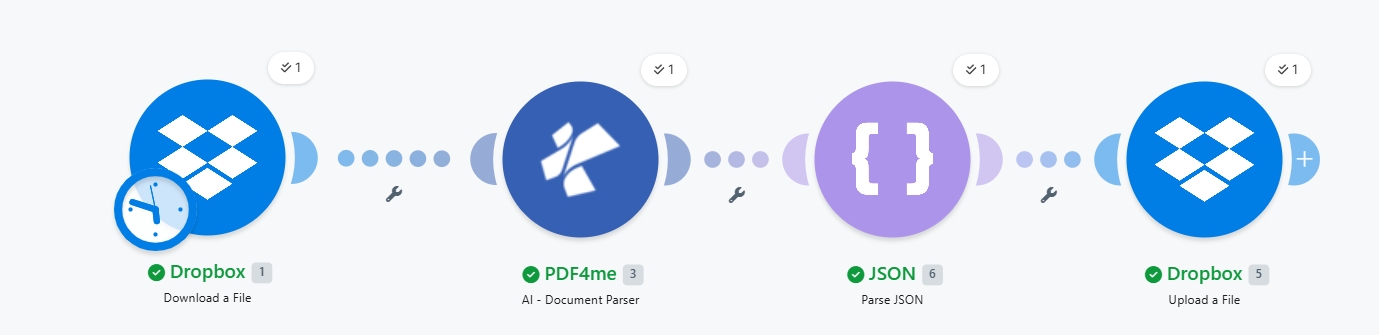
Empat modul ujung-ke-ujung. Lencana jam pada Dropbox 1 menunjukkan pemicu terjadwal; ganti ke webhook atau file-watch untuk produksi.
Apa yang Anda butuhkan
- Membuat akun dengan skenario yang sedang dibuka. Buat akun Make jika Anda membutuhkannya.
- Kunci API PDF4me. Dapatkan kunci API AndaTambahkan di modul PDF4me pertama. Lihat Hubungkan PDF4me untuk Membuat.
- Dropbox dengan folder sumber (misalnya,
/pdf4metest/sampel/) yang berisi PDF vendor dan folder output (/pdf4meoutput/Semua penyimpanan bekerja dengan cara yang sama. - Faktur vendor dalam format PDFPanduan ini menggunakan...
contoh-faktur-vendor.pdf. Unduh file persis yang digunakan dalam tangkapan layar. lalu seret ke folder sumber Dropbox Anda untuk mencerminkan setiap langkahnya. - (Opsional) Sebuah Analyzer khusus Jika kasus penggunaan Anda bukan faktur, buatlah satu di sini. Dasbor Pengurai Dokumen AI (Detail penganalisis). Gunakan yang bawaan
ekstraksi_faktur_defaultuntuk ap.
Ambil sampelnya dulu. Unduh faktur vendor yang sama seperti yang digunakan pada tangkapan layar. Seret ke folder sumber Dropbox Anda (misalnya, /pdf4metest/sampel/) sebelum menjalankan skenario sehingga Modul 1 mengambil file yang sama dan ekstraksi_faktur_default mengembalikan hal yang sama nama vendor token yang Anda lihat pada langkah unggah.
Referensi singkat: fungsi setiap parameter
Susun skenarionya
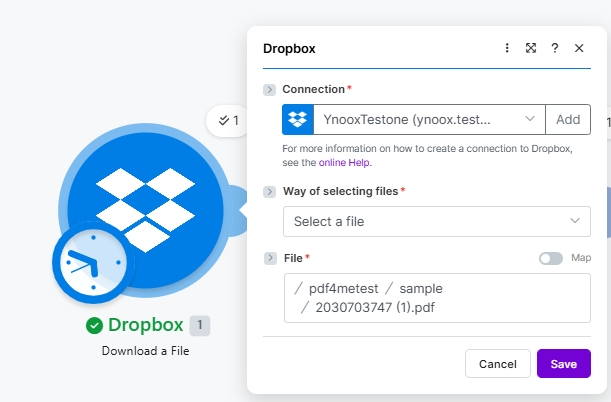
Modul 1: Mengunduh File dari Dropbox
Ambil file PDF mentah dari vendor dari folder sumber.
| Bidang | Nilai yang digunakan dalam proses ini |
|---|---|
| Connection | YnooxTestone (ynoox.test...). your Dropbox connection |
| Way of selecting files | Select a file |
| File | /pdf4metest/sample/2030703747 (1).pdf |
Modul 2: PDF4me AI - Pengurai Dokumen
Cari PDF4me di pemilih aksi dan pilih AI - Pengurai Dokumen.
| Bidang | Nilai yang digunakan dalam proses ini |
|---|---|
| Connection | My PDF4me connection (t...) |
| File | Map |
| File Name | 1. File Name (from Module 1) |
| Document | 1. Data (from Module 1) |
| AI Analyzer Id | default_invoice_extraction (built-in) |
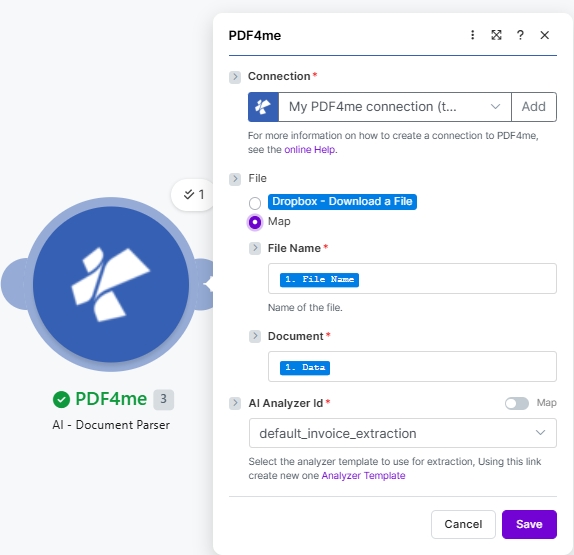
Yang ekstraksi_faktur_default Templat sudah terintegrasi. Klik Templat Analisis Klik tautan di petunjuk untuk membuat penganalisis khusus untuk tanda terima, kontrak, atau jenis dokumen apa pun.
Modul 3: JSON - Mengurai JSON
Modul AI mengembalikan hasilnya sebagai string JSON pada Doc TextUraikan untuk mengekspos bidang yang dapat dipetakan secara individual.
| Bidang | Nilai yang digunakan dalam proses ini |
|---|---|
| Data structure | My data structure (or leave blank. Make builds one on first run) |
| JSON string | 3. Doc Text (from Module 2) |
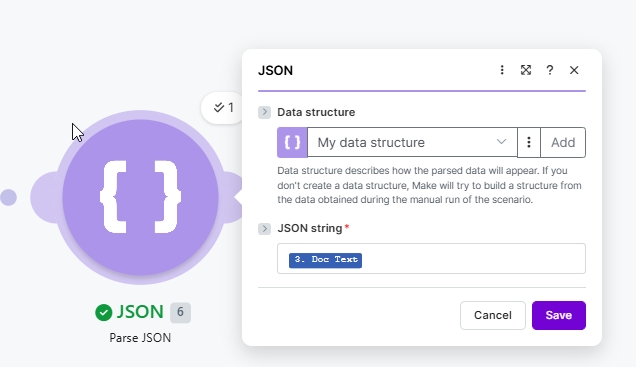
Biarkan struktur data tetap pada pengaturan default. Struktur data saya dan Make membangunnya dari output AI langsung pada skenario pertama yang dijalankan.
Modul 4: Mengunggah File ke Dropbox
Langkah penggantian nama cerdas. Peta Nama File ke token yang diuraikan ditambah literal .pdf perluasan, dan Data ke asli Berkas Modul 1 (bukan keluaran AI).
| Bidang | Nilai yang digunakan dalam proses ini |
|---|---|
| Connection | YnooxTestone (ynoox.test...) |
| Folder | /pdf4meoutput/ |
| File | Map (so File Name and Data come from prior modules) |
| File Name | 6. vendorName + .pdf (the parsed vendorName plus a literal .pdf extension) |
| Data | 1. Data (re-uses the original Dropbox download. not the AI output) |
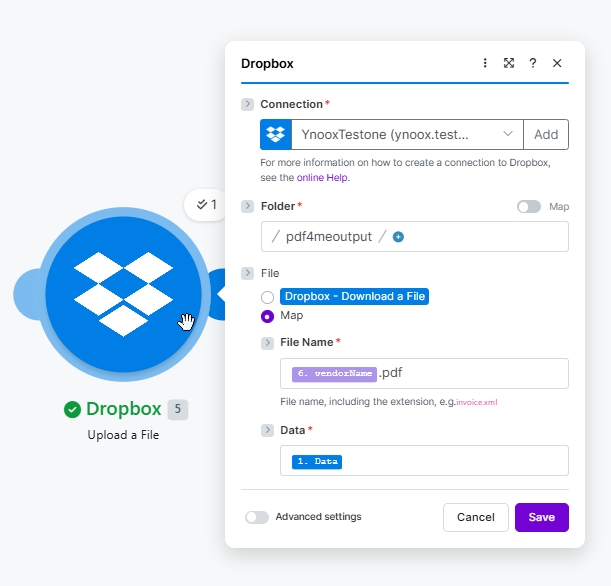
Penggantian nama cerdas: 6. vendorName adalah token yang diuraikan dari Modul 3, dengan literal .pdf diketik tepat setelahnya.
Simpan dan klik Jalankan sekaliFile PDF vendor tersebut masuk ke /pdf4meoutput/ dinamai berdasarkan nama penjualnya.
Penyelesaian Masalah
Kapan menggunakan pola ini?
Apa yang harus dibaca selanjutnya?
Pertanyaan yang Sering Diajukan (FAQ)
Mulai
↓ Unduh sample-vendor-invoice.pdf