Ajouter un filigrane d'image à Word Document dans n8n
Ajouter un filigrane d'image à Word est un PDF4me action de nœud dans n8n qui imprime une image sur un Word Utilisez-le pour personnaliser les rapports sortants avec le logo de l'entreprise, annoter les brouillons avant relecture ou apposer un badge de confidentialité sur chaque contrat généré par un flux de travail, sans ouvrir un seul fichier. Word.
Que fait ce nœud ?
PDF4me Word: Ajouter un filigrane d'image à Word nécessite deux entrées, et non une seule : le .docx fichier à tamponner et le image pour y apposer un filigrane. Chacun possède sa propre liste déroulante de méthode d'entrée, de sorte que le document et le filigrane peuvent provenir de chemins différents, par exemple un document provenant d'un nœud précédent et un logo récupéré d'un URLLe dimensionnement est par Échelle sauf si vous définissez explicitement Largeur ou Hauteur en points.
Authentification de votre API Demande
Chaque PDF4me nœud dans n8n nécessite une authentification valide. Créez ou sélectionnez-en une qui contient votre identifiant. PDF4me API clé permettant au flux de travail d'authentifier les demandes de filigrane de manière sécurisée.
Informations importantes à ne pas manquer
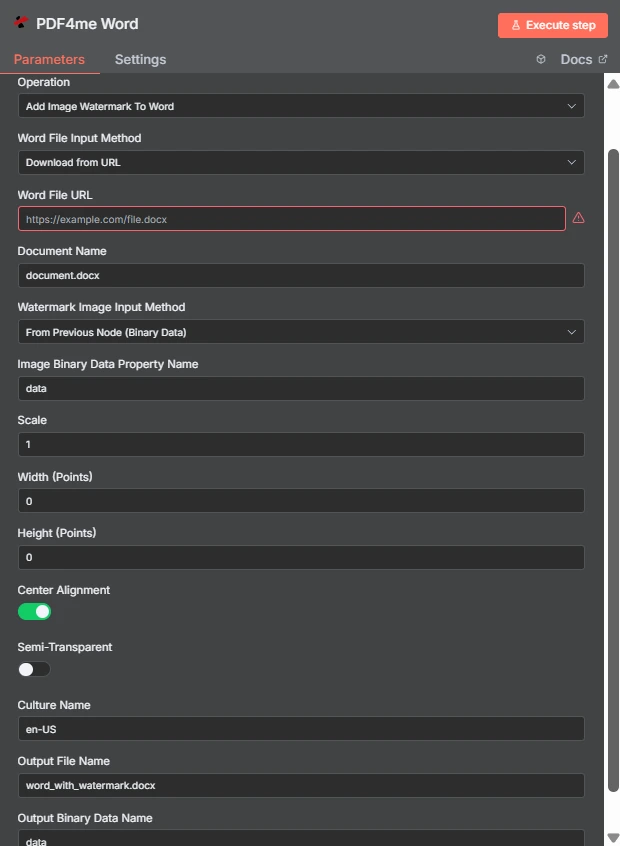
Notez les deux méthodes de saisie indépendantes : Word le fichier arrive par URL L'image du filigrane provient du nœud précédent. La largeur et la hauteur sont égales à 0 ; l'échelle 1 contrôle donc la taille.
Filigrane image vs filigrane texte dans Word
| Question | Ajouter un filigrane d'image à Word | Ajouter un filigrane de texte à Word |
|---|---|---|
| What gets stamped | An image file such as a logo, seal, or badge | A word or phrase you type, such as DRAFT |
| Second input needed | Yes, the image file itself | No, only the text string |
| Changing it per run | Swap the image binary or URL | Change the text with an expression |
| Best for | Company branding and scanned marks | Status labels and per-document text |
| Transparency control | Semi-Transparent toggle plus PNG alpha | Handled through the text styling options |
Quels paramètres permettent d'ajouter un filigrane à l'image ? Word Besoin?
Le Word Le fichier et l'image du filigrane possèdent chacun une liste déroulante de méthode de saisie. Quelle que soit la méthode choisie, le champ source correspondant apparaît juste en dessous, et les lignes conditionnelles suivantes s'adaptent en fonction de votre sélection.
| Paramètre | Requis | Ce que cela fait | Exemple |
|---|---|---|---|
| Credential to connect with | Required | The PDF4me API credential the node authenticates with. | PDF4me account |
| Operation | Required | The action this node performs. Select Add Image Watermark To Word. | Add Image Watermark To Word |
| Word File Input Method | Required | How the .docx reaches the node: from the previous node as binary data, as a Base64 string, or downloaded from a URL. | Download from URL |
| Word File URL | Conditional | Public URL of the .docx to stamp. Appears only when the Word file input method is set to download from a URL. | https://example.com/file.docx |
| Document Name | Required | Filename of the input document including the extension. Used for format detection, so keep the .docx suffix accurate. | document.docx |
| Watermark Image Input Method | Required | How the image reaches the node. Independent of the Word file input method, so the two can differ. | From Previous Node (Binary Data) |
| Image Binary Data Property Name | Conditional | Name of the binary property holding the watermark image. Appears when the image comes from the previous node. | data |
| Scale | Optional | Size multiplier applied to the image at its natural size. Ignored when a non-zero Width or Height is supplied. | 1 |
| Width (Points) | Optional | Exact watermark width in points. Leave at 0 to size by Scale. Setting only Width keeps the aspect ratio. | 0 |
| Height (Points) | Optional | Exact watermark height in points. Leave at 0 to size by Scale. Setting only Height keeps the aspect ratio. | 0 |
| Center Alignment | Optional | Toggle that centres the watermark on the page. Ships enabled; turn it off to align to the top left within the margins. | enabled |
| Semi-Transparent | Optional | Toggle that reduces watermark opacity so page text stays readable underneath. Ships disabled. | disabled |
| Culture Name | Optional | Culture code recorded for document processing, such as en-US or de-DE. | en-US |
| Output File Name | Optional | Filename of the returned document. Keep the .docx extension so downstream steps handle it correctly. | word_with_watermark.docx |
| Output Binary Data Name | Optional | Binary property the stamped document is written to. Leave as data unless a later node expects another name. | data |
Sortir
| Champ | Taper | Ce qu'il contient |
|---|---|---|
| fileName | String | Name of the returned watermarked document, taken from Output File Name. |
| fileSize | Number | Size of the returned document in bytes. A useful sanity check that the image was embedded. |
| success | Boolean | Whether the watermark was applied. Branch on this so failures surface as alerts. |
| originalFileName | String | Name of the input document as supplied in Document Name. |
| scale | Number | The scale factor actually applied, echoed back for verification. |
| alignImage | Boolean | Whether centre alignment was used, reflecting the Center Alignment toggle. |
| semiTransparent | Boolean | Whether reduced opacity was applied, reflecting the Semi-Transparent toggle. |
| cultureName | String | The culture code recorded for the operation. |
| message | String | Human-readable status text describing the result of the operation. |
Le document estampillé lui-même est renvoyé sous forme binaire sur la propriété nommée dans Nom des données binaires de sortie, prêt à être enregistré, joint à un courriel ou intégré à un PDF étape de conversion.
Comment configurer l'ajout d'un filigrane image à Word dans n8n?
- Ajoutez le PDF4me Word Ajoutez un nœud à votre flux de travail et définissez Opération à Ajouter un filigrane d'image à Word.
- Sélectionnez votre PDF4me Veuillez utiliser vos identifiants ou en créer un et y coller votre code d'identification. API clé.
- Choisissez un Word Méthode d'entrée de fichier et fournir le
.docxà travers le champ qui apparaît en dessous. - Ensemble Nom du document donc le
.docxL'extension est présente et correcte. - Choisissez un Méthode de saisie d'image de filigrane, puis pointez Nom de la propriété des données binaires de l'image sur le site qui détient l'image, généralement
data. - Partir Largeur (points) et Hauteur (Points) à
0et ajuster Échelle, ou définissez des valeurs de points explicites lorsque la taille doit être exacte. - Allumer Semi-transparent si le filigrane se superpose au texte principal, laissez-le tel quel. Alignement central activé sauf si vous souhaitez une marque en haut à gauche.
- Ensemble Nom du fichier de sortie se terminant par
.docx, exécutez le nœud et acheminez le résultat vers la suite.
Configurations typiques
Exemples de flux de travailCommon n8n workflow patterns using Add Image Watermark To Word.
- Une étape de reporting produit un Word documenter selon un calendrier.
- Ajouter un filigrane d'image à Word y appose le logo de l'entreprise.
- Le fichier personnalisé est envoyé par courriel à la liste de diffusion.
- Un contrat atterrit dans un dossier de révision.
- L'image du badge DRUFT est estampillée avec l'option Semi-Transparent activée.
- Les relecteurs ne peuvent jamais confondre la version de travail avec la version finale.
- Le logo est appliqué alors que le fichier est encore modifiable. Word.
- Une étape de conversion transforme le document estampillé en un PDF.
- Le PDF est publié, la marque étant intégrée plutôt qu'apposée ultérieurement.
- Une liste de dossiers génère un élément par fichier .docx existant.
- Le nœud s'exécute une fois par élément avec la même image de filigrane.
- Les copies estampillées sont réécrites sous de nouveaux noms de fichiers.
Conseils pratiques
Aide-mémoire
| Champ | Valeur |
|---|---|
| Operation | Add Image Watermark To Word |
| Word File Input Method | Download from URL |
| Word File URL | https://example.com/file.docx |
| Document Name | document.docx |
| Watermark Image Input Method | From Previous Node (Binary Data) |
| Image Binary Data Property Name | data |
| Scale | 1 |
| Width (Points) / Height (Points) | 0 / 0 |
| Center Alignment | enabled |
| Semi-Transparent | disabled |
| Culture Name | en-US |
| Output File Name | word_with_watermark.docx |
| Output Binary Data Name | data |