Eliminar encabezado y pie de página de Excel en n8n
Eliminar encabezado/pie de página es un PDF4me Excel operación en n8n que despeja las secciones izquierda, central y derecha de Excel Encabezados y pies de página de forma independiente, en una hoja de cálculo o en todo el libro. Úselo para eliminar la imagen de marca anterior antes de un cambio de marca, limpiar plantillas para su reutilización o eliminar marcas internas antes de enviar un libro de trabajo a un cliente.
Lo que hace este nodo
PDF4me ExcelEliminar encabezado/pie de página despeja Excel Encabezados y pies de página sección por sección. Seis interruptores independientes controlan las posiciones izquierda, central y derecha tanto del encabezado como del pie de página, lo que permite eliminar un logotipo de una esquina sin modificar el número de página en otra. El nombre de la hoja de cálculo de destino aplica la eliminación a una sola hoja o a todas las hojas si se dejan en blanco.
Autenticando su API Pedido
Cada PDF4me nodo en n8n requiere un válido Credencial para conectarse con. Crea o selecciona uno que contenga tu PDF4me API clave para que el flujo de trabajo pueda autenticar las solicitudes de limpieza de forma segura.
Datos importantes que no debes perderte
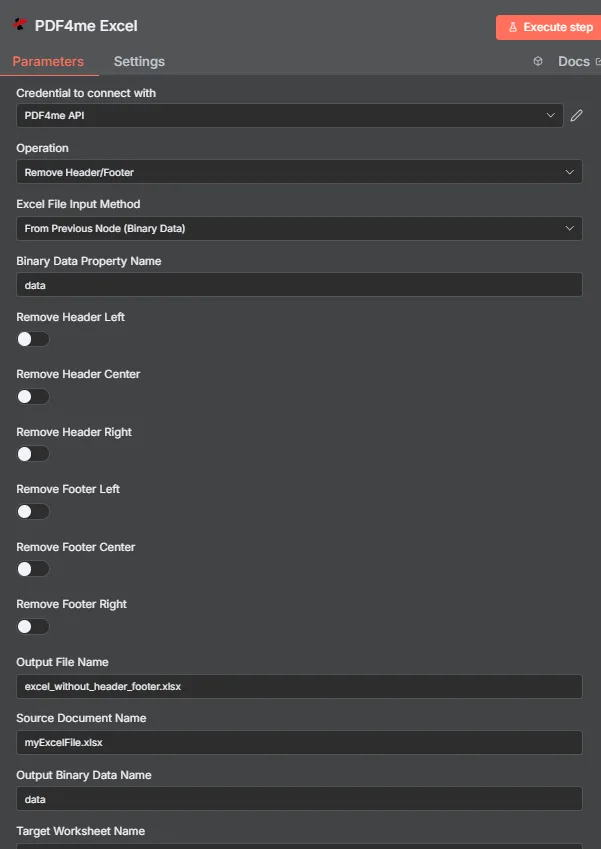
PDF4me Excel Eliminar el panel de parámetros de encabezado/pie de página en n8n
¿Qué parámetros necesita la función Eliminar encabezado/pie de página?
Requerido: Operación, Excel Método de entrada de archivo, el campo de entrada que coincide con ese método y el nombre del archivo de salida. Los seis interruptores de eliminación de secciones están desactivados por defecto, y el nombre de la hoja de cálculo de destino, el nombre de la cultura, el nombre del documento de origen y el nombre de los datos binarios de salida son opcionales.
| Parámetro | Requerido | Lo que hace | Ejemplo |
|---|---|---|---|
| Operation | Required | Selects the PDF4me Excel action to run. Choose Remove Header/Footer. | Remove Header/Footer |
| Excel File Input Method | Required | How the workbook reaches the node. From Previous Node (Binary Data) reads it from an upstream item; the dropdown also offers base64 and file URL alternatives. | From Previous Node (Binary Data) |
| Binary Data Property Name | Conditional | Name of the binary property on the incoming n8n item holding the .xlsx workbook. Applies when the input method is binary data. Defaults to data. | data |
| Remove Header Left | Optional | Clears the left section of the page header. Default false. | true |
| Remove Header Center | Optional | Clears the center section of the page header. Default false. | true |
| Remove Header Right | Optional | Clears the right section of the page header. Default false. | false |
| Remove Footer Left | Optional | Clears the left section of the page footer. Default false. | true |
| Remove Footer Center | Optional | Clears the center section of the page footer. Default false. | true |
| Remove Footer Right | Optional | Clears the right section of the page footer. Default false. | false |
| Output File Name | Required | Filename for the cleaned workbook the node returns. Include the .xlsx extension. | excel_without_header_footer.xlsx |
| Source Document Name | Optional | Reference label for the incoming workbook. Echoed back as originalFileName for tracking; it does not change the output. | myExcelFile.xlsx |
| Output Binary Data Name | Optional | Name of the binary property the output item exposes. Defaults to data. | data |
| Target Worksheet Name | Optional | Name of the single worksheet to process. Leave blank to apply the removal to every worksheet. | Sheet1 |
| Culture Name | Optional | Locale used while processing the workbook, relevant when header or footer text includes locale-sensitive placeholders. | en-US |
Campos de salida
Una carrera exitosa devuelve uno n8n artículo que transporta JSON metadatos más el libro de trabajo limpio como datos binarios.
| Campo | Tipo | Lo que contiene |
|---|---|---|
success | Boolean | True when the removal ran successfully. Use it to route error-handling branches. |
fileName | String | Filename of the cleaned workbook, matching Output File Name. |
fileSize | Number | Size of the returned workbook in bytes. |
originalFileName | String | The value supplied in Source Document Name, echoed back for tracking. |
removeHeaderLeft | Boolean | Whether the left header section was removed. |
removeHeaderCenter | Boolean | Whether the center header section was removed. |
removeHeaderRight | Boolean | Whether the right header section was removed. |
removeFooterLeft | Boolean | Whether the left footer section was removed. |
removeFooterCenter | Boolean | Whether the center footer section was removed. |
removeFooterRight | Boolean | Whether the right footer section was removed. |
worksheetName | String | The worksheet the removal targeted, matching Target Worksheet Name. |
applyToAllWorksheets | Boolean | True when the removal applied to every worksheet, false when only the named worksheet was processed. |
message | String | Human-readable result message for the operation. |
Binary (data) | Binary | The cleaned .xlsx under Output Binary Data Name (default data). Pass into Write Binary File, Email, or a cloud-storage upload. |
N8N Respuesta a la acción
- JSON
- Schema
- Binary
JSON Formato de respuesta
[
  {
    "fileName": "excel_without_header_footer.xlsx",
    "fileSize": 212810,
    "success": true,
    "originalFileName": "myExcelFile.xlsx",
    "removeHeaderLeft": false,
    "removeHeaderCenter": false,
    "removeHeaderRight": false,
    "removeFooterLeft": false,
    "removeFooterCenter": false,
    "removeFooterRight": false,
    "worksheetName": "Sheet1",
    "applyToAllWorksheets": false,
    "message": "Header and footer removed from Excel file successfully"
  }
]
Vista de esquema
1 item
fileName: T excel_without_header_footer.xlsx
fileSize: # 212810
success: true
originalFileName: T myExcelFile.xlsx
removeHeaderLeft: false
removeHeaderCenter: false
removeHeaderRight: false
removeFooterLeft: false
removeFooterCenter: false
removeFooterRight: false
worksheetName: T Sheet1
applyToAllWorksheets: false
message: T Header and footer removed from Excel file successfully
Indicadores de tipo: T = String, # = Number.
Vista de datos binarios
data
File Name: excel_without_header_footer.xlsx
File Extension: xlsx
Mime Type: application/vnd.openxmlformats-officedocument.spreadsheetml.sheet
File Size: 212.8 kB
Acceso a datos binarios: Acceda al libro de trabajo en $binary.data.data, listo para descargar, enviar por correo electrónico o almacenar.
¿Cómo configuro la opción para eliminar el encabezado/pie de página? n8n¿
- Añade el PDF4me Excel nodo a su flujo de trabajo y configure Operación a Eliminar encabezado/pie de página.
- En Credencial para conectarse con, seleccione su PDF4me API credencial o crea una con tu API llave.
- Colocar Excel Método de entrada de archivos a Desde el nodo anterior (datos binarios) y establecer Nombre de la propiedad de datos binarios a la propiedad que contiene el libro de trabajo, normalmente
data. - Activa los interruptores de sección que necesites: Eliminar encabezado izquierdo, Centro, Bien y Eliminar pie de página izquierdo, Centro, Bien.
- Colocar Nombre de la hoja de trabajo objetivo Puede seleccionar una hoja específica o dejarla en blanco para todo el libro de trabajo.
- Opcionalmente se puede configurar Nombre de la cultura para texto de encabezado o pie de página sensible a la configuración regional.
- Colocar Nombre del archivo de salida terminando en
.xlsx, ejecuta el nodo y envía el libro de trabajo limpio hacia adelante.
Configuraciones típicas
Ejemplos de flujo de trabajoCommon n8n workflow patterns using Remove Header/Footer for Excel.
- Un proceso por lotes extrae plantillas de informes antiguas de una unidad compartida.
- La función Remove Header/Footer se ejecuta con Remove Header Center y Remove Footer Center activados para borrar el texto del logotipo anterior.
- PDF4me Excel Agregar texto Encabezado Pie de página aplica la nueva imagen de marca posteriormente.
- Un webhook se activa cuando un informe se marca como listo para su entrega externa.
- La opción Eliminar encabezado/pie de página borra la sección Eliminar encabezado izquierdo, donde se colocaron las iniciales del revisor interno.
- El libro de trabajo depurado se envía por correo electrónico al cliente.
- El libro de trabajo del proyecto finalizado se copia a una carpeta de plantillas.
- Los seis interruptores de sección están activados, borrando todas las secciones de encabezado y pie de página.
- La plantilla de encabezado en blanco se guarda para el próximo proyecto.
- Un libro de trabajo de varias hojas contiene pestañas con datos sin procesar, además de una hoja de resumen.
- El nombre de la hoja de cálculo de destino está configurado como Resumen para que las pestañas de datos sin procesar conserven sus encabezados.
- La hoja de resumen limpia se exporta a PDF para su distribución.
Consejos prácticos
Hoja de trucos
| Campo | Valor |
|---|---|
| Operation | Remove Header/Footer |
| Excel File Input Method | From Previous Node (Binary Data) |
| Binary Data Property Name | data |
| Remove Header Left / Center / Right | true / true / false (example) |
| Remove Footer Left / Center / Right | true / true / false (example) |
| Target Worksheet Name | (blank for all worksheets) |
| Culture Name | en-US |
| Output File Name | excel_without_header_footer.xlsx |
| Source Document Name | myExcelFile.xlsx |
| Output Binary Data Name | data |
| Credentials | PDF4me API credential |