Agregar filas a un Excel Hoja de trabajo en n8n
Agregar filas es un PDF4me acción del nodo en n8n que escribe JSON registros en un Excel hoja de trabajo. Úsala para empujar API resultados en un informe, registrar cargas útiles de webhook en un libro de trabajo compartido o agregar CRM exportaciones a una hoja de seguimiento, con números y fechas que llegan como reales Excel valores en lugar de texto.
Lo que hace este nodo
PDF4me Excel: Agregar filas toma uno existente .xlsx un libro de ejercicios más un JSON matriz en JSON Datos de filay escribe una fila por objeto. Tiene dos modos de colocación: nombre una tabla en Objetivo Excel Mesa y las claves se hacen coincidir con los encabezados, o déjelo en blanco y Insertar desde fila más Insertar desde columna Establece la celda de inicio exacta. Edita un libro de trabajo que proporciones en lugar de crear uno desde cero.
Autenticando su API Pedido
Cada PDF4me nodo en n8n requiere un válido Credencial para conectarse con. Crea o selecciona uno que contenga tu PDF4me API clave para que el flujo de trabajo pueda autenticar de forma segura las solicitudes de hojas de cálculo.
Datos importantes que no debes perderte
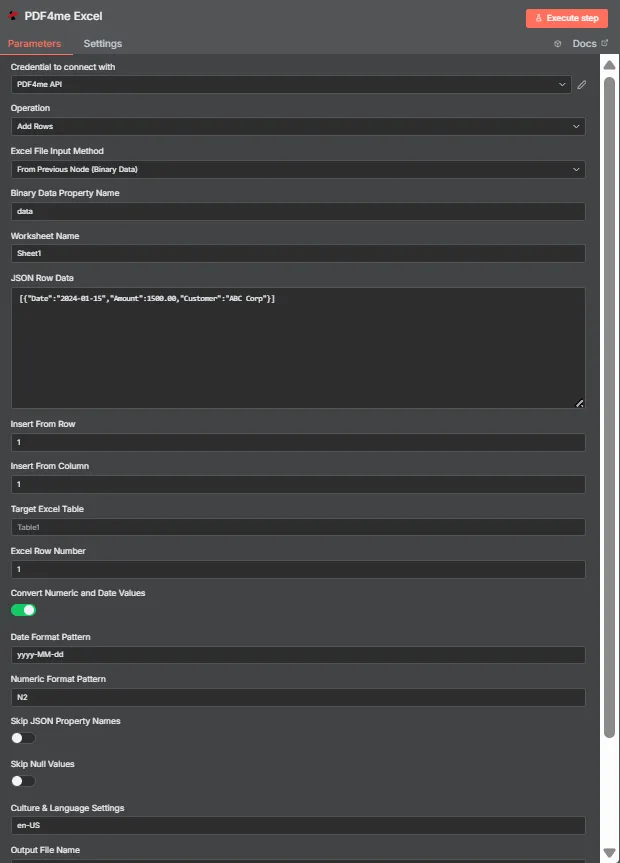
JSON Los datos de fila contienen un JSON Conjunto de objetos planos. Objetivo Excel La tabla está vacía aquí, por lo que las funciones Insertar desde fila e Insertar desde columna colocan los datos en la celda A1.
Modo tabla frente a modo coordenadas
| Pregunta | Modo mesa | Modo de coordenadas |
|---|---|---|
| How you switch to it | Name a table in Target Excel Table | Leave Target Excel Table blank |
| How columns are matched | JSON keys matched against table headers | Values written in key order from the start cell |
| Does column order matter | No, headers drive placement | Yes, position drives placement |
| Which fields control it | Target Excel Table and Excel Row Number | Insert From Row and Insert From Column |
| Best for | Structured sheets that already have a table | Blank sheets or a fixed reporting layout |
| Overwrite risk | Lower, rows follow the table structure | Higher, the start cell is written to directly |
¿Qué parámetros necesita la función Agregar filas?
| Parámetro | Requerido | Lo que hace | Ejemplo |
|---|---|---|---|
| Credential to connect with | Required | The PDF4me API credential the node authenticates with. | PDF4me API |
| Operation | Required | The action this node performs. Select Add Rows. | Add Rows |
| Excel File Input Method | Required | How the workbook reaches the node: from the previous node as binary data, as a Base64 string, or from a URL. | From Previous Node (Binary Data) |
| Binary Data Property Name | Conditional | Name of the binary property holding the .xlsx. Appears when the workbook comes from the previous node. | data |
| Worksheet Name | Required | Sheet the rows are written to. Match the sheet tab name exactly. | Sheet1 |
| JSON Row Data | Required | JSON array of flat objects. Each object becomes one row and each key maps to a column. | [{"Date":"2024-01-15","Amount":1500.00}] |
| Insert From Row | Conditional | Row number the data starts at, counting from 1. Used in coordinate mode when no table is named. | 1 |
| Insert From Column | Conditional | Column number the data starts at, counting from 1 for column A. Used in coordinate mode. | 1 |
| Target Excel Table | Optional | Name of an existing table to write into. Filling this in switches the node to header matching instead of coordinates. | Table1 |
| Excel Row Number | Conditional | Row index inside the named table where insertion begins. Used in table mode. | 1 |
| Convert Numeric and Date Values | Optional | Toggle that turns numeric and date strings into real Excel values rather than text. Ships enabled. | enabled |
| Date Format Pattern | Optional | Pattern applied to converted dates. Match it to the shape of the dates in your JSON. | yyyy-MM-dd |
| Numeric Format Pattern | Optional | Format applied to converted numbers, such as two decimal places. | N2 |
| Skip JSON Property Names | Optional | Toggle that omits the JSON keys, writing only values. Ships disabled so headers are included. | disabled |
| Skip Null Values | Optional | Toggle that leaves cells untouched where a JSON value is null instead of clearing them. Ships disabled. | disabled |
| Culture and Language Settings | Optional | Culture code used when parsing numbers and dates, which decides separator handling. | en-US |
| Output File Name | Optional | Filename of the returned workbook. Keep a valid Excel extension. | excel_with_rows.xlsx |
Producción
| Campo | Tipo | Lo que contiene |
|---|---|---|
| fileName | String | Name of the returned workbook after the rows were written. |
| fileSize | Number | Size of the returned workbook in bytes. |
| success | Boolean | Whether the insertion completed. Branch on this so failures surface as alerts. |
| originalFileName | String | Name of the input workbook as supplied to the node. |
| worksheetName | String | The worksheet the rows were written to. |
| rowsAdded | Number | How many rows were inserted. The most useful verification signal the node returns. |
| insertFromRow | Number | Starting row used, echoed back when running in coordinate mode. |
| insertFromColumn | Number | Starting column used, echoed back when running in coordinate mode. |
| tableName | String | The table written into, or null when coordinate mode was used. |
| excelRowNumber | Number | Row index inside the table where insertion began, in table mode. |
| convertNumericAndDate | Boolean | Whether numeric and date conversion was applied. |
| dateFormat | String | The date pattern applied during conversion. |
| numericFormat | String | The numeric format applied during conversion. |
| cultureName | String | The culture code used to parse numbers and dates. |
| message | String | Human-readable summary, including the row count and worksheet name. |
El libro de trabajo actualizado se devuelve como datos binarios, listos para escribir en el almacenamiento, adjuntar a un correo electrónico o pasar a otro proceso. Excel paso.
¿Cómo configuro Agregar filas en? n8n¿
- Añade el PDF4me Excel nodo a su flujo de trabajo y configurar Operación a Agregar filas.
- Seleccione su PDF4me credencial, o cree una y pegue su API llave.
- Elige un Excel Método de entrada de archivos y proporcione el libro de trabajo a través del campo que aparece debajo.
- Colocar Nombre de la hoja de trabajo a la pestaña exacta de la hoja en la que está escribiendo.
- Pon un JSON conjunto de objetos planos en JSON Datos de fila, un objeto por fila.
- Para usar el modo tabla, ingrese el nombre de la tabla en Objetivo Excel Mesa y establecer Excel Fila NumberPara usar coordenadas, deje la tabla en blanco y configure Insertar desde fila y Insertar desde columna.
- Dejar Convertir valores numéricos y de fecha habilitado, luego configurar Patrón de formato de fecha, Patrón de formato numérico, y Contextos culturales y lingüísticos para que coincida con sus datos.
- Colocar Nombre del archivo de salida, ejecute el nodo y verifique
rowsAddeden la respuesta antes de enrutar el libro de trabajo.
Configuraciones típicas
Ejemplos de flujo de trabajoCommon n8n workflow patterns using Add Rows.
- Un webhook recibe un envío de formulario como JSON.
- La función Agregar filas la añade a una tabla con nombre en un libro de trabajo compartido.
- El equipo lee la hoja de cálculo sin que nadie vuelva a introducir los datos.
- Un programado HTTP La solicitud extrae registros de un archivo interno. API.
- Un nodo de código transforma la respuesta en una matriz simple.
- La función Agregar filas lo escribe en la plantilla de informes en coordenadas fijas.
- Un trabajo nocturno ofrece nuevas oportunidades JSON.
- El modo tabla hace coincidir las claves con los encabezados existentes.
- Los cambios en el orden de las columnas en el código fuente no dañan la hoja de cálculo.
- Agregar filas devuelve las filas agregadas junto con el libro de trabajo.
- Un nodo IF lo compara con la longitud del array de entrada.
- En caso de discrepancia, se activa una alerta en lugar de enviar un informe breve.
Consejos prácticos
Hoja de trucos
| Campo | Valor |
|---|---|
| Operation | Add Rows |
| Excel File Input Method | From Previous Node (Binary Data) |
| Binary Data Property Name | data |
| Worksheet Name | Sheet1 |
| JSON Row Data | [{"Date":"2024-01-15","Amount":1500.00}] |
| Insert From Row / Column | 1 / 1 |
| Target Excel Table | Table1 |
| Excel Row Number | 1 |
| Convert Numeric and Date Values | enabled |
| Date Format Pattern | yyyy-MM-dd |
| Numeric Format Pattern | N2 |
| Culture and Language Settings | en-US |
| Output File Name | excel_with_rows.xlsx |